Add text and image watermarks to images programmatically using CE.SDK’s Engine block API on Apple platforms.
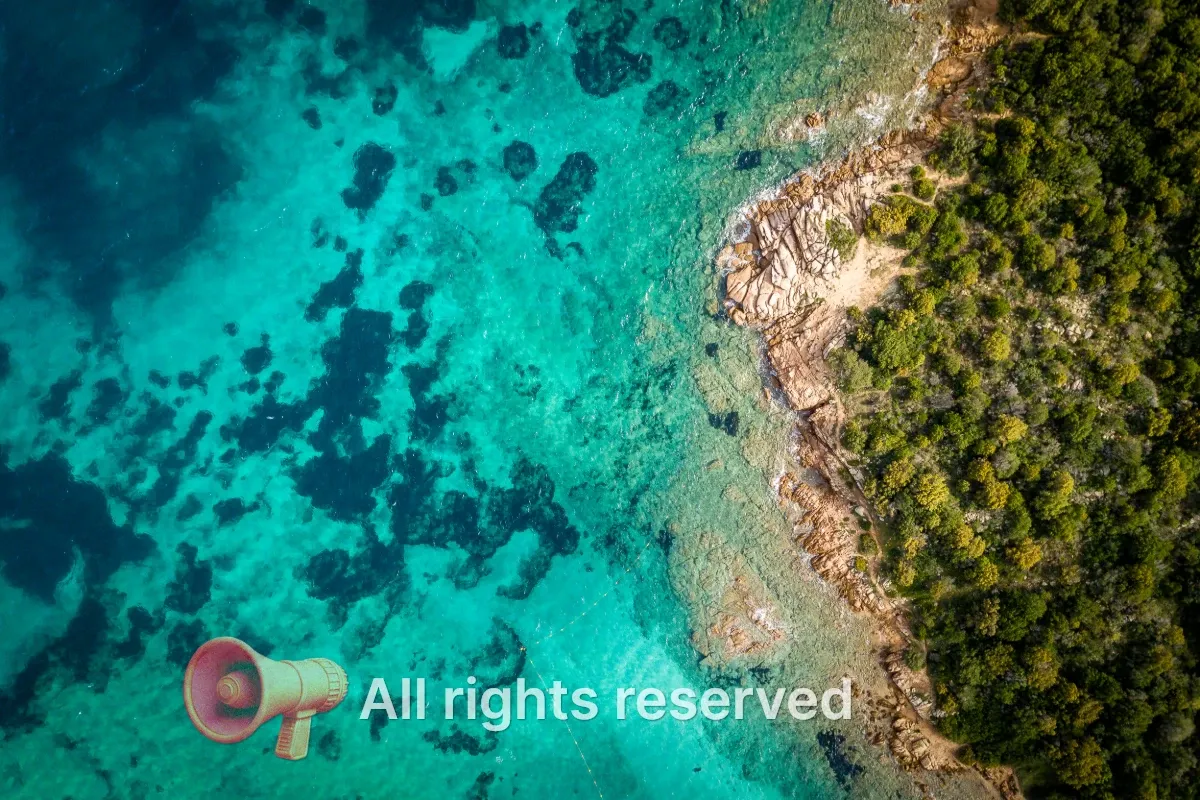
Watermarks protect intellectual property, indicate ownership, add branding, or mark content as drafts. CE.SDK supports two types of watermarks: text watermarks created from text blocks for copyright notices and brand names, and image watermarks created from graphic blocks with image fills for logos and symbols.
This guide covers how to create text and logo watermarks, position them on a design, style them for visibility, and export the watermarked result.
Setup and Prerequisites#
Start from an image scene and read the page dimensions. The page provides the canvas where we add and position watermarks.
let imageURL = baseURL.appendingPathComponent("ly.img.image/images/sample_1.jpg")try await engine.scene.create(fromImage: imageURL)
guard let page = try engine.scene.getCurrentPage() else {  fatalError("Expected create(fromImage:) to create a page.")}let pageWidth = try engine.block.getWidth(page)let pageHeight = try engine.block.getHeight(page)
engine.scene.create(fromImage:) creates a scene with a single page that displays the source image. engine.scene.getCurrentPage() returns the page block, and getWidth(_:) and getHeight(_:) provide the values used for placement calculations later.
Creating Text Watermarks#
Text watermarks display copyright notices, URLs, or brand names. We create a text block, set its content, and add it to the page.
let textWatermark = try engine.block.create(.text)
try engine.block.replaceText(textWatermark, text: "All rights reserved")try engine.block.setHeightMode(textWatermark, mode: .auto)try engine.block.setWidth(textWatermark, value: pageWidth * 0.55)try engine.block.appendChild(to: page, child: textWatermark)
engine.block.create(.text) creates a text block. setWidth(_:value:) defines the text wrap boundary as a fraction of the page width, and SizeMode.auto on the height lets the block grow vertically to fit the content if it ever wraps to multiple lines.
Styling the Text#
Configure the font size, color, alignment, and opacity to make the watermark visible without dominating the image.
try engine.block.setTextFontSize(textWatermark, fontSize: 28)try engine.block.setTextColor(textWatermark, color: .rgba(r: 1, g: 1, b: 1, a: 1))try engine.block.setTextHorizontalAlignment(textWatermark, alignment: .left)try engine.block.setOpacity(textWatermark, value: 0.7)Key styling options:
- Font size — Use a size that remains readable at the target export dimensions.
- Text color — White or black usually works best, depending on the image background.
- Opacity — Values between
0.5and0.7provide a balanced semi-transparent appearance.
Creating Logo Watermarks#
Logo watermarks use graphic blocks with image fills to display brand symbols or company logos.
let logoWatermark = try engine.block.create(.graphic)try engine.block.setShape(logoWatermark, shape: engine.block.createShape(.rect))
let logoFill = try engine.block.createFill(.image)let logoURL = baseURL.appendingPathComponent(  "ly.img.sticker/images/3Dstickers/3d_stickers_megaphone.png",)try engine.block.setURL(logoFill, property: "fill/image/imageFileURI", value: logoURL)try engine.block.setFill(logoWatermark, fill: logoFill)try engine.block.setContentFillMode(logoWatermark, mode: .contain)try engine.block.appendChild(to: page, child: logoWatermark)
We create a graphic block, assign a rect shape, then create an image fill with the logo URL. ContentFillMode.contain keeps the logo inside its frame without cropping, regardless of the source image aspect ratio.
Sizing the Logo#
Set dimensions for the logo and apply opacity to match the text watermark.
let logoSize = pageWidth * 0.14
try engine.block.setWidth(logoWatermark, value: logoSize)try engine.block.setHeight(logoWatermark, value: logoSize)try engine.block.setOpacity(logoWatermark, value: 0.62)
A useful rule is to size logos to 10–20% of the page width. This keeps them visible without covering the main image content.
Positioning the Watermarks#
Calculate positions from the current page dimensions. This sample places the logo and text side by side near the bottom center.
let spacing: Float = 18let bottomPadding: Float = 36let textWidth = try engine.block.getFrameWidth(textWatermark)let textHeight = try engine.block.getFrameHeight(textWatermark)let totalWatermarkWidth = logoSize + spacing + textWidthlet startX = (pageWidth - totalWatermarkWidth) / 2let centerY = pageHeight - bottomPadding - max(logoSize, textHeight) / 2let logoY = centerY - logoSize / 2let textY = centerY - textHeight / 2
try engine.block.setPositionX(logoWatermark, value: startX)try engine.block.setPositionY(logoWatermark, value: logoY)try engine.block.setPositionX(textWatermark, value: startX + logoSize + spacing)try engine.block.setPositionY(textWatermark, value: textY)
The sample reads the text block’s rendered dimensions with getFrameWidth and getFrameHeight so the layout stays accurate when the text content, wrap width, or font size changes. It combines the logo size, the text width, and a fixed spacing to compute the total watermark width, then centers the group horizontally with startX. Vertically, it derives a shared centerY from the taller of the two blocks so both elements sit on a common baseline while respecting bottomPadding.
Enhancing Visibility with Drop Shadows#
Drop shadows improve watermark readability against varied backgrounds by adding contrast.
for watermark in [textWatermark, logoWatermark] { guard try engine.block.supportsDropShadow(watermark) else { continue } try engine.block.setDropShadowEnabled(watermark, enabled: true) try engine.block.setDropShadowColor(watermark, color: .rgba(r: 0, g: 0, b: 0, a: 0.55)) try engine.block.setDropShadowOffsetX(watermark, offsetX: 3) try engine.block.setDropShadowOffsetY(watermark, offsetY: 3) try engine.block.setDropShadowBlurRadiusX(watermark, blurRadiusX: 6) try engine.block.setDropShadowBlurRadiusY(watermark, blurRadiusY: 6)}supportsDropShadow(_:) guards the call so the loop works for any future block type that does not carry a drop shadow component. The shadow parameters that matter:
- Offset X/Y — Distance from the block;
2–4works well for subtle watermarks. - Blur Radius X/Y — Softness of the shadow;
4–8adds contrast without harsh edges. - Color — Black with partial alpha provides contrast without overpowering the image.
Exporting Watermarked Images#
After adding watermarks, export the complete page as an image file.
let exportedPNG = try await engine.block.export(page, mimeType: .png)let exportedJPEG = try await engine.block.export( page, mimeType: .jpeg, options: ExportOptions(jpegQuality: 0.86),)let tempDir = URL(fileURLWithPath: NSTemporaryDirectory())try exportedPNG.write(to: tempDir.appendingPathComponent("watermarked.png"))try exportedJPEG.write(to: tempDir.appendingPathComponent("watermarked.jpg"))engine.block.export(_:mimeType:options:) renders the page with all watermarks and returns the encoded image data. Pass a different MIMEType to switch formats — .png for lossless output, .jpeg for smaller files with the jpegQuality option, or .webp when both size and quality matter.
Troubleshooting#
Watermark not visible
- Verify the block is within page bounds using its position values.
- Check that opacity is between
0.3and1.0. - Ensure
appendChild(to:child:)was called to add the block to the page.
Position appears incorrect
- Recalculate positions using the current page width and height.
- Account for watermark dimensions when computing corner or centered positions.
- Remember that coordinates start from the top-left corner.
Text not legible
- Increase the font size relative to the target export dimensions.
- Add a drop shadow for contrast against complex backgrounds.
- Increase opacity if the watermark is too faint.
Logo quality issues
- Use a higher-resolution source image for the logo.
- Avoid scaling the logo beyond its original dimensions.
API Reference#
Methods#
| Method | Description |
|---|---|
engine.scene.create(fromImage:) |
Create a scene with a single page from an image URL |
engine.scene.getCurrentPage() |
Get the page created for the image scene |
engine.block.getWidth(_:) |
Read the page width for placement calculations |
engine.block.getHeight(_:) |
Read the page height for placement calculations |
engine.block.create(_:) |
Create a text or graphic block |
engine.block.setHeightMode(_:mode:) |
Let the text block auto-grow vertically with its content |
engine.block.replaceText(_:text:) |
Set the text watermark content |
engine.block.appendChild(to:child:) |
Add the watermark to the page |
engine.block.setTextFontSize(_:fontSize:) |
Set the text size |
engine.block.setTextColor(_:color:) |
Set the text color |
engine.block.setTextHorizontalAlignment(_:alignment:) |
Set paragraph alignment |
engine.block.setOpacity(_:value:) |
Set watermark transparency |
engine.block.createShape(_:) |
Create a shape for a graphic block |
engine.block.setShape(_:shape:) |
Apply the shape to the graphic block |
engine.block.createFill(_:) |
Create a fill for a graphic block |
engine.block.setURL(_:property:value:) |
Set the logo image URL on the fill |
engine.block.setFill(_:fill:) |
Apply the image fill to the graphic block |
engine.block.setContentFillMode(_:mode:) |
Fit the logo inside its frame |
engine.block.setWidth(_:value:) |
Set the watermark width |
engine.block.setHeight(_:value:) |
Set the watermark height |
engine.block.setPositionX(_:value:) |
Set the horizontal position |
engine.block.setPositionY(_:value:) |
Set the vertical position |
engine.block.supportsDropShadow(_:) |
Check whether a block supports drop shadows |
engine.block.setDropShadowEnabled(_:enabled:) |
Enable or disable a drop shadow |
engine.block.setDropShadowColor(_:color:) |
Set the shadow color and alpha |
engine.block.setDropShadowOffsetX(_:offsetX:) |
Set the horizontal shadow offset |
engine.block.setDropShadowOffsetY(_:offsetY:) |
Set the vertical shadow offset |
engine.block.setDropShadowBlurRadiusX(_:blurRadiusX:) |
Set the horizontal shadow blur |
engine.block.setDropShadowBlurRadiusY(_:blurRadiusY:) |
Set the vertical shadow blur |
engine.block.export(_:mimeType:options:) |
Export the watermarked page |
Enums#
| Enum | Description |
|---|---|
DesignBlockType.text / .graphic |
Block type used for text and image watermarks |
ShapeType.rect |
Rectangular shape for the logo block |
FillType.image |
Image fill for the logo block |
SizeMode.auto |
Height mode that lets the text block grow vertically with its content |
ContentFillMode.contain |
Keep the logo inside its frame without cropping |
HorizontalTextAlignment.left |
Paragraph alignment for the text watermark |
MIMEType.png / .jpeg / .webp |
Output formats for the exported image |
Next Steps#
- Text Styling — Style text blocks with fonts, colors, and effects
- Export Overview — Export options and formats for watermarked images
- Crop Images — Transform images before watermarking