Populate a reusable template from application data and export the finished design as a PNG with the CE.SDK Engine API.
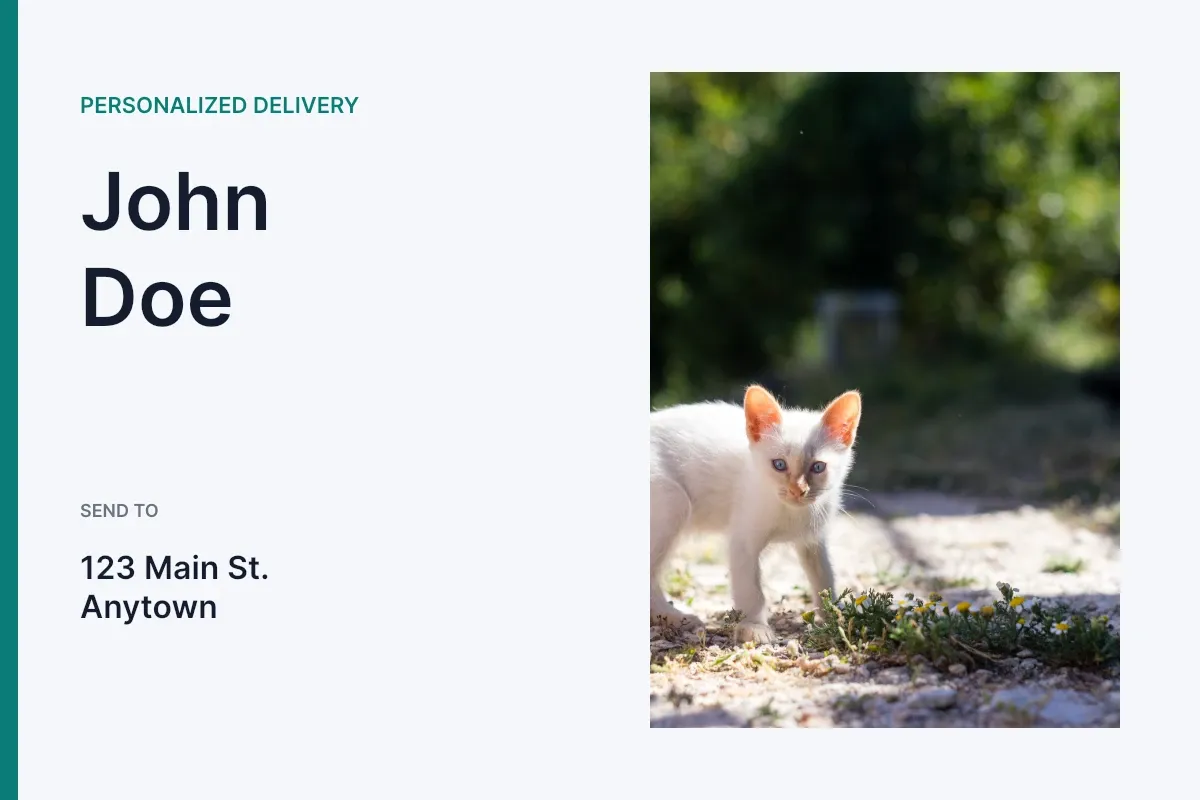
The workflow starts from one pristine template, validates its data contract, applies one record, and exports its page. Start every independent generation job from the original template input and resolve new block IDs after loading it.
Load a Template#
Load a remote or bundled .scene file from a native URL. overrideEditorConfig: true imports serialized settings and merges the template’s variables into the engine, replacing matching keys without clearing unrelated variables. waitForResources: true waits for initial resources before returning.
@MainActorfunc loadDesignGenerationTemplate(engine: Engine, from templateURL: URL) async throws -> [DesignBlockID] { try await engine.scene.load( from: templateURL, overrideEditorConfig: true, waitForResources: true, ) return try engine.scene.getPages()}The example creates a local template fixture; production code can pass an HTTPS URL to the same overload. Every engine call runs under @MainActor. Treat each page, block, and fill ID as valid only for the scene that returned it.
Map and Validate Data#
Map one application record to the template’s expected fields, then validate the contract before changing engine data. Read each loaded text block’s text/text property and extract its {{token}} keys; engine.variable.findAll() is engine-wide and can still contain variables from a previously loaded scene.
struct DesignGenerationGuideRecord {  let firstName: String  let lastName: String  let address: String  let city: String  let imageURL: URL}
struct ValidatedDesignGenerationGuideTemplate {  let page: DesignBlockID  let record: DesignGenerationGuideRecord  let referencedVariableNames: [String]  let imageBlock: DesignBlockID  let imageFill: DesignBlockID  let imageBlockCount: Int  let imageFillType: String}
enum DesignGenerationGuideError: LocalizedError {  case expectedSinglePage(Int)  case missingVariables([String])  case missingVariableReferences  case namedImageCount(name: String, count: Int)  case unexpectedFillType(String)
  var errorDescription: String? {    switch self {    case let .expectedSinglePage(count):      "Expected the template to contain one page, found \(count)."    case let .missingVariables(keys):      "Template is missing required variables: \(keys.joined(separator: ", "))."    case .missingVariableReferences:      "Template text blocks do not reference any variables."    case let .namedImageCount(name, count):      "Expected one image block named \(name), found \(count)."    case let .unexpectedFillType(type):      "Expected the named image block to use an image fill, found \(type)."    }  }}
@MainActorfunc validateDesignGenerationTemplate(  engine: Engine,  pages: [DesignBlockID],  baseURL: URL,) throws -> ValidatedDesignGenerationGuideTemplate {  guard pages.count == 1, let page = pages.first else {    throw DesignGenerationGuideError.expectedSinglePage(pages.count)  }
  let record = DesignGenerationGuideRecord(    firstName: "John",    lastName: "Doe",    address: "123 Main St.",    city: "Anytown",    imageURL: baseURL.appendingPathComponent("ly.img.image/images/sample_2.jpg"),  )  let requiredVariableKeys = Set(["first_name", "last_name", "address", "city"])  let textBlocks = try engine.block.find(byType: .text)  let hasVariableReferences = try textBlocks.contains {    try engine.block.referencesAnyVariables($0)  }  guard hasVariableReferences else {    throw DesignGenerationGuideError.missingVariableReferences  }  let variableTokenPattern = try NSRegularExpression(pattern: #"\{\{\s*([^{}]+?)\s*\}\}"#)  let referencedVariableNames = Set(try textBlocks.flatMap { block -> [String] in    let content = try engine.block.getString(block, property: "text/text")    let range = NSRange(content.startIndex ..< content.endIndex, in: content)    return variableTokenPattern.matches(in: content, range: range).compactMap { match in      Range(match.range(at: 1), in: content).map {        String(content[$0]).trimmingCharacters(in: .whitespacesAndNewlines)      }    }  })  let missingVariableKeys = requiredVariableKeys.subtracting(referencedVariableNames).sorted()  guard missingVariableKeys.isEmpty else {    throw DesignGenerationGuideError.missingVariables(missingVariableKeys)  }
  let imageBlockName = "profile-photo"  let namedBlocks = engine.block.find(byName: imageBlockName)  guard namedBlocks.count == 1, let namedBlock = namedBlocks.first else {    throw DesignGenerationGuideError.namedImageCount(name: imageBlockName, count: namedBlocks.count)  }
  let fill = try engine.block.getFill(namedBlock)  let fillType = try engine.block.getType(fill)  guard fillType == FillType.image.rawValue else {    throw DesignGenerationGuideError.unexpectedFillType(fillType)  }
  return ValidatedDesignGenerationGuideTemplate(    page: page,    record: record,    referencedVariableNames: referencedVariableNames.sorted(),    imageBlock: namedBlock,    imageFill: fill,    imageBlockCount: namedBlocks.count,    imageFillType: fillType,  )}
The validation confirms every required text reference and that exactly one block named profile-photo owns an image fill. Failing early identifies a template mismatch instead of silently targeting an unrelated graphic.
Populate Text Variables#
Set each case-sensitive variable key to its string value. Every text block that references a matching token uses the new value when rendered or exported.
@MainActorfunc populateDesignGenerationText(engine: Engine, record: DesignGenerationGuideRecord) throws { try engine.variable.set(key: "first_name", value: record.firstName) try engine.variable.set(key: "last_name", value: record.lastName) try engine.variable.set(key: "address", value: record.address) try engine.variable.set(key: "city", value: record.city)}Use engine.variable.get(key:) for preflight checks when needed. Remove only keys your application owns; clearing unrelated variables can alter other template behavior.
Replace a Named Image#
Reuse the named block’s existing image fill and update its fill/image/imageFileURI property with a native URL. Resetting the crop recalculates how replacement media with different dimensions covers the graphic block. Reading the property back as a URL verifies the stored replacement.
@MainActorfunc replaceDesignGenerationImage( engine: Engine, imageBlock: DesignBlockID, imageFill: DesignBlockID, imageURL: URL,) throws -> URL { try engine.block.setURL( imageFill, property: "fill/image/imageFileURI", value: imageURL, ) try engine.block.resetCrop(imageBlock) return try engine.block.getURL(imageFill, property: "fill/image/imageFileURI")}Do not create a replacement fill when the existing fill has the wrong type. That would hide a broken template contract and discard the fill configuration authored with the template.
Export the Design#
After changing remote media, force the page’s resources to load and export that page as PNG data. Persist the returned Data with write(to:), upload it, or pass it to another native API.
@MainActorfunc exportDesignGenerationPage(engine: Engine, page: DesignBlockID) async throws -> (Data, URL) { try await engine.block.forceLoadResources([page]) let pngData = try await engine.block.export(page, mimeType: .png) let outputURL = FileManager.default.temporaryDirectory .appendingPathComponent("personalized-design-\(UUID().uuidString).png") try pngData.write(to: outputURL, options: .atomic) return (pngData, outputURL)}The example generates one record, and its focused test verifies that the PNG decodes to non-blank pixels. Use .jpeg for a smaller raster result or .pdf for document output. For independent jobs, load the original template for each record and resolve fresh IDs; use Data Merge for larger orchestration workflows.
API Reference#
Methods#
| Method | Description |
|---|---|
engine.scene.load(from:overrideEditorConfig:waitForResources:) |
Load a .scene template from a URL and return its scene ID. |
engine.scene.getPages() |
Resolve pages from the currently loaded scene. |
engine.variable.findAll() |
List engine-wide variable keys; this is not a per-template inventory. |
engine.variable.set(key:value:) |
Set a string variable value. |
engine.variable.get(key:) |
Read a variable value. |
engine.variable.remove(key:) |
Remove an application-owned variable. |
engine.block.find(byType:) |
Resolve text blocks with the type-safe overload. |
engine.block.referencesAnyVariables(_:) |
Confirm that a text block references variables. |
engine.block.getString(_:property:) |
Read text/text to validate its exact variable keys. |
engine.block.find(byName:) |
Find blocks by their stable template name. |
engine.block.getFill(_:) |
Read the fill attached to a block. |
engine.block.getType(_:) |
Read the fill type for validation. |
engine.block.setURL(_:property:value:) |
Set fill/image/imageFileURI with a native URL. |
engine.block.getURL(_:property:) |
Read fill/image/imageFileURI as a native URL. |
engine.block.resetCrop(_:) |
Reframe replaced media to cover its block. |
engine.block.forceLoadResources(_:) |
Wait for changed page resources. |
engine.block.export(_:mimeType:options:onPreExport:uriResolver:) |
Export the populated page as Blob, which is Data. |
Next Steps#
- Use Templates - Prepare and load reusable templates.
- Text Variables - Work with variable-backed text.
- Data Merge - Process structured records and media placeholders.
- Export - Configure output formats and quality.