Configure typefaces, manage right-to-left text, and bind multilingual content to variables using the Block API.
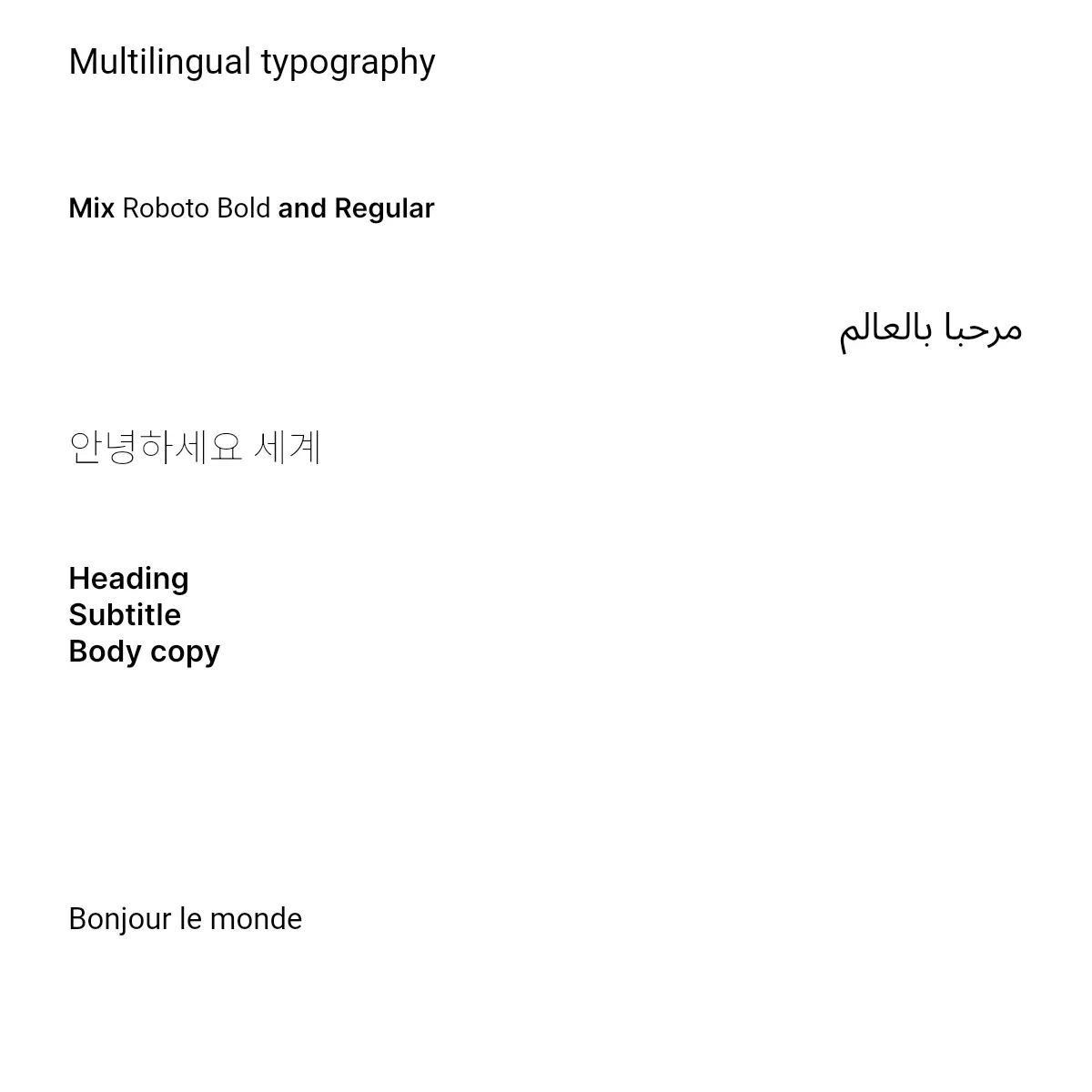
The engine handles text shaping, bidirectional layout, and script-specific rendering automatically — every Unicode character, complex script ligatures, and mixed LTR/RTL content render without additional configuration. The Block API exposes the knobs that drive those defaults: typefaces, block- and paragraph-level alignment, and variables for dynamic content.
This guide covers programmatic font configuration, automatic right-to-left detection, paragraph-level alignment overrides, and variable bindings for multilingual content.
Programmatic Font and Typeface Management#
A Typeface bundles one or more Font files under a shared family name. Each Font carries a URL, sub-family label, weight, and style — the engine picks the right file when text formatting changes the rendered weight or style.
Configuring Typefaces for Language Support#
Build a dedicated Typeface for each script your design renders. Fonts can come from your app bundle, a remote URL, or — as the example shows — the bundled asset source.
let roboto = Typeface( name: "Roboto", fonts: [ Font( uri: baseURL.appendingPathComponent("ly.img.typeface/fonts/Roboto/Roboto-Regular.ttf"), subFamily: "Regular", weight: .normal, style: .normal, ), Font( uri: baseURL.appendingPathComponent("ly.img.typeface/fonts/Roboto/Roboto-Bold.ttf"), subFamily: "Bold", weight: .bold, style: .normal, ), ],)let notoArabic = Typeface( name: "Noto Sans Arabic", fonts: [ Font( uri: baseURL.appendingPathComponent("fonts/font-6.ttf"), subFamily: "Regular", weight: .normal, style: .normal, ), ],)
let notoKorean = Typeface( name: "Noto Sans KR", fonts: [ Font( uri: baseURL.appendingPathComponent("fonts/font-30.ttf"), subFamily: "Regular", weight: .normal, style: .normal, ), ],)The example defines three typefaces:
- Roboto — a Latin-script family with regular and bold weights for body text and emphasis.
- Noto Sans Arabic — carries the OpenType tables the engine relies on for contextual shaping. Also covers Persian and Urdu.
- Noto Sans KR — supports Korean Hangul.
Each Font includes:
uri— path to the font file (TTF, OTF, or WOFF2).subFamily— a human-readable label ("Regular","Bold Italic", …) used by the asset-source schema for naming.weight—.thin(100) through.heavy(900); the engine matchesweightagainst the text’s current formatting when picking a file.style—.normalor.italic.
In production, ship these font files alongside your app or load them from a controlled URL — comprehensive Unicode coverage avoids missing-glyph rendering for the scripts your users care about.
Applying Typefaces to a Block#
Use setTypeface(_:typeface:) to apply a typeface to a whole text block. Existing run-level formatting is preserved where the new typeface supports it; runs that don’t have a matching font fall back to the typeface’s default.
let latinText = try engine.block.create(.text)try engine.block.replaceText(latinText, text: "Multilingual typography")try engine.block.appendChild(to: page, child: latinText)try engine.block.setPositionX(latinText, value: 50)try engine.block.setPositionY(latinText, value: 30)try engine.block.setWidth(latinText, value: 700)try engine.block.setHeight(latinText, value: 80)try engine.block.setTextFontSize(latinText, fontSize: 26)try engine.block.setTypeface(latinText, typeface: roboto)The same setter accepts a string subrange to apply a typeface to only part of the text — for mixing scripts within a single block, for example.
let mixed = "Mix Roboto Bold and Regular"let bold = try engine.block.create(.text)try engine.block.replaceText(bold, text: mixed)try engine.block.appendChild(to: page, child: bold)try engine.block.setPositionX(bold, value: 50)try engine.block.setPositionY(bold, value: 140)try engine.block.setWidth(bold, value: 700)try engine.block.setHeight(bold, value: 50)try engine.block.setTextFontSize(bold, fontSize: 20)try engine.block.setTypeface(bold, typeface: roboto, in: mixed.range(of: "Roboto Bold")!)The setter works for any typeface — applying Noto Sans KR to a Korean block follows the same pattern:
let koreanText = try engine.block.create(.text)try engine.block.replaceText(koreanText, text: "안녕하세요 세계")try engine.block.appendChild(to: page, child: koreanText)try engine.block.setPositionX(koreanText, value: 50)try engine.block.setPositionY(koreanText, value: 310)try engine.block.setWidth(koreanText, value: 700)try engine.block.setHeight(koreanText, value: 80)try engine.block.setTextFontSize(koreanText, fontSize: 28)try engine.block.setTypeface(koreanText, typeface: notoKorean)For read-back, getTypeface(_:) returns the block’s default typeface and getTypefaces(_:in:) returns the typefaces of every text run in the optional range. Both are documented in the API Reference below; the runnable example doesn’t call either.
Working with Right-to-Left (RTL) Text#
Understanding Automatic RTL Detection#
The engine implements the Unicode Bidirectional Algorithm (UAX #9) and determines text direction from the Unicode bidirectional class of the characters in the block. Strong RTL characters from Arabic, Hebrew, Persian, and Urdu establish a right-to-left flow; embedded LTR words like English brand names are positioned correctly without manual intervention.
HorizontalTextAlignment.auto defers the alignment decision to that analysis — RTL scripts align right, LTR scripts align left, and the same template renders correctly across writing systems without an alignment branch in your code:
try engine.block.setTextHorizontalAlignment(latinText, alignment: .auto)This automatic detection works for:
- Arabic — including Persian and Urdu variants
- Hebrew — modern and Biblical Hebrew
- Mixed content — English or other LTR text within RTL paragraphs
Text Alignment for RTL Languages#
HorizontalTextAlignment has five cases:
| Case | Behavior |
|---|---|
.left |
Always align text to the left. |
.right |
Always align text to the right. |
.center |
Center-align text. |
.justify |
Stretch every line of a paragraph except the last, by widening the gaps between words. The last line, and any line with no gap to widen, keeps its natural width and is aligned like .auto. |
.auto |
Resolve direction from the script — RTL scripts align right, LTR scripts align left. |
setTextHorizontalAlignment(_:alignment:) with the default negative paragraphIndex sets a block-level value. The example below creates an Arabic text block, applies the Noto Sans Arabic typeface, sets .right explicitly, and reads back the effective alignment:
let arabicText = try engine.block.create(.text)try engine.block.replaceText(arabicText, text: "مرحبا بالعالم")try engine.block.appendChild(to: page, child: arabicText)try engine.block.setPositionX(arabicText, value: 50)try engine.block.setPositionY(arabicText, value: 210)try engine.block.setWidth(arabicText, value: 700)try engine.block.setHeight(arabicText, value: 80)try engine.block.setTextFontSize(arabicText, fontSize: 28)try engine.block.setTypeface(arabicText, typeface: notoArabic)try engine.block.setTextHorizontalAlignment(arabicText, alignment: .right)
let effective = try engine.block.getTextEffectiveHorizontalAlignment(arabicText)print("Effective alignment is right:", effective == .right)
getTextEffectiveHorizontalAlignment(_:) returns the resolved direction the engine uses to lay out the block. When the alignment is .auto, the getter returns .left or .right based on the script of the first logical run — never .auto — so a UI control can display the concrete direction the engine picked.
Paragraph-Level Alignment Overrides#
Pass a non-negative paragraphIndex to override the alignment of a single paragraph. The block-level default still applies to every paragraph that doesn’t carry an override.
let mixedText = try engine.block.create(.text)try engine.block.replaceText(mixedText, text: "Heading\nSubtitle\nBody copy")try engine.block.appendChild(to: page, child: mixedText)try engine.block.setPositionX(mixedText, value: 50)try engine.block.setPositionY(mixedText, value: 410)try engine.block.setWidth(mixedText, value: 700)try engine.block.setHeight(mixedText, value: 220)try engine.block.setTextFontSize(mixedText, fontSize: 22)
// Block-level default — every paragraph without an override inherits this.try engine.block.setTextHorizontalAlignment(mixedText, alignment: .left)
// Override the second paragraph (index 1) only.try engine.block.setTextHorizontalAlignment(mixedText, alignment: .right, paragraphIndex: 1)
Read back an override with getTextHorizontalAlignment(_:paragraphIndex:). It returns nil when the paragraph inherits the block-level value, and the override otherwise. Passing a negative paragraphIndex returns the block-level value itself.
let para0 = try engine.block.getTextHorizontalAlignment(mixedText, paragraphIndex: 0)let para1 = try engine.block.getTextHorizontalAlignment(mixedText, paragraphIndex: 1)let blockDefault = try engine.block.getTextHorizontalAlignment(mixedText)print("paragraph 0 inherits block-level:", para0 == nil)print("paragraph 1 override:", para1 == .right ? "right" : "other")print("block-level default:", blockDefault == .left ? "left" : "other")Clear an override by passing nil as the alignment. The paragraph reverts to the block-level default.
try engine.block.setTextHorizontalAlignment(mixedText, alignment: nil, paragraphIndex: 1)Use getTextParagraphIndices(_:in:) to discover valid paragraph indices before querying overrides. Passing an optional string subrange restricts the result to paragraphs that overlap the range.
let allIndices = try engine.block.getTextParagraphIndices(mixedText)print("Paragraph indices:", allIndices)Note: Calling
setTextHorizontalAlignmentwith a negativeparagraphIndexand a non-nilalignment clears every paragraph-level override at once. If your app applies overrides and then changes the block-level alignment, re-apply the paragraph overrides afterward.
Complex Script Support#
The text engine ships script-aware shaping and applies the right OpenType features automatically when the typeface includes the necessary tables. No additional configuration is required.
Arabic Script Features#
When the configured typeface ships the necessary OpenType tables, the engine’s HarfBuzz shaper applies Arabic-specific rendering automatically:
- Contextual letter forms — letters change shape based on position (initial, medial, final, isolated) when the font has the
init/medi/finafeatures - Required ligatures — mandatory character combinations render as single glyphs through the
ligafeature - Diacritical-mark positioning — tashkeel marks anchor correctly via
markandmkmktables
Other Complex Scripts#
The same shaping pipeline covers other writing systems when the typeface ships the required tables:
- Devanagari (Hindi, Sanskrit) — conjunct formations and half-forms
- Thai — vowel and tone mark positioning above and below base characters
- Japanese — Kanji, hiragana, and katakana rendering
- Southeast Asian scripts — Khmer subscripts, Myanmar ligatures
Creating Multilingual Design Templates#
Using Variables for Multilingual Content#
Bind dynamic content to a variable instead of hardcoding the text on the block. Updating the variable swaps the rendered content without rebuilding the block, so the same template can render in any language.
try engine.variable.set(key: "greeting", value: "Hello world")
let dynamicText = try engine.block.create(.text)try engine.block.replaceText(dynamicText, text: "{{greeting}}")try engine.block.appendChild(to: page, child: dynamicText)try engine.block.setPositionX(dynamicText, value: 50)try engine.block.setPositionY(dynamicText, value: 660)try engine.block.setWidth(dynamicText, value: 700)try engine.block.setHeight(dynamicText, value: 80)try engine.block.setTextFontSize(dynamicText, fontSize: 22)try engine.block.setTypeface(dynamicText, typeface: roboto)
// Update the variable later to swap the rendered content to a different// language — the existing block re-renders with the new value.try engine.variable.set(key: "greeting", value: "Bonjour le monde")
engine.variable.set(key:value:) creates or updates a variable. findAll() lists every variable currently registered, and remove(key:) destroys a variable.
Benefits of using variables:
- Dynamic language switching — update variable values to change content language at runtime.
- Consistent formatting — text styling and layout remain stable across languages.
- Template reusability — one template works for multiple language markets.
Variables are particularly useful for:
- Localized marketing materials — same design, different language content.
- A/B testing — test messaging across languages.
- Regional campaigns — deploy region-specific content from a single template.
Template Design Considerations#
Account for these factors when designing multilingual templates:
- Text expansion — some languages require 30–50% more space than English
- Direction changes — RTL layouts may need mirrored designs
- Font availability — make sure each typeface covers every target script
- Line height — scripts with diacritics may need additional vertical space
Test templates with representative content in every target language to verify the layout works correctly.
Font Fallback and Character Coverage#
Font Selection Priority#
When a glyph is missing from the configured typeface’s primary font, the engine searches in this order:
- The exact
weight+stylematch in the typeface’sfontsarray - A similar
weight(mapped via the engine’s weight-replacement table) within the same typeface - The
fallbackFontUriengine setting if one is configured - A Noto font fetched from the IMG.LY CDN for the glyph’s script, while the
useSystemFontFallbacksetting istrue(the default) - The
defaultFontFileUriengine setting - The
.notdefglyph (rendered as an empty box) when no font contains the character
The CDN Noto set covers most of Unicode out of the box, so missing glyphs auto-fill without extra configuration — the engine does not consult the device’s own OS fonts, only the CDN set. Emoji code points use the separate defaultEmojiFontFileUri setting when configured.
Ensuring Complete Character Coverage#
Use typefaces that cover every script you ship. Comprehensive Unicode coverage avoids missing-glyph rendering and reduces visual inconsistency caused by automatic fallback to a different font family.
- Use comprehensive typefaces — the Noto family covers most Unicode scripts
- Test with target-language samples — verify fonts include the required scripts before deployment
- Configure fallback stacks — define multiple typefaces for comprehensive coverage
- Check font formats — ensure fonts include OpenType layout tables for complex scripts
API Reference#
Methods#
| Method | Description |
|---|---|
engine.block.setTypeface(_:typeface:in:) |
Apply a typeface to the whole text block or a string subrange. |
engine.block.getTypeface(_:) |
Get the block-level typeface. |
engine.block.getTypefaces(_:in:) |
Get the typefaces of every text run in an optional subrange. |
engine.block.setTextHorizontalAlignment(_:alignment:paragraphIndex:) |
Set the alignment for one paragraph (paragraphIndex >= 0) or the whole block (negative index). Pass a nil alignment to clear a paragraph-level override. |
engine.block.getTextHorizontalAlignment(_:paragraphIndex:) |
Get the paragraph-level override; returns nil when the paragraph inherits the block-level value. |
engine.block.getTextEffectiveHorizontalAlignment(_:) |
Get the resolved alignment after layout — explicit cases return the stored value, .auto resolves to .left or .right based on the first logical run. |
engine.block.getTextParagraphIndices(_:in:) |
Get the 0-based paragraph indices overlapping a grapheme range. |
engine.block.replaceText(_:text:in:) |
Replace the text content of a block or a string subrange. Variable tokens written as {{name}} substitute at render time. |
engine.block.setTextFontSize(_:fontSize:in:) |
Set the font size of the whole text block or a string subrange. |
engine.block.getTextFontSizes(_:in:) |
Get the ordered unique list of font sizes in an optional subrange. |
engine.variable.set(key:value:) |
Create or update a text variable for substitution at render time. |
engine.variable.findAll() |
List every registered variable. |
engine.variable.remove(key:) |
Destroy a variable. |
Types#
| Type | Description |
|---|---|
Typeface |
Family of fonts sharing a name; carries an array of Font files. |
Font |
Single font file with a uri, subFamily label, weight, and style. |
HorizontalTextAlignment |
.left, .right, .center, .justify, .auto. |
Troubleshooting#
Text Displays as Squares or Question Marks#
The selected font is missing glyphs for the script you’re rendering. Switch to a typeface with comprehensive Unicode coverage (the Noto family is a good starting point), verify the font file format (TTF, OTF, or WOFF2), and confirm the font URL resolves.
RTL Text Renders Left-to-Right#
Set the block’s alignment to either .auto or .right via setTextHorizontalAlignment(_:alignment:). After layout, call getTextEffectiveHorizontalAlignment(_:) to confirm the resolved direction. If it returns .left for text you expect to flow RTL, the string probably begins with neutral characters — leading punctuation or numbers can flip the resolved direction.
Ligatures or Diacritics Display Incorrectly#
Use a font designed for the target script. The font must include GSUB/GPOS OpenType tables for the engine to apply contextual forms, ligatures, and mark positioning.
Mixed-Direction Text Layout Issues#
The engine resolves bidirectional layout from the Unicode character properties of the text. If a sentence with both LTR and RTL content lays out incorrectly, the source string may need Unicode directional formatting characters — RLM (U+200F) for right-to-left or LRM (U+200E) for left-to-right — at the boundaries where the direction switches.
Next Steps#
- Text Styling — Apply fonts, colors, alignment, and other styling options to customize text appearance.
- Text Overview — Learn about text editing capabilities in CE.SDK.
- Text Variables — Define dynamic text elements that can be populated with custom values during design generation.
- Edit Text — Edit text content directly on the canvas or through the properties panel.