Configure text blocks to automatically adapt their dimensions or font size for dynamic content.
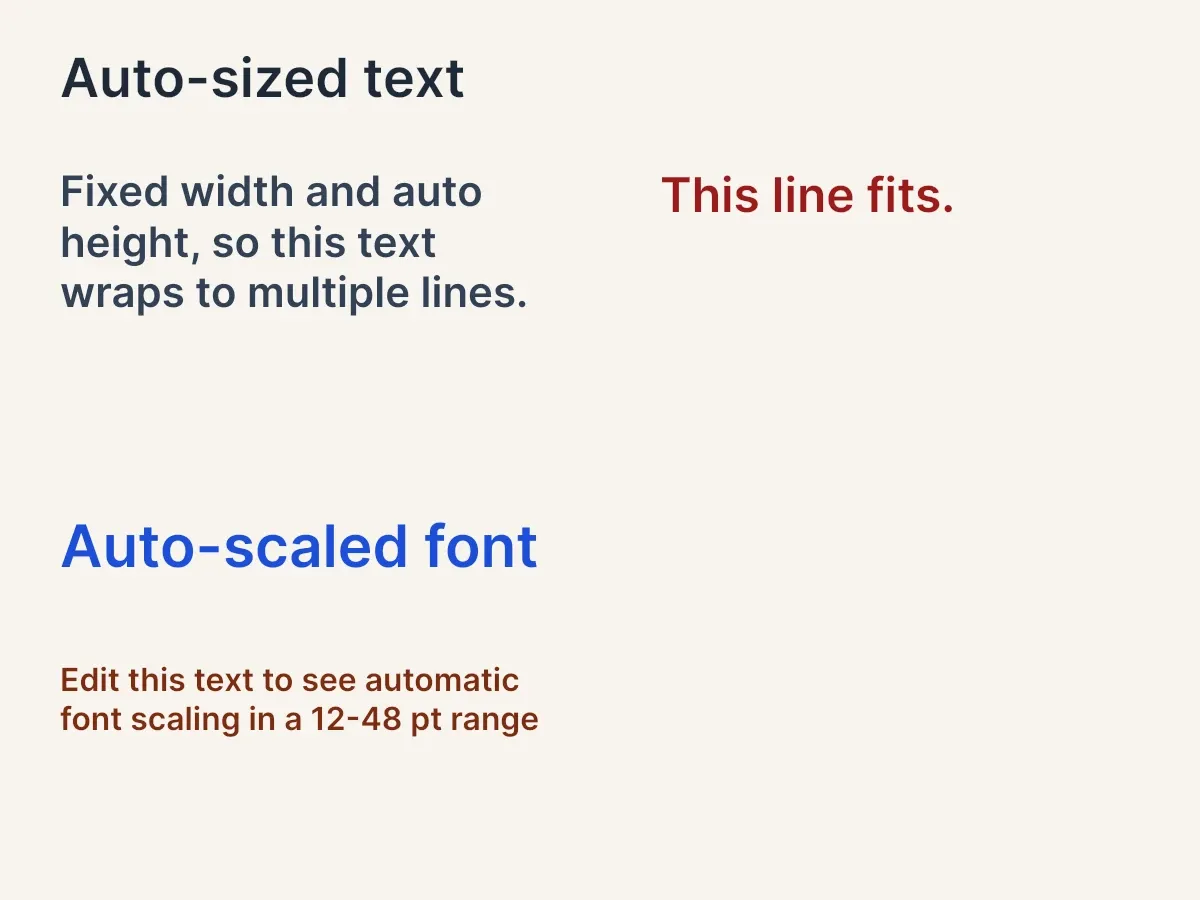
CE.SDK provides two approaches for handling dynamic text content. Auto size modes let text blocks resize to fit their content, while automatic font sizing scales the font to fit within fixed boundaries.
This guide covers configuring size modes, enabling automatic font sizing, setting font size constraints, and detecting clipped text with the Block API.
Text Size Modes#
Text blocks support SizeMode.absolute, SizeMode.percent, and SizeMode.auto for each dimension. Use engine.block.setWidthMode(_:mode:) and engine.block.setHeightMode(_:mode:) to decide whether the block keeps an explicit size, follows its parent, or grows from its content.
Auto Width and Height#
When both dimensions use SizeMode.auto, the text block expands freely to fit its content. This works well for single-line labels that grow horizontally.
let autoText = try engine.block.create(.text)try engine.block.appendChild(to: page, child: autoText)try engine.block.setWidthMode(autoText, mode: .auto)try engine.block.setHeightMode(autoText, mode: .auto)try engine.block.replaceText(autoText, text: "Auto-sized text")try engine.block.setTextFontSize(autoText, fontSize: 36)try engine.block.setTextColor(autoText, color: .rgba(r: 0.122, g: 0.161, b: 0.216, a: 1.0))try engine.block.setPositionX(autoText, value: 40)try engine.block.setPositionY(autoText, value: 30)Set both width and height modes to SizeMode.auto, then write the text and choose a font size. CE.SDK calculates the block dimensions from the rendered text.
Fixed Width with Auto Height#
For wrapped multi-line text, keep the width fixed and let the height adjust. The text wraps within the defined width and the block grows vertically as needed.
let wrappedText = try engine.block.create(.text)try engine.block.appendChild(to: page, child: wrappedText)try engine.block.setWidthMode(wrappedText, mode: .absolute)try engine.block.setWidth(wrappedText, value: 320)try engine.block.setHeightMode(wrappedText, mode: .auto)try engine.block.replaceText( wrappedText, text: "Fixed width and auto height, so this text wraps to multiple lines.",)try engine.block.setTextFontSize(wrappedText, fontSize: 28)try engine.block.setTextColor(wrappedText, color: .rgba(r: 0.200, g: 0.255, b: 0.333, a: 1.0))try engine.block.setPositionX(wrappedText, value: 40)try engine.block.setPositionY(wrappedText, value: 110)This pattern is useful for template placeholders where the width should stay aligned with the design but content length varies.
Querying Size Modes#
Read current modes with engine.block.getWidthMode(_:) and engine.block.getHeightMode(_:).
let widthMode = try engine.block.getWidthMode(autoText)let heightMode = try engine.block.getHeightMode(autoText)print("Auto text size modes — width is .auto:", widthMode == .auto)print("Auto text size modes — height is .auto:", heightMode == .auto)Automatic Font Sizing#
For text blocks with bounded dimensions, enable automatic font sizing to scale the font within the frame. The engine calculates the largest font size that fits the content.
let scaledText = try engine.block.create(.text)try engine.block.appendChild(to: page, child: scaledText)try engine.block.setWidthMode(scaledText, mode: .absolute)try engine.block.setHeightMode(scaledText, mode: .absolute)try engine.block.setWidth(scaledText, value: 320)try engine.block.setHeight(scaledText, value: 70)try engine.block.setBool(scaledText, property: "text/automaticFontSizeEnabled", value: true)try engine.block.replaceText(scaledText, text: "Auto-scaled font")try engine.block.setTextColor(scaledText, color: .rgba(r: 0.114, g: 0.306, b: 0.847, a: 1.0))try engine.block.setPositionX(scaledText, value: 40)try engine.block.setPositionY(scaledText, value: 340)The example uses SizeMode.absolute for both dimensions before enabling text/automaticFontSizeEnabled. SizeMode.percent can also work when the parent provides concrete dimensions; automatic font sizing only has a bounded frame to solve against when neither dimension is SizeMode.auto.
Setting Font Size Constraints#
Constrain the automatic scaling range with text/minAutomaticFontSize and text/maxAutomaticFontSize. These constraints apply to the automatic sizing algorithm, not to manual font size edits made elsewhere in your app.
let constrainedText = try engine.block.create(.text)try engine.block.appendChild(to: page, child: constrainedText)try engine.block.setWidthMode(constrainedText, mode: .absolute)try engine.block.setHeightMode(constrainedText, mode: .absolute)try engine.block.setWidth(constrainedText, value: 320)try engine.block.setHeight(constrainedText, value: 70)try engine.block.setBool(constrainedText, property: "text/automaticFontSizeEnabled", value: true)try engine.block.setFloat(constrainedText, property: "text/minAutomaticFontSize", value: 12)try engine.block.setFloat(constrainedText, property: "text/maxAutomaticFontSize", value: 48)try engine.block.replaceText( constrainedText, text: "Edit this text to see automatic font scaling in a 12-48 pt range",)try engine.block.setTextColor(constrainedText, color: .rgba(r: 0.486, g: 0.176, b: 0.071, a: 1.0))try engine.block.setPositionX(constrainedText, value: 40)try engine.block.setPositionY(constrainedText, value: 440)With constraints set, the font size scales within the 12-48 pt range as content length changes. Use minimum values to keep dynamic text readable and maximum values to preserve the design hierarchy.
Read whether automatic font sizing is enabled with engine.block.getBool(_:property:) and the constraint values with engine.block.getFloat(_:property:).
let isAutomaticFontSizeEnabled = try engine.block.getBool( scaledText, property: "text/automaticFontSizeEnabled",)let minAutomaticFontSize = try engine.block.getFloat( constrainedText, property: "text/minAutomaticFontSize",)let maxAutomaticFontSize = try engine.block.getFloat( constrainedText, property: "text/maxAutomaticFontSize",)print("Automatic font size enabled:", isAutomaticFontSizeEnabled)print("Automatic font size range:", minAutomaticFontSize, "-", maxAutomaticFontSize)Text Clipping#
New text blocks clip overflowing lines by default. Use a bounded frame when text must stay inside a fixed area, keep or set text/clipLinesOutsideOfFrame to true, then read text/hasClippedLines after the engine has updated text layout.
let clippedText = try engine.block.create(.text)try engine.block.appendChild(to: page, child: clippedText)try engine.block.setWidthMode(clippedText, mode: .absolute)try engine.block.setHeightMode(clippedText, mode: .absolute)try engine.block.setWidth(clippedText, value: 320)try engine.block.setHeight(clippedText, value: 60)try engine.block.replaceText( clippedText, text: "This line fits.\nThis line overflows.\nThis line is clipped.",)try engine.block.setTextFontSize(clippedText, fontSize: 32)try engine.block.setBool(clippedText, property: "text/clipLinesOutsideOfFrame", value: true)try engine.block.setTextColor(clippedText, color: .rgba(r: 0.6, g: 0.106, b: 0.106, a: 1.0))try engine.block.setPositionX(clippedText, value: 440)try engine.block.setPositionY(clippedText, value: 110)text/hasClippedLines is layout-backed — the engine recomputes it during the layout pass that follows a text or frame change, so yield briefly before reading it.
try await Task.sleep(nanoseconds: 16_000_000)let hasClippedLines = try engine.block.getBool( clippedText, property: "text/hasClippedLines",)print("Clipped lines detected:", hasClippedLines)The clipping readback helps you decide whether to enable automatic font sizing, switch the height mode to SizeMode.auto, or adjust the frame dimensions.
API Reference#
Methods#
| Method | Description |
|---|---|
engine.block.create(_:) |
Create a text block with .text. |
engine.block.appendChild(to:child:) |
Add the text block to the scene hierarchy. |
engine.block.replaceText(_:text:in:) |
Set the full text content. |
engine.block.setWidthMode(_:mode:) |
Set the text block’s width mode. |
engine.block.getWidthMode(_:) |
Read the current width mode. |
engine.block.setHeightMode(_:mode:) |
Set the text block’s height mode. |
engine.block.getHeightMode(_:) |
Read the current height mode. |
engine.block.setWidth(_:value:maintainCrop:) |
Set an explicit text block width. |
engine.block.setHeight(_:value:maintainCrop:) |
Set an explicit text block height. |
engine.block.setPositionX(_:value:) |
Position the text block on the x-axis. |
engine.block.setPositionY(_:value:) |
Position the text block on the y-axis. |
engine.block.setTextFontSize(_:fontSize:in:) |
Set the base text font size. |
engine.block.setTextColor(_:color:in:) |
Set the text color. |
engine.block.setBool(_:property:value:) |
Set a boolean property such as text/automaticFontSizeEnabled or text/clipLinesOutsideOfFrame. |
engine.block.getBool(_:property:) |
Read a boolean property such as text/automaticFontSizeEnabled or text/hasClippedLines. |
engine.block.setFloat(_:property:value:) |
Set a numeric property such as text/minAutomaticFontSize or text/maxAutomaticFontSize. |
engine.block.getFloat(_:property:) |
Read a numeric property such as text/minAutomaticFontSize or text/maxAutomaticFontSize. |
Properties#
| Property | Type | Description |
|---|---|---|
text/automaticFontSizeEnabled |
Bool | Enable or disable automatic font sizing. Defaults to false. |
text/minAutomaticFontSize |
Float | Minimum font size for automatic sizing. Negative values indicate no minimum. |
text/maxAutomaticFontSize |
Float | Maximum font size for automatic sizing. Negative values indicate no maximum. |
text/clipLinesOutsideOfFrame |
Bool | Whether lines that fall outside the frame are hidden. Defaults to true. |
text/hasClippedLines |
Bool | Reports whether any lines are currently clipped. Updates during layout. |
Troubleshooting#
| Issue | Cause | Solution |
|---|---|---|
| Text does not resize | One dimension still uses SizeMode.absolute |
Set both dimensions to SizeMode.auto for free-growing text, or combine fixed width with SizeMode.auto height for wrapped text |
| Font size does not scale | The text block does not have bounded width and height, or text/automaticFontSizeEnabled is disabled |
Use non-auto width and height modes such as SizeMode.absolute, or SizeMode.percent with a concrete parent size, then enable automatic font sizing |
| Text becomes too small | The automatic font size range has no readable lower bound | Set text/minAutomaticFontSize to the smallest acceptable size for the design |
| Text is clipped unexpectedly | A fixed frame is hiding overflow without automatic font sizing | Check text/hasClippedLines, enable automatic font sizing, or switch the height mode to SizeMode.auto |
Next Steps#
- Text Styling — Apply fonts, colors, alignment, and other styling options to customize text appearance.
- Adjust Text Spacing — Control letter spacing, line height, and paragraph spacing in text blocks.
- Customize Fonts — On iOS, load and manage custom fonts to match brand guidelines or user preferences.