Import a file format CE.SDK does not natively support by parsing it yourself and rebuilding its content as editable blocks with the Scene and Block APIs.
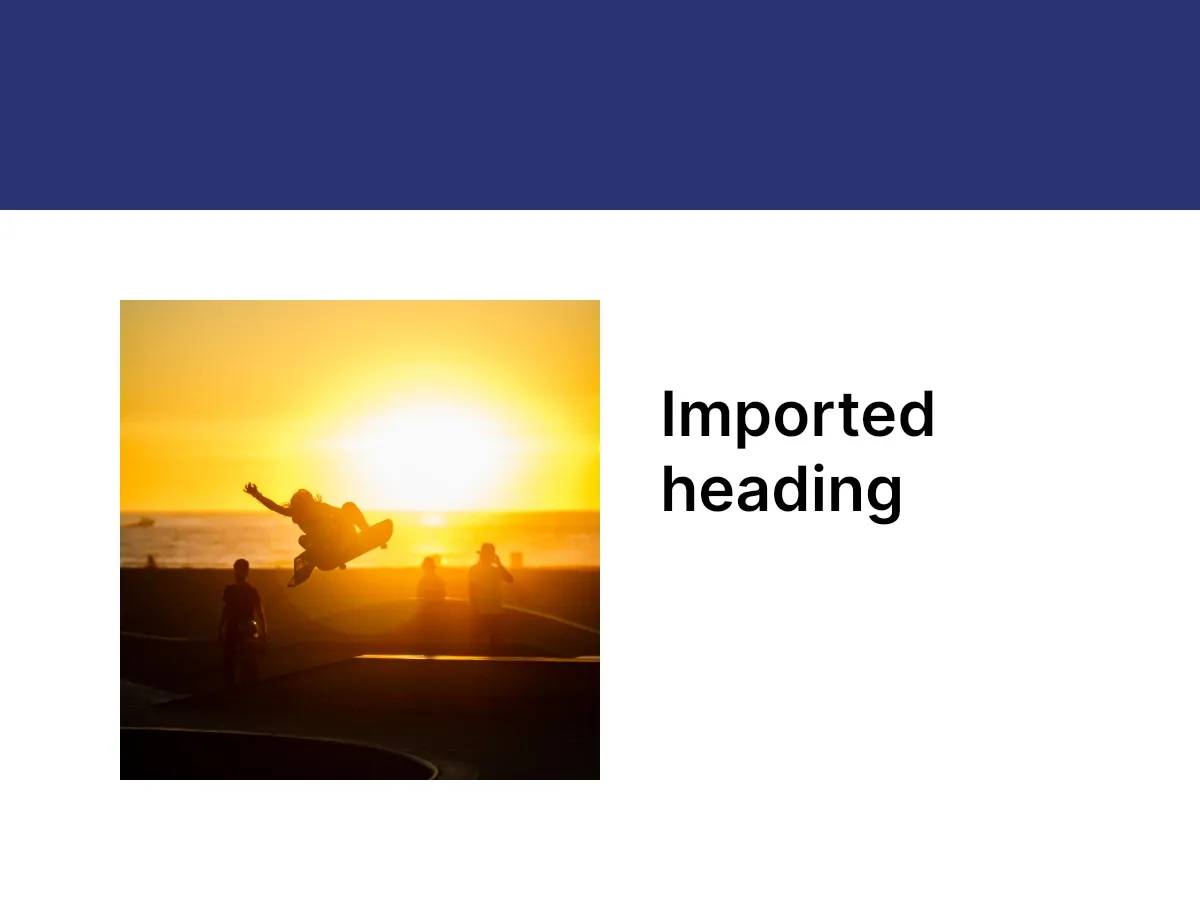
CE.SDK natively opens its own scenes and archives, plus images and videos, and converts Photoshop and InDesign files through dedicated server-side packages. A custom importer covers everything else: when you have a proprietary or otherwise unsupported format, you parse it yourself and reconstruct its content as CE.SDK blocks. The engine never reads your file — it only sees the pages, graphics, and text blocks you create.
How a Custom Importer Works#
An importer is a two-step pipeline:
- Parse the source bytes into an intermediate model — your own types.
- Build the scene by walking that model and calling the Block APIs.
The engine has no knowledge of the source format; it only sees engine.scene.create() and the blocks you append afterward. Keeping parse and build separate lets you unit-test parsing without the engine and swap source formats without touching the build step.
Define the Source Format#
Model the design as a page size plus a list of elements — each with a position, a size, and type-specific fields. This worked example uses a small JSON layout with image, text, and rectangle elements, decoded into Decodable structs.
/// The intermediate model the importer decodes the source format into. In a real/// importer this mirrors the structure of your own file format.struct CustomImporterDesign: Decodable {  let width: Float  let height: Float  let background: [Float]? // page background rgba in 0...1  let elements: [CustomImporterElement]}
struct CustomImporterElement: Decodable {  enum Kind: String, Decodable {    case image    case text    case rectangle  }
  let type: Kind  let x: Float  let y: Float  let width: Float  let height: Float  let src: String? // image reference, for `.image`  let text: String? // text content, for `.text`  let color: [Float]? // rgba components in 0...1, for `.rectangle`}
Parse the Source#
Decode the source bytes into the typed model with JSONDecoder. Here an inline string stands in for a file read from disk, an upload, or your API.
// The source bytes — here an inline string standing in for a file read from// disk, an upload, or your API.let sourceJSON = """{  "width": 800,  "height": 600,  "background": [1.0, 1.0, 1.0, 1.0],  "elements": [    { "type": "rectangle", "x": 0, "y": 0, "width": 800, "height": 140, "color": [0.16, 0.20, 0.45, 1.0] },    { "type": "image", "x": 80, "y": 200, "width": 320, "height": 320, "src": "ly.img.image/images/sample_4.jpg" },    { "type": "text", "x": 440, "y": 250, "width": 300, "height": 120, "text": "Imported heading" }  ]}"""
let design = try JSONDecoder().decode(CustomImporterDesign.self, from: Data(sourceJSON.utf8))
Create the Scene and Page#
Create an empty design scene with engine.scene.create(), then add a page sized from the parsed document, give it the document’s background color with a color fill, and attach it with engine.block.appendChild(to:child:).
let scene = try engine.scene.create()let page = try engine.block.create(.page)try engine.block.setWidth(page, value: design.width)try engine.block.setHeight(page, value: design.height)if let background = design.background, background.count == 4 { let pageFill = try engine.block.createFill(.color) try engine.block.setColor( pageFill, property: "fill/color/value", color: .rgba(r: background[0], g: background[1], b: background[2], a: background[3]), ) try engine.block.setFill(page, fill: pageFill)}try engine.block.appendChild(to: scene, child: page)Map Elements to Blocks#
Walk the parsed elements and create one block per element, then set its frame from the source coordinates and append it to the page. This loop is the core of any importer — only the per-type mapping changes:
- Image → a graphic block with an image fill. Create the block with
engine.block.create(.graphic), give it a shape withsetShape, build an image fill withcreateFill(.image), and point it at the resolved URL withsetURL. Image references resolve against the base URL where your importer’s assets live. - Rectangle → a graphic block with a color fill. Build the fill with
createFill(.color)and setsetColor(_:property:color:). - Text → a text block. Set its content with
replaceTextand let its height auto-size withsetHeightMode(_:mode: .auto).
for element in design.elements {  let block: DesignBlockID  switch element.type {  case .image:    block = try engine.block.create(.graphic)    try engine.block.setShape(block, shape: engine.block.createShape(.rect))    let fill = try engine.block.createFill(.image)    if let src = element.src {      try engine.block.setURL(fill, property: "fill/image/imageFileURI", value: baseURL.appendingPathComponent(src))    }    try engine.block.setFill(block, fill: fill)  case .rectangle:    block = try engine.block.create(.graphic)    try engine.block.setShape(block, shape: engine.block.createShape(.rect))    let fill = try engine.block.createFill(.color)    if let color = element.color, color.count == 4 {      try engine.block.setColor(        fill,        property: "fill/color/value",        color: .rgba(r: color[0], g: color[1], b: color[2], a: color[3]),      )    }    try engine.block.setFill(block, fill: fill)  case .text:    block = try engine.block.create(.text)    try engine.block.replaceText(block, text: element.text ?? "")    try engine.block.setHeightMode(block, mode: .auto)  }
  try engine.block.setPositionX(block, value: element.x)  try engine.block.setPositionY(block, value: element.y)  try engine.block.setWidth(block, value: element.width)  // Text auto-sizes its height; every other element takes the source height.  if element.type != .text {    try engine.block.setHeight(block, value: element.height)  }  try engine.block.appendChild(to: page, child: block)}
Every block is positioned and sized in CE.SDK’s top-left design units, so map your source’s coordinate origin accordingly.
Fit and Verify the Result#
Frame the page with engine.scene.enableZoomAutoFit(_:axis:...) so the import is visible, then confirm it is well-formed with engine.scene.getPages(). An empty result means the source produced no blocks.
try engine.scene.enableZoomAutoFit(  page,  axis: .both,  paddingLeft: 40,  paddingTop: 40,  paddingRight: 40,  paddingBottom: 40,)
let pages = try engine.scene.getPages()print("Imported design has \(pages.count) page(s)")
The imported design is now the active scene, fully editable — every element behaves like a natively created block.
What Does Not Translate#
A custom importer reproduces only what you map. Set expectations accordingly:
- Source features without a CE.SDK equivalent — custom filters, effects, blend modes — need explicit mapping or are dropped.
- Fonts referenced by the source must be available to the engine, or text falls back to a default typeface.
- Image elements resolve their URLs when the scene renders — an unreachable URL renders empty even though the block exists.
- Centered origins or percentage units must be converted to top-left design units during the build step.
Troubleshooting#
- Imported blocks are invisible — confirm each block was appended to the page and has a non-zero width and height. A graphic block also needs a shape and a fill to render.
- Image elements render empty — verify the resolved
fill/image/imageFileURIURL is reachable and the format is supported. - Everything stacks at the top-left — the source coordinates were not mapped; set
setPositionX/setPositionYper element. - Text shows a fallback font — register or load the source’s font, or accept the substitution.
API Reference#
Methods#
| Method | Description |
|---|---|
engine.scene.create() |
Create an empty design scene |
engine.block.create(_:) |
Create a block of a DesignBlockType (.page, .graphic, .text) |
engine.block.createShape(_:) |
Create a shape (.rect) for a graphic block |
engine.block.setShape(_:shape:) |
Attach a shape to a graphic block |
engine.block.createFill(_:) |
Create an image or color fill |
engine.block.setURL(_:property:value:) |
Set the image fill URI (fill/image/imageFileURI) |
engine.block.setColor(_:property:color:) |
Set the fill color (fill/color/value) |
engine.block.setFill(_:fill:) |
Attach a fill to a block |
engine.block.replaceText(_:text:) |
Set a text block’s content |
engine.block.setHeightMode(_:mode:) |
Set the height sizing mode (.auto for text) |
engine.block.setWidth(_:value:) / setHeight(_:value:) |
Size a block in design units |
engine.block.setPositionX(_:value:) / setPositionY(_:value:) |
Position a block in design units |
engine.block.appendChild(to:child:) |
Add a child block to a parent |
engine.scene.enableZoomAutoFit(_:axis:paddingLeft:paddingTop:paddingRight:paddingBottom:) |
Fit a block in the viewport |
engine.scene.getPages() |
Return the scene’s pages |
Next Steps#
- Import a Design — Load native CE.SDK scenes, archives, images, and videos.
- From Photoshop — Convert PSD files to a scene archive and load it.
- From InDesign — Convert IDML files to a scene archive and load it.