Extend CE.SDK with your own LUT filters by creating and registering custom filter asset sources for brand-specific color grading.
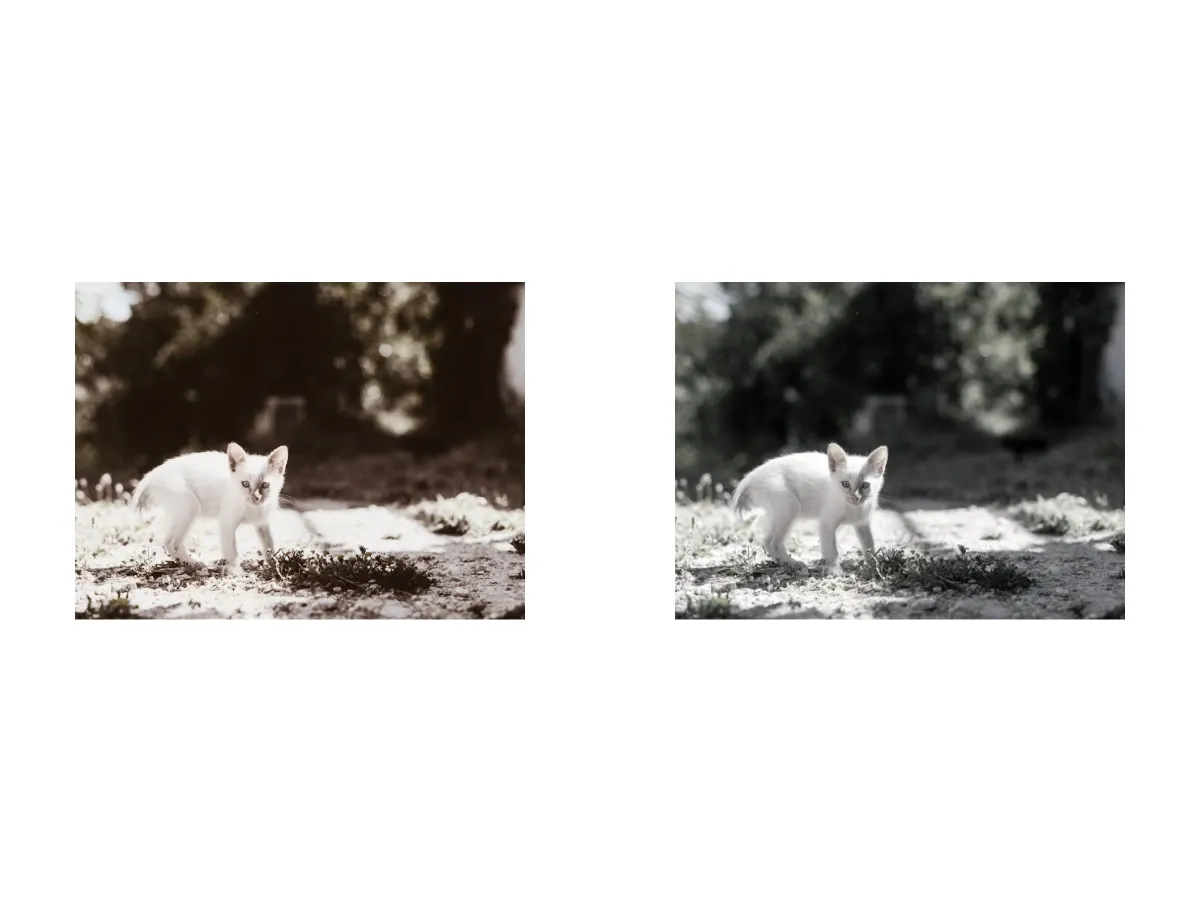
CE.SDK provides built-in LUT filters, but many applications need brand-specific color grading or custom filter collections. Custom filter asset sources let you register your own LUT filters that can be queried and applied programmatically, alongside the built-in defaults.
This guide covers how to define filter metadata, register a filter asset source, load filters from JSON configuration, query the source, and apply filters to design elements.
Filter Asset Metadata#
LUT filters need these properties in the meta dictionary of each asset:
uri- URL to the LUT image file (PNG format)thumbUri- URL to the preview thumbnail shown in a filter picker. In production this should point at a rendered preview (a sample image with the filter applied); the examples here reuse the LUT image for brevity, which would otherwise show the raw LUT grid in a pickerhorizontalTileCount- Number of horizontal tiles in the LUT grid (typically 5 or 8)verticalTileCount- Number of vertical tiles in the LUT grid (typically 5 or 8)blockType- Must be//ly.img.ubq/effect/lut_filterfor LUT filters, the value ofEffectType.lutFilter.rawValue
meta is a [String: String] dictionary, so numeric values like the tile counts are stored as strings.
Adding a Custom Filter#
Register a local asset source with engine.asset.addLocalSource(sourceID:), then add each filter to it with engine.asset.addAsset(to:asset:). Each filter is an AssetDefinition carrying its display label, search tags, category groups, and the LUT configuration in meta.
let warmLUT = baseURL.appendingPathComponent("ly.img.filter.lut/LUTs/imgly_lut_sepia_5_5_128.png")let monochromeLUT = baseURL.appendingPathComponent("ly.img.filter.lut/LUTs/imgly_lut_bw_5_5_128.png")
// Register a local asset source to hold the brand's custom filters.try engine.asset.addLocalSource(sourceID: "my-custom-filters")
// Define each filter with its LUT metadata and add it to the source.let vintageWarm = AssetDefinition(  id: "vintage-warm",  groups: ["Warm Tones"],  meta: [    "uri": warmLUT.absoluteString,    "thumbUri": warmLUT.absoluteString,    "horizontalTileCount": "5",    "verticalTileCount": "5",    "blockType": EffectType.lutFilter.rawValue,  ],  label: ["en": "Vintage Warm"],  tags: ["en": ["vintage", "warm", "retro"]],)try engine.asset.addAsset(to: "my-custom-filters", asset: vintageWarm)
let monochromeClassic = AssetDefinition(  id: "monochrome-classic",  groups: ["Monochrome"],  meta: [    "uri": monochromeLUT.absoluteString,    "thumbUri": monochromeLUT.absoluteString,    "horizontalTileCount": "5",    "verticalTileCount": "5",    "blockType": EffectType.lutFilter.rawValue,  ],  label: ["en": "Monochrome Classic"],  tags: ["en": ["monochrome", "classic", "black and white"]],)try engine.asset.addAsset(to: "my-custom-filters", asset: monochromeClassic)
Filter Asset Structure#
Each AssetDefinition needs:
id- Unique identifier for the filterlabel- Localized display name.IMGLYEngine.Localeis aStringtypealias, so use plain language keys such as["en": "Vintage Warm"]tags- Localized keywords for free-text searchgroups- Category assignments for filtering and organizationmeta- The LUT configuration (uri, thumbUri, tile counts, blockType)
Loading Filters from JSON Configuration#
For larger filter collections, load definitions from a JSON string with engine.asset.addLocalAssetSourceFromJSON(_:). It returns the source ID declared in the JSON, keeping filter libraries in configuration files instead of code.
let filterConfigJSON = """{ "version": "2.0.0", "id": "my-json-filters", "assets": [ { "id": "noir-classic", "label": { "en": "Noir Classic" }, "tags": { "en": ["monochrome", "noir", "grayscale"] }, "groups": ["Monochrome"], "meta": { "uri": "\(monochromeLUT.absoluteString)", "thumbUri": "\(monochromeLUT.absoluteString)", "horizontalTileCount": "5", "verticalTileCount": "5", "blockType": "\(EffectType.lutFilter.rawValue)" } }, { "id": "sunset-glow", "label": { "en": "Sunset Glow" }, "tags": { "en": ["warm", "sunset", "golden"] }, "groups": ["Warm Tones"], "meta": { "uri": "\(warmLUT.absoluteString)", "thumbUri": "\(warmLUT.absoluteString)", "horizontalTileCount": "5", "verticalTileCount": "5", "blockType": "\(EffectType.lutFilter.rawValue)" } } ]}"""let jsonSourceID = try engine.asset.addLocalAssetSourceFromJSON(filterConfigJSON)print("Created JSON-based filter source: \(jsonSourceID)")JSON Structure for Filter Assets#
The JSON includes:
version- Schema version (use"2.0.0")id- Unique source identifierassets- Array of filter definitions
Each asset contains an id, a localized label object (e.g. { "en": "Sunset Glow" }), localized tags, groups, and a meta object with the LUT configuration.
For filters hosted on a CDN, pass a URL to engine.asset.addLocalAssetSourceFromJSON(_:) instead, which loads the JSON from a URL and resolves relative URLs against the JSON file’s parent directory.
Querying and Applying Filters#
Query a source’s filters with engine.asset.findAssets(sourceID:query:). The AssetQueryData controls pagination (page, perPage), free-text search (query), and category filters (groups). findAllSources() lists every registered source ID.
let customResults = try await engine.asset.findAssets(  sourceID: "my-custom-filters",  query: .init(query: nil, page: 0, perPage: 10),)print("Found \(customResults.total) filters in the custom source")
// Narrow the results to a single category with the groups parameter.let warmResults = try await engine.asset.findAssets(  sourceID: "my-custom-filters",  query: .init(query: nil, page: 0, groups: ["Warm Tones"], perPage: 10),)print("Found \(warmResults.total) warm-tone filters")
let jsonResults = try await engine.asset.findAssets(  sourceID: jsonSourceID,  query: .init(query: nil, page: 0, perPage: 10),)print("Found \(jsonResults.total) filters in the JSON source")
let monochromeResults = try await engine.asset.findAssets(  sourceID: jsonSourceID,  query: .init(query: nil, page: 0, groups: ["Monochrome"], perPage: 10),)print("Found \(monochromeResults.total) monochrome filters")
let allSources = engine.asset.findAllSources()print("Registered sources: \(allSources)")
Build a LUT filter effect from a queried filter’s meta: create a lut_filter effect, set its LUT file URL and tile counts from the metadata, set the intensity, then attach it to a graphic block with appendEffect(_:effectID:). firstImage here is a graphic block with an image fill.
if let filter = warmResults.assets.first, let meta = filter.meta, let lutURL = meta["uri"].flatMap(URL.init(string:)) { let lutEffect = try engine.block.createEffect(.lutFilter) try engine.block.setURL(lutEffect, property: "effect/lut_filter/lutFileURI", value: lutURL) try engine.block.setInt( lutEffect, property: "effect/lut_filter/horizontalTileCount", value: Int(meta["horizontalTileCount"] ?? "") ?? 5, ) try engine.block.setInt( lutEffect, property: "effect/lut_filter/verticalTileCount", value: Int(meta["verticalTileCount"] ?? "") ?? 5, ) try engine.block.setFloat(lutEffect, property: "effect/lut_filter/intensity", value: 0.85) try engine.block.appendEffect(firstImage, effectID: lutEffect)}The same recipe applies to filters from any registered source, including the JSON-based source.
if let filter = monochromeResults.assets.first, let meta = filter.meta, let lutURL = meta["uri"].flatMap(URL.init(string:)) { let lutEffect = try engine.block.createEffect(.lutFilter) try engine.block.setURL(lutEffect, property: "effect/lut_filter/lutFileURI", value: lutURL) try engine.block.setInt( lutEffect, property: "effect/lut_filter/horizontalTileCount", value: Int(meta["horizontalTileCount"] ?? "") ?? 5, ) try engine.block.setInt( lutEffect, property: "effect/lut_filter/verticalTileCount", value: Int(meta["verticalTileCount"] ?? "") ?? 5, ) try engine.block.setFloat(lutEffect, property: "effect/lut_filter/intensity", value: 0.85) try engine.block.appendEffect(secondImage, effectID: lutEffect)}After applying the filters, export the page to a PNG.
let blob = try await engine.block.export(page, mimeType: .png)let outputURL = FileManager.default.temporaryDirectory.appendingPathComponent("custom-filters.png")try blob.write(to: outputURL)Troubleshooting#
Filters Not Found in Query#
- Add filters with
addAsset(to:asset:)(or load them withaddLocalAssetSourceFromJSON(_:)) before callingfindAssets(sourceID:query:) - Check that the source ID matches the one you registered
- Confirm each filter’s
metaincludes all required fields
LUT Not Rendering Correctly#
- Verify the tile count values match the actual LUT image grid dimensions
- Check that the LUT image URL is reachable
- Confirm the LUT image is a PNG
JSON Source Not Loading#
- Verify the JSON has
version,id, andassets - Ensure each asset’s
metaincludes the required fields - Check for JSON syntax errors
API Reference#
Methods#
| Method | Description |
|---|---|
engine.asset.addLocalSource(sourceID:) |
Register a local asset source |
engine.asset.addAsset(to:asset:) |
Add an AssetDefinition to a registered source |
engine.asset.addLocalAssetSourceFromJSON(_:basePath:matcher:) |
Create an asset source from an inline JSON string |
engine.asset.addLocalAssetSourceFromJSON(_:matcher:) |
Load an asset source from a JSON file URL |
engine.asset.findAssets(sourceID:query:) |
Query a source’s assets with paging, search, and groups |
engine.asset.findAllSources() |
List registered asset source IDs |
engine.block.createEffect(_:) |
Create an effect (use .lutFilter for LUT filters) |
engine.block.setURL(_:property:value:) |
Set the LUT file URL |
engine.block.setInt(_:property:value:) |
Set the tile counts |
engine.block.setFloat(_:property:value:) |
Set the filter intensity |
engine.block.appendEffect(_:effectID:) |
Add the effect to a block’s effect stack |
Properties#
| Property | Type | Description |
|---|---|---|
effect/lut_filter/lutFileURI |
URL | LUT image file URL |
effect/lut_filter/horizontalTileCount |
Int | Horizontal tiles in the LUT grid |
effect/lut_filter/verticalTileCount |
Int | Vertical tiles in the LUT grid |
effect/lut_filter/intensity |
Float | Blend strength in the range 0.0–1.0; 0.0 applies no filtering and 1.0 applies the LUT fully |
Next Steps#
- Apply Filters and Effects - Learn to apply filters to design elements and manage effect stacks
- Create a Custom LUT Filter - Understand LUT image format and create your own color grading filters
- Blur Effects - Add blur effects to images and videos