Apply blur effects to design blocks using CE.SDK’s dedicated blur system for softening backgrounds, simulating depth of field, or drawing focus toward specific elements.
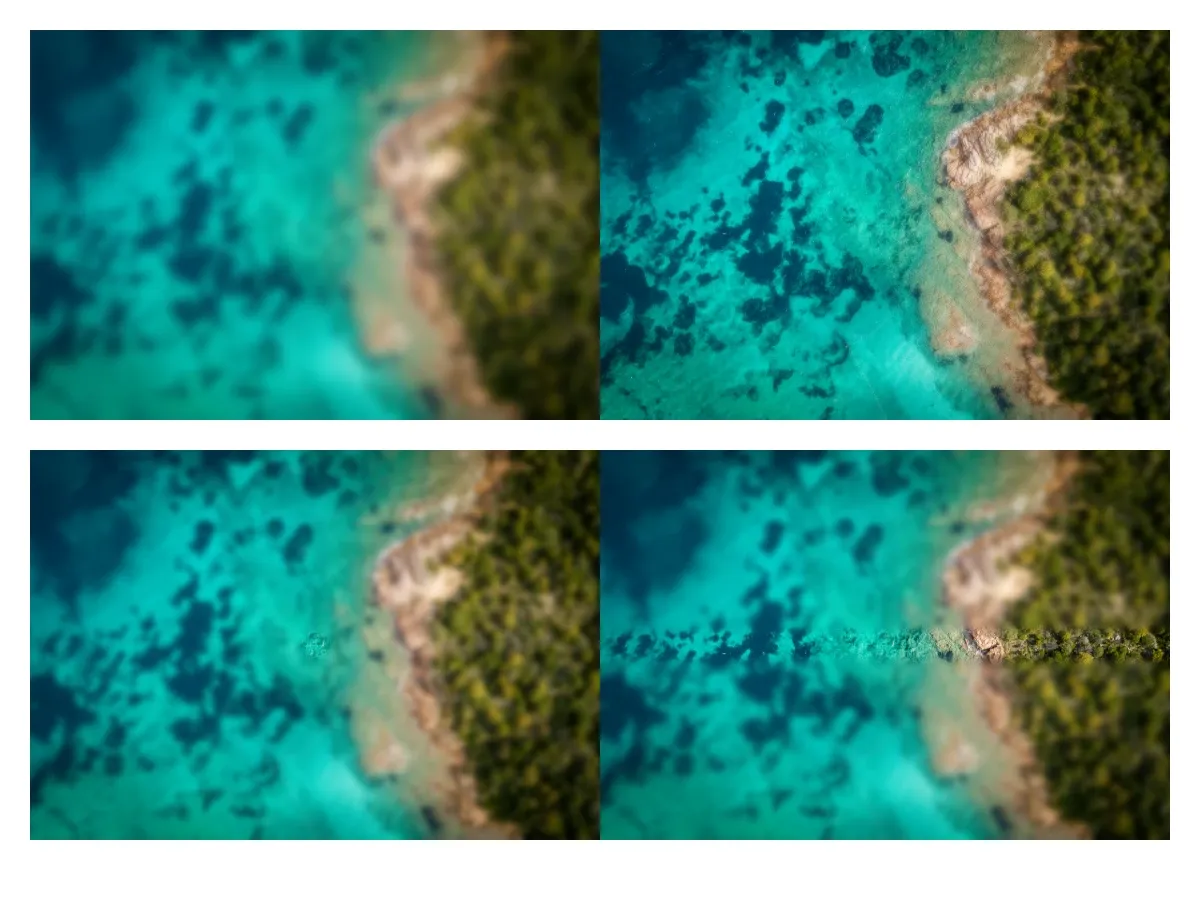
Unlike stackable effects, blur is a dedicated feature with its own API. Each block supports exactly one blur at a time, though the same blur instance can be shared across multiple blocks. CE.SDK provides four blur types: uniform for even softening, linear and mirrored for gradient-based effects along an axis, and radial for circular focal points.
Programmatic Blur Application#
Apply, configure, and combine blur directly through the engine’s block API.
Check Blur Support#
Not every block type accepts blur, so call supportsBlur(_:) before reaching for any of the other blur APIs.
guard try engine.block.supportsBlur(uniformCell) else { return }Create and Apply Blur#
Create a blur instance with createBlur(_:), passing the BlurType you want. Attach it to a block with setBlur(_:blurID:) and turn it on with setBlurEnabled(_:enabled:). Creating a blur does not change the rendered output — the blur has to be attached and enabled first.
let uniformBlur = try engine.block.createBlur(.uniform)try engine.block.setBlur(uniformCell, blurID: uniformBlur)try engine.block.setBlurEnabled(uniformCell, enabled: true)BlurType has four cases:
.uniform—//ly.img.ubq/blur/uniform.linear—//ly.img.ubq/blur/linear.mirrored—//ly.img.ubq/blur/mirrored.radial—//ly.img.ubq/blur/radial
Configure Blur Parameters#
Each blur type exposes its own set of properties. Configure them with setFloat(_:property:value:). Coordinate properties such as x, y, x1, y1 are relative values in the range 0.0 – 1.0, where (0, 0) is the top-left of the block and (1, 1) is the bottom-right.
Apply Uniform Blur#
The uniform blur (also known as a Gaussian blur) applies consistent softening across the entire block. It has a single parameter, blur/uniform/intensity, ranging from 0.0 (no blur) to 1.0 (maximum softness).
try engine.block.setFloat(uniformBlur, property: "blur/uniform/intensity", value: 0.8)Blur the Whole Block#
A uniform blur blurs the fill inside the block’s shape by default. Set blur/uniform/mode to "Block" to blur the whole block, its outline and stroke included. The blur then spreads past the block’s frame.
// Blur the whole block, its stroke included. The blur spreads past the frame.try engine.block.setStrokeEnabled(uniformCell, enabled: true)try engine.block.setStrokeWidth(uniformCell, width: 8)try engine.block.setEnum(uniformBlur, property: "blur/uniform/mode", value: "Block")print(try engine.block.getEnum(uniformBlur, property: "blur/uniform/mode")) // "Block"A group has no fill, so a uniform blur blurs its children together in either mode, and a group accepts only a uniform blur. On a page, Block blurs the page and its content together, and the page edge cuts the blur.
Apply Linear Blur#
The linear blur creates a directional blur along a line defined by two control points. Moving the control points rotates the blur axis and shifts where the transition occurs.
let linearBlur = try engine.block.createBlur(.linear)try engine.block.setFloat(linearBlur, property: "blur/linear/blurRadius", value: 35)try engine.block.setFloat(linearBlur, property: "blur/linear/x1", value: 0.0)try engine.block.setFloat(linearBlur, property: "blur/linear/y1", value: 0.3)try engine.block.setFloat(linearBlur, property: "blur/linear/x2", value: 1.0)try engine.block.setFloat(linearBlur, property: "blur/linear/y2", value: 0.7)try engine.block.setBlur(linearCell, blurID: linearBlur)try engine.block.setBlurEnabled(linearCell, enabled: true)Apply Radial Blur#
The radial blur radiates outward from a center point, keeping a circular inner area sharp. Adjust the sharp region’s size with radius and the width of the transition band with gradientRadius.
let radialBlur = try engine.block.createBlur(.radial)try engine.block.setFloat(radialBlur, property: "blur/radial/blurRadius", value: 45)try engine.block.setFloat(radialBlur, property: "blur/radial/radius", value: 40)try engine.block.setFloat(radialBlur, property: "blur/radial/gradientRadius", value: 30)try engine.block.setFloat(radialBlur, property: "blur/radial/x", value: 0.5)try engine.block.setFloat(radialBlur, property: "blur/radial/y", value: 0.5)try engine.block.setBlur(radialCell, blurID: radialBlur)try engine.block.setBlurEnabled(radialCell, enabled: true)Apply Mirrored Blur#
The mirrored blur creates a band of focus with blur on both sides — a tilt-shift style effect. size controls the width of the clear band and gradientSize controls how quickly the blur ramps up on either side.
let mirroredBlur = try engine.block.createBlur(.mirrored)try engine.block.setFloat(mirroredBlur, property: "blur/mirrored/blurRadius", value: 50)try engine.block.setFloat(mirroredBlur, property: "blur/mirrored/size", value: 30)try engine.block.setFloat(mirroredBlur, property: "blur/mirrored/gradientSize", value: 25)try engine.block.setFloat(mirroredBlur, property: "blur/mirrored/x1", value: 0.0)try engine.block.setFloat(mirroredBlur, property: "blur/mirrored/y1", value: 0.5)try engine.block.setFloat(mirroredBlur, property: "blur/mirrored/x2", value: 1.0)try engine.block.setFloat(mirroredBlur, property: "blur/mirrored/y2", value: 0.5)try engine.block.setBlur(mirroredCell, blurID: mirroredBlur)try engine.block.setBlurEnabled(mirroredCell, enabled: true)Managing Blur#
Inspect the blur already attached to a block, toggle it, share it across blocks, or remove it.
Read an Applied Blur#
Retrieve the blur attached to a block with getBlur(_:), then read or modify its properties with the same setters and getFloat(_:property:).
let currentBlur = try engine.block.getBlur(radialCell)let currentRadius = try engine.block.getFloat(currentBlur, property: "blur/radial/blurRadius")print("current radial blur radius: \(currentRadius)")Enable and Disable Blur#
Toggle blur on and off without removing it using setBlurEnabled(_:enabled:). When disabled the blur stays attached to the block and its parameters are preserved for when it is enabled again. Read the current state with isBlurEnabled(_:).
try engine.block.setBlurEnabled(uniformCell, enabled: false)let uniformEnabled = try engine.block.isBlurEnabled(uniformCell)print("uniform blur enabled: \(uniformEnabled)")Share a Blur Across Blocks#
A single blur instance can be attached to multiple blocks. Create the blur once, then call setBlur(_:blurID:) on each block. Changes to the blur’s properties update every block that uses it.
let sharedBlur = try engine.block.createBlur(.uniform)try engine.block.setFloat(sharedBlur, property: "blur/uniform/intensity", value: 0.4)try engine.block.setBlur(uniformCell, blurID: sharedBlur)try engine.block.setBlurEnabled(uniformCell, enabled: true)try engine.block.setBlur(linearCell, blurID: sharedBlur)try engine.block.setBlurEnabled(linearCell, enabled: true)Attaching a new blur to a block replaces the previous one on that block — a block only ever has one active blur.
Remove a Blur#
To remove a blur permanently, call destroy(_:) on the blur block. This frees the blur and detaches it from every block that was using it. When you only want to turn a blur off temporarily, prefer setBlurEnabled(_:enabled:) instead.
let existingBlur = try engine.block.getBlur(mirroredCell)try engine.block.destroy(existingBlur)Troubleshooting#
| Symptom | Cause | Solution |
|---|---|---|
| No blur appears | The block doesn’t support blur or blur isn’t enabled | Verify with supportsBlur(_:) and isBlurEnabled(_:) |
| Property changes have no effect | Wrong property key | Check the exact property name — keys begin with blur/<type>/ |
| Blur looks off-center | Coordinate values outside 0.0 – 1.0 |
Confirm each x, y, x1, y1 value is within range |
| Blur too subtle or too strong | Radius or intensity values | Increase or decrease blurRadius (linear, mirrored, radial) or intensity (uniform) |
API Reference#
Methods#
| Method | Description |
|---|---|
engine.block.supportsBlur(_:) |
Check whether a block supports blur |
engine.block.createBlur(_:) |
Create a new blur instance of a BlurType |
engine.block.setBlur(_:blurID:) |
Attach a blur to a block |
engine.block.getBlur(_:) |
Get the blur attached to a block |
engine.block.setBlurEnabled(_:enabled:) |
Enable or disable the blur on a block |
engine.block.isBlurEnabled(_:) |
Check whether the blur on a block is enabled |
engine.block.setFloat(_:property:value:) |
Set a blur property |
engine.block.getFloat(_:property:) |
Read a blur property |
engine.block.getType(_:) |
Get the type identifier of a blur block |
engine.block.destroy(_:) |
Destroy a blur, detaching it from every block that used it |
Properties#
| Property | Type | Default | Description |
|---|---|---|---|
blur/uniform/intensity |
Float | 0.5 |
Uniform blur strength, 0.0 – 1.0 |
blur/uniform/mode |
Enum | Fill |
Fill (default) blurs the fill inside the block’s shape. Block blurs the whole block, including its outline and stroke, and the blur spreads past the block. A group has no fill, so a uniform blur blurs its children together in either mode, and a group accepts only a uniform blur. On a page, Block blurs the page and its content together, and the page edge cuts the blur (experimental) |
blur/linear/blurRadius |
Float | 30 |
Linear blur intensity |
blur/linear/x1, y1 |
Float | 0, 0.5 |
Linear blur start point |
blur/linear/x2, y2 |
Float | 1, 0.5 |
Linear blur end point |
blur/mirrored/blurRadius |
Float | 30 |
Mirrored blur intensity |
blur/mirrored/size |
Float | 75 |
Width of the unblurred band |
blur/mirrored/gradientSize |
Float | 50 |
Width of the transition zones |
blur/mirrored/x1, y1, x2, y2 |
Float | 0, 0.5, 1, 0.5 |
Mirrored blur axis points |
blur/radial/blurRadius |
Float | 30 |
Radial blur intensity |
blur/radial/radius |
Float | 75 |
Size of the sharp center |
blur/radial/gradientRadius |
Float | 50 |
Width of the transition band |
blur/radial/x, y |
Float | 0.5, 0.5 |
Radial blur center point |
Next Steps#
- Apply Filters and Effects — Stack visual effects such as adjustments, LUT filters, and duotone alongside blur.
- Distortion Effects — Apply warping and glitch effects to design blocks.
- Filters & Effects Overview — Browse every filter and effect CE.SDK provides.
- Modify Properties — Understand block properties and how to modify them.