Swap one color for another with the Recolor effect, or remove backgrounds with the Green Screen effect, both attached to graphic blocks via the effect stack.
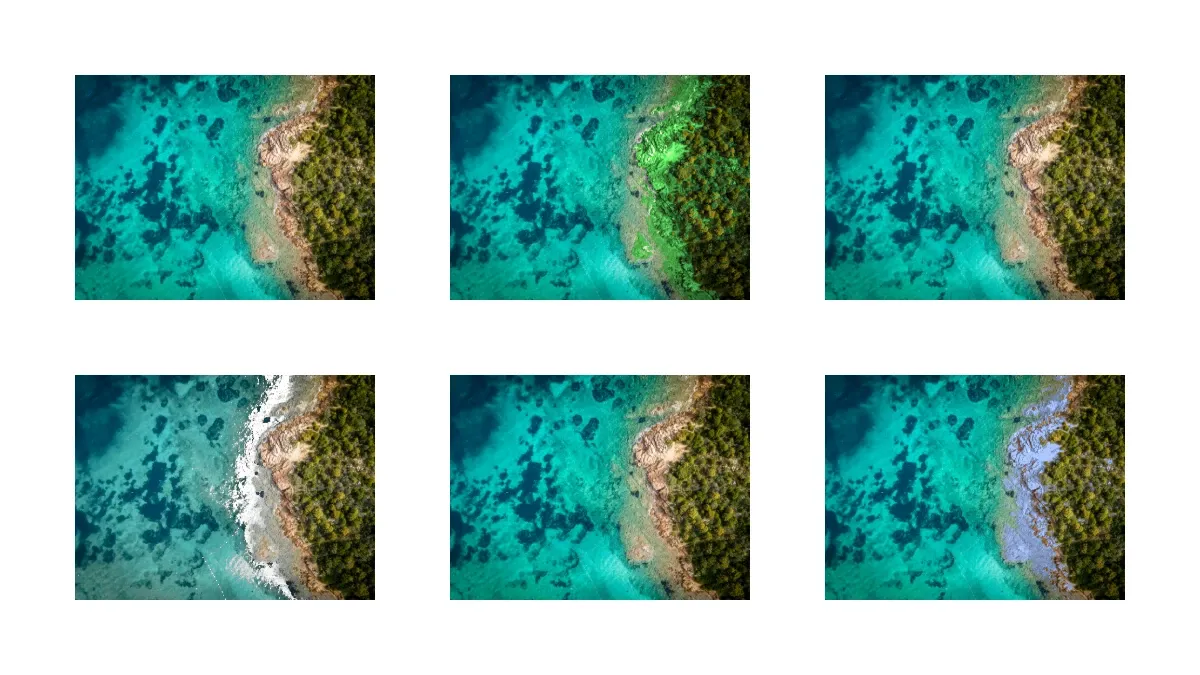
CE.SDK exposes two color-replacement effects through the engine’s effect stack. The Recolor effect swaps pixels matching a source color with a target color while preserving image detail. The Green Screen effect makes pixels matching a source color transparent, useful for removing solid-color backgrounds. Both effects attach to graphic blocks via appendEffect(_:effectID:) and configure colors and tolerance through the standard property API.
Setting Up a Scene#
The examples below all attach effects to graphic blocks with image fills. Create a scene with a page that will host the image blocks.
let scene = try engine.scene.create()
let page = try engine.block.create(.page)try engine.block.setWidth(page, value: 800)try engine.block.setHeight(page, value: 450)try engine.block.appendChild(to: scene, child: page)
let imageURL = baseURL.appendingPathComponent("ly.img.image/images/sample_1.jpg")
Creating and Applying Recolor Effects#
The Recolor effect swaps one color for another throughout an image. Create the effect with engine.block.createEffect(.recolor), set the source color via effect/recolor/fromColor, set the target color via effect/recolor/toColor, and attach the effect to a graphic block.
// Create a Recolor effect that swaps red pixels for blue, then attach it to// an image block using `appendEffect`.let recolorBlock = try engine.block.create(.graphic)try engine.block.setShape(recolorBlock, shape: engine.block.createShape(.rect))try engine.block.setPositionX(recolorBlock, value: 50)try engine.block.setPositionY(recolorBlock, value: 50)try engine.block.setWidth(recolorBlock, value: 200)try engine.block.setHeight(recolorBlock, value: 150)try engine.block.appendChild(to: page, child: recolorBlock)
let recolorFill = try engine.block.createFill(.image)try engine.block.setURL(recolorFill, property: "fill/image/imageFileURI", value: imageURL)try engine.block.setFill(recolorBlock, fill: recolorFill)
let recolorEffect = try engine.block.createEffect(.recolor)try engine.block.setColor(  recolorEffect,  property: "effect/recolor/fromColor",  color: .rgba(r: 1, g: 0, b: 0, a: 1),)try engine.block.setColor(  recolorEffect,  property: "effect/recolor/toColor",  color: .rgba(r: 0, g: 0.5, b: 1, a: 1),)try engine.block.appendEffect(recolorBlock, effectID: recolorEffect)
Pixels close to fromColor are remapped to toColor. Color values use the Color.rgba(r:g:b:a:) constructor with components in the 0...1 range. The alpha channel of fromColor is ignored — only the RGB triplet is compared against image pixels.
Tuning Recolor Tolerance#
The Recolor effect exposes three numeric properties that control which pixels are affected and how the recolor transition blends. All three accept values in the 0...1 range.
let tolerancesEffect = try engine.block.createEffect(.recolor)try engine.block.setFloat(tolerancesEffect, property: "effect/recolor/colorMatch", value: 0.3)try engine.block.setFloat(tolerancesEffect, property: "effect/recolor/brightnessMatch", value: 0.2)try engine.block.setFloat(tolerancesEffect, property: "effect/recolor/smoothness", value: 0.1)| Property | Default | Purpose |
|---|---|---|
effect/recolor/colorMatch |
0.4 |
Threshold between the source color and the from color. Lower values match a narrower color range, higher values match a broader range. |
effect/recolor/brightnessMatch |
1.0 |
Weight of brightness when computing similarity. Lower values let the effect reach pixels of the same hue but different brightness. |
effect/recolor/smoothness |
0.08 |
Rate at which the color transition increases beyond the match threshold. Higher values produce softer edges. |
Use setFloat(_:property:value:) to write each tolerance.
Removing Backgrounds with Green Screen#
The Green Screen effect replaces pixels matching a chosen color with transparency. Create the effect with engine.block.createEffect(.greenScreen), set the color to remove via effect/green_screen/fromColor, and append it to a graphic block.
// Create a Green Screen effect. `fromColor` picks the color to remove; any// pixel close enough to that color becomes transparent.let greenScreenBlock = try engine.block.create(.graphic)try engine.block.setShape(greenScreenBlock, shape: engine.block.createShape(.rect))try engine.block.setPositionX(greenScreenBlock, value: 550)try engine.block.setPositionY(greenScreenBlock, value: 50)try engine.block.setWidth(greenScreenBlock, value: 200)try engine.block.setHeight(greenScreenBlock, value: 150)try engine.block.appendChild(to: page, child: greenScreenBlock)
let greenScreenFill = try engine.block.createFill(.image)try engine.block.setURL(greenScreenFill, property: "fill/image/imageFileURI", value: imageURL)try engine.block.setFill(greenScreenBlock, fill: greenScreenFill)
let greenScreenEffect = try engine.block.createEffect(.greenScreen)try engine.block.setColor(  greenScreenEffect,  property: "effect/green_screen/fromColor",  color: .rgba(r: 0, g: 1, b: 0, a: 1),)try engine.block.appendEffect(greenScreenBlock, effectID: greenScreenEffect)
This works best on images with solid, uniform background colors (chroma-key shoots, product photography on flat backdrops). The alpha channel of fromColor is ignored.
Fine-Tuning Green Screen Removal#
The Green Screen effect exposes three numeric properties that control matching tolerance, edge feathering, and color spill suppression.
let spillEffect = try engine.block.createEffect(.greenScreen)try engine.block.setFloat(spillEffect, property: "effect/green_screen/colorMatch", value: 0.4)try engine.block.setFloat(spillEffect, property: "effect/green_screen/smoothness", value: 0.2)try engine.block.setFloat(spillEffect, property: "effect/green_screen/spill", value: 0.5)| Property | Default | Purpose |
|---|---|---|
effect/green_screen/colorMatch |
0.4 |
Threshold between the source color and the from color. Higher values capture broader color variations in the background. |
effect/green_screen/smoothness |
0.08 |
Rate at which the transparency transition increases beyond the match threshold. Higher values feather the matte edge. |
effect/green_screen/spill |
0.0 |
Desaturates the source color across the image to reduce color bleed from the removed background onto subject edges. |
Managing Multiple Effects#
A graphic block carries an effect stack — appendEffect(_:effectID:) adds an effect to the end of the stack, and effects are applied in order. Retrieve the current stack with getEffects(_:), toggle individual entries with setEffectEnabled(effectID:enabled:), and query each one’s state with isEffectEnabled(effectID:).
// Stack multiple Recolor effects on a single block, then toggle individual// entries with `setEffectEnabled` without removing them from the stack.let stackedBlock = try engine.block.create(.graphic)try engine.block.setShape(stackedBlock, shape: engine.block.createShape(.rect))try engine.block.setPositionX(stackedBlock, value: 300)try engine.block.setPositionY(stackedBlock, value: 250)try engine.block.setWidth(stackedBlock, value: 200)try engine.block.setHeight(stackedBlock, value: 150)try engine.block.appendChild(to: page, child: stackedBlock)
let stackedFill = try engine.block.createFill(.image)try engine.block.setURL(stackedFill, property: "fill/image/imageFileURI", value: imageURL)try engine.block.setFill(stackedBlock, fill: stackedFill)
let redToBlue = try engine.block.createEffect(.recolor)try engine.block.setColor(redToBlue, property: "effect/recolor/fromColor", color: .rgba(r: 1, g: 0, b: 0, a: 1))try engine.block.setColor(redToBlue, property: "effect/recolor/toColor", color: .rgba(r: 0, g: 0, b: 1, a: 1))try engine.block.appendEffect(stackedBlock, effectID: redToBlue)
let greenToOrange = try engine.block.createEffect(.recolor)try engine.block.setColor(greenToOrange, property: "effect/recolor/fromColor", color: .rgba(r: 0, g: 1, b: 0, a: 1))try engine.block.setColor(greenToOrange, property: "effect/recolor/toColor", color: .rgba(r: 1, g: 0.5, b: 0, a: 1))try engine.block.appendEffect(stackedBlock, effectID: greenToOrange)
let stackedEffects = try engine.block.getEffects(stackedBlock)print("Number of effects: \(stackedEffects.count)") // 2
try engine.block.setEffectEnabled(effectID: stackedEffects[0], enabled: false)let isEnabled = try engine.block.isEffectEnabled(effectID: stackedEffects[0])print("First effect enabled: \(isEnabled)") // false
Disabling an effect with setEffectEnabled(...) leaves it in the stack so you can re-enable it later — useful for before/after comparisons and for pausing expensive effects during interactive editing.
Batch Processing Multiple Images#
engine.block.find(byType: .graphic) returns every graphic block in the scene. Combined with getEffects(_:), you can apply a consistent Recolor configuration to every image block that does not already carry an effect.
// Apply a consistent Recolor effect to every graphic block in the scene.// Skip blocks that already carry an effect so existing work isn't overwritten.let batchBlock = try engine.block.create(.graphic)try engine.block.setShape(batchBlock, shape: engine.block.createShape(.rect))try engine.block.setPositionX(batchBlock, value: 550)try engine.block.setPositionY(batchBlock, value: 250)try engine.block.setWidth(batchBlock, value: 200)try engine.block.setHeight(batchBlock, value: 150)try engine.block.appendChild(to: page, child: batchBlock)
let batchFill = try engine.block.createFill(.image)try engine.block.setURL(batchFill, property: "fill/image/imageFileURI", value: imageURL)try engine.block.setFill(batchBlock, fill: batchFill)
let allGraphicBlocks = try engine.block.find(byType: .graphic)for blockID in allGraphicBlocks {  if try engine.block.getEffects(blockID).isEmpty == false {    continue  }  let batchRecolor = try engine.block.createEffect(.recolor)  try engine.block.setColor(    batchRecolor,    property: "effect/recolor/fromColor",    color: .rgba(r: 0.8, g: 0.7, b: 0.6, a: 1),  )  try engine.block.setColor(    batchRecolor,    property: "effect/recolor/toColor",    color: .rgba(r: 0.6, g: 0.7, b: 0.9, a: 1),  )  try engine.block.setFloat(batchRecolor, property: "effect/recolor/colorMatch", value: 0.25)  try engine.block.appendEffect(blockID, effectID: batchRecolor)}
This pattern is useful for generating product-color variations across a catalog and for applying brand-consistent color corrections to a batch of imported images.
Troubleshooting#
Effect not visible
- Verify the effect is enabled with
isEffectEnabled(effectID:). - Check that the effect is attached to the intended graphic block with
getEffects(_:). - Confirm the block accepts effects with
supportsEffects(_:)— graphic blocks (including image fills) and pages carry an effect stack; text blocks do not.
Wrong colors being replaced
- Decrease
colorMatchfor stricter matching, or increase it to capture lighting variations and JPEG compression artifacts. - For Recolor, decrease
brightnessMatchso pixels of the same hue but different brightness are also affected.
Harsh edges or artifacts
- Increase
smoothnessto blend the transition more gradually. - For Green Screen, raise
spillto desaturate residual background color around subject edges.
Performance during interactive editing
- Use
setEffectEnabled(effectID:enabled: false)to pause heavy effects between user interactions instead of removing and re-adding them. - Limit the depth of the effect stack on a single block when targeting real-time playback.
API Reference#
Methods#
| Method | Description |
|---|---|
engine.block.createEffect(_:) |
Create a new effect block. Pass .recolor or .greenScreen for color replacement. |
engine.block.appendEffect(_:effectID:) |
Attach an effect to the end of a block’s effect stack. |
engine.block.insertEffect(_:effectID:index:) |
Insert an effect at a specific position in the stack. |
engine.block.removeEffect(_:index:) |
Remove an effect from a block by stack index. |
engine.block.getEffects(_:) |
Get all effects currently attached to a block. |
engine.block.supportsEffects(_:) |
Check whether a block carries an effect stack. |
engine.block.setColor(_:property:color:) |
Set a color property on an effect, such as fromColor or toColor. |
engine.block.getColor(_:property:) |
Read a color property from an effect. |
engine.block.setFloat(_:property:value:) |
Set a numeric property (tolerance, smoothness, spill). |
engine.block.getFloat(_:property:) |
Read a numeric property from an effect. |
engine.block.setEffectEnabled(effectID:enabled:) |
Enable or disable an effect without removing it from the stack. |
engine.block.isEffectEnabled(effectID:) |
Check whether an effect is currently enabled. |
engine.block.find(byType:) |
Find all blocks of a given DesignBlockType — pass .graphic to locate every graphic block in the scene. |
Properties#
| Property | Type | Description |
|---|---|---|
effect/recolor/fromColor |
Color |
The source color the Recolor effect matches against. Alpha is ignored. |
effect/recolor/toColor |
Color |
The target color matched pixels are remapped to. |
effect/recolor/colorMatch |
Float |
Match threshold against fromColor. Range 0...1. |
effect/recolor/brightnessMatch |
Float |
Weight of brightness in the similarity calculation. Range 0...1. |
effect/recolor/smoothness |
Float |
Transition softness beyond the match threshold. Range 0...1. |
effect/green_screen/fromColor |
Color |
The color the Green Screen effect makes transparent. Alpha is ignored. |
effect/green_screen/colorMatch |
Float |
Match threshold against fromColor. Range 0...1. |
effect/green_screen/smoothness |
Float |
Edge feathering on the transparency matte. Range 0...1. |
effect/green_screen/spill |
Float |
Desaturation of the source color to reduce spill. Range 0...1. |
Next Steps#
- Apply Filters and Effects — Explore the broader catalog of filters, blurs, and effects available on graphic blocks.
- Export Designs — Save your color-replaced images in PNG, JPEG, PDF, and other formats.