Make a block follow the position, rotation and scale of another block, like a parented layer in a motion design tool.
A transform parent moves a block without changing the layer list. The block follows the other block wherever it sits on the page, also while that block is animated, and keeps its own opacity, visibility and stacking order. The editor has no control for transform parents, so you set them with the block API.
This guide covers how to animate a hidden block that drives others, how to link a block and read the link back, how chains of links work, what a block inherits from its transform parent, how to read the animated position, how to remove a link, the errors to expect, and how to export a frame.
Animating a Hidden Parent#
A transform parent can be any graphic or text block. The example draws its blocks as circles with a small local function.
// Creates a circle graphic of the given size and color on the pagefunc createCircle(size: Float, color: Color) throws -> DesignBlockID { let block = try engine.block.create(.graphic) try engine.block.setShape(block, shape: engine.block.createShape(.ellipse)) let fill = try engine.block.createFill(.color) try engine.block.setColor(fill, property: "fill/color/value", color: color) try engine.block.setFill(block, fill: fill) try engine.block.setWidth(block, value: size) try engine.block.setHeight(block, value: size) try engine.block.appendChild(to: page, child: block) try engine.block.setDuration(block, duration: 5) return block}We use a small circle at the page center as a pivot. Its anchor, transform/anchor/x and transform/anchor/y, sits at its center, so its rotation keyframes turn it in place, once over 5 seconds. For keyframes and anchors, see Keyframes.
setVisible(_:visible:) hides the pivot. A hidden block still works as a transform parent, like a null layer in a motion design tool, so one invisible block can move several others.
let pivot = try createCircle(size: 20, color: .rgba(r: 0, g: 0, b: 0, a: 1))try engine.block.setPositionX(pivot, value: 950)try engine.block.setPositionY(pivot, value: 530)try engine.block.setFloat(pivot, property: "transform/anchor/x", value: 10)try engine.block.setFloat(pivot, property: "transform/anchor/y", value: 10)try engine.block.setKeyframes(pivot, property: "rotation", keyframes: [ Keyframe(time: 0, value: .float(0)), Keyframe(time: 1, value: .float(2 * Float.pi)),])try engine.block.setVisible(pivot, visible: false)Linking a Block#
setTransformParent(_:parent:) makes the block follow the transform of the parent. getTransformParent(_:) returns the parent. Both blocks must be graphic or text blocks.
The block’s position, rotation and scale are then read in the local space of the parent. The planet’s position of (300, -50) is an offset from the pivot’s top-left corner, measured along the pivot’s turning axes, so the planet circles the page center while the pivot turns. The block does not keep its place on screen when you link or unlink it, so set its position for the new space after you change the link.
let planet = try createCircle(size: 120, color: .rgba(r: 0.2, g: 0.4, b: 0.9, a: 1))try engine.block.setTransformParent(planet, parent: pivot)let planetTransformParent = try engine.block.getTransformParent(planet)print(planetTransformParent == pivot) // true// The position is now an offset from the pivot's top-left corner,// in the pivot's turning spacetry engine.block.setPositionX(planet, value: 300)try engine.block.setPositionY(planet, value: -50)Building a Chain#
A block can follow a block that follows a third block. The planet has its own rotation track about its center, and the moon follows the planet, so the moon circles the planet while the planet circles the pivot. The text label also follows the planet. Each link adds the transform of its parent, in any order of the blocks on the page.
// The planet spins twice about its center while it circles the pivottry engine.block.setFloat(planet, property: "transform/anchor/x", value: 60)try engine.block.setFloat(planet, property: "transform/anchor/y", value: 60)try engine.block.setKeyframes(planet, property: "rotation", keyframes: [  Keyframe(time: 0, value: .float(0)),  Keyframe(time: 1, value: .float(4 * Float.pi)),])
// The moon follows the planet, which follows the pivotlet moon = try createCircle(size: 40, color: .rgba(r: 0.85, g: 0.85, b: 0.8, a: 1))try engine.block.setTransformParent(moon, parent: planet)try engine.block.setPositionX(moon, value: 160)try engine.block.setPositionY(moon, value: 40)
// A text label follows the planet, toolet label = try engine.block.create(.text)try engine.block.replaceText(label, text: "Planet")try engine.block.setTextFontSize(label, fontSize: 36)try engine.block.setWidthMode(label, mode: .auto)try engine.block.setHeightMode(label, mode: .auto)try engine.block.appendChild(to: page, child: label)try engine.block.setTransformParent(label, parent: planet)try engine.block.setPositionX(label, value: 0)try engine.block.setPositionY(label, value: 140)
What a Follower Inherits#
Only the transform is inherited. A follower keeps its own opacity and visibility, its place in the stacking order and its parent in the block hierarchy. The planet is half transparent, while the moon stays opaque, and getParent(_:) still returns the page for the moon.
try engine.block.setOpacity(planet, value: 0.5)let moonOpacity = try engine.block.getOpacity(moon)let moonParent = try engine.block.getParent(moon)print(moonOpacity, moonParent == page) // 1.0 trueReading the Animated Position#
A follower moves when its transform parent plays keyframes, auto-orients or runs a preset animation. The global bounding box of the follower includes that motion at the current playback time. It uses the static position, rotation and scale of the follower itself, so the follower’s own keyframes and animations do not change the box. After setPlaybackTime(_:time:) with 1.25 seconds, a quarter of the duration, the pivot has turned by 90 degrees, so getGlobalBoundingBoxX(_:) and getGlobalBoundingBoxY(_:) place the planet below the page center.
// A quarter of the way through, the pivot has turned by 90 degreestry engine.block.setPlaybackTime(page, time: 1.25)let planetX = try engine.block.getGlobalBoundingBoxX(planet)let planetY = try engine.block.getGlobalBoundingBoxY(planet)print(planetX, planetY) // 900.0 830.0Removing the Link#
Pass nil as the parent to remove the link. getTransformParent(_:) then returns nil, and the label’s position is read in page space again, so we give it a page position.
// The label's position is read in page space again, so place it theretry engine.block.setTransformParent(label, parent: nil)let labelTransformParent = try engine.block.getTransformParent(label)print(labelTransformParent == nil) // truetry engine.block.setPositionX(label, value: 80)try engine.block.setPositionY(label, value: 80)Handling Errors#
A failed setTransformParent(_:parent:) throws an EngineError and adds no link. Its catalogCode names the cause. A block cannot follow itself, a block inside it or a block that follows it, directly or through other blocks. A page, a group and every other block type that is not a graphic or text block are refused on either side.
var cycleErrorCode: EngineErrorCode?do { // The pivot cannot follow a block that follows it try engine.block.setTransformParent(pivot, parent: moon)} catch let error as EngineError { cycleErrorCode = error.catalogCode print(cycleErrorCode == .blockTransformParentCycle) // true}var unsupportedErrorCode: EngineErrorCode?do { // Only graphic and text blocks take part in a link try engine.block.setTransformParent(planet, parent: page)} catch let error as EngineError { unsupportedErrorCode = error.catalogCode print(unsupportedErrorCode == .blockTransformParentUnsupported) // true}Exporting a Frame#
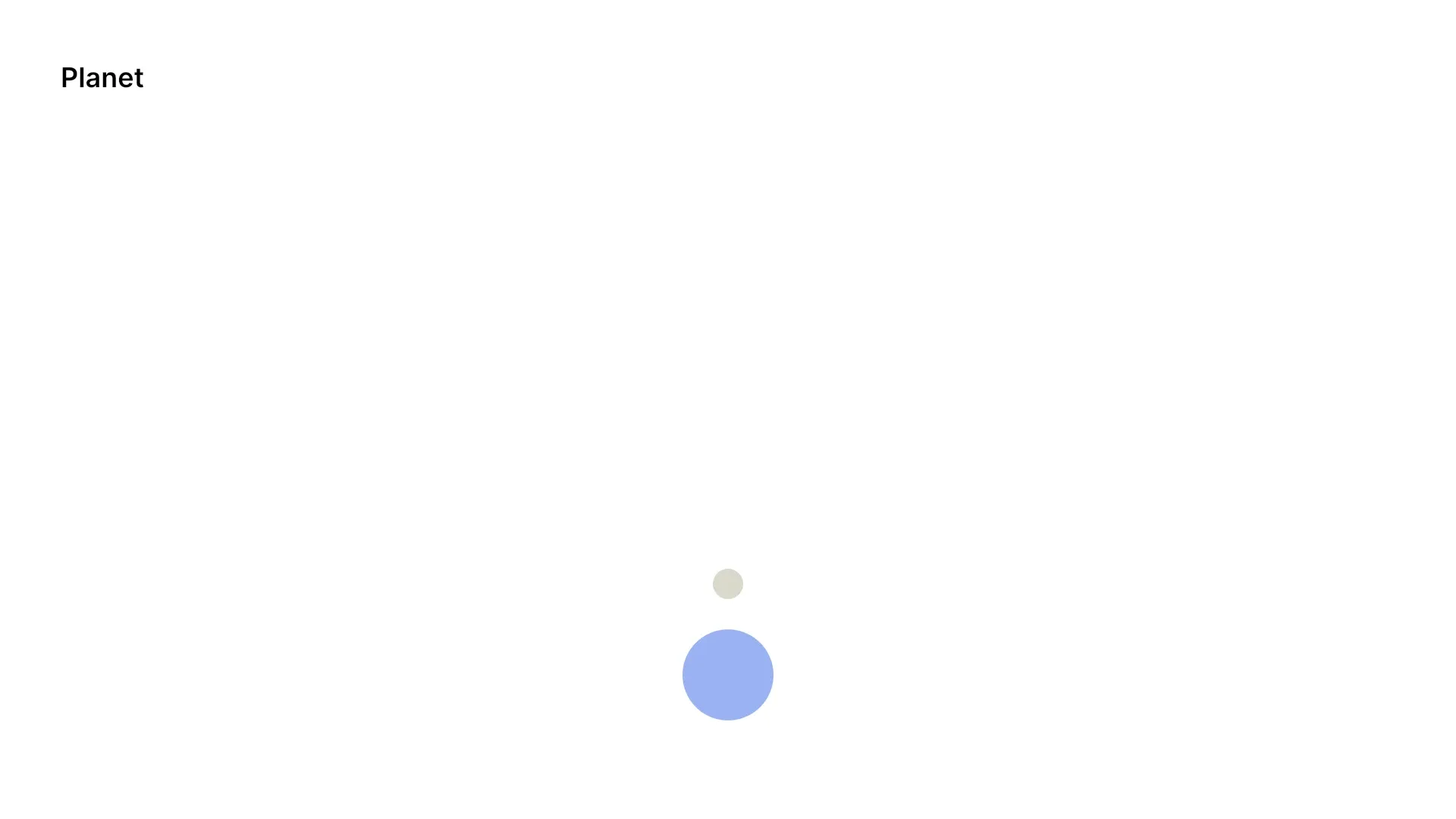
The playback time is still 1.25 seconds, so we export the page as PNG Data. The frame shows the planet below the page center with its moon, and no pivot.
// The playback time is still 1.25 seconds, so the frame shows the planet below the pivotlet pngData = try await engine.block.export(page, mimeType: .png)Links and Other Block Operations#
- Destroying the transform parent removes the link.
fillParent(_:)ends the link, because the block then fills its own parent.- Undo and redo, saving and loading, and duplicating keep the link. A copy follows the same parent. In a copy of a group, a block that followed another member follows the copy of that member.
- Blocks saved to a string or an archive without their transform parent keep their place on the page and lose the link. Their position, rotation and scale keyframes keep playing in place when the transform parent has no keyframes or animations and no mirror, shear or unequal scale. Otherwise they stay in the space of the transform parent.
- A pasted copy does not follow the transform parent again, also when that block is in the scene.
- Moving, rotating, scaling or flipping a group or a selection that holds both blocks transforms the follower once.
- An auto-orienting block turns in the space of its transform parent.
- When the engine enforces scopes,
setTransformParent(_:parent:)needs thelayer/movescope.
Troubleshooting#
- A link would make a cycle (
EngineErrorCode.blockTransformParentCycle): the parent is the block itself, sits inside it, or already follows it. Link the blocks the other way round, or pick another parent. - The block type cannot take part in a link (
EngineErrorCode.blockTransformParentUnsupported): pass graphic or text blocks on both sides. To move a group, link its children instead. - The link cannot change (
EngineErrorCode.blockPositionLocked): the transform of the block is locked. Unlock it before you link or unlink it. The lock of the parent does not matter. - A link stops working after a hierarchy change: moving the transform parent into the follower, for example with
appendChild(to:child:), turns the link into a cycle. The engine then ignores the link when it draws the block and reports no error. Remove the link, or move the parent out again. Destroying any block or loading the scene removes such a link. Then move the parent out and link the blocks again. - The block jumps when you link it: its position is now read in the space of the parent. Set the position again after the link changes.
API Reference#
Methods#
| Method | Description |
|---|---|
engine.block.setTransformParent(_:parent:) |
Make a block follow the transform of another block, or pass nil to remove the link |
engine.block.getTransformParent(_:) |
Get the block that a block follows, or nil |
engine.block.create(_:) |
Create the graphic and text blocks |
engine.block.createShape(_:) |
Create the ellipse shape of a circle |
engine.block.setShape(_:shape:) |
Give a graphic its shape |
engine.block.createFill(_:) |
Create a color fill |
engine.block.setColor(_:property:color:) |
Set the fill color |
engine.block.setFill(_:fill:) |
Give a graphic its fill |
engine.block.setWidth(_:value:) |
Set the width of a block |
engine.block.setHeight(_:value:) |
Set the height of a block |
engine.block.appendChild(to:child:) |
Add a block to the page |
engine.block.setDuration(_:duration:) |
Set the duration that keyframe times refer to |
engine.block.setPositionX(_:value:) |
Set the x position, in the space of the transform parent when a block has one |
engine.block.setPositionY(_:value:) |
Set the y position, in the space of the transform parent when a block has one |
engine.block.setFloat(_:property:value:) |
Set the anchor that rotation turns about |
engine.block.setKeyframes(_:property:keyframes:mode:) |
Animate the rotation of a block |
engine.block.setVisible(_:visible:) |
Hide the transform parent, which still moves its followers |
engine.block.replaceText(_:text:in:) |
Set the text of the label |
engine.block.setTextFontSize(_:fontSize:in:) |
Set the font size of the label |
engine.block.setWidthMode(_:mode:) |
Size the label to its text |
engine.block.setHeightMode(_:mode:) |
Size the label to its text |
engine.block.setOpacity(_:value:) |
Set the opacity, which a follower does not inherit |
engine.block.getOpacity(_:) |
Read the opacity of a follower |
engine.block.getParent(_:) |
Get the parent in the block hierarchy, which a link does not change |
engine.block.setPlaybackTime(_:time:) |
Seek before you read the animated position or export a frame |
engine.block.getGlobalBoundingBoxX(_:) |
Read the x position of a follower at the current playback time |
engine.block.getGlobalBoundingBoxY(_:) |
Read the y position of a follower at the current playback time |
engine.block.export(_:mimeType:options:onPreExport:uriResolver:onProgress:) |
Export the frame as PNG |
Next Steps#
- Keyframes: animate the transform parent with keyframe tracks.
- Create Animations: add preset animations, which a follower also follows.
- Import Lottie Animations: the Lottie import links each layer to its Lottie parent layer with a transform parent.