Freeze, reverse or replay the children of a composition group by remapping their clock.
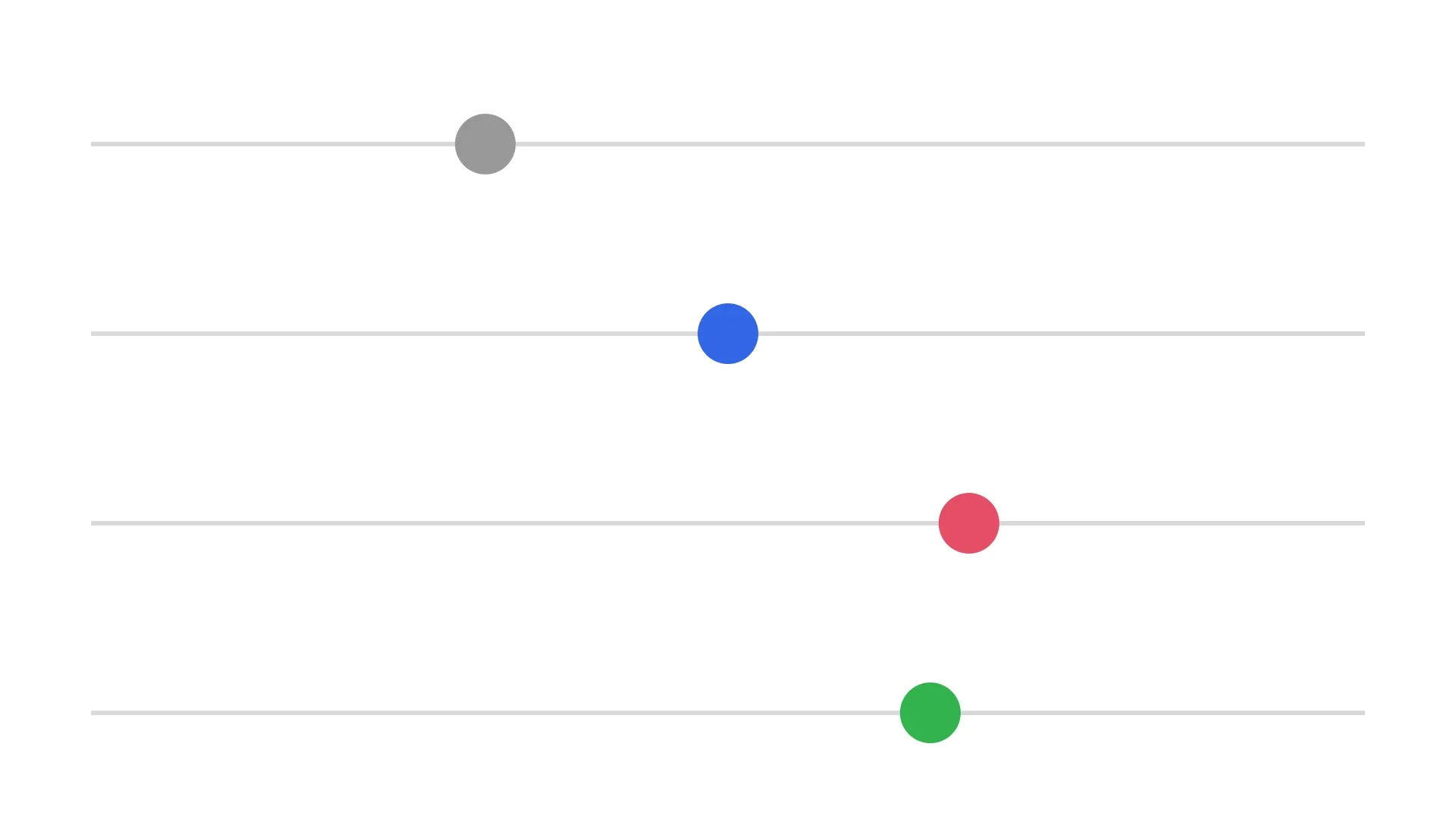
A composition group gives its children their own clock. playback/timeRemap sets the time on that clock, in seconds, that the children show. A static value freezes them, and .float keyframes drive them over the group’s duration. The editor has no time remap controls, so you set them with the block API.
This guide covers how to turn time remap on, how to freeze the children, how to play them in reverse or forward and back, how to read the remap back, and the error to expect. It ends with a frame export.
Creating a Composition Group#
Time remap acts on the children of a composition group. Each lane of the example is a group with a gray line and a ball on page, the 5-second page of the scene. The ball has a position/x track and crosses the page in 5 seconds of the group’s clock. group(_:) groups the two blocks, and group/composition gives the group its own clock for its children.
// Creates a lane: a composition group with a line and a ball that crosses// the page in 5 seconds of the group's own clockfunc createLane(y: Float, color: Color) throws -> DesignBlockID {  let line = try engine.block.create(.graphic)  try engine.block.setShape(line, shape: engine.block.createShape(.rect))  let lineFill = try engine.block.createFill(.color)  try engine.block.setColor(lineFill, property: "fill/color/value", color: .rgba(r: 0.85, g: 0.85, b: 0.85, a: 1))  try engine.block.setFill(line, fill: lineFill)  try engine.block.setWidth(line, value: 1680)  try engine.block.setHeight(line, value: 6)  try engine.block.setPositionX(line, value: 120)  try engine.block.setPositionY(line, value: y + 37)  try engine.block.appendChild(to: page, child: line)  try engine.block.setDuration(line, duration: 5)
  let ball = try engine.block.create(.graphic)  try engine.block.setShape(ball, shape: engine.block.createShape(.ellipse))  let ballFill = try engine.block.createFill(.color)  try engine.block.setColor(ballFill, property: "fill/color/value", color: color)  try engine.block.setFill(ball, fill: ballFill)  try engine.block.setWidth(ball, value: 80)  try engine.block.setHeight(ball, value: 80)  try engine.block.setPositionY(ball, value: y)  try engine.block.appendChild(to: page, child: ball)  try engine.block.setDuration(ball, duration: 5)  try engine.block.setKeyframes(ball, property: "position/x", keyframes: [    Keyframe(time: 0, value: .float(120)),    Keyframe(time: 1, value: .float(1720)),  ])
  let lane = try engine.block.group([line, ball])  try engine.block.setDuration(lane, duration: 5)  // A composition group gives its children their own clock  try engine.block.setBool(lane, property: "group/composition", value: true)  return lane}
Creating the Lanes#
The example creates four lanes. The first one plays normally, and the other three get a time remap below. playback/timeRemapEnabled is off by default, and getBool(_:property:) reads it.
let normal = try createLane(y: 150, color: .rgba(r: 0.6, g: 0.6, b: 0.6, a: 1))let frozen = try createLane(y: 400, color: .rgba(r: 0.2, g: 0.4, b: 0.9, a: 1))let reversed = try createLane(y: 650, color: .rgba(r: 0.9, g: 0.3, b: 0.4, a: 1))let pingPong = try createLane(y: 900, color: .rgba(r: 0.2, g: 0.7, b: 0.3, a: 1))let normalRemapEnabled = try engine.block.getBool(normal, property: "playback/timeRemapEnabled")print(normalRemapEnabled) // falseFreezing the Children#
setBool(_:property:value:) turns on playback/timeRemapEnabled. A static playback/timeRemap, set with setFloat(_:property:value:), then holds the children at that time on their clock, here 2.5 seconds, so the blue ball stays in the middle of its lane.
// A static remap holds the children at 2.5 seconds of their own timetry engine.block.setBool(frozen, property: "playback/timeRemapEnabled", value: true)try engine.block.setFloat(frozen, property: "playback/timeRemap", value: 2.5)Playing in Reverse#
A track on playback/timeRemap drives the children while the group plays. The keyframe times are normalized over the group’s duration, from 0 to 1. The values are times on the children’s clock, in seconds. The track from just below 5 to 0 plays the red ball from the end of its lane back to the start. The values stay below 5, because a child shows only while the clock is before its end.
// The track values are times on the children's clock, in seconds. They// stay below 5, because a clock at a child's end hides the child.try engine.block.setBool(reversed, property: "playback/timeRemapEnabled", value: true)try engine.block.setKeyframes(reversed, property: "playback/timeRemap", keyframes: [ Keyframe(time: 0, value: .float(4.99)), Keyframe(time: 1, value: .float(0)),])Playing Forward and Back#
Three keyframes play the children forward to just below 5 seconds and back to 0. The .easeInOut easing slows the green ball at both ends and at the turn.
try engine.block.setBool(pingPong, property: "playback/timeRemapEnabled", value: true)try engine.block.setKeyframes(pingPong, property: "playback/timeRemap", keyframes: [ Keyframe(time: 0, value: .float(0), easing: .preset(.easeInOut)), Keyframe(time: 0.5, value: .float(4.99), easing: .preset(.easeInOut)), Keyframe(time: 1, value: .float(0)),])Reading the Remap Back#
A track leaves the static value of playback/timeRemap unchanged, so getFloat(_:property:) still reads 0 for the reversed lane. isPropertyAnimatable(_:property:) is true for playback/timeRemap on a group and false on other blocks.
// The track leaves the static remap unchangedlet reversedStaticRemap = try engine.block.getFloat(reversed, property: "playback/timeRemap")let remapIsAnimatable = try engine.block.isPropertyAnimatable(reversed, property: "playback/timeRemap")print(reversedStaticRemap, remapIsAnimatable) // 0.0 trueHandling Errors#
Only a group has a time remap. On any other block, a call throws an EngineError whose catalogCode names the cause.
var errorCode: EngineErrorCode?do { // Only a group has a time remap if let ball = try engine.block.getChildren(normal).last { try engine.block.setFloat(ball, property: "playback/timeRemap", value: 1) }} catch let error as EngineError { errorCode = error.catalogCode print(errorCode == .editorBlockNoTimeRemapSupport) // true}Exporting a Frame#
We export the page as PNG at 1.5 seconds. The gray ball is at 30 percent of its lane, the blue ball in the middle, the red ball at 70 percent, and the green ball past the middle on its way out.
// Export the frame at 1.5 secondstry engine.block.setPlaybackTime(page, time: 1.5)let pngData = try await engine.block.export(page, mimeType: .png)print(!pngData.isEmpty) // trueTime Remap and Other Block Operations#
- Without
group/composition, the remap has no effect, and the children play on the page clock. playback/speedof a composition group multiplies the remapped time.- A child shows only while the remapped time is at or after its time offset and before its end, so a clock at a child’s end, or a reversed or frozen clock, can hide it.
- A
.relativeremap track adds its values to the static remap. - Saving and loading, undo and redo keep the remap and its keyframes.
Troubleshooting#
- The block has no time remap (
EngineErrorCode.editorBlockNoTimeRemapSupport): setplayback/timeRemapon a group. - The block takes no remap keyframes (
EngineErrorCode.blockKeyframesPropertyNotAnimatable): setplayback/timeRemapkeyframes on a group. - The value is not a number (
EngineErrorCode.blockValueNotFinite): pass a finite time in seconds. - The keyframes are refused (
EngineErrorCode.blockKeyframesValueKindMismatch): use.floatkeyframes forplayback/timeRemap. - The children do not change: turn on
group/compositionandplayback/timeRemapEnabledfor the group. - A child disappears: the remapped time is outside the child’s time offset and duration.
API Reference#
Methods#
| Method | Description |
|---|---|
engine.block.create(_:) |
Create a graphic block |
engine.block.createShape(_:) |
Create a rect or ellipse shape |
engine.block.setShape(_:shape:) |
Give a graphic its shape |
engine.block.createFill(_:) |
Create a color fill |
engine.block.setColor(_:property:color:) |
Set the fill color |
engine.block.setFill(_:fill:) |
Give a graphic its fill |
engine.block.setWidth(_:value:) |
Set the width of a block |
engine.block.setHeight(_:value:) |
Set the height of a block |
engine.block.setPositionX(_:value:) |
Set the x position of a block |
engine.block.setPositionY(_:value:) |
Set the y position of a block |
engine.block.appendChild(to:child:) |
Add a block to the page |
engine.block.setDuration(_:duration:) |
Set the duration of a block or group |
engine.block.group(_:) |
Group blocks into a group |
engine.block.setBool(_:property:value:) |
Turn on group/composition or playback/timeRemapEnabled |
engine.block.getBool(_:property:) |
Check whether the remap is on |
engine.block.setFloat(_:property:value:) |
Set the static remap, in seconds |
engine.block.getFloat(_:property:) |
Read the static remap |
engine.block.setKeyframes(_:property:keyframes:mode:) |
Animate the ball or the remap |
engine.block.isPropertyAnimatable(_:property:) |
Check that a block takes remap keyframes |
engine.block.getChildren(_:) |
Get the children of a group |
engine.block.setPlaybackTime(_:time:) |
Seek before you export a frame |
engine.block.export(_:mimeType:options:onPreExport:uriResolver:onProgress:) |
Export the frame as PNG |
Properties#
| Property | Type | Description |
|---|---|---|
group/composition |
Bool | Give the children of a group their own clock. Default off |
playback/timeRemapEnabled |
Bool | Use playback/timeRemap for the clock of the children. Default off |
playback/timeRemap |
Float | Time on the children’s clock, in seconds. Takes keyframes. Default 0 |
Next Steps#
- Keyframes: easing and the other keyframe value kinds.
- Create Animations: add preset animations to blocks.