Support right-to-left text, complex scripts, and multilingual typography in your designs using CE.SDK’s comprehensive text rendering capabilities.
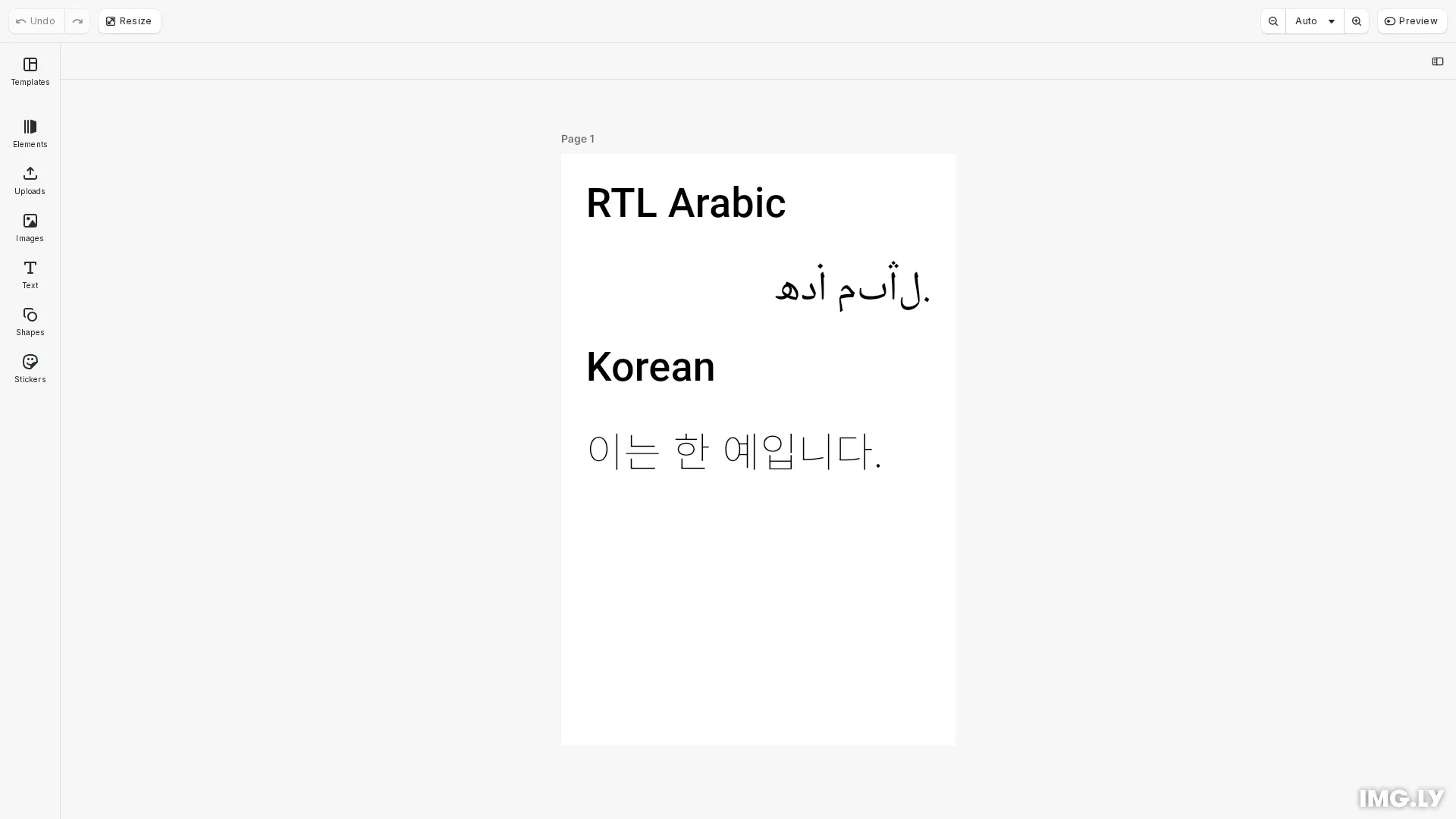
CE.SDK provides built-in support for creating designs that work seamlessly across different languages and writing systems. The engine automatically handles text shaping, bidirectional layout, and script-specific rendering - supporting all Unicode characters, complex script ligatures, and mixed LTR/RTL content without additional configuration.
This guide covers how to work with multilingual text using both the built-in text UI and programmatic APIs for font configuration, text direction, and dynamic language content.
Programmatic Font and Typeface Management#
Initialize CE.SDK#
For applications that need to manage multilingual text programmatically, we start by setting up CE.SDK and creating a scene.
// Create a blank scene with a white canvasconst scene = engine.scene.create();const page = engine.block.create('page');engine.block.setWidth(page, LAYOUT.PAGE.width);engine.block.setHeight(page, LAYOUT.PAGE.height);engine.block.appendChild(scene, page);engine.scene.zoomToBlock(page);This creates a blank 800×1200px canvas that we’ll use for demonstrating multilingual text features.
Configuring Typefaces for Language Support#
To support specific languages and scripts, we define typefaces as constants with appropriate Unicode coverage. This example uses a constants-based approach for reusable typeface definitions that can be referenced throughout the code.
// Typeface definitionsconst ROBOTO_BOLD = {  name: 'Roboto',  fonts: [    {      uri: 'https://fonts.gstatic.com/s/roboto/v30/KFOlCnqEu92Fr1MmEU9vAw.ttf',      subFamily: 'Bold',      weight: 'bold' as const,      style: 'normal' as const    }  ]};
const NOTO_NASKH_ARABIC = {  name: 'Noto Naskh Arabic',  fonts: [    {      uri: `${window.location.origin}${import.meta.env.BASE_URL}NotoNaskhArabic-Regular.ttf`,      subFamily: 'Regular',      weight: 'normal' as const,      style: 'normal' as const    }  ]};
const NOTO_SANS_KR = {  name: 'Noto Sans KR',  fonts: [    {      uri: `${window.location.origin}${import.meta.env.BASE_URL}NotoSansKR-VariableFont_wght.ttf`,      subFamily: 'Regular',      weight: 'normal' as const,      style: 'normal' as const    }  ]};
The example defines three typefaces as named constants:
- ROBOTO_BOLD - A web font for Latin script labels
- NOTO_NASKH_ARABIC - Optimized for Arabic script with proper contextual forms
- NOTO_SANS_KR - Variable font supporting Korean (Hangul) characters
Each typeface includes:
- name - The typeface family name
- fonts - Array of font objects with URIs and styles
- uri - Path to font file (TTF, OTF, WOFF2 formats supported)
- weight - Font weight (normal, bold, or numeric values)
- style - Font style (normal or italic)
Applying Fonts with a Helper Function#
The createTextBlock() function encapsulates all text block setup logic, reducing code duplication. Text elements are defined as an array and processed in a loop:
function createTextBlock( engine: CreativeEngine, page: number, text: string, typeface: Typeface, yPosition: number, height: number = LAYOUT.TEXT.defaultHeight, alignment: 'Left' | 'Center' | 'Right' = 'Left'): void { const textBlock = engine.block.create('text'); engine.block.setString(textBlock, 'text/text', text); engine.block.setPositionX(textBlock, LAYOUT.TEXT.x); engine.block.setPositionY(textBlock, yPosition); engine.block.setWidth(textBlock, LAYOUT.TEXT.width); engine.block.setHeight(textBlock, height); engine.block.setFloat(textBlock, 'text/fontSize', LAYOUT.TEXT.fontSize); engine.block.setTypeface(textBlock, typeface); if (alignment !== 'Left') { engine.block.setEnum(textBlock, 'text/horizontalAlignment', alignment); } engine.block.appendChild(page, textBlock);}// Create four text elements demonstrating multilingual font supportconst textElements = [ { text: 'RTL Arabic', typeface: ROBOTO_BOLD, height: 140 }, { text: 'هذا مثال.', typeface: NOTO_NASKH_ARABIC, height: 160, alignment: 'Right' as const }, { text: 'Korean', typeface: ROBOTO_BOLD, height: 140 }, { text: '이는 한 예입니다.', typeface: NOTO_SANS_KR, height: 140 }];
let currentY = LAYOUT.SPACING.startY;for (const element of textElements) { createTextBlock( engine, page, element.text, element.typeface, currentY, element.height, element.alignment ); currentY += element.height + LAYOUT.SPACING.gap;}This approach provides several benefits:
- DRY Principle - Eliminates repetitive block setup code
- Easy to Extend - Add new languages by appending to the configuration array
- Maintainable - Change layout spacing or dimensions in one place
The engine.block.setTypeface() method applies fonts at the block level. CE.SDK automatically uses the configured fonts to render text with proper glyph coverage for the languages in your content.
Working with Right-to-Left (RTL) Text#
Understanding Automatic RTL Detection#
CE.SDK automatically detects text direction based on Unicode character properties. When you create a text block with RTL content like Arabic or Hebrew, the engine analyzes the text and applies right-to-left rendering automatically.
// Create four text elements demonstrating multilingual font supportconst textElements = [  { text: 'RTL Arabic', typeface: ROBOTO_BOLD, height: 140 },  {    text: 'هذا مثال.',    typeface: NOTO_NASKH_ARABIC,    height: 160,    alignment: 'Right' as const  },  { text: 'Korean', typeface: ROBOTO_BOLD, height: 140 },  { text: '이는 한 예입니다.', typeface: NOTO_SANS_KR, height: 140 }];
let currentY = LAYOUT.SPACING.startY;for (const element of textElements) { createTextBlock( engine, page, element.text, element.typeface, currentY, element.height, element.alignment ); currentY += element.height + LAYOUT.SPACING.gap;}The engine implements the Unicode Bidirectional Algorithm (UAX #9), which:
- Detects strong directional characters - Characters like Arabic or Hebrew letters establish RTL flow
- Handles neutral characters - Spaces, punctuation, and numbers display correctly in context
- Manages embedding - LTR words (like English brand names) embed correctly within RTL text
This automatic detection works for:
- Arabic - Including Persian and Urdu variants
- Hebrew - Modern and Biblical Hebrew
- Mixed content - English or other LTR text within RTL paragraphs
Text Alignment for RTL Languages#
CE.SDK now defaults to ‘Auto’ alignment, which automatically aligns text based on script direction. RTL scripts (Arabic, Hebrew) align right, while LTR scripts align left. This eliminates the need to manually configure alignment for different writing systems.
if (alignment !== 'Left') { engine.block.setEnum(textBlock, 'text/horizontalAlignment', alignment);}The alignment options:
- ‘Auto’ (default) - Automatically aligns based on the text’s script direction. RTL scripts align right, LTR scripts align left.
- ‘Left’ - Always align text to the left
- ‘Right’ - Always align text to the right
- ‘Center’ - Center-align text (language-neutral)
With ‘Auto’ alignment, the Arabic text in our example automatically aligns to the right without explicit configuration:
{ text: 'هذا مثال.', typeface: NOTO_NASKH_ARABIC, height: 160, // No alignment needed - Auto handles RTL automatically}You can still override alignment when needed:
{ text: 'Centered Title', typeface: ROBOTO_BOLD, height: 80, alignment: 'Center' as const // Override Auto for centering}To check the effective alignment when ‘Auto’ is set, use getTextEffectiveHorizontalAlignment():
const effectiveAlignment = engine.block.getTextEffectiveHorizontalAlignment(textBlock);// Returns 'Left' or 'Right' based on text content, never 'Auto'This approach simplifies multilingual templates - the same template works correctly for both LTR and RTL languages without alignment adjustments.
Complex Script Support#
CE.SDK automatically handles complex script features without requiring additional configuration. The text engine provides:
Arabic Script Features#
When rendering Arabic text, the engine automatically applies:
- Contextual letter forms - Letters change shape based on position (initial, medial, final, isolated)
- Required ligatures - Mandatory character combinations render as single glyphs
- Diacritical marks - Tashkeel marks position correctly above and below letters
- Kashida - Text justification through letter elongation
These features work automatically when you use fonts that include the necessary OpenType tables.
Other Complex Scripts#
The text engine similarly supports other writing systems:
- Devanagari (Hindi, Sanskrit) - Conjunct formations and half-forms
- Thai - Vowel and tone mark positioning above and below base characters
- Japanese - Kanji, hiragana, and katakana rendering
- Southeast Asian scripts - Khmer subscripts, Myanmar ligatures
All complex script features are applied automatically based on Unicode properties and font capabilities.
Creating Multilingual Design Templates#
Using Variables for Multilingual Content#
For designs that need to display different language content dynamically, use variable bindings. Variables enable you to switch languages while maintaining proper text rendering for each script.
Benefits of using variables:
- Dynamic language switching - Update variable values to change content language
- Consistent formatting - Text styling and layout remain stable across languages
- Template reusability - One template works for multiple language markets
Variables are particularly useful for:
- Localized marketing materials - Same design, different language content
- A/B testing - Test messaging across languages
- Regional campaigns - Deploy region-specific content from a single template
Template Design Considerations#
When designing multilingual templates, account for:
- Text expansion - Some languages require 30-50% more space than English
- Direction changes - RTL layouts may need mirrored designs
- Font availability - Ensure typefaces cover all target scripts
- Line height - Scripts with diacritics may need additional vertical space
Test templates with representative content in all target languages to verify layout works correctly.
Font Fallback and Character Coverage#
Font Selection Priority#
When rendering text, CE.SDK follows a fallback chain to ensure all characters display correctly:
- Primary typeface - The explicitly assigned font
- System fonts - Fonts available on the user’s system
- Fallback glyphs - Generic replacement characters when no font contains the glyph
This fallback system ensures text always renders, even when fonts lack specific characters.
Ensuring Complete Character Coverage#
To avoid missing glyph issues:
- Use comprehensive typefaces - Noto fonts family provides extensive Unicode coverage
- Test with target languages - Verify fonts include required scripts before deployment
- Configure fallback stacks - Define multiple typefaces for comprehensive coverage
- Check font formats - Ensure fonts include OpenType layout tables for complex scripts
Testing with representative text samples in all target languages helps identify coverage gaps before production.
Troubleshooting#
Text Displays as Squares or Question Marks#
Issue: Characters render as replacement glyphs (□ or ?) instead of the intended script.
Solution: The selected font lacks glyphs for the text content. Use fonts with appropriate Unicode coverage:
- Verify font supports required Unicode blocks
- Test with Noto fonts family for comprehensive coverage
- Check font file format compatibility (TTF, OTF, WOFF2)
- Ensure font files are accessible with correct URIs
RTL Text Renders Left-to-Right#
Issue: Arabic or Hebrew text flows left-to-right instead of right-to-left.
Solution: The default ‘Auto’ alignment should handle this automatically. If issues persist:
- Verify alignment is set to ‘Auto’ (default) or explicitly ‘Right’
- Use
engine.block.getTextEffectiveHorizontalAlignment(block)to check resolved alignment - Verify font includes bidirectional layout features
- Check that font supports RTL scripts
- Test with known RTL-compatible fonts (Noto Sans Arabic, Noto Sans Hebrew)
Ligatures or Diacritics Display Incorrectly#
Issue: Complex script features like ligatures or diacritical marks appear disconnected or mispositioned.
Solution: Use fonts specifically designed for the target script:
- Verify font includes GSUB/GPOS OpenType tables
- Use script-specific Noto fonts
- Check font includes required OpenType layout features
- Test with fonts known to support the script
Mixed-Direction Text Layout Issues#
Issue: Text with both LTR and RTL content displays incorrectly.
Solution: The engine’s automatic bidirectional handling should resolve most cases. If issues persist:
- Test with different fonts to verify bidirectional support
- Use Unicode directional formatting characters sparingly (RLM U+200F, LRM U+200E)
- Verify text editor preserves directional markers
- Check that text content includes proper strong directional characters