Work with CMYK colors in CE.SDK for professional print production workflows with support for color space conversion and tint control.
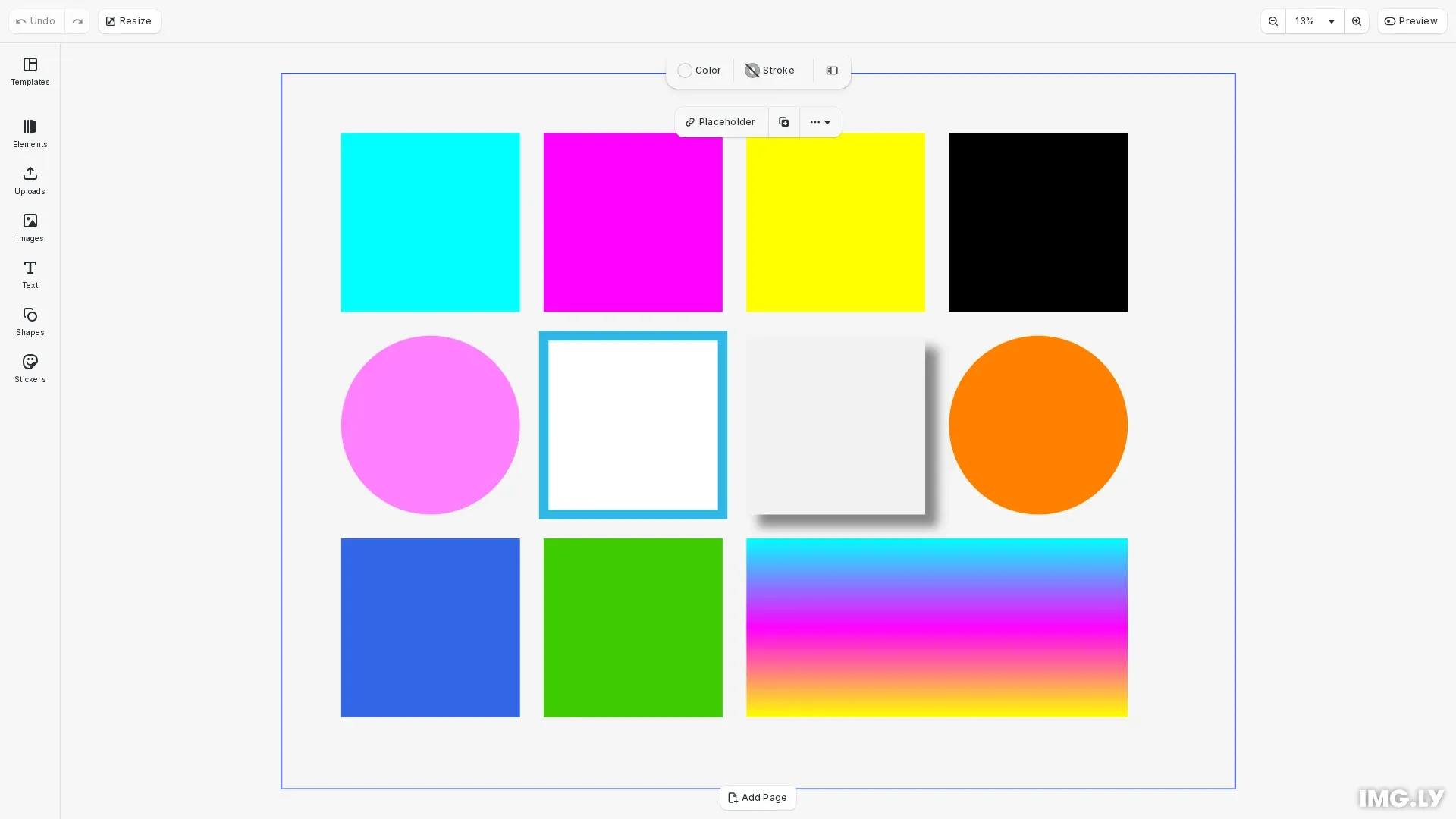
CMYK (Cyan, Magenta, Yellow, Key/Black) is the standard color model for print production. Unlike RGB which is additive and designed for screens, CMYK uses subtractive color mixing to represent how inks combine on paper. CE.SDK supports CMYK colors natively, allowing you to prepare designs for professional print output while maintaining accurate color representation.
This guide covers how to create CMYK color values, apply them to fills, strokes, and shadows, use the tint property for color intensity control, and convert between color spaces.
Understanding CMYK Colors#
When to Use CMYK#
Use CMYK colors when preparing designs for commercial printing or when print service providers require CMYK values. Screen displays convert CMYK to RGB for preview, but exported PDFs retain the original CMYK values for accurate print reproduction.
CMYK colors in CE.SDK have five properties:
c(Cyan): 0.0 to 1.0m(Magenta): 0.0 to 1.0y(Yellow): 0.0 to 1.0k(Key/Black): 0.0 to 1.0tint: 0.0 to 1.0 (controls overall color intensity)
Creating CMYK Colors#
Create CMYK color objects using the CMYKColor interface. All component values range from 0.0 to 1.0:
// Create CMYK color objects for print production// CMYK values range from 0.0 to 1.0const cmykCyan: CMYKColor = { c: 1.0, m: 0.0, y: 0.0, k: 0.0, tint: 1.0 };const cmykMagenta: CMYKColor = { c: 0.0, m: 1.0, y: 0.0, k: 0.0, tint: 1.0};const cmykYellow: CMYKColor = { c: 0.0, m: 0.0, y: 1.0, k: 0.0, tint: 1.0 };const cmykBlack: CMYKColor = { c: 0.0, m: 0.0, y: 0.0, k: 1.0, tint: 1.0 };The tint property acts as a multiplier for the entire color—a tint of 1.0 applies the full color, while 0.5 applies 50% intensity.
Applying CMYK Colors to Fills#
Apply CMYK colors to color fills using engine.block.setColor(). First create a color fill with engine.block.createFill('color'), then set its color value:
// Example 1: Apply CMYK Cyan to a fillconst { fill: cyanFill } = createColorBlock(50, 50, 150, 150);engine.block.setColor(cyanFill, 'fill/color/value', cmykCyan);The same method works for any color type—RGBA, CMYK, or SpotColor. CE.SDK automatically handles the color representation internally.
Using the Tint Property#
The tint property provides fine-grained control over color intensity without modifying the base CMYK values. This is useful for creating lighter variations of a color:
// Example 5: Use tint for partial color intensity// Tint of 0.5 gives 50% color intensityconst cmykHalfMagenta: CMYKColor = { c: 0.0, m: 1.0, y: 0.0, k: 0.0, tint: 0.5};const { fill: tintedFill } = createColorBlock(50, 220, 150, 150, 'ellipse');engine.block.setColor(tintedFill, 'fill/color/value', cmykHalfMagenta);A tint of 0.5 creates a 50% lighter version of the color, useful for secondary elements or subtle backgrounds.
Applying CMYK to Strokes#
Apply CMYK colors to strokes using the stroke/color property path:
// Example 6: Apply CMYK color to strokeconst { block: strokeBlock, fill: strokeBlockFill } = createColorBlock( 220, 220, 150, 150);// Set fill to white (using CMYK)engine.block.setColor(strokeBlockFill, 'fill/color/value', { c: 0.0, m: 0.0, y: 0.0, k: 0.0, tint: 1.0});// Enable stroke and set CMYK colorengine.block.setStrokeEnabled(strokeBlock, true);engine.block.setStrokeWidth(strokeBlock, 8);const cmykStrokeColor: CMYKColor = { c: 0.8, m: 0.2, y: 0.0, k: 0.1, tint: 1.0};engine.block.setColor(strokeBlock, 'stroke/color', cmykStrokeColor);Enable the stroke first with setStrokeEnabled(), set the stroke width, then apply the CMYK color.
Applying CMYK to Drop Shadows#
Apply CMYK colors to drop shadows using the dropShadow/color property path:
// Example 7: Apply CMYK color to drop shadowconst { block: shadowBlock, fill: shadowBlockFill } = createColorBlock( 390, 220, 150, 150);// Set fill to light gray (using CMYK)engine.block.setColor(shadowBlockFill, 'fill/color/value', { c: 0.0, m: 0.0, y: 0.0, k: 0.05, tint: 1.0});// Enable drop shadow and set CMYK colorengine.block.setDropShadowEnabled(shadowBlock, true);engine.block.setDropShadowOffsetX(shadowBlock, 10);engine.block.setDropShadowOffsetY(shadowBlock, 10);engine.block.setDropShadowBlurRadiusX(shadowBlock, 15);engine.block.setDropShadowBlurRadiusY(shadowBlock, 15);const cmykShadowColor: CMYKColor = { c: 0.0, m: 0.0, y: 0.0, k: 0.6, tint: 0.8};engine.block.setColor(shadowBlock, 'dropShadow/color', cmykShadowColor);Enable the drop shadow first, configure its offset and blur radius, then apply the CMYK color.
Reading CMYK Colors#
Retrieve color values from blocks using engine.block.getColor(). The returned color could be RGBA, CMYK, or SpotColor, so use the isCMYKColor() type guard to check:
// Example 8: Read CMYK color from a blockconst { fill: readFill } = createColorBlock(560, 220, 150, 150, 'ellipse');const cmykOrange: CMYKColor = { c: 0.0, m: 0.5, y: 1.0, k: 0.0, tint: 1.0 };engine.block.setColor(readFill, 'fill/color/value', cmykOrange);
// Retrieve and check the colorconst retrievedColor = engine.block.getColor(readFill, 'fill/color/value');if (isCMYKColor(retrievedColor)) {  console.log(    `CMYK Color - C: ${retrievedColor.c}, M: ${retrievedColor.m}, Y: ${retrievedColor.y}, K: ${retrievedColor.k}, Tint: ${retrievedColor.tint}`  );}
The isCMYKColor() type guard checks if a color has the CMYK properties (c, m, y, k).
Converting Between Color Spaces#
Use engine.editor.convertColorToColorSpace() to convert colors between ‘sRGB’ and ‘CMYK’:
// Example 9: Convert RGB to CMYKconst rgbBlue: RGBAColor = { r: 0.2, g: 0.4, b: 0.9, a: 1.0 };const convertedCmyk = engine.editor.convertColorToColorSpace(  rgbBlue,  'CMYK');const { fill: convertedFill } = createColorBlock(50, 390, 150, 150);engine.block.setColor(convertedFill, 'fill/color/value', convertedCmyk);console.log('RGB to CMYK conversion:', convertedCmyk);
// Example 10: Convert CMYK to RGB (for demonstration)const cmykGreen: CMYKColor = { c: 0.7, m: 0.0, y: 1.0, k: 0.2, tint: 1.0 };const convertedRgb = engine.editor.convertColorToColorSpace(  cmykGreen,  'sRGB');console.log('CMYK to RGB conversion:', convertedRgb);// Display using original CMYK colorconst { fill: previewFill } = createColorBlock(220, 390, 150, 150);engine.block.setColor(previewFill, 'fill/color/value', cmykGreen);
Note that color conversions may not be perfectly reversible due to differences in color gamuts between RGB and CMYK. Some RGB colors cannot be accurately represented in CMYK and vice versa.
Using CMYK in Gradients#
CMYK colors work in gradient color stops. Create a gradient fill and set stops using engine.block.setGradientColorStops():
// Example 11: Use CMYK colors in gradientsconst gradientBlock = engine.block.create('graphic');const gradientShape = engine.block.createShape('rect');engine.block.setShape(gradientBlock, gradientShape);engine.block.setWidth(gradientBlock, 320);engine.block.setHeight(gradientBlock, 150);engine.block.setPositionX(gradientBlock, 390);engine.block.setPositionY(gradientBlock, 390);engine.block.appendChild(page, gradientBlock);
const gradientFill = engine.block.createFill('gradient/linear');engine.block.setFill(gradientBlock, gradientFill);
// Set gradient stops with CMYK colorsengine.block.setGradientColorStops(gradientFill, 'fill/gradient/colors', [  { color: { c: 1.0, m: 0.0, y: 0.0, k: 0.0, tint: 1.0 }, stop: 0 },  { color: { c: 0.0, m: 1.0, y: 0.0, k: 0.0, tint: 1.0 }, stop: 0.5 },  { color: { c: 0.0, m: 0.0, y: 1.0, k: 0.0, tint: 1.0 }, stop: 1 }]);
This creates a gradient transitioning through the primary CMYK colors—cyan, magenta, and yellow.
Troubleshooting#
Colors Look Different on Screen vs Print#
Screen displays convert CMYK to RGB for preview. The exported PDF retains original CMYK values. For accurate color preview, use calibrated monitors and proof prints.
Tint Not Having Expected Effect#
Ensure the tint value is between 0 and 1. A tint of 0 makes the color fully transparent, while 1 applies full intensity.
Type Guard Returns False#
Make sure you’re checking a Color value returned from engine.block.getColor(). The isCMYKColor() function only works with color values, not arbitrary objects.
API Reference#
| Method | Description |
|---|---|
engine.block.setColor() | Set a color property value |
engine.block.getColor() | Get a color property from a block |
engine.editor.convertColorToColorSpace() | Convert color to a different color space |
engine.block.createFill() | Create a color fill |
engine.block.setFill() | Assign a fill to a block |
engine.block.getFill() | Get the fill from a block |
engine.block.setGradientColorStops() | Set gradient color stops |
isCMYKColor() | Check if a color is CMYK |