Combine multiple shapes using boolean operations to create custom compound designs programmatically.
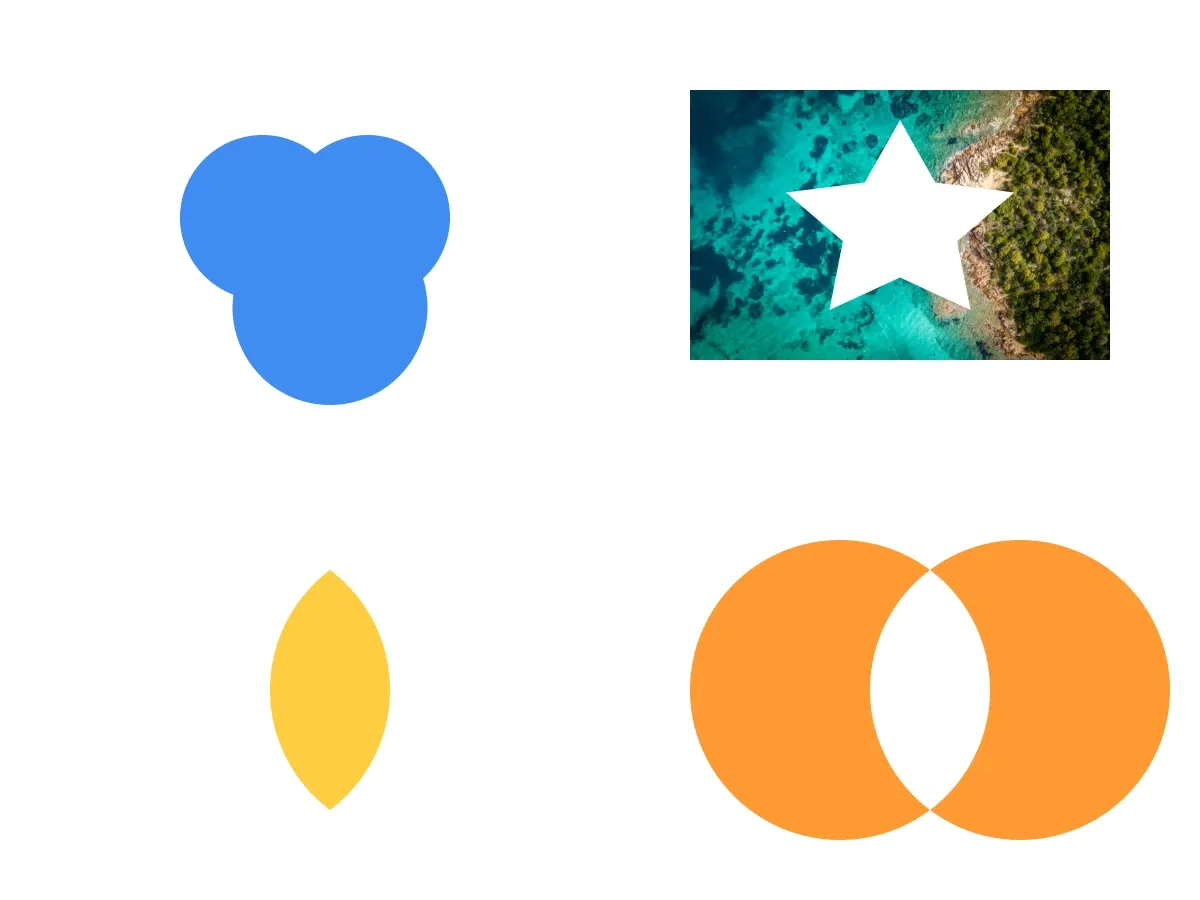
CE.SDK provides four boolean operations for graphic and text blocks: Union, Difference, Intersection, and XOR. Use them to merge simple primitives, create cutouts, isolate overlapping areas, or remove overlaps from a compound shape.
This guide covers checking combinability, applying the four operations with Swift’s BooleanOperation enum, controlling fill inheritance through block order, and avoiding common scope issues.
A boolean operation replaces the shapes with one new block, while a compound shape keeps each shape editable inside one block.
Understanding Boolean Operations#
Boolean operations create a new block from the geometry of multiple input blocks. The result replaces the input blocks when the required scopes allow CE.SDK to duplicate and destroy them.
| Operation | Swift case | Result |
|---|---|---|
| Union | BooleanOperation.union |
Merges all block areas into one compound shape |
| Difference | BooleanOperation.difference |
Subtracts upper blocks from the bottom-most base block |
| Intersection | BooleanOperation.intersection |
Keeps only the areas where all blocks overlap |
| XOR | BooleanOperation.xor |
Keeps non-overlapping areas and removes intersections |
For Union and XOR, the new block inherits the fill from the top-most block. For Difference and Intersection, it inherits the fill from the bottom-most block. The operation order follows visual stacking order, not the order of the block IDs in the array. Reorder blocks with engine.block.bringToFront(_:) or engine.block.sendToBack(_:) before combining when fill inheritance matters.
Checking Combinability#
Before combining blocks, call engine.block.isCombinable(_:). It returns true only when the array contains at least two compatible graphic or text blocks on the same page and each block has the "lifecycle/duplicate" scope enabled.
if try engine.block.isCombinable([circle1, circle2, circle3]) { print("Blocks are combinable")}Use the same array of blocks for the later combine(_:booleanOperation:) call so the checked selection and the mutated selection cannot drift.
Combining with Union#
Union merges several blocks into one compound outline. In this sample, three overlapping circles become a single block and inherit the blue fill from the top-most circle.
let unionResult = try engine.block.combine( [circle1, circle2, circle3], booleanOperation: .union,)try engine.block.setName(unionResult, name: "Union")engine.block.combine(_:booleanOperation:) returns the newly created block. The example assigns a name with engine.block.setName(_:name:) so the result is easy to identify in the scene hierarchy.
Use Union for merged logos, compound icons, and shapes built from simple primitives.
Combining with Difference#
Difference subtracts upper blocks from the bottom-most base block. Place the base block behind the subtracting blocks before combining so the result keeps the intended fill.
// Load image resources before combining media-backed blocks so the// resulting image fill is ready for rendering.try await engine.block.forceLoadResources([image])// Difference subtracts upper blocks from the bottom-most base block and// inherits the base block's fill, so send the image to the back first.try engine.block.sendToBack(image)let differenceResult = try engine.block.combine( [image, cutoutStar], booleanOperation: .difference,)try engine.block.setName(differenceResult, name: "Difference")The sample places an image block behind a star-shaped graphic block, then removes the star from the image. The combined block keeps the image’s fill and has a star-shaped hole punched through it.
engine.block.forceLoadResources(_:) loads the image fill before combining so the operation can resolve its shape. Without it, the engine has no pixel data resolved for the image block and the difference operation may produce unexpected results.
Combining with Intersection#
Intersection keeps only the area shared by all selected blocks. The result inherits the bottom-most block’s fill. The sample uses two overlapping circles to create a lens-shaped result.
// Intersection inherits the bottom-most block's fill, so send the block// whose fill should survive to the back before combining.try engine.block.sendToBack(lensA)let intersectionResult = try engine.block.combine( [lensA, lensB], booleanOperation: .intersection,)try engine.block.setName(intersectionResult, name: "Intersection")Use Intersection for overlap effects, lens shapes, and geometric masks.
Combining with XOR#
XOR (exclusive OR) keeps the non-overlapping areas of the selected blocks and removes the area where they overlap. Two overlapping circles, for example, become a single block that contains the two outer crescents and a hole where they crossed — the same “donut” shape as cutting the intersection out of their union.
// XOR inherits the top-most block's fill.let xorResult = try engine.block.combine( [xorA, xorB], booleanOperation: .xor,)try engine.block.setName(xorResult, name: "XOR")Use XOR for donut shapes, ring outlines, and any compound where you need the union of two shapes minus the area they share.
Understanding Fill Inheritance#
The combined block inherits the prioritized block’s parent, sort order, and appearance — including its fill, stroke, opacity, blend mode, drop shadow, blur, and effects. The prioritized block is top-most for Union and XOR, bottom-most for Difference and Intersection. The result’s shape is computed by the boolean operation itself rather than copied from any single input.
Operations apply pair-wise in visual stacking order: Union and XOR start from the top-most input block and walk down; Difference and Intersection start from the bottom-most input block and walk up. Reorder blocks with engine.block.bringToFront(_:) or engine.block.sendToBack(_:) before combining to control both which appearance survives and the order in which pairs are combined.
Scope Requirements#
Combining blocks uses the same scope system as other block mutations:
"lifecycle/duplicate"must be enabled for every input block.engine.block.isCombinable(_:)checks this, along with the two-block and same-page requirements, before you callcombine(_:booleanOperation:)."lifecycle/destroy"must be enabled when the input blocks should be replaced by the combined result.
If scoped content blocks a combination workflow, inspect the relevant scope with engine.block.isScopeEnabled(_:key:) and update it with engine.block.setScopeEnabled(_:key:enabled:) only when your editing rules allow that change.
Troubleshooting#
Combination Fails#
- Check the block array with
engine.block.isCombinable(_:)before callingcombine(_:booleanOperation:). - Make sure every input is a graphic or text block.
- Pass at least two compatible blocks on the same page.
- Verify that the selected blocks still exist and have not already been consumed by a previous boolean operation.
Wrong Fill on the Result#
- For Union and XOR, move the block whose fill should be inherited to the front.
- For Difference and Intersection, send the block whose fill should be inherited to the back.
- Re-run the combinability check after changing the selection or replacing any block.
Original Blocks Remain#
If the combined result appears but the original blocks remain, the input blocks may not have "lifecycle/destroy" enabled. Check that scope with engine.block.isScopeEnabled(_:key:) and only enable it with engine.block.setScopeEnabled(_:key:enabled:) when your app’s editing rules allow the originals to be removed.
Unexpected Shape Result#
- Boolean operations use block order. Union and XOR start from the highest sort order; Difference and Intersection start from the lowest sort order.
- Control visual stacking with
engine.block.bringToFront(_:)orengine.block.sendToBack(_:)before combining.
API Reference#
| Method | Purpose |
|---|---|
engine.block.isCombinable(_:) |
Check whether blocks can be combined |
engine.block.combine(_:booleanOperation:) |
Perform a boolean operation on compatible blocks |
engine.block.create(_:) |
Create a graphic or text block |
engine.block.createShape(_:) |
Create a shape for a graphic block |
engine.block.setShape(_:shape:) |
Assign a shape to a graphic block |
engine.block.createFill(_:) |
Create a fill |
engine.block.setFill(_:fill:) |
Assign a fill to a block |
engine.block.setColor(_:property:color:) |
Set a color value on a fill |
engine.block.setURL(_:property:value:) |
Set a URL property such as an image fill source |
engine.block.setWidth(_:value:) |
Set the block width |
engine.block.setHeight(_:value:) |
Set the block height |
engine.block.setPositionX(_:value:) |
Set the block’s x position |
engine.block.setPositionY(_:value:) |
Set the block’s y position |
engine.block.appendChild(to:child:) |
Add a block to a parent |
engine.block.forceLoadResources(_:) |
Load image fills and fonts needed by blocks |
engine.block.setName(_:name:) |
Assign a name to a block |
engine.block.bringToFront(_:) |
Move a block to the highest sort order |
engine.block.sendToBack(_:) |
Move a block to the lowest sort order |
engine.block.isScopeEnabled(_:key:) |
Check whether a scope is enabled |
engine.block.setScopeEnabled(_:key:enabled:) |
Enable or disable a scope |
Next Steps#
- Create Shapes — Draw the building-block shapes that boolean operations combine.
- Edit Shapes — Modify shape properties before or after combining.
- Create Cutout — Generate cutout paths for die-cut prints and stickers.