Create smooth color transitions in shapes, text, and design blocks using CE.SDK’s gradient fill system with support for linear, radial, and conical gradients.
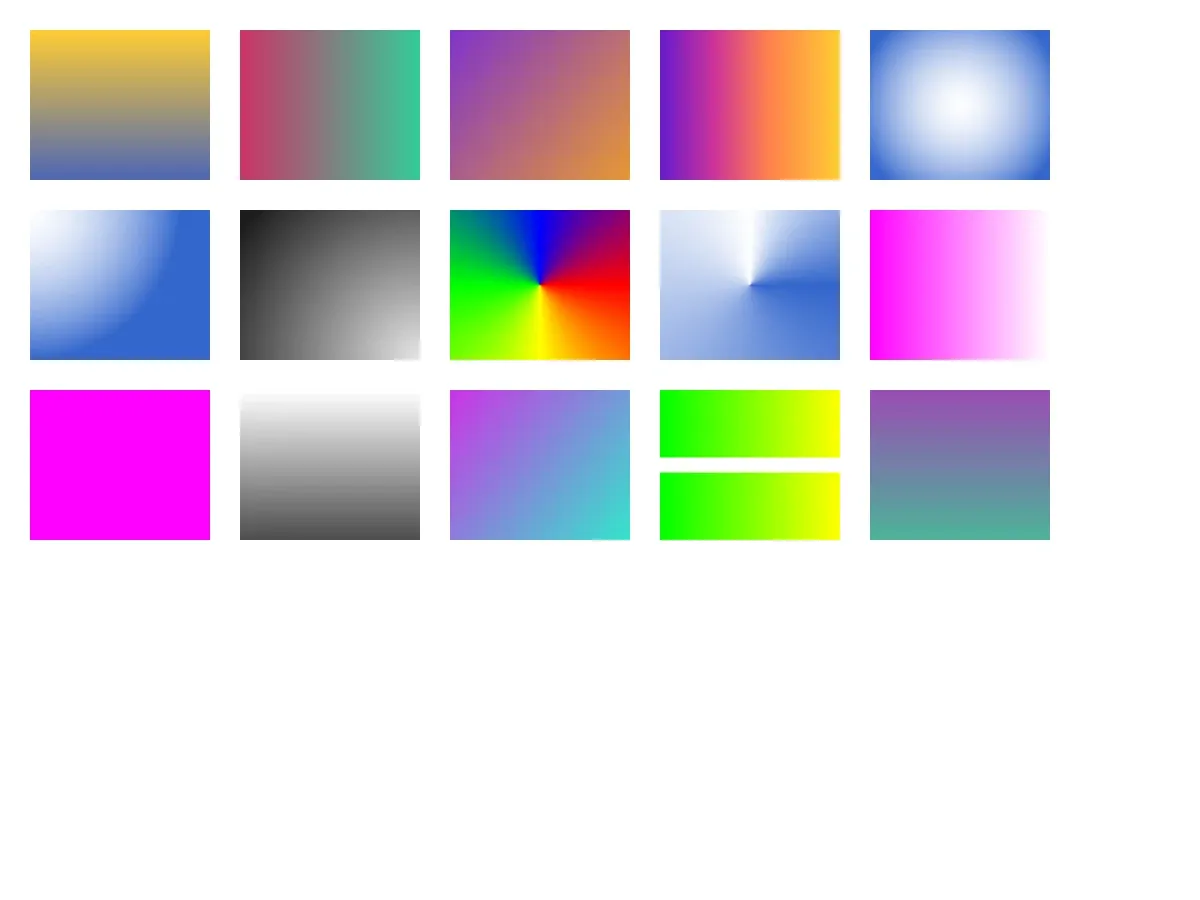
Gradient fills are one of the fundamental fill types in CE.SDK, allowing you to paint design blocks with smooth color transitions. Unlike solid color fills that apply a uniform color or image fills that display photo content, gradient fills create dynamic visual effects with depth and visual interest. The gradient fill system supports three types: linear gradients that transition along a straight line, radial gradients that emanate from a center point, and conical gradients that rotate around a center point like a color wheel.
This guide demonstrates how to create, apply, and configure gradient fills programmatically, work with color stops, position gradients, and create modern visual effects like aurora gradients and button highlights.
Understanding Gradient Fills#
What is a Gradient Fill?#
A gradient fill is a fill object that paints a design block with smooth color transitions. Gradient fills are part of the broader fill system in CE.SDK and come in three types, each identified by a FillType enum case:
- Linear:
.linearGradient(full form"//ly.img.ubq/fill/gradient/linear") - Radial:
.radialGradient(full form"//ly.img.ubq/fill/gradient/radial") - Conical:
.conicalGradient(full form"//ly.img.ubq/fill/gradient/conical")
Each gradient type contains color stops that define colors at specific positions and positioning properties that control the gradient’s direction and coverage.
Gradient Types Comparison#
Linear Gradients#
Linear gradients transition colors along a straight line defined by start and end points. They’re the most common gradient type and create clean, modern looks. Common use cases include hero sections, call-to-action buttons, headers, and banners.
try engine.block.setGradientColorStops( linearFill, property: "fill/gradient/colors", colors: [ GradientColorStop(color: .rgba(r: 1.0, g: 0.8, b: 0.2), stop: 0), GradientColorStop(color: .rgba(r: 0.3, g: 0.4, b: 0.7), stop: 1), ],)Radial Gradients#
Radial gradients emanate from a central point outward, creating circular or elliptical color transitions. They add depth and create focal points or spotlight effects. Common use cases include button highlights, card shadows, vignettes, and circular badges.
try engine.block.setGradientColorStops( radialFill, property: "fill/gradient/colors", colors: [ GradientColorStop(color: .rgba(r: 1.0, g: 1.0, b: 1.0, a: 0.3), stop: 0), GradientColorStop(color: .rgba(r: 0.2, g: 0.4, b: 0.8), stop: 1), ],)Conical Gradients#
Conical gradients transition colors around a center point like a color wheel, starting at the top (12 o’clock) and rotating clockwise. Colors are specified by position rather than angle. Common use cases include pie charts, loading spinners, circular progress indicators, and color picker wheels.
try engine.block.setGradientColorStops( conicalFill, property: "fill/gradient/colors", colors: [ GradientColorStop(color: .rgba(r: 1.0, g: 0.0, b: 0.0), stop: 0), GradientColorStop(color: .rgba(r: 1.0, g: 1.0, b: 0.0), stop: 0.25), GradientColorStop(color: .rgba(r: 0.0, g: 1.0, b: 0.0), stop: 0.5), GradientColorStop(color: .rgba(r: 0.0, g: 0.0, b: 1.0), stop: 0.75), GradientColorStop(color: .rgba(r: 1.0, g: 0.0, b: 0.0), stop: 1), ],)Gradient vs Other Fill Types#
Understanding how gradients differ from other fill types helps you choose the right fill for your design:
- Gradient fills: Smooth color transitions (linear, radial, conical)
- Color fills: Solid, uniform color
- Image fills: Photo or raster content
- Video fills: Animated video content
Color Stops Explained#
Color stops define the colors at specific positions in the gradient. Each GradientColorStop consists of:
color: AColorvalue (.rgba,.cmyk, or.spot)stop: Position value between 0.0 and 1.0 (0% to 100%)
A gradient requires a minimum of two color stops. You can add multiple stops to create complex color transitions. Color stops can use any color space supported by CE.SDK, including RGB for screen display, CMYK for print, and Spot Colors for brand consistency.
try engine.block.setGradientColorStops( auroraFill, property: "fill/gradient/colors", colors: [ GradientColorStop(color: .rgba(r: 0.4, g: 0.1, b: 0.8), stop: 0), GradientColorStop(color: .rgba(r: 0.8, g: 0.2, b: 0.6), stop: 0.3), GradientColorStop(color: .rgba(r: 1.0, g: 0.5, b: 0.3), stop: 0.6), GradientColorStop(color: .rgba(r: 1.0, g: 0.8, b: 0.2), stop: 1), ],)Checking Gradient Fill Support#
Verifying Block Compatibility#
Before applying gradient fills, verify that the block type supports fills. Not all blocks support fills — for example, scenes typically don’t.
guard try engine.block.supportsFill(page) else { return }Always check supportsFill(_:) before accessing fill APIs. Graphic blocks, shapes, and text typically support fills.
Creating Gradient Fills#
Creating a New Linear Gradient#
Create a new linear gradient fill using createFill(.linearGradient):
let linearFill = try engine.block.createFill(.linearGradient)Creating a Radial Gradient#
Create a radial gradient using createFill(.radialGradient):
let radialFill = try engine.block.createFill(.radialGradient)Creating a Conical Gradient#
Create a conical gradient using createFill(.conicalGradient):
let conicalFill = try engine.block.createFill(.conicalGradient)The createFill(_:) method returns a DesignBlockID. The fill exists independently until you attach it to a block. If you create a fill but don’t attach it to a block, you must destroy it manually with destroy(_:) to prevent memory leaks.
Applying Gradient Fills#
Setting a Gradient Fill on a Block#
Once you’ve created a gradient fill, attach it to a block using setFill(_:fill:):
let block = try engine.block.create(.graphic)try engine.block.setShape(block, shape: engine.block.createShape(.rect))let gradientFill = try engine.block.createFill(.linearGradient)try engine.block.setFill(block, fill: gradientFill)Getting the Current Fill#
Retrieve the current fill attached to a block and inspect its type:
let currentFill = try engine.block.getFill(inspectBlock)let fillType = try engine.block.getType(currentFill)print("Fill type:", fillType)Configuring Gradient Color Stops#
Setting Color Stops#
Set color stops using setGradientColorStops(_:property:colors:) with an array of GradientColorStop values:
try engine.block.setGradientColorStops( linearFill, property: "fill/gradient/colors", colors: [ GradientColorStop(color: .rgba(r: 1.0, g: 0.8, b: 0.2), stop: 0), GradientColorStop(color: .rgba(r: 0.3, g: 0.4, b: 0.7), stop: 1), ],)RGB values are normalized floats from 0.0 to 1.0. Stop positions are normalized where 0.0 represents the start and 1.0 represents the end. The alpha channel controls opacity per color stop and defaults to 1.0 when omitted.
Getting Color Stops#
Retrieve the current color stops from a gradient fill:
let colorStops = try engine.block.getGradientColorStops( inspectFill, property: "fill/gradient/colors",)print("Color stops:", colorStops)Using Different Color Spaces#
Gradient color stops support multiple color spaces:
try engine.block.setGradientColorStops(  cmykFill,  property: "fill/gradient/colors",  colors: [    GradientColorStop(color: .cmyk(c: 0.0, m: 1.0, y: 1.0, k: 0.0), stop: 0),    GradientColorStop(color: .cmyk(c: 1.0, m: 0.0, y: 1.0, k: 0.0), stop: 1),  ],)
engine.editor.setSpotColor(name: "BrandPrimary", r: 0.2, g: 0.4, b: 0.8)try engine.block.setGradientColorStops(  cmykFill,  property: "fill/gradient/colors",  colors: [    GradientColorStop(color: .spot(name: "BrandPrimary"), stop: 0),    GradientColorStop(color: .rgba(r: 1.0, g: 1.0, b: 1.0), stop: 1),  ],)
Positioning Linear Gradients#
Setting Start and End Points#
Linear gradients are positioned using start and end points with normalized coordinates (0.0 to 1.0) relative to block dimensions:
try engine.block.setFloat(linearFill, property: "fill/gradient/linear/startPointX", value: 0.5)try engine.block.setFloat(linearFill, property: "fill/gradient/linear/startPointY", value: 0)try engine.block.setFloat(linearFill, property: "fill/gradient/linear/endPointX", value: 0.5)try engine.block.setFloat(linearFill, property: "fill/gradient/linear/endPointY", value: 1)Coordinates are normalized where (0, 0) represents the top-left corner and (1, 1) represents the bottom-right corner.
Common Linear Gradient Directions#
Horizontal (Left to Right):
try engine.block.setFloat(horizontalFill, property: "fill/gradient/linear/startPointX", value: 0)try engine.block.setFloat(horizontalFill, property: "fill/gradient/linear/startPointY", value: 0.5)try engine.block.setFloat(horizontalFill, property: "fill/gradient/linear/endPointX", value: 1)try engine.block.setFloat(horizontalFill, property: "fill/gradient/linear/endPointY", value: 0.5)Diagonal (Top-Left to Bottom-Right):
try engine.block.setFloat(diagonalFill, property: "fill/gradient/linear/startPointX", value: 0)try engine.block.setFloat(diagonalFill, property: "fill/gradient/linear/startPointY", value: 0)try engine.block.setFloat(diagonalFill, property: "fill/gradient/linear/endPointX", value: 1)try engine.block.setFloat(diagonalFill, property: "fill/gradient/linear/endPointY", value: 1)Getting Current Position#
Retrieve the current position values:
let startX = try engine.block.getFloat(inspectFill, property: "fill/gradient/linear/startPointX")let startY = try engine.block.getFloat(inspectFill, property: "fill/gradient/linear/startPointY")let endX = try engine.block.getFloat(inspectFill, property: "fill/gradient/linear/endPointX")let endY = try engine.block.getFloat(inspectFill, property: "fill/gradient/linear/endPointY")print("Linear gradient position:", startX, startY, endX, endY)Positioning Radial Gradients#
Setting Center Point and Radius#
Radial gradients are positioned using a center point and radius:
try engine.block.setFloat(radialFill, property: "fill/gradient/radial/centerPointX", value: 0.5)try engine.block.setFloat(radialFill, property: "fill/gradient/radial/centerPointY", value: 0.5)try engine.block.setFloat(radialFill, property: "fill/gradient/radial/radius", value: 0.8)The centerPointX/Y properties use normalized coordinates (0.0 to 1.0) relative to block dimensions. The radius property is relative to the smaller side of the block frame, where 1.0 equals full coverage. Default values are centerX = 0.0, centerY = 0.0, and radius = 1.0.
Common Radial Patterns#
Centered Circle:
try engine.block.setFloat(radialFill, property: "fill/gradient/radial/centerPointX", value: 0.5)try engine.block.setFloat(radialFill, property: "fill/gradient/radial/centerPointY", value: 0.5)try engine.block.setFloat(radialFill, property: "fill/gradient/radial/radius", value: 0.7)Top-Left Highlight:
try engine.block.setFloat(buttonFill, property: "fill/gradient/radial/centerPointX", value: 0)try engine.block.setFloat(buttonFill, property: "fill/gradient/radial/centerPointY", value: 0)try engine.block.setFloat(buttonFill, property: "fill/gradient/radial/radius", value: 1.0)Bottom-Right Vignette:
try engine.block.setFloat(vignetteFill, property: "fill/gradient/radial/centerPointX", value: 1)try engine.block.setFloat(vignetteFill, property: "fill/gradient/radial/centerPointY", value: 1)try engine.block.setFloat(vignetteFill, property: "fill/gradient/radial/radius", value: 1.5)Positioning Conical Gradients#
Setting Center Point#
Conical gradients are positioned using a center point. The rotation starts at the top (12 o’clock) and proceeds clockwise:
try engine.block.setFloat(conicalFill, property: "fill/gradient/conical/centerPointX", value: 0.5)try engine.block.setFloat(conicalFill, property: "fill/gradient/conical/centerPointY", value: 0.5)The centerPointX/Y properties use normalized coordinates (0.0 to 1.0) relative to block dimensions. There is no separate rotation or angle property — the gradient always starts at the top. Default values are centerX = 0.0 and centerY = 0.0.
Additional Techniques#
Sharing Gradient Fills#
You can share a single gradient fill between multiple blocks. Changes to the shared gradient affect all blocks using it. Note that setFill(_:fill:) does not automatically destroy the previous fill — call destroy(_:) manually if the replaced fill is no longer needed.
let sharedBlock1 = try createBlock(x: 440, y: 260, width: 120, height: 45)let sharedBlock2 = try createBlock(x: 440, y: 315, width: 120, height: 45)
let sharedGradient = try engine.block.createFill(.linearGradient)try engine.block.setGradientColorStops(  sharedGradient,  property: "fill/gradient/colors",  colors: [    GradientColorStop(color: .rgba(r: 1, g: 0, b: 0), stop: 0),    GradientColorStop(color: .rgba(r: 0, g: 0, b: 1), stop: 1),  ],)try engine.block.setFloat(sharedGradient, property: "fill/gradient/linear/startPointX", value: 0)try engine.block.setFloat(sharedGradient, property: "fill/gradient/linear/startPointY", value: 0.5)try engine.block.setFloat(sharedGradient, property: "fill/gradient/linear/endPointX", value: 1)try engine.block.setFloat(sharedGradient, property: "fill/gradient/linear/endPointY", value: 0.5)
try engine.block.setFill(sharedBlock1, fill: sharedGradient)try engine.block.setFill(sharedBlock2, fill: sharedGradient)
try engine.block.setGradientColorStops(  sharedGradient,  property: "fill/gradient/colors",  colors: [    GradientColorStop(color: .rgba(r: 0, g: 1, b: 0), stop: 0),    GradientColorStop(color: .rgba(r: 1, g: 1, b: 0), stop: 1),  ],)
Duplicating Gradient Fills#
When you duplicate a block, its gradient fill is automatically duplicated, creating an independent copy. Each duplicate has its own fill instance that can be modified independently without affecting the original.
Common Use Cases#
Modern Hero Background (Aurora Effect)#
Create dreamy multi-color gradient backgrounds for hero sections:
let auroraFill = try engine.block.createFill(.linearGradient)
try engine.block.setGradientColorStops(  auroraFill,  property: "fill/gradient/colors",  colors: [    GradientColorStop(color: .rgba(r: 0.4, g: 0.1, b: 0.8), stop: 0),    GradientColorStop(color: .rgba(r: 0.8, g: 0.2, b: 0.6), stop: 0.3),    GradientColorStop(color: .rgba(r: 1.0, g: 0.5, b: 0.3), stop: 0.6),    GradientColorStop(color: .rgba(r: 1.0, g: 0.8, b: 0.2), stop: 1),  ],)
try engine.block.setFloat(auroraFill, property: "fill/gradient/linear/startPointX", value: 0)try engine.block.setFloat(auroraFill, property: "fill/gradient/linear/startPointY", value: 0.5)try engine.block.setFloat(auroraFill, property: "fill/gradient/linear/endPointX", value: 1)try engine.block.setFloat(auroraFill, property: "fill/gradient/linear/endPointY", value: 0.5)
Button Highlight Effect#
Use radial gradients to add depth and highlight effects to buttons:
let buttonFill = try engine.block.createFill(.radialGradient)try engine.block.setGradientColorStops( buttonFill, property: "fill/gradient/colors", colors: [ GradientColorStop(color: .rgba(r: 1.0, g: 1.0, b: 1.0, a: 0.3), stop: 0), GradientColorStop(color: .rgba(r: 0.2, g: 0.4, b: 0.8), stop: 1), ],)Loading Spinner (Conical)#
Create circular progress indicators and loading animations with conical gradients:
let spinnerFill = try engine.block.createFill(.conicalGradient)try engine.block.setGradientColorStops( spinnerFill, property: "fill/gradient/colors", colors: [ GradientColorStop(color: .rgba(r: 0.2, g: 0.4, b: 0.8), stop: 0), GradientColorStop(color: .rgba(r: 0.2, g: 0.4, b: 0.8, a: 0), stop: 0.75), GradientColorStop(color: .rgba(r: 0.2, g: 0.4, b: 0.8), stop: 1), ],)try engine.block.setFloat(spinnerFill, property: "fill/gradient/conical/centerPointX", value: 0.5)try engine.block.setFloat(spinnerFill, property: "fill/gradient/conical/centerPointY", value: 0.5)Transparency Overlay#
Create smooth transparency effects with alpha channel transitions:
let overlayFill = try engine.block.createFill(.linearGradient)try engine.block.setGradientColorStops( overlayFill, property: "fill/gradient/colors", colors: [ GradientColorStop(color: .rgba(r: 0.0, g: 0.0, b: 0.0, a: 0), stop: 0), GradientColorStop(color: .rgba(r: 0.0, g: 0.0, b: 0.0, a: 0.7), stop: 1), ],)try engine.block.setFloat(overlayFill, property: "fill/gradient/linear/startPointX", value: 0.5)try engine.block.setFloat(overlayFill, property: "fill/gradient/linear/startPointY", value: 0)try engine.block.setFloat(overlayFill, property: "fill/gradient/linear/endPointX", value: 0.5)try engine.block.setFloat(overlayFill, property: "fill/gradient/linear/endPointY", value: 1)Duotone Effect#
Create modern two-color gradient overlays:
let duotoneFill = try engine.block.createFill(.linearGradient)try engine.block.setGradientColorStops( duotoneFill, property: "fill/gradient/colors", colors: [ GradientColorStop(color: .rgba(r: 0.8, g: 0.2, b: 0.9), stop: 0), GradientColorStop(color: .rgba(r: 0.2, g: 0.9, b: 0.8), stop: 1), ],)try engine.block.setFloat(duotoneFill, property: "fill/gradient/linear/startPointX", value: 0)try engine.block.setFloat(duotoneFill, property: "fill/gradient/linear/startPointY", value: 0)try engine.block.setFloat(duotoneFill, property: "fill/gradient/linear/endPointX", value: 1)try engine.block.setFloat(duotoneFill, property: "fill/gradient/linear/endPointY", value: 1)Troubleshooting#
Gradient Not Visible#
If your gradient doesn’t appear:
- Check if fill is enabled:
engine.block.isFillEnabled(block) - Verify color stops have visible colors (check alpha channels)
- Ensure block has valid dimensions (width and height > 0)
- Confirm block is in the scene hierarchy
- Check if color stops are properly ordered by stop position
Gradient Looks Different Than Expected#
If the gradient doesn’t look right:
- Verify color stop positions are between 0.0 and 1.0
- Check gradient direction and positioning properties
- Ensure correct gradient type is used (linear vs radial vs conical)
- Review color space (
.rgbavs.cmyk) for output medium - Confirm alpha values for transparency effects
Gradient Direction Wrong#
If the gradient direction is incorrect:
- For linear gradients, check
startPointX/YandendPointX/Yvalues - Remember coordinates are normalized (0.0 to 1.0), not pixels
- Verify the block’s coordinate system and transformations
- Test with simple horizontal or vertical gradients first
Memory Leaks#
To prevent memory leaks:
- Always destroy replaced gradients:
engine.block.destroy(oldFill) - Don’t create gradient fills without attaching them to blocks
- Clean up shared gradients when no longer needed
Cannot Apply Gradient to Block#
If you can’t apply a gradient fill:
- Verify block supports fills:
engine.block.supportsFill(block) - Check if block has a shape: some blocks require shapes
- Ensure gradient fill object is valid and not already destroyed
Color Stops Not Updating#
If color stops don’t update:
- Verify you’re calling
setGradientColorStops(_:property:colors:)notsetColor(_:property:color:) - Ensure property name is exactly
"fill/gradient/colors" - Check that the color stop array is properly formatted
- Confirm fill ID is correct and still valid
API Reference#
Core Methods#
| Method | Description |
|---|---|
engine.block.createFill(.linearGradient) | Create a new linear gradient fill |
engine.block.createFill(.radialGradient) | Create a new radial gradient fill |
engine.block.createFill(.conicalGradient) | Create a new conical gradient fill |
engine.block.setFill(_:fill:) | Assign gradient fill to a block |
engine.block.getFill(_:) | Get the fill ID from a block |
engine.block.setGradientColorStops(_:property:colors:) | Set gradient color stops array |
engine.block.getGradientColorStops(_:property:) | Get current gradient color stops |
engine.block.setFloat(_:property:value:) | Set gradient position/radius properties |
engine.block.getFloat(_:property:) | Get gradient position/radius values |
engine.block.setFillEnabled(_:enabled:) | Enable or disable fill rendering |
engine.block.isFillEnabled(_:) | Check if fill is enabled |
engine.block.supportsFill(_:) | Check if block supports fills |
Linear Gradient Properties#
| Property | Type | Default | Description |
|---|---|---|---|
fill/gradient/colors | [GradientColorStop] | - | Array of color stops |
fill/gradient/linear/startPointX | Float (0.0-1.0) | 0.5 | Horizontal start position |
fill/gradient/linear/startPointY | Float (0.0-1.0) | 0.0 | Vertical start position |
fill/gradient/linear/endPointX | Float (0.0-1.0) | 0.5 | Horizontal end position |
fill/gradient/linear/endPointY | Float (0.0-1.0) | 1.0 | Vertical end position |
Radial Gradient Properties#
| Property | Type | Default | Description |
|---|---|---|---|
fill/gradient/colors | [GradientColorStop] | - | Array of color stops |
fill/gradient/radial/centerPointX | Float (0.0-1.0) | 0.0 | Horizontal center position |
fill/gradient/radial/centerPointY | Float (0.0-1.0) | 0.0 | Vertical center position |
fill/gradient/radial/radius | Float | 1.0 | Radius relative to smaller side |
Conical Gradient Properties#
| Property | Type | Default | Description |
|---|---|---|---|
fill/gradient/colors | [GradientColorStop] | - | Array of color stops |
fill/gradient/conical/centerPointX | Float (0.0-1.0) | 0.0 | Horizontal center position |
fill/gradient/conical/centerPointY | Float (0.0-1.0) | 0.0 | Vertical center position |
Note: Conical gradients rotate clockwise starting from the top (12 o’clock). There is no rotation or angle property.
GradientColorStop Struct#
Each GradientColorStop has two fields:
color: Color— aColorenum value (.rgba(...),.cmyk(...), or.spot(...))stop: Float— position in the gradient from 0.0 (start) to 1.0 (end)
Next Steps#
Now that you understand gradient fills, explore other fill types and color management features:
- Color Fills — Learn about solid color fills with RGB, CMYK, and Spot Colors
- Fills Overview — Understand the comprehensive fill system and all available fill types
- Apply Colors — Learn about color management across fills, strokes, and shadows
- Blocks Concept — Understand the block system that design elements are built on