Apply distortion effects to warp, shift, and transform images and videos for dynamic artistic visuals using CE.SDK’s effect system.
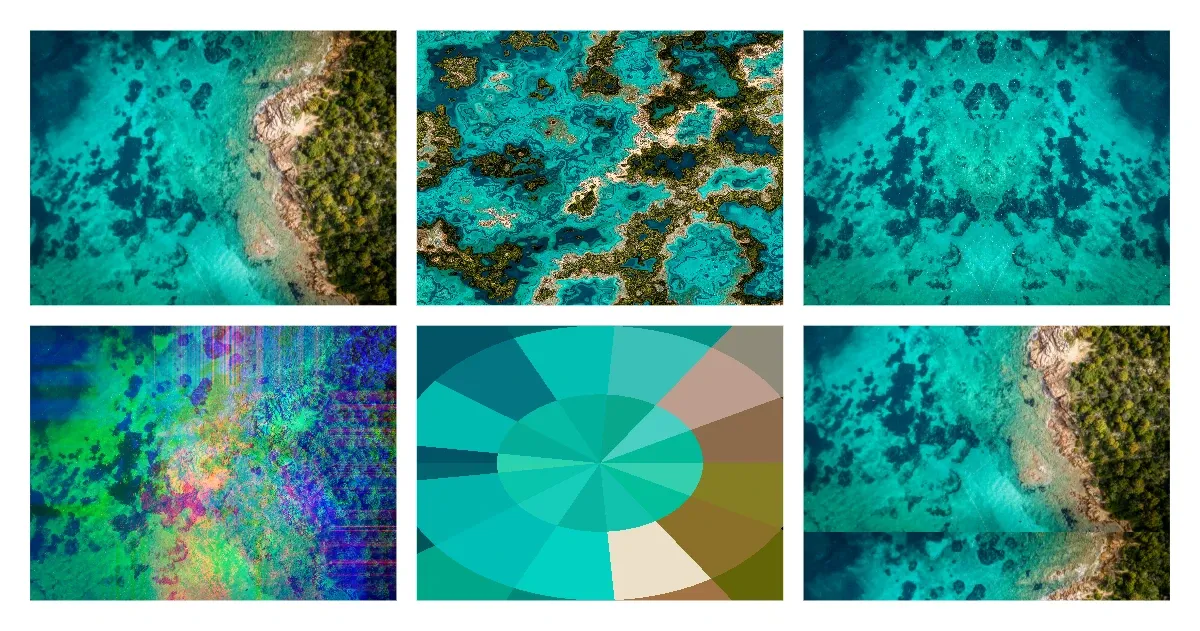
Distortion effects differ from color filters in that they modify the geometry and spatial arrangement of pixels rather than their color values. CE.SDK provides several distortion effect types: liquid warping, mirror reflections, color channel shifting, radial pixelation, TV glitch, corner pin, bulge, wave warp and displacement map. Each effect offers configurable parameters to control the intensity and style of the distortion.
This guide covers how to apply and configure each distortion effect programmatically, combine multiple effects on a single block, and manage the effect stack with the block API. To compare the effects side by side, the example places six copies of the same image in a grid and applies one effect to each — liquidBlock, mirrorBlock, and so on are the individual image cells. A second page holds the cells for the corner pin, bulge, wave warp and displacement map effects.
Check Effect Support#
Before applying distortion effects, verify the block supports them with engine.block.supportsEffects. Graphic blocks with image or video fills support effects, while scene blocks do not.
let canHaveEffects = try engine.block.supportsEffects(liquidBlock)print("Block supports effects: \(canHaveEffects)")Apply Liquid Effect#
The liquid effect creates organic, flowing distortions that warp the image as if viewed through water. Create the effect with engine.block.createEffect(.liquid), configure its properties with engine.block.setFloat, then attach it with engine.block.appendEffect.
let liquid = try engine.block.createEffect(.liquid)try engine.block.setFloat(liquid, property: "effect/liquid/amount", value: 0.5)try engine.block.setFloat(liquid, property: "effect/liquid/scale", value: 1.0)try engine.block.appendEffect(liquidBlock, effectID: liquid)The liquid effect properties:
effect/liquid/amount(0.0to1.0) — Intensity of the warping.effect/liquid/scale— Scale of the liquid pattern.effect/liquid/time— Animation time offset for animated liquid distortions.
Apply Mirror Effect#
The mirror effect reflects the image along a configurable side, creating symmetrical compositions.
let mirror = try engine.block.createEffect(.mirror)try engine.block.setInt(mirror, property: "effect/mirror/side", value: 0)try engine.block.appendEffect(mirrorBlock, effectID: mirror)The effect/mirror/side property is an integer: 0 (Left), 1 (Right), 2 (Top), or 3 (Bottom). Set it with engine.block.setInt.
Apply Shifter Effect#
The shifter effect displaces color channels at an angle, creating chromatic aberration commonly seen in glitch art and retro visuals.
let shifter = try engine.block.createEffect(.shifter)try engine.block.setFloat(shifter, property: "effect/shifter/amount", value: 0.3)try engine.block.setFloat(shifter, property: "effect/shifter/angle", value: 0.785)try engine.block.appendEffect(shifterBlock, effectID: shifter)The shifter effect properties:
effect/shifter/amount(0.0to1.0) — Displacement distance.effect/shifter/angle— Direction of the shift in radians.
Apply Radial Pixel Effect#
The radial pixel effect pixelates the image in a circular pattern emanating from the center, useful for focus effects or stylized treatments.
let radialPixel = try engine.block.createEffect(.radialPixel)try engine.block.setFloat(radialPixel, property: "effect/radial_pixel/radius", value: 0.5)try engine.block.setFloat(radialPixel, property: "effect/radial_pixel/segments", value: 0.5)try engine.block.appendEffect(radialPixelBlock, effectID: radialPixel)The radial pixel effect properties:
effect/radial_pixel/radius(up to1.0) — Radius of each row of pixels, relative to the image.effect/radial_pixel/segments(up to1.0) — Proportional size of a pixel in each row.
Apply TV Glitch Effect#
The TV glitch effect simulates analog television interference with horizontal distortion and rolling effects, popular for retro and digital aesthetics.
let tvGlitch = try engine.block.createEffect(.tvGlitch)try engine.block.setFloat(tvGlitch, property: "effect/tv_glitch/distortion", value: 0.4)try engine.block.setFloat(tvGlitch, property: "effect/tv_glitch/distortion2", value: 0.2)try engine.block.setFloat(tvGlitch, property: "effect/tv_glitch/speed", value: 0.5)try engine.block.setFloat(tvGlitch, property: "effect/tv_glitch/rollSpeed", value: 0.5)try engine.block.appendEffect(tvGlitchBlock, effectID: tvGlitch)The TV glitch effect properties:
effect/tv_glitch/distortion— Primary horizontal distortion intensity.effect/tv_glitch/distortion2— Secondary distortion layer.effect/tv_glitch/speed— Animation speed for the glitch effect.effect/tv_glitch/rollSpeed— Vertical roll speed simulating signal sync issues.
Apply Corner Pin Effect#
The corner pin effect moves the four corners of the block’s content. Each corner position is relative to the block size: (0, 0) is the upper left and (1, 1) the lower right. Here the upper corners move inward for a perspective look.
// Pull the upper corners inward for a perspective looklet cornerPin = try engine.block.createEffect(.cornerPin)try engine.block.setFloat(cornerPin, property: "effect/corner_pin/upperLeftX", value: 0.15)try engine.block.setFloat(cornerPin, property: "effect/corner_pin/upperLeftY", value: 0.1)try engine.block.setFloat(cornerPin, property: "effect/corner_pin/upperRightX", value: 0.85)try engine.block.setFloat(cornerPin, property: "effect/corner_pin/upperRightY", value: 0.1)try engine.block.appendEffect(cornerPinBlock, effectID: cornerPin)The corner pin properties are upperLeftX, upperLeftY, upperRightX, upperRightY, lowerLeftX, lowerLeftY, lowerRightX, and lowerRightY under effect/corner_pin/. Each accepts values from -2.0 to 3.0, so a corner can move outside the block.
Apply Bulge Effect#
The bulge effect magnifies or pinches an elliptical area of the block. Positive height values magnify, negative values pinch, and 0 does nothing.
// Magnify an ellipse with radii of 120 and 100 design units at the centerlet bulge = try engine.block.createEffect(.bulge)try engine.block.setFloat(bulge, property: "effect/bulge/centerX", value: 0.5)try engine.block.setFloat(bulge, property: "effect/bulge/centerY", value: 0.5)try engine.block.setFloat(bulge, property: "effect/bulge/horizontalRadius", value: 120)try engine.block.setFloat(bulge, property: "effect/bulge/verticalRadius", value: 100)try engine.block.setFloat(bulge, property: "effect/bulge/height", value: 1.5)try engine.block.appendEffect(bulgeBlock, effectID: bulge)The bulge effect properties:
effect/bulge/centerXandeffect/bulge/centerY(0.0to1.0) — The center of the ellipse, relative to the block size.effect/bulge/horizontalRadiusandeffect/bulge/verticalRadius— The radii of the ellipse in design units.effect/bulge/height(-4.0to4.0) — The strength of the bulge.
Apply Wave Warp Effect#
The wave warp effect moves the pixels of a block with a wave. height is the largest displacement and width is the distance between two crests. Both are in design units, so they scale with the block.
// A wave 15 design units high with crests 90 design units apartlet waveWarp = try engine.block.createEffect(.waveWarp)try engine.block.setFloat(waveWarp, property: "effect/wave_warp/height", value: 15)try engine.block.setFloat(waveWarp, property: "effect/wave_warp/width", value: 90)try engine.block.setEnum(waveWarp, property: "effect/wave_warp/waveType", value: "Sine")try engine.block.appendEffect(waveWarpBlock, effectID: waveWarp)The wave warp effect properties:
effect/wave_warp/heightandeffect/wave_warp/width— The size of the wave in design units.effect/wave_warp/waveType—"Sine","Square","Triangle", or"Sawtooth". Set it withengine.block.setEnum.effect/wave_warp/directionandeffect/wave_warp/phase— The direction and the offset of the wave in degrees.
Apply Displacement Map Effect#
The displacement map effect moves each pixel by the value of a second block at the same place. engine.block.setEffectSource(effectID:source:) sets that block, and nil removes it. A value of 0.5 does not move the pixel. Higher and lower values move it up to maxHorizontal and maxVertical design units. horizontalChannel and verticalChannel pick the channel of the map that each direction reads.
// The map is a hidden image block. The effect still reads it.let map = try makeImageCell(x: 410, y: 320, on: distortPage)try engine.block.setVisible(map, visible: false)
let displacementMap = try engine.block.createEffect(.displacementMap)try engine.block.setEnum(displacementMap, property: "effect/displacement_map/horizontalChannel", value: "Luminance")try engine.block.setFloat(displacementMap, property: "effect/displacement_map/maxHorizontal", value: 20)try engine.block.setEnum(displacementMap, property: "effect/displacement_map/verticalChannel", value: "Luminance")try engine.block.setFloat(displacementMap, property: "effect/displacement_map/maxVertical", value: 20)try engine.block.setEnum(displacementMap, property: "effect/displacement_map/mapBehavior", value: "Stretch")try engine.block.appendEffect(displacedBlock, effectID: displacementMap)
// Set the map block as the source of the effecttry engine.block.setEffectSource(effectID: displacementMap, source: map)
Effect Sources#
These rules apply to effect sources:
- Only the displacement map effect reads a source.
- A graphic, text or group block can be the source. The block that owns the effect can be its own source.
- The effect reads the source without its position and rotation. It also reads a hidden source, so hide a block that you only use as a map.
- The source still draws on the page when it is visible.
mapBehaviorplaces the map on the block:"Center","Stretch", or"Tile".- Without a source, the effect does not move any pixels.
setEffectSource(effectID:source:)needs theappearance/effectscope on every block that the effect is attached to.
engine.block.getEffectSource(effectID:) returns the source block, or nil when the effect has no source.
let source = try engine.block.getEffectSource(effectID: displacementMap)print(source == map) // trueThe source link takes part in the usual block operations:
- Destroying the source clears the link. Undo restores it.
- Undo and redo restore the source.
- Saving and loading a scene keeps the source.
- Duplicating the block that owns the effect keeps the same source. Duplicating a group with the owner and the source links the copy to the copied source.
Handling Errors#
Invalid input throws an EngineError. Its catalogCode names the problem as an EngineErrorCode: .blockEffectSourceUnsupported for an effect that does not read a source, and .blockEffectSourceInvalid for a block that cannot be a source.
do { // Only the displacement map effect reads a source try engine.block.setEffectSource(effectID: waveWarp, source: map)} catch let error as EngineError { print(error.catalogCode == .blockEffectSourceUnsupported) // true}do { // A page cannot be a source try engine.block.setEffectSource(effectID: displacementMap, source: distortPage)} catch let error as EngineError { print(error.catalogCode == .blockEffectSourceInvalid) // true}Combine Multiple Distortion Effects#
Stack multiple distortion effects on a single block. Here a shifter is added to liquidBlock, which already carries the liquid effect. Effects render in the order they appear in the block’s effect list, from bottom to top, so the liquid warp is applied first and the shifter then displaces color channels on the already-warped result. Use engine.block.appendEffect to add an effect to the end of the list, or engine.block.insertEffect to place it at a specific index.
let extraShifter = try engine.block.createEffect(.shifter)try engine.block.setFloat(extraShifter, property: "effect/shifter/amount", value: 0.2)try engine.block.appendEffect(liquidBlock, effectID: extraShifter)List Applied Effects#
Retrieve every effect attached to a block with engine.block.getEffects. It returns an ordered array of effect IDs.
let effects = try engine.block.getEffects(liquidBlock)print("Applied effects: \(effects.count)")Enable and Disable Effects#
Toggle an effect on and off without removing it using engine.block.setEffectEnabled, and query its state with engine.block.isEffectEnabled. A disabled effect stays attached and keeps its parameters, but the engine skips it during rendering — useful for before/after comparisons or performance tuning.
try engine.block.setEffectEnabled(effectID: extraShifter, enabled: false)let shifterEnabled = try engine.block.isEffectEnabled(effectID: extraShifter)print("Shifter enabled: \(shifterEnabled)")Remove Effects#
Remove an effect from a block by index with engine.block.removeEffect, then call engine.block.destroy on the removed effect to free its instance.
try engine.block.removeEffect(liquidBlock, index: 1)try engine.block.destroy(extraShifter)Discover Effect Properties#
Use engine.block.findAllProperties to discover every property available on an effect. The returned property paths work with engine.block.setFloat, engine.block.setInt, and engine.block.setEnum.
let liquidProperties = try engine.block.findAllProperties(liquid)print("Liquid effect properties: \(liquidProperties)")Troubleshooting#
Effect Not Visible#
Confirm the block supports effects with supportsEffects and that the effect is enabled with isEffectEnabled. Effects apply to graphic blocks with image or video fills, not to scene blocks.
Unexpected Results#
Verify parameter values fall within their expected ranges. Many distortion parameters are normalized to 0.0–1.0, but some use wider ranges — the TV glitch intensities and the shifter angle, for example. Values outside the expected range can produce extreme or unintended distortion.
The Effect Does Not Accept a Source#
Only a .displacementMap effect reads a source. For other effects, setEffectSource(effectID:source:) and getEffectSource(effectID:) throw with .blockEffectSourceUnsupported (BLOCK.EFFECT_SOURCE_UNSUPPORTED).
The Block Cannot Be a Source#
Use a graphic, text or group block. A page, scene, fill, shape or effect throws with .blockEffectSourceInvalid (BLOCK.EFFECT_SOURCE_INVALID).
The Displacement Map Does Not Move Anything#
Set a source with setEffectSource(effectID:source:), and check that maxHorizontal or maxVertical is not 0.
Performance#
Distortion effects are GPU-intensive. Limit the number of stacked effects on a single block, especially on mobile devices, and disable effects you aren’t actively rendering.
API Reference#
| Method | Description |
|---|---|
engine.block.supportsEffects(_:) |
Check if a block supports effects |
engine.block.createEffect(_:) |
Create a new effect instance from an EffectType |
engine.block.appendEffect(_:effectID:) |
Add an effect to the end of a block’s effect list |
engine.block.insertEffect(_:effectID:index:) |
Insert an effect at a specific position |
engine.block.getEffects(_:) |
Get all effects applied to a block |
engine.block.removeEffect(_:index:) |
Remove an effect at a specific index |
engine.block.setEffectEnabled(effectID:enabled:) |
Enable or disable an effect |
engine.block.isEffectEnabled(effectID:) |
Check if an effect is enabled |
engine.block.findAllProperties(_:) |
Discover all properties of an effect |
engine.block.setFloat(_:property:value:) |
Set a float property value |
engine.block.setInt(_:property:value:) |
Set an integer property value |
engine.block.setEnum(_:property:value:) |
Set an enum property value |
engine.block.destroy(_:) |
Destroy an effect instance to free memory |
engine.block.setVisible(_:visible:) |
Hide a block that you only use as a map |
engine.block.setEffectSource(effectID:source:) |
Set or remove the block that a displacement map effect reads |
engine.block.getEffectSource(effectID:) |
Get the block that a displacement map effect reads |
Available Distortion Effects#
| Effect | EffectType |
Description | Key Properties |
|---|---|---|---|
| Liquid | .liquid |
Flowing, organic warping | amount, scale, time |
| Mirror | .mirror |
Reflection along a side | side (0=Left, 1=Right, 2=Top, 3=Bottom) |
| Shifter | .shifter |
Chromatic aberration | amount, angle |
| Radial Pixel | .radialPixel |
Circular pixelation | radius, segments |
| TV Glitch | .tvGlitch |
Analog TV interference | distortion, distortion2, speed, rollSpeed |
| Corner Pin | .cornerPin |
Moves the four corners | upperLeftX … lowerRightY |
| Bulge | .bulge |
Magnifies or pinches an ellipse | centerX, centerY, horizontalRadius, verticalRadius, height |
| Wave Warp | .waveWarp |
Moves pixels with a wave | waveType, height, width, direction, phase |
| Displacement Map | .displacementMap |
Moves pixels by the values of a source block | horizontalChannel, maxHorizontal, verticalChannel, maxVertical, mapBehavior |
Next Steps#
- Apply Filters and Effects — Learn the foundational effect APIs.
- Blur Effects — Apply blur techniques for depth and focus effects.