Understand how CE.SDK’s plugin system fits together on iOS—what a plugin is, how it composes into the editor configuration, and which parts of the editor it can extend.
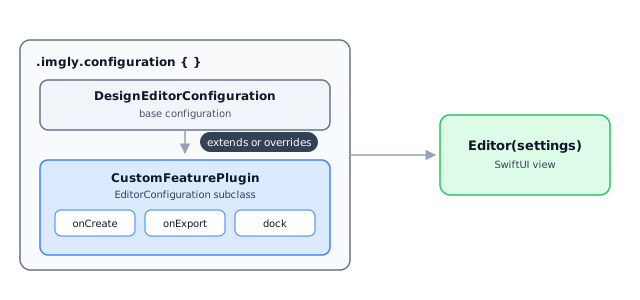
A plugin is a self-contained unit that packages editor behavior—callbacks, options, UI component configuration—and attaches to an existing editor without rebuilding it. On iOS, a plugin is a class inheriting from EditorConfiguration that is composed into the editor setup. IMG.LY ships official plugins such as background removal this way, and you can build your own.
This guide covers what a plugin is on iOS, when to use one instead of other customization mechanisms, how plugins compose into the configuration, and where each official plugin is documented.
What a Plugin Is#
The editor configuration is built first, and plugins are composed into it afterwards. Each plugin is one EditorConfiguration subclass with a stable identity, options passed through its initializer, and overridden callbacks or component configurations. The same composition idea exists on every platform, even though the APIs differ—the Web registers plugin objects with addPlugin() and Android chains EditorConfigurationBuilder classes.
Plugin or Not?#
Plugins are one of several customization mechanisms, and they’re commonly conflated. Use this list to place them:
- Inline configuration: The default. Configure the editor directly where it’s created—best for one editor surface or a one-off product flow.
- Starter kits: Copy-to-adapt scaffolds for complete editor experiences. Browse them in the starter kits overview.
- Plugins: When the same behavior must travel between projects or entry points as one unit.
Importers and exporters are standalone packages that convert file formats. They are versioned independently of CE.SDK and are not plugins—you use their own APIs instead of composing them into the editor configuration.
How a Plugin Attaches#
The base configuration comes first, plugins second. The configuration builder composes them in order, so later entries can extend or override what earlier entries set up:
Editor(settings) .imgly.configuration { DesignEditorConfiguration() CustomFeaturePlugin(options: .init(imageURL: Self.imageURL)) }Plugin Options#
Plugins expose options through a nested Options struct with defaults, passed through the initializer and read from overridden callbacks or component configurations:
struct Options { var imageURL: URL}Extending and Replacing Behavior#
A plugin that overrides onCreate decides whether to run work around the inherited setup or own the behavior completely:
override var onCreate: OnCreate.Handler? { { _, existing in // Pre-setup work goes here. try await existing() // Post-setup work goes here. }}The same choice applies to UI components. This dock override keeps the inherited dock and prepends one button instead of replacing the whole component:
override var dock: Dock.Configuration? { let imageURL = options.imageURL return Dock.Configuration { builder in builder.modify { _, items in items.addFirst { Dock.Button( id: "com.example.dock.customFeature", action: { context in Task { try? await Self.addImageBlock(engine: context.engine, imageURL: imageURL) } }, label: { _ in Label { Text("Image") } icon: { Image(systemName: "photo") } }, ) } } }}Official Plugins#
Each official plugin has its own page with installation and options; this table only maps the landscape.
| Plugin | What it does | Docs |
|---|---|---|
| Background Removal | Removes image backgrounds on device | Remove Background |
| AI Generation | Generates images and more in the editor | AI Image Generation |
The plugins section lists the full set.
Building Your Own#
A custom plugin is an EditorConfiguration subclass with options and overridden callbacks or components. Reach for one when the same behavior needs to travel together instead of being pasted into every editor setup. The Custom Feature Plugin guide walks through building the plugin shown on this page.
Troubleshooting#
- The editor opens without the expected scene: A plugin overrode
onCreateand skipped the base setup. Delegate to the inherited behavior, or fully create the scene inside the plugin. - A dock or inspector item disappears: The plugin replaced a component configuration instead of extending it. Modify the inherited configuration when adding controls.
- Export behavior runs twice: The plugin both delegates and performs the full export. Choose extension or replacement per callback.
Next Steps#
- Custom Feature Plugin - Build your own plugin
- Architecture - How the CreativeEngine is structured
- Starter Kits - Complete editor scaffolds to start from