Set the point that a block turns, scales and skews about, shear a block with a skew, and turn a block along its motion path.
Anchor, skew and auto-orient are transform properties of graphic, text and caption blocks. The anchor is the pivot of rotation, scale and skew, the skew shears a block, and auto-orient turns a block along the direction of its position keyframes. The editor has no controls for them, so you set them with the block API.
This guide covers how to set the anchor, how to skew a block and animate the skew, how to turn a block along its motion path, the errors to expect, and how the properties behave with other block operations. It ends with a frame export.
Creating the Blocks#
The example draws its blocks as rectangles with a color fill. A small local function creates each one on the page with a duration of 5 seconds.
// Creates a rect graphic with a color fill on the pagefunc createRect(x: Float, y: Float, width: Float, height: Float, color: Color) throws -> DesignBlockID { let block = try engine.block.create(.graphic) try engine.block.setShape(block, shape: engine.block.createShape(.rect)) let fill = try engine.block.createFill(.color) try engine.block.setColor(fill, property: "fill/color/value", color: color) try engine.block.setFill(block, fill: fill) try engine.block.setWidth(block, value: width) try engine.block.setHeight(block, value: height) try engine.block.setPositionX(block, value: x) try engine.block.setPositionY(block, value: y) try engine.block.appendChild(to: page, child: block) try engine.block.setDuration(block, duration: 5) return block}Setting the Anchor#
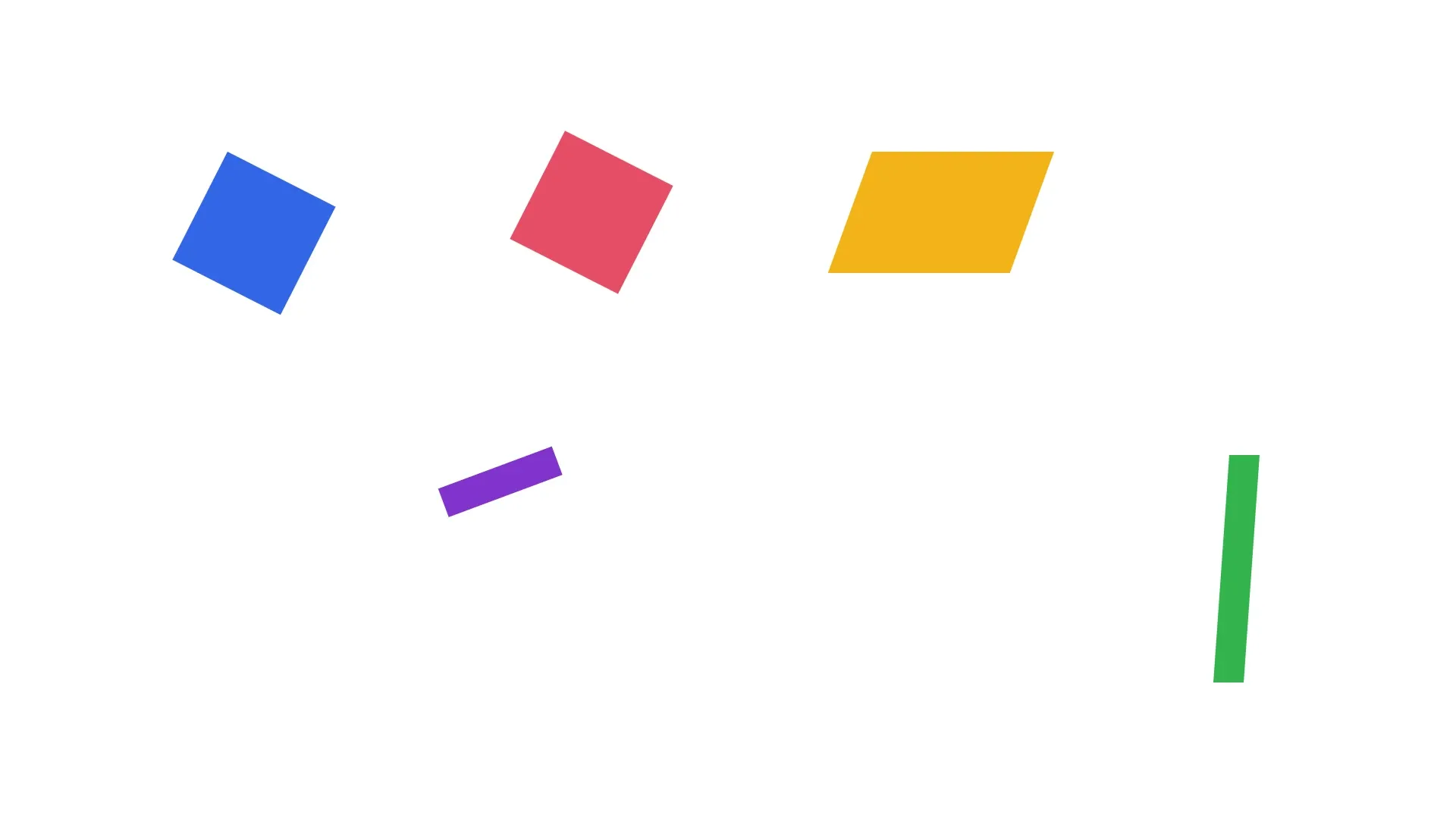
transform/anchor/x and transform/anchor/y set the point that rotation, scale and skew pivot on, in design units from the top-left corner of the block’s frame. A block without an anchor turns about its center under a rotation track, as setRotation(_:radians:) turns it. Its skew and scale pivot on its top-left corner. Both squares get the same quarter turn over 5 seconds. The left square sets its anchor to (0, 0) and swings about its corner, while the right square has its anchor at its center and turns in place. setFloat(_:property:value:) sets the anchor and getFloat(_:property:) reads it back.
let cornerSquare = try createRect(x: 300, y: 200, width: 160, height: 160, color: .rgba(r: 0.2, g: 0.4, b: 0.9, a: 1))let centerSquare = try createRect(x: 700, y: 200, width: 160, height: 160, color: .rgba(r: 0.9, g: 0.3, b: 0.4, a: 1))// Without an anchor, a rotation track turns a block about its center, so// the left square sets its anchor to its top-left cornertry engine.block.setFloat(cornerSquare, property: "transform/anchor/x", value: 0)try engine.block.setFloat(cornerSquare, property: "transform/anchor/y", value: 0)try engine.block.setFloat(centerSquare, property: "transform/anchor/x", value: 80)try engine.block.setFloat(centerSquare, property: "transform/anchor/y", value: 80)for square in [cornerSquare, centerSquare] { try engine.block.setKeyframes(square, property: "rotation", keyframes: [ Keyframe(time: 0, value: .float(0)), Keyframe(time: 1, value: .float(Float.pi / 2)), ])}let centerAnchorX = try engine.block.getFloat(centerSquare, property: "transform/anchor/x")print(centerAnchorX) // 80.0Setting transform/anchor/x or transform/anchor/y, even to 0, or giving one of them keyframes, gives a block an anchor. getFloat(_:property:) reads 0 for a block without an anchor too, so hasTransformAnchor(_:) tells whether a block has one.
// An anchor set to 0 is still an anchorprint(try engine.block.hasTransformAnchor(cornerSquare)) // trueSkewing a Block#
transform/skew shears a block by an angle in degrees. transform/skewAxis sets the direction of the shear in degrees, where 0 shears along the block’s x-axis. The rendered shear is limited to the range from -85° to 85°. The skew pivots on the anchor, or on the top-left corner of a block without one. The sign has no anchor, so it keeps its top edge in place and leans by 20 degrees.
let sign = try createRect(x: 1150, y: 200, width: 240, height: 160, color: .rgba(r: 0.95, g: 0.7, b: 0.1, a: 1))try engine.block.setFloat(sign, property: "transform/skew", value: 20)try engine.block.setFloat(sign, property: "transform/skewAxis", value: 0)Animating the Skew#
All four anchor and skew properties are numbers, so .float keyframes animate them with setKeyframes(_:property:keyframes:mode:). The blade of grass has its anchor at its bottom center, so its base stays in place while the skew track sways it from -20 to 20 degrees and back. For keyframes, see Keyframes.
// The anchor sits at the bottom center, so the base of the blade stays putlet blade = try createRect(x: 1600, y: 600, width: 40, height: 300, color: .rgba(r: 0.2, g: 0.7, b: 0.3, a: 1))try engine.block.setFloat(blade, property: "transform/anchor/x", value: 20)try engine.block.setFloat(blade, property: "transform/anchor/y", value: 300)try engine.block.setKeyframes(blade, property: "transform/skew", keyframes: [ Keyframe(time: 0, value: .float(-20)), Keyframe(time: 0.5, value: .float(20)), Keyframe(time: 1, value: .float(-20)),])Turning Along the Motion Path#
When the bool property transform/autoOrient is on, a block turns to follow the direction of its position keyframes. The engine adds the direction of the path at the current playback time to the block’s rotation, so a static rotation or a rotation track stays as an offset. The direction comes from a position track or from position/x and position/y tracks, absolute or relative. A hold segment adds no turn. The arrow turns about its anchor at its center, so it points up while it climbs the curve and down while it falls.
let arrow = try createRect(x: 300, y: 800, width: 160, height: 40, color: .rgba(r: 0.5, g: 0.2, b: 0.8, a: 1))try engine.block.setFloat(arrow, property: "transform/anchor/x", value: 80)try engine.block.setFloat(arrow, property: "transform/anchor/y", value: 20)try engine.block.setVec2(arrow, property: "position", value: [300, 800])try engine.block.setKeyframes(arrow, property: "position", keyframes: [ Keyframe(time: 0, value: .vec2([300, 800]), spatialOut: [300, -300], spatialIn: [-300, -300]), Keyframe(time: 1, value: .vec2([1300, 800])),])try engine.block.setBool(arrow, property: "transform/autoOrient", value: true)let arrowAutoOrient = try engine.block.getBool(arrow, property: "transform/autoOrient")print(arrowAutoOrient) // truetransform/autoOrient is off by default and does not take keyframes. setBool(_:property:value:) turns it on and getBool(_:property:) reads it back.
Handling Errors#
Graphic, text and caption blocks have an anchor, a skew and auto-orient. Any other block, such as a page or a group, is refused and nothing changes. The call throws an EngineError whose catalogCode names the cause.
var anchorErrorCode: EngineErrorCode?do { // A page has no anchor and no skew try engine.block.setFloat(page, property: "transform/anchor/x", value: 10)} catch let error as EngineError { anchorErrorCode = error.catalogCode print(anchorErrorCode == .blockTypeCannotHaveAnchorOrSkew) // true}var autoOrientErrorCode: EngineErrorCode?do { try engine.block.setBool(page, property: "transform/autoOrient", value: true)} catch let error as EngineError { autoOrientErrorCode = error.catalogCode print(autoOrientErrorCode == .blockTypeCannotAutoOrient) // true}Exporting a Frame#
We export the page as PNG at 1.5 seconds. The frame shows both squares part way through their turn, the leaning sign, the swaying blade and the arrow pointing up along its path.
// Export the frame at 1.5 seconds, while the arrow climbs its pathtry engine.block.setPlaybackTime(page, time: 1.5)let pngData = try await engine.block.export(page, mimeType: .png)Anchor, Skew and Other Block Operations#
setRotation(_:radians:)keeps the center of an anchored block in place.- Scaling a block scales its anchor and keeps the fixed corner. A flip mirrors an anchored or skewed block in place. Filling the parent removes the skew.
- Saving and loading and undo keep the properties. Changing the design unit converts the anchor.
- A block that follows a transform parent auto-orients in the space of that parent.
- When the engine enforces scopes, changing the anchor needs the
layer/movescope, and changing the skew or auto-orient needslayer/rotate. Check a block withisAllowedByScopebefore you offer the edit.
Troubleshooting#
- The block type has no anchor or skew (
EngineErrorCode.blockTypeCannotHaveAnchorOrSkew): pass a graphic, text or caption block. - The block type cannot auto-orient (
EngineErrorCode.blockTypeCannotAutoOrient): pass a graphic, text or caption block. - The anchor or the skew cannot change (
EngineErrorCode.blockTransformLockedAnchorOrSkew): the transform of the block is locked. Unlock it first. - Auto-orient cannot change (
EngineErrorCode.blockTransformLockedRotate): the transform of the block is locked. Unlock it first. - The value is not a number (
EngineErrorCode.editorValueNotFinite): pass a finite anchor, skew or skew axis. - The block turns about its corner: it has an anchor at (0, 0), which
hasTransformAnchor(_:)reports. A block with arotationtrack in a scene saved by an earlier version loads with this anchor. Set the anchor to half the width and height to turn the block about its center. - The block does not turn along its path: it has no position keyframes, or the current segment is a hold.
API Reference#
Methods#
| Method | Description |
|---|---|
engine.block.create(_:) |
Create a graphic block |
engine.block.createShape(_:) |
Create the rect shape |
engine.block.setShape(_:shape:) |
Give a graphic its shape |
engine.block.createFill(_:) |
Create a color fill |
engine.block.setColor(_:property:color:) |
Set the fill color |
engine.block.setFill(_:fill:) |
Give a graphic its fill |
engine.block.setWidth(_:value:) |
Set the width of a block |
engine.block.setHeight(_:value:) |
Set the height of a block |
engine.block.setPositionX(_:value:) |
Set the x position of a block |
engine.block.setPositionY(_:value:) |
Set the y position of a block |
engine.block.appendChild(to:child:) |
Add a block to the page |
engine.block.setDuration(_:duration:) |
Set the duration that keyframe times refer to |
engine.block.setFloat(_:property:value:) |
Set the anchor, the skew or the skew axis |
engine.block.getFloat(_:property:) |
Read an anchor or skew property |
engine.block.hasTransformAnchor(_:) |
Check whether a block has an anchor, even one at (0, 0) |
engine.block.setBool(_:property:value:) |
Turn auto-orient on or off |
engine.block.getBool(_:property:) |
Check whether a block auto-orients |
engine.block.setKeyframes(_:property:keyframes:mode:) |
Animate the rotation, the skew or the position |
engine.block.setVec2(_:property:value:) |
Set the static position at the start of the path |
engine.block.setPlaybackTime(_:time:) |
Seek before you export a frame |
engine.block.export(_:mimeType:options:onPreExport:uriResolver:onProgress:) |
Export the frame as PNG |
Properties#
| Property | Type | Description |
|---|---|---|
transform/anchor/x |
Float | X position of the anchor, in design units from the left edge of the frame. Reads 0 for a block without an anchor |
transform/anchor/y |
Float | Y position of the anchor, in design units from the top edge of the frame. Reads 0 for a block without an anchor |
transform/skew |
Float | Shear angle in degrees, rendered from -85° to 85°. Default 0 |
transform/skewAxis |
Float | Direction of the shear in degrees, 0 shears along the x-axis. Default 0 |
transform/autoOrient |
Bool | Turn the block along the direction of its position keyframes. Default off |
Next Steps#
- Keyframes: animate block properties with keyframe tracks.
- Create Animations: add preset animations, which turn and scale about the anchor.