Edit text content programmatically with range-based APIs for replacing, formatting, and querying text.
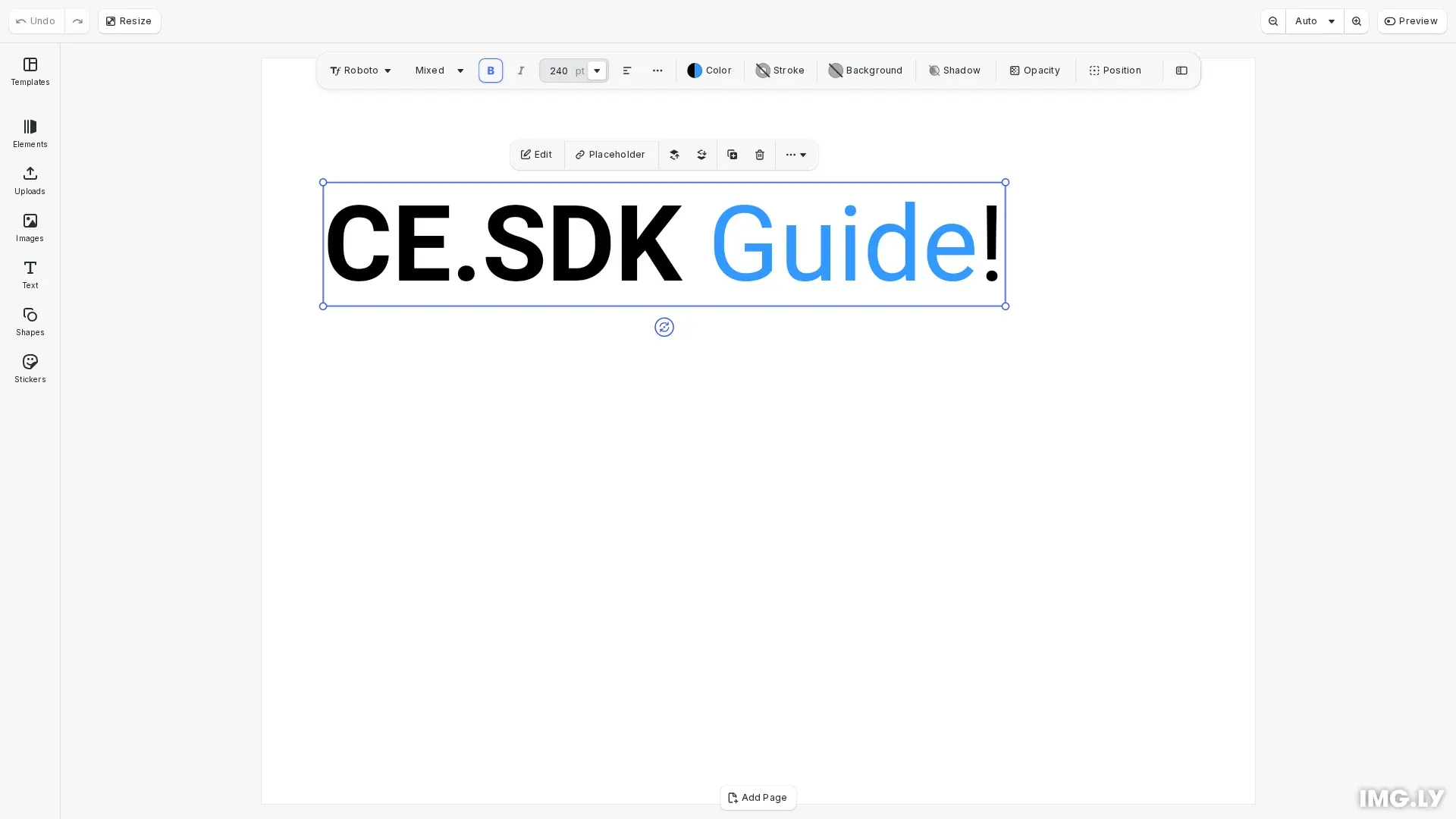
CE.SDK provides text editing through two approaches: interactive canvas editing where users type directly into text blocks, and programmatic editing through range-based APIs. This guide focuses on the programmatic approach, covering how to replace text, apply formatting to specific ranges, and query text properties.
This guide covers creating text blocks, replacing and removing text content, applying formatting to character ranges, and querying line information.
Creating a Text Block#
We first create a text block and position it on the page. Text blocks support automatic sizing based on content using the Auto width and height modes.
// Create a text blockconst text = engine.block.create("text");engine.block.appendChild(page, text);engine.block.setPositionX(text, 50);engine.block.setPositionY(text, 100);engine.block.setWidthMode(text, "Auto");engine.block.setHeightMode(text, "Auto");The text block is appended to the page and positioned with explicit X and Y coordinates. Setting width and height modes to Auto allows the block to resize based on its content.
Setting a Typeface#
We define a typeface with font variants to enable formatting options like bold. The typeface must include variants for each weight or style you want to apply.
// Define a typeface with bold variant supportconst typeface = {  name: "Roboto",  fonts: [    {      uri: "https://cdn.img.ly/assets/v2/ly.img.typeface/fonts/Roboto/Roboto-Regular.ttf",      subFamily: "Regular",    },    {      uri: "https://cdn.img.ly/assets/v2/ly.img.typeface/fonts/Roboto/Roboto-Bold.ttf",      subFamily: "Bold",      weight: "bold" as const,    },  ],};
// Set the font (required for bold weight support)engine.block.setFont(text, typeface.fonts[0].uri, typeface);
The setFont() method sets the font and typeface for the text block. Once set, the block supports all formatting options defined in the typeface’s font variants.
Replacing and Removing Text#
We modify text content using engine.block.replaceText() and engine.block.removeText(). Text positions use UTF-16 indices where [from, to) defines the range.
// Replace the entire text contentengine.block.replaceText(text, "Hello World!");
// Replace "World" with "CE.SDK" (positions 6-11)engine.block.replaceText(text, "CE.SDK", 6, 11);
// Insert " Guide" before the exclamation mark (position 12)engine.block.replaceText(text, " Guide", 12, 12);
The replaceText() method can replace all text (when no indices provided), insert at a position (when from equals to), or replace a range. Here we start with a full replacement, insert text, then replace a portion.
// Remove "Hello " to get "CE.SDK Guide!" (positions 0-6)engine.block.removeText(text, 0, 6);The removeText() method deletes characters in the specified range. When we omit indices, operations apply to the entire text content.
Using Tab Stops#
We align text into columns with tab characters. A tab moves the text after it to the next tab stop. Tab stops repeat at a fixed interval from the start of each line, in both left-to-right and right-to-left text. A tab whose stop lies past the frame edge wraps to the next line.
// A tab character moves the text after it to the next tab stop.// Tabs align the two columns of this second text block.const table = engine.block.create("text");engine.block.appendChild(page, table);engine.block.setPositionX(table, 50);engine.block.setPositionY(table, 380);engine.block.setWidthMode(table, "Auto");engine.block.setHeightMode(table, "Auto");engine.block.setTextFontSize(table, 60);engine.block.replaceText(table, "Name:\tCE.SDK\nSize:\tA4");
// Tab stops repeat every `tabStopInterval` multiples of the base font size.engine.editor.setSettingFloat("tabStopInterval", 3.0);
The tabStopInterval setting defines the distance between tab stops as a multiple of the base font size. The default is 2. A value of 0 or less makes tab characters advance no width.
During interactive editing, pressing Tab inserts a tab character at the cursor. In lists, Tab and Shift+Tab at the start of a paragraph change the list indent level instead; outside a list Shift+Tab does nothing.
Applying Text Formatting#
We apply formatting to specific character ranges using setter methods. Each method accepts optional from and to parameters to target specific ranges.
// Apply bold formatting to "CE.SDK" (positions 0-6)engine.block.setTextFontWeight(text, "bold", 0, 6);
// Apply color to "Guide" (positions 7-12)engine.block.setTextColor(text, { r: 0.2, g: 0.6, b: 1.0, a: 1.0 }, 7, 12);
// Set font size for the entire blockengine.block.setTextFontSize(text, 240);
The setTextFontWeight() method applies bold or normal weight. The setTextColor() method accepts RGBA color objects. The setTextFontSize() method sets the font size in design units.
Querying Text Properties#
We retrieve formatting information using getter methods that return arrays of unique values found in the specified range.
// Query formatting propertiesconst colors = engine.block.getTextColors(text);const weights = engine.block.getTextFontWeights(text);const sizes = engine.block.getTextFontSizes(text);
console.log("Text colors:", colors);console.log("Font weights:", weights);console.log("Font sizes:", sizes);
The getter methods return arrays because text blocks can contain mixed formatting. For example, getTextColors() returns all unique colors applied within the queried range.
Line Information#
We query information about rendered text lines including count, content, and bounding boxes.
// Query line informationconst lineCount = engine.block.getTextVisibleLineCount(text);console.log("Line count:", lineCount);
if (lineCount > 0) {  const lineContent = engine.block.getTextVisibleLineContent(text, 0);  console.log("First line content:", lineContent);
  const lineBounds = engine.block.getTextVisibleLineGlobalBoundingBoxXYWH(    text,    0  );  console.log("First line bounds:", lineBounds);}
The getTextVisibleLineCount() returns the number of rendered lines. For each line, getTextVisibleLineContent() returns the text content and getTextVisibleLineGlobalBoundingBoxXYWH() returns the bounding box in scene coordinates.
Font Metrics#
We retrieve raw font metrics from a font file URI. The returned values are in the font’s design units coordinate space.
// Get raw font metrics from a font file URIconst fontFileUri = typeface.fonts[0].uri;const metrics = await engine.editor.getFontMetrics(fontFileUri);console.log("Ascender:", metrics.ascender);console.log("Descender:", metrics.descender);console.log("Units per em:", metrics.unitsPerEm);console.log("Line Gap:", metrics.lineGap);console.log("Cap Height:", metrics.capHeight);console.log("x-Height:", metrics.xHeight);console.log("Underline Offset:", metrics.underlineOffset);console.log("Underline Size:", metrics.underlineSize);console.log("Strikeout Offset:", metrics.strikeoutOffset);console.log("Strikeout Size:", metrics.strikeoutSize);The getFontMetrics() method returns the font’s ascender, descender, unitsPerEm, lineGap, capHeight, xHeight, underlineOffset, underlineSize, strikeoutOffset, and strikeoutSize values. These metrics are useful for precise text layout calculations, such as computing line heights, aligning text across different fonts, or positioning text decorations. The capHeight and xHeight values are useful for optical alignment of text elements. If the font is not yet loaded, it will be fetched asynchronously.
Troubleshooting#
Text not updating: Verify the text block ID is valid using engine.block.isValid().
Range indices incorrect: Remember indices are UTF-16 code units. Multi-byte characters (emojis, some Unicode) occupy multiple indices.
Formatting not applied: Check that the range [from, to) is valid and within the text length. Also ensure the typeface includes a font variant for the requested weight or style.
Line count is zero: Ensure the text block has content and is rendered. Empty text blocks return zero lines.
Tab characters show no width: Check that the tabStopInterval setting is greater than 0.
API Reference#
| Method | Purpose |
|---|---|
engine.block.setFont() |
Set font and typeface for the text block |
engine.block.replaceText() |
Replace or insert text at specified indices |
engine.block.removeText() |
Remove text at specified indices |
engine.block.setTextColor() |
Set color for entire text or specific range |
engine.block.getTextColors() |
Get unique colors in text range |
engine.block.setTextFontWeight() |
Set font weight for text range |
engine.block.getTextFontWeights() |
Get unique font weights in range |
engine.block.setTextFontSize() |
Set font size for text range |
engine.block.getTextFontSizes() |
Get unique font sizes in range |
engine.block.getTextVisibleLineCount() |
Get number of rendered lines |
engine.block.getTextVisibleLineContent() |
Get text content of a specific line |
engine.block.getTextVisibleLineGlobalBoundingBoxXYWH() |
Get line bounds in scene coordinates |
engine.editor.setSettingFloat() |
Set the distance between text tab stops |
Text Type#
A block for displaying text content.
This section describes the properties available for the Text Type (//ly.img.ubq/text) block type.
| Property | Type | Default | Description |
|---|---|---|---|
alwaysOnBottom |
Bool |
false |
If true, this element’s global sorting order is automatically adjusted to be lower than all other siblings. |
alwaysOnTop |
Bool |
false |
If true, this element’s global sorting order is automatically adjusted to be higher than all other siblings. |
backgroundColor/color |
Color |
{"r":0.667,"g":0.667,"b":0.667,"a":1} |
The color of the background. |
backgroundColor/cornerRadius |
Float |
0 |
The corner radius of the background. |
backgroundColor/enabled |
Bool |
false |
Whether the background color is enabled. |
backgroundColor/paddingBottom |
Float |
0 |
The bottom padding of the background. |
backgroundColor/paddingLeft |
Float |
0 |
The left padding of the background. |
backgroundColor/paddingRight |
Float |
0 |
The right padding of the background. |
backgroundColor/paddingTop |
Float |
0 |
The top padding of the background. |
blend/mode |
Enum |
"Normal" |
The blend mode to use when compositing the block., Possible values: "PassThrough", "Normal", "Darken", "Multiply", "ColorBurn", "LinearBurn", "DarkenColor", "Lighten", "Screen", "ColorDodge", "LinearDodge", "LightenColor", "Overlay", "SoftLight", "HardLight", "VividLight", "LinearLight", "PinLight", "HardMix", "Difference", "Exclusion", "Subtract", "Divide", "Hue", "Saturation", "Color", "Luminosity" |
clipped |
Bool |
false |
This component is used to identify elements whose contents and children should be clipped to their bounds. |
contentFill/horizontalAlignment |
Enum |
"Center" |
The horizontal alignment of the content fill inside the block. Only affects Contain and Cover fill modes; has no visible effect in Crop mode., Possible values: "Left", "Center", "Right" |
contentFill/mode |
Enum |
"Cover" |
Defines how content should be resized to fit its container., Possible values: "Crop", "Cover", "Contain" |
contentFill/verticalAlignment |
Enum |
"Center" |
The vertical alignment of the content fill inside the block. Only affects Contain and Cover fill modes; has no visible effect in Crop mode., Possible values: "Top", "Center", "Bottom" |
dropShadow/blurRadius/x |
Float |
1 |
The horizontal blur radius of the drop shadow. |
dropShadow/blurRadius/y |
Float |
1 |
The vertical blur radius of the drop shadow. |
dropShadow/clip |
Bool |
false |
Whether the drop shadow should be clipped to the block’s bounds. |
dropShadow/color |
Color |
{"r":0,"g":0,"b":0,"a":0.25} |
The color of the drop shadow. |
dropShadow/enabled |
Bool |
false |
Whether the drop shadow is enabled. |
dropShadow/offset/x |
Float |
1.76777 |
The horizontal offset of the drop shadow. |
dropShadow/offset/y |
Float |
1.76777 |
The vertical offset of the drop shadow. |
fill/enabled |
Bool |
true |
Whether the fill should be rendered or not. |
fill/overprint |
Bool |
false |
Whether the fill should be printed over (added to) the underlying inks instead of replacing them. Used for CMYK separations. |
fill/solid/color |
Color |
"-" |
The fill color. |
flip/horizontal |
Bool |
"-" |
Whether the block is flipped horizontally. |
flip/vertical |
Bool |
"-" |
Whether the block is flipped vertically. |
globalBoundingBox/height |
Float |
"-" |
The height of the block’s axis-aligned bounding box in world coordinates., (read-only) |
globalBoundingBox/width |
Float |
"-" |
The width of the block’s axis-aligned bounding box in world coordinates., (read-only) |
globalBoundingBox/x |
Float |
"-" |
The x-coordinate of the block’s axis-aligned bounding box in world coordinates., (read-only) |
globalBoundingBox/y |
Float |
"-" |
The y-coordinate of the block’s axis-aligned bounding box in world coordinates., (read-only) |
height |
Float |
100 |
The height of the block’s frame. |
height/mode |
Enum |
"Absolute" |
A mode describing how the height dimension may be interpreted., Possible values: "Absolute", "Percent", "Auto" |
highlightEnabled |
Bool |
true |
Show highlighting when selected or hovered |
lastFrame/height |
Float |
"-" |
The height of the block’s frame from the previous layout pass., (read-only) |
lastFrame/width |
Float |
"-" |
The width of the block’s frame from the previous layout pass., (read-only) |
lastFrame/x |
Float |
"-" |
The x-coordinate of the block’s frame from the previous layout pass., (read-only) |
lastFrame/y |
Float |
"-" |
The y-coordinate of the block’s frame from the previous layout pass., (read-only) |
motionBlur/enabled |
Bool |
false |
Whether a video export and the preview draw this block with motion blur: the average of sub-frame renders over the scene’s shutter. Image export is not blurred. The features/previewMotionBlurEnabled setting turns the preview blur off. |
movement/constraint |
Float |
-1 |
The fraction of the block’s own size that may be positioned outside the parent page boundary. A value of -1 means “not set” (fall through to the next priority level). A value of 0 means the block must stay fully inside the page. When set on a page, applies to the page’s children as a default constraint. |
opacity |
Float |
1 |
The opacity of the block. Valid range is 0.0 to 1.0. |
placeholder/enabled |
Bool |
false |
Whether the placeholder behavior is enabled or not. |
placeholderBehavior/enabled |
Bool |
false |
Whether the placeholder behavior is enabled or not. |
playback/duration |
Double |
5 |
The duration in seconds for which this block should be visible. |
playback/timeOffset |
Double |
0 |
The time in seconds relative to its parent at which this block should first appear. |
position |
Vec2 |
{"x":0,"y":0} |
The x and y coordinates of the block’s origin as one value. Each coordinate follows its own mode, position/x/mode and position/y/mode. |
position/x |
Float |
0 |
The x-coordinate of the block’s origin. |
position/x/mode |
Enum |
"Absolute" |
A mode describing how the x-position may be interpreted., Possible values: "Absolute", "Percent", "Auto" |
position/y |
Float |
0 |
The y-coordinate of the block’s origin. |
position/y/mode |
Enum |
"Absolute" |
A mode describing how the y-position may be interpreted., Possible values: "Absolute", "Percent", "Auto" |
rotation |
Float |
0 |
The rotation of the block in radians. |
selected |
Bool |
false |
Indicates if the block is currently selected. |
selectionEnabled |
Bool |
true |
Whether the block can be selected in the editor. |
stroke/cap |
Enum |
"Butt" |
The cap geometry applied to both ends of an open stroked path. Writing this property updates both stroke/startCap and stroke/endCap., Possible values: "Butt", "Round", "Square" |
stroke/color |
Color |
{"r":0.67,"g":0.67,"b":0.67,"a":1} |
The color of the stroke. |
stroke/cornerGeometry |
Enum |
"Miter" |
The geometry of the stroke at corners., Possible values: "Bevel", "Miter", "Round" |
stroke/dashArray |
Struct |
null |
The custom dash pattern as alternating dash and gap lengths in design-unit space. An empty array renders a solid stroke. |
stroke/dashEndCap |
Enum |
"Butt" |
The cap geometry at the trailing edge of each dash piece. Only takes effect when a dash pattern is active., Possible values: "Butt", "Round", "Square" |
stroke/dashOffset |
Float |
0 |
The offset into the dash pattern at which dashing starts, in design-unit space. |
stroke/dashStartCap |
Enum |
"Butt" |
The cap geometry at the leading edge of each dash piece. Only takes effect when a dash pattern is active., Possible values: "Butt", "Round", "Square" |
stroke/enabled |
Bool |
false |
Whether the stroke is enabled. |
stroke/endCap |
Enum |
"Butt" |
The cap geometry at the end of an open stroked path., Possible values: "Butt", "Round", "Square" |
stroke/miterLimit |
Float |
4 |
The limit for the length of a miter join, as a multiple of the stroke width. A longer join is beveled. At least 1. |
stroke/overprint |
Bool |
false |
Whether the stroke should be printed over (added to) the underlying inks instead of replacing them. Used for CMYK separations. |
stroke/position |
Enum |
"Center" |
The position of the stroke relative to the shape’s edge., Possible values: "Center", "Inner", "Outer" |
stroke/startCap |
Enum |
"Butt" |
The cap geometry at the start of an open stroked path., Possible values: "Butt", "Round", "Square" |
stroke/style |
Enum |
"Solid" |
The style of the stroke., Possible values: "Dashed", "DashedRound", "Dotted", "LongDashed", "LongDashedRound", "Solid" |
stroke/width |
Float |
4.72441 |
The width of the stroke. |
text/automaticFontSizeEnabled |
Bool |
false |
Whether the font size should be automatically determined to fit the entire text within the block’s frame. |
text/backgroundCornerRadius |
Float |
0 |
The corner radius of the background of each text run. |
text/backgroundPadding/bottom |
Float |
0 |
The bottom padding of the background of each text run. |
text/backgroundPadding/left |
Float |
0 |
The left padding of the background of each text run. |
text/backgroundPadding/right |
Float |
0 |
The right padding of the background of each text run. |
text/backgroundPadding/top |
Float |
0 |
The top padding of the background of each text run. |
text/clipLinesOutsideOfFrame |
Bool |
true |
Whether or not to display lines outside the frame. |
text/externalReference |
String |
"" |
An external reference that may hint at the source that was used to populate fontFileURI. |
text/fontFileUri |
String |
"" |
The URI of a font file. |
text/fontSize |
Float |
10 |
The font size in points. |
text/hasClippedLines |
Bool |
false |
A tag indicating that text lines are outside the block’s frame and are hidden., (read-only) |
text/horizontalAlignment |
Enum |
"Auto" |
The horizontal text alignment., Possible values: "Left", "Right", "Center", "Justify", "Auto" |
text/letterSpacing |
Float |
0 |
The letter spacing relative to the original spacing. |
text/lineHeight |
Float |
1 |
The line height relative to the font size. |
text/maxAutomaticFontSize |
Float |
-1 |
The upper font size limit if the font size is automatically calculated. |
text/minAutomaticFontSize |
Float |
-1 |
The lower font size limit if the font size is automatically calculated. |
text/paragraphSpacing |
Float |
0 |
The additional spacing between paragraphs relative to the font size. |
text/pathExternalRef |
String |
"" |
A hint recording which asset last populated the baseline path. Ignored for layout; used by the UI to highlight the active curve preset. |
text/pathFlipped |
Bool |
false |
Whether text is placed on the opposite (under) side of the baseline path. Has no effect when no path is set. |
text/pathOffset |
Float |
0 |
The start offset along the baseline path as a proportion of the path length in [-1, 1]. Has no effect when no path is set. |
text/subscriptFontScale |
Float |
0.583 |
The font scale of subscript text relative to the font size. |
text/subscriptVerticalShift |
Float |
0.333 |
The downward shift of subscript text relative to the font size. |
text/superscriptFontScale |
Float |
0.583 |
The font scale of superscript text relative to the font size. |
text/superscriptVerticalShift |
Float |
0.333 |
The upward shift of superscript text relative to the font size. |
text/text |
String |
"Text" |
The text content. |
text/typeface |
String |
"" |
The typeface of the font. |
text/useContextualAlternates |
Bool |
true |
Whether contextual alternates (calt) are enabled for text shaping. |
text/useContextualLigatures |
Bool |
true |
Whether contextual ligatures (clig) are enabled for text shaping. |
text/useDiscretionaryLigatures |
Bool |
false |
Whether discretionary ligatures (dlig) are enabled for text shaping. |
text/useKerning |
Bool |
true |
Whether kerning is enabled for text shaping. |
text/useLigatures |
Bool |
true |
Whether font ligatures (standard and contextual) are enabled for text shaping. |
text/verticalAlignment |
Enum |
"Top" |
The vertical text alignment., Possible values: "Top", "Bottom", "Center" |
transform/anchor/x |
Float |
0 |
The x-coordinate of the point that rotation, skew and scale pivot on, in the block’s local design units. 0 is the left edge of the block. Set it, even to 0, to make it the pivot of a rotation keyframe track too; without an anchor the track turns the block around its centre. |
transform/anchor/y |
Float |
0 |
The y-coordinate of the point that rotation, skew and scale pivot on, in the block’s local design units. 0 is the top edge of the block. Set it, even to 0, to make it the pivot of a rotation keyframe track too; without an anchor the track turns the block around its centre. |
transform/autoOrient |
Bool |
false |
Whether the block turns to follow the direction of its position keyframes. The direction is added to the rotation. |
transform/scale/x |
Float |
1 |
The horizontal scale of the block about its anchor. 1 is the frame size. A negative value flips the block horizontally. |
transform/scale/y |
Float |
1 |
The vertical scale of the block about its anchor. 1 is the frame size. A negative value flips the block vertically. |
transform/skew |
Float |
0 |
The shear angle of the block in degrees. The rendered shear is limited to the range -85° to 85°. |
transform/skewAxis |
Float |
0 |
The direction along which the block is sheared, in degrees. 0 shears along the block’s x-axis. |
transformLocked |
Bool |
false |
DesignBlocks with this tag can’t be transformed (moved, rotated, scaled, cropped, or flipped). |
visible |
Bool |
true |
If the block is visible in the editor. |
width |
Float |
100 |
The width of the block’s frame. |
width/mode |
Enum |
"Absolute" |
A mode describing how the width dimension may be interpreted., Possible values: "Absolute", "Percent", "Auto" |