Validate your design before export by detecting elements outside the page, protruding content, obscured text, and other issues that could affect the final output quality.
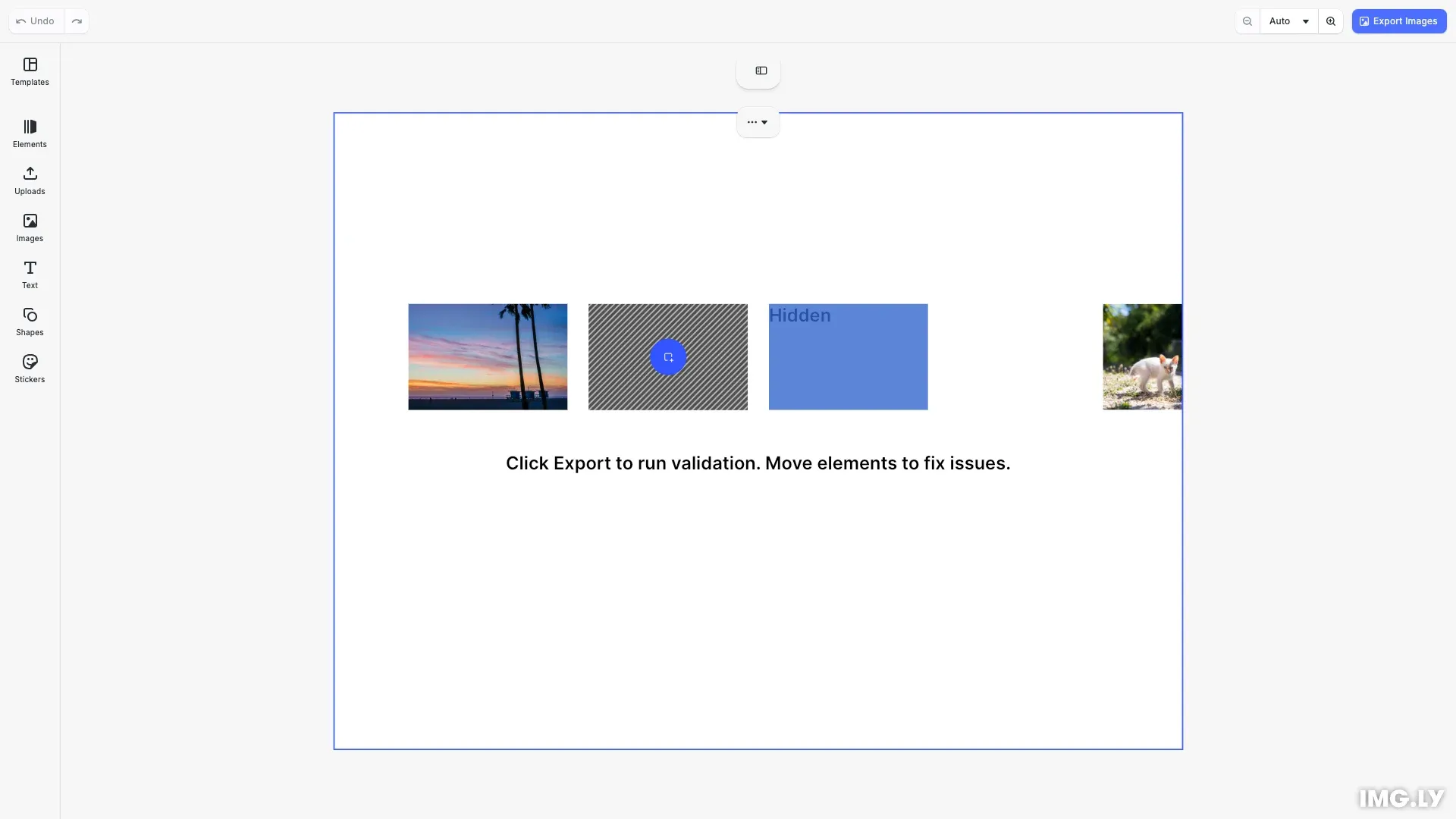
Pre-export validation catches layout and quality issues before export, preventing problems like cropped content, hidden text, and elements missing from the final output. Production-quality designs require elements to be properly positioned within the page boundaries.
This guide demonstrates how to detect elements outside the page, find protruding content, identify obscured text, and integrate validation into the export workflow.
Getting Element Bounds#
To detect spatial issues, we need to get the bounding box of elements in global coordinates. The getGlobalBoundingBox* methods return positions that account for all transformations:
const x = engine.block.getGlobalBoundingBoxX(blockId);const y = engine.block.getGlobalBoundingBoxY(blockId);const width = engine.block.getGlobalBoundingBoxWidth(blockId);const height = engine.block.getGlobalBoundingBoxHeight(blockId);return [x, y, x + width, y + height];This returns coordinates as [x1, y1, x2, y2] representing the top-left and bottom-right corners of the element. The overlap between element and page bounds is calculated as the intersection area divided by the element’s total area. An overlap of 0 means completely outside, while 1 (100%) means fully inside.
Detecting Elements Outside the Page#
Elements completely outside the page won’t appear in the exported output. We find these by checking for blocks with zero overlap with the page bounds:
const blockBounds = this.getBoundingBox(engine, blockId);const overlap = this.calculateOverlap(blockBounds, pageBounds);
if (overlap === 0) {  // Element is completely outside the page
These issues are categorized as errors because the content is completely missing from the export.
Detecting Protruding Elements#
Elements that extend beyond the page boundaries will be partially cropped in the export. For each block, compare its bounds against the page bounds and calculate the overlap ratio:
// Compare element bounds against page boundsconst blockBounds = this.getBoundingBox(engine, blockId);const overlap = this.calculateOverlap(blockBounds, pageBounds);
// Protruding: partially inside (overlap > 0) but not fully inside (overlap < 1)if (overlap > 0 && overlap < 0.99) {
An overlap between 0% and 100% indicates the element is partially inside the page. These issues are warnings because the content is partially visible but may not appear as intended.
Finding Obscured Text#
Text hidden behind other elements may be unreadable in the final export. First, get the stacking order and all text blocks:
const children = engine.block.getChildren(page);const textBlocks = engine.block.findByType('text');The getChildren() method returns blocks in stacking order - elements later in the array are rendered on top. For each text block, check if any non-text element above it overlaps with its bounds:
// Elements later in children array are rendered on topconst blocksAbove = children.slice(textIndex + 1);
for (const aboveId of blocksAbove) {  // Skip text blocks - they don't typically obscure other text  if (engine.block.getType(aboveId) === '//ly.img.ubq/text') continue;
  const overlap = this.calculateOverlap(    this.getBoundingBox(engine, textId),    this.getBoundingBox(engine, aboveId)  );
  if (overlap > 0) {    // Text is obscured by element above it
We skip text-on-text comparisons since transparent text backgrounds don’t typically obscure other text. When overlap is detected, we flag the text as potentially obscured.
Checking Placeholder Content#
Placeholders mark areas where users must add content before export. First, find all placeholder blocks in the design:
const placeholders = engine.block.findAllPlaceholders();Then inspect each placeholder’s fill to determine if content has been added. Get the fill block and check its type to determine the validation logic:
const fillId = engine.block.getFill(blockId);if (!fillId || !engine.block.isValid(fillId)) return false;
const fillType = engine.block.getType(fillId);
// Check image fill - empty URI means unfilled placeholderif (fillType === '//ly.img.ubq/fill/image') {  const imageUri = engine.block.getString(fillId, 'fill/image/imageFileURI');  return imageUri !== '' && imageUri !== undefined;}
For image placeholders, check if the fill/image/imageFileURI property has a value. An empty or undefined URI indicates the placeholder hasn’t been filled. Unfilled placeholders are treated as errors that block export, ensuring users complete all required content before exporting.
Overriding the Export Action#
Intercept the navigation bar export action using cesdk.actions.get() and cesdk.actions.register(). The action ID 'exportDesign' controls the export button in the CE.SDK interface:
cesdk.actions.register('exportDesign', async () => {  const result = this.validateDesign(engine);  const hasErrors = result.errors.length > 0;  const hasWarnings = result.warnings.length > 0;
  // Log all issues to console for debugging  if (hasErrors || hasWarnings) {    console.log('Validation Results:', result);  }
  // Block export for errors  if (hasErrors) {    cesdk.ui.showNotification({      message: `${result.errors.length} error(s) found - export blocked`,      type: 'error',      duration: 'long'    });
    // Select first problematic block    const firstError = result.errors[0];    if (engine.block.isValid(firstError.blockId)) {      engine.block.select(firstError.blockId);    }    return;  }
  // Show warning but allow export  if (hasWarnings) {    cesdk.ui.showNotification({      message: `${result.warnings.length} warning(s) found - proceeding with export`,      type: 'warning',      duration: 'medium'    });  }
  // Proceed with export  exportDesign();});
This override runs validation before export, shows notifications for errors or warnings, and selects the first problematic block to help users locate issues. Export proceeds only when validation passes.
API Reference#
| Method | Purpose |
|---|---|
engine.block.getGlobalBoundingBoxX(id) | Get element’s global X position |
engine.block.getGlobalBoundingBoxY(id) | Get element’s global Y position |
engine.block.getGlobalBoundingBoxWidth(id) | Get element’s global width |
engine.block.getGlobalBoundingBoxHeight(id) | Get element’s global height |
engine.block.findByType(type) | Find all blocks of a specific type |
engine.block.getChildren(id) | Get child blocks in stacking order |
engine.block.getType(id) | Get the block’s type string |
engine.block.getName(id) | Get the block’s display name |
engine.block.isValid(id) | Check if block exists |
engine.block.select(id) | Select a block in the editor |
engine.block.findAllPlaceholders() | Find all placeholder blocks |
engine.block.getFill(id) | Get the fill block |
engine.block.getString(id, property) | Get a string property value |
cesdk.actions.get(actionId) | Get an action function (browser) |
cesdk.actions.register(actionId, fn) | Register an action (browser) |
cesdk.ui.showNotification(options) | Display notification (browser) |