Add custom caption presets to CE.SDK’s video caption feature. A caption preset is a declarative style preset: you describe the look as JSON and the engine applies it to a caption block with a single click.
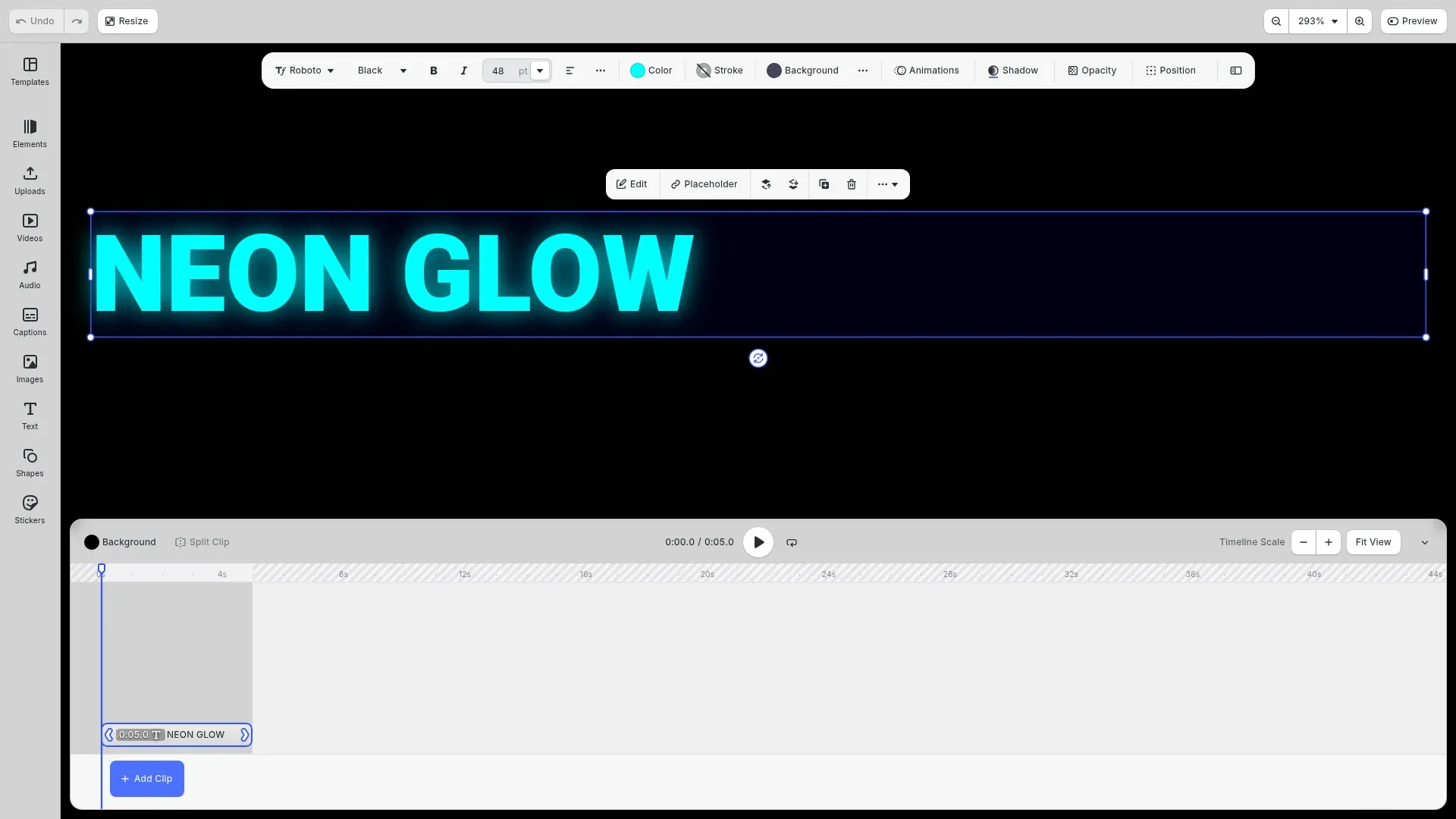
CE.SDK ships built-in caption presets so users can restyle their captions in one click, and you can add your own. A preset is just a JSON object that describes the look, so there are no blocks to build or files to serialize. This guide shows how to define a preset, register it at runtime, and host your own set.
Define a caption style preset#
Describe the look as a plain object. The engine applies it to a caption block, so you never create or serialize a styled block yourself.
// Describe the look as a declarative style preset. The engine reads this// object and applies it to a caption block, so there is no styled block to// serialize. Colors are RGB(A) objects in the 0-1 range.const neonGlowStylePreset: AssetStylePreset = { blockType: '//ly.img.ubq/caption', // `replace` resets the properties the preset does not list, so switching // presets never stacks leftover decorations. mode: 'replace', typeface: { family: 'Monoton', weight: 'normal', style: 'normal' }, properties: { // Keys without a slash are namespaced to the block (caption/*). 'caption/horizontalAlignment': 'Center', 'caption/verticalAlignment': 'Center', // Bright cyan text fill. 'fill/enabled': true, 'fill/solid/color': { r: 0, g: 1, b: 1, a: 1 }, // Semi-transparent background so captions stay readable over video. 'backgroundColor/enabled': true, 'backgroundColor/color': { r: 0, g: 0, b: 0.1, a: 0.7 }, // A matching glow built from a soft drop shadow. 'dropShadow/enabled': true, 'dropShadow/color': { r: 0, g: 1, b: 1, a: 0.8 }, 'dropShadow/clip': false }, // Keep the background rounding and the glow proportional to the font size // instead of baking in fixed pixel values. Each entry sets its property to // `ratio * fontSize`. scaleWithFontSize: [ { property: 'backgroundColor/cornerRadius', ratio: 0.2 }, { property: 'dropShadow/blurRadius/x', ratio: 0.8 }, { property: 'dropShadow/blurRadius/y', ratio: 0.8 } ]};The fields:
blockType: the target block. Use'//ly.img.ubq/caption'.mode:'replace'(the default) clears anything the preset omits, so presets never stack.'merge'layers the preset on top and keeps untouched properties.typeface: the font, resolved byfamilywith optionalweightandstyle.properties: a flat map of property paths to values. Keys without a slash are namespaced to the block (for examplecaption/horizontalAlignment); colors are RGB(A) objects in the 0-1 range. Common paths arefill/solid/color,backgroundColor/color,dropShadow/color, andcaption/horizontalAlignment.scaleWithFontSize(optional): keeps a decoration proportional to the font size. Each{ property, ratio }entry setspropertytoratio × fontSize. Supported forstroke/width, thedropShadowoffset and blur radius, andbackgroundColor/cornerRadius.
Register the preset#
CE.SDK already includes the ly.img.caption.presets source. Add your preset to it so it appears in the caption presets panel:
// Add the preset to the existing caption presets source so it shows up in// the caption presets panel next to the built-in presets.engine.asset.addAssetToSource('ly.img.caption.presets', { id: 'ly.img.caption.presets.neon-glow', label: { en: 'Neon Glow' }, meta: { thumbUri: '{{base_url}}/ly.img.caption.presets/thumbnails/neon-glow.png' }, groups: ['caption'], payload: { stylePreset: neonGlowStylePreset }});Users apply it from the panel like any built-in preset. To apply it in code, use engine.asset.applyToBlock('ly.img.caption.presets', asset, captionBlockId).
Host your own presets#
To serve presets from your own server instead of registering them at runtime, host a content.json and point the engine’s baseURL at it. The source needs only the index file and a thumbnails folder:
assets/v8/ly.img.caption.presets/├── content.json└── thumbnails/ └── neon-glow.pngEach asset carries its look inline in payload.stylePreset and a preview in meta.thumbUri. There are no separate preset files:
{ "version": "7.0.0", "id": "ly.img.caption.presets", "assets": [ { "id": "ly.img.caption.presets.neon-glow", "label": { "en": "Neon Glow" }, "meta": { "thumbUri": "{{base_url}}/ly.img.caption.presets/thumbnails/neon-glow.png" }, "groups": ["caption"], "payload": { "stylePreset": { "blockType": "//ly.img.ubq/caption", "mode": "replace", "typeface": { "family": "Monoton", "weight": "normal" }, "properties": { "fill/enabled": true, "fill/solid/color": { "r": 0, "g": 1, "b": 1, "a": 1 } } } } } ]}CE.SDK loads ly.img.caption.presets/content.json relative to baseURL, so your presets replace the defaults automatically:
const cesdk = await CreativeEditorSDK.create('#cesdk_container', { baseURL: 'https://your-server.com/assets/'});Troubleshooting#
- Preset not loading: confirm
content.jsonis reachable with no 404 or CORS errors, and thatversionis7.0.0. - Styles not applying: set
blockTypeto'//ly.img.ubq/caption'and check the property paths.mode: 'replace'drops anything the preset omits, so switch to'merge'to layer on top. - Color or decoration missing: use RGB(A) values in the 0-1 range, and enable a decoration before coloring it (for example
dropShadow/enabled: truealongsidedropShadow/color). - Thumbnail blank: verify the
thumbUripath resolves and the image is a PNG.
API Reference#
| Method | Purpose |
|---|---|
engine.asset.addAssetToSource(sourceId, asset) |
Register a custom preset in an asset source |
engine.asset.applyToBlock(sourceId, asset, block) |
Apply a preset to a caption block |
CreativeEditorSDK.create(container, config) |
Initialize the editor with a baseURL |