Protect design elements from unwanted modifications using CE.SDK’s scope-based permission system.
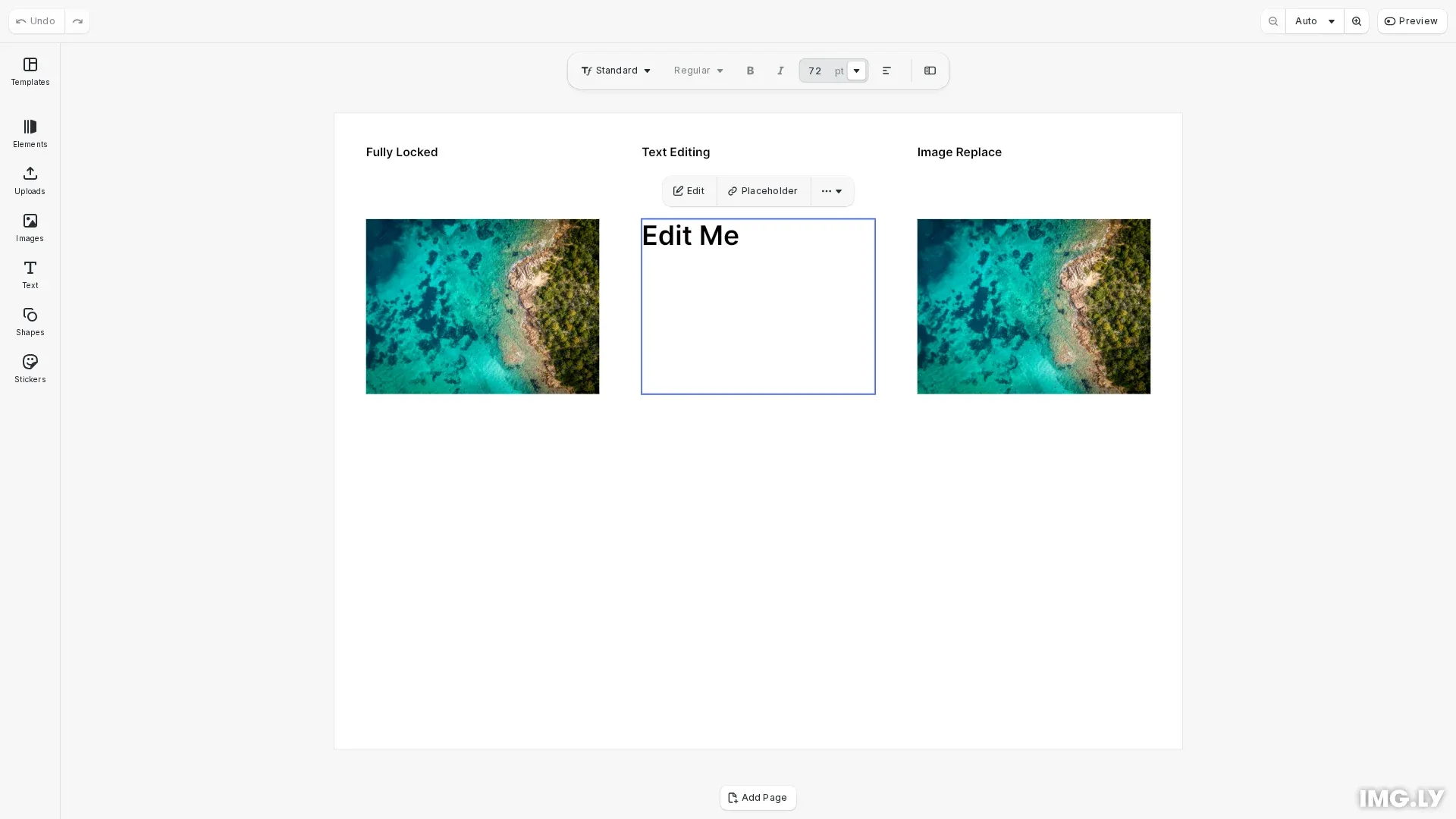
CE.SDK uses a two-layer scope system to control editing permissions. Global scopes set defaults for the entire scene, while block-level scopes override when the global setting is Defer. This enables flexible permission models from fully locked to selectively editable designs.
This guide covers how to lock entire designs, selectively enable specific editing capabilities, and check permissions programmatically.
Understanding the Scope Permission Model#
Scopes control what operations users can perform on design elements. CE.SDK combines global scope settings with block-level settings to determine the final permission.
| Global Scope | Block Scope | Result |
|---|---|---|
Allow | any | Permitted |
Deny | any | Blocked |
Defer | enabled | Permitted |
Defer | disabled | Blocked |
Global scopes have three possible values:
Allow: The operation is always permitted, regardless of block-level settingsDeny: The operation is always blocked, regardless of block-level settingsDefer: The permission depends on the block-level scope setting
Block-level scopes are binary: enabled or disabled. They only take effect when the global scope is set to Defer.
Locking an Entire Design#
To lock all editing operations, iterate through all available scopes and set each to Deny. We use engine.editor.findAllScopes() to discover all scope names dynamically.
// Lock the entire design by setting all scopes to Denyconst scopes = engine.editor.findAllScopes();for (const scope of scopes) { engine.editor.setGlobalScope(scope, 'Deny');}When all scopes are set to Deny, users cannot modify any aspect of the design. This includes selecting, moving, editing text, or changing any visual properties.
Enabling Selection for Interactive Blocks#
Before users can interact with any block, you must enable the editor/select scope. Without selection, users cannot click on or access any blocks, even if other editing capabilities are enabled.
// Enable selection for specific blocksengine.editor.setGlobalScope('editor/select', 'Defer');engine.block.setScopeEnabled(textBlock, 'editor/select', true);engine.block.setScopeEnabled(placeholderBlock, 'editor/select', true);Setting the global editor/select scope to Defer delegates the decision to each block. We then enable selection only on the specific blocks users should be able to interact with.
Selective Locking Patterns#
Lock everything first, then selectively enable specific capabilities on chosen blocks. This pattern provides fine-grained control over what users can modify.
Text-Only Editing#
To allow users to edit text content while protecting everything else, enable the text/edit scope. For text styling changes like font, size, and color, also enable text/character.
// Enable text editing on the text blockengine.editor.setGlobalScope('text/edit', 'Defer');engine.editor.setGlobalScope('text/character', 'Defer');engine.block.setScopeEnabled(textBlock, 'text/edit', true);engine.block.setScopeEnabled(textBlock, 'text/character', true);Users can now type new text content in the designated text block but cannot move, resize, or delete it.
Image Replacement#
To allow users to swap images while protecting layout and position, enable the fill/change scope on placeholder blocks.
// Enable image replacement on the placeholder blockengine.editor.setGlobalScope('fill/change', 'Defer');engine.block.setScopeEnabled(placeholderBlock, 'fill/change', true);Users can replace the image content but the block’s position, dimensions, and other properties remain locked.
Checking Permissions#
Verify whether operations are permitted using engine.block.isAllowedByScope(). This method evaluates both global and block-level settings to return the effective permission state.
// Check if operations are permitted on blocksconst canEditText = engine.block.isAllowedByScope(textBlock, 'text/edit');const canMoveImage = engine.block.isAllowedByScope(  imageBlock,  'layer/move');const canReplacePlaceholder = engine.block.isAllowedByScope(  placeholderBlock,  'fill/change');
console.log('Permission status:');console.log('- Can edit text:', canEditText); // trueconsole.log('- Can move locked image:', canMoveImage); // falseconsole.log('- Can replace placeholder:', canReplacePlaceholder); // true
The distinction between checking methods is:
isAllowedByScope()returns the effective permission after evaluating all scope levelsisScopeEnabled()returns only the block-level settinggetGlobalScope()returns only the global setting
Discovering Available Scopes#
To work with scopes programmatically, you can discover all available scope names and check their current settings.
// Discover all available scopesconst allScopes: Scope[] = engine.editor.findAllScopes();console.log('Available scopes:', allScopes);
// Check global scope settingsconst textEditGlobal = engine.editor.getGlobalScope('text/edit');const layerMoveGlobal = engine.editor.getGlobalScope('layer/move');console.log('Global text/edit:', textEditGlobal); // 'Defer'console.log('Global layer/move:', layerMoveGlobal); // 'Deny'
// Check block-level scope settingsconst textEditEnabled = engine.block.isScopeEnabled(textBlock, 'text/edit');console.log('Text block text/edit enabled:', textEditEnabled); // true
Available Scopes Reference#
| Scope | Description |
|---|---|
layer/move | Move block position |
layer/resize | Resize block dimensions |
layer/rotate | Rotate block |
layer/flip | Flip block horizontally or vertically |
layer/crop | Crop block content |
layer/opacity | Change block opacity |
layer/blendMode | Change blend mode |
layer/visibility | Toggle block visibility |
layer/clipping | Change clipping behavior |
fill/change | Change fill content |
fill/changeType | Change fill type |
stroke/change | Change stroke properties |
shape/change | Change shape type |
text/edit | Edit text content |
text/character | Change text styling (font, size, color) |
appearance/adjustments | Change color adjustments |
appearance/filter | Apply or change filters |
appearance/effect | Apply or change effects |
appearance/blur | Apply or change blur |
appearance/shadow | Apply or change shadows |
appearance/animation | Apply or change animations |
lifecycle/destroy | Delete the block |
lifecycle/duplicate | Duplicate the block |
editor/add | Add new blocks |
editor/select | Select blocks |