Understand how CE.SDK’s plugin system fits together—what a plugin is, how plugins attach to the editor or engine, and which parts of the editor they can extend.
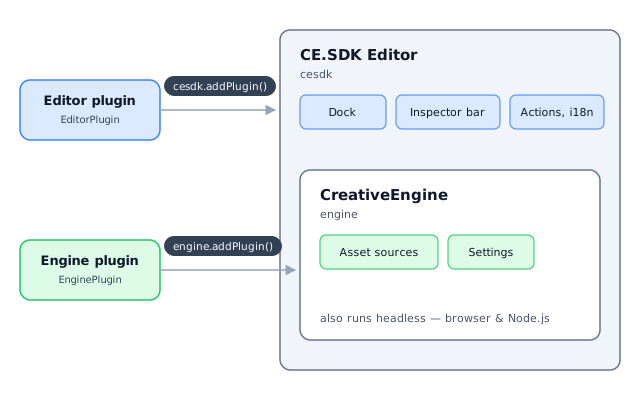
A plugin is a self-contained unit that packages editor behavior—settings, UI components, asset sources, callbacks—and attaches to an existing editor without rebuilding it. IMG.LY ships official plugins such as background removal as installable packages, and you can build your own to reuse the same behavior across products and editor entry points.
This guide covers what a plugin is, when to use one instead of other customization mechanisms, the two plugin layers on the Web, the extension surfaces plugins can reach, and where each official plugin is documented. For a complete, runnable implementation of both plugin layers, see the Custom Feature Plugin guide.
What a Plugin Is#
The editor is created first, and plugins are applied to it afterwards. Each plugin has a stable identity (name, version) and one initialize function where it applies its behavior. The same composition idea exists on every platform, even though the APIs differ: Android chains configuration classes and iOS subclasses the editor configuration.
Plugin or Not?#
Plugins are one of several customization mechanisms, and they’re commonly conflated. Use this list to place them:
- Inline configuration: The default. Configure the editor directly where you create it—best for one editor surface or a one-off product flow.
- Starter kits: Copy-to-adapt scaffolds for complete editor experiences. Browse them in the starter kits overview.
- Plugins: When the same behavior must travel between projects or entry points as one unit.
- Asset sources: Content providers that plugins (or apps directly) register—not a competing mechanism. See Asset Sources.
Importers and exporters, such as the PDF importer, are standalone packages that convert file formats. They are versioned independently of CE.SDK and are not plugins—you use their own APIs instead of registering them with the editor.
The Two Plugin Layers#
CE.SDK for Web distinguishes engine plugins from editor plugins. The rule of thumb: if the plugin needs UI (dock entries, panels, canvas menus), it’s an editor plugin; if it only needs engine APIs, an engine plugin suffices and stays compatible with headless setups.
Editor Plugins#
An editor plugin implements the EditorPlugin interface: a class with a stable name, a version and one initialize function. Its context contains both cesdk and engine, so it can extend the editor UI, actions and translations in addition to engine functionality. You register it with cesdk.addPlugin()—the same call you use for official plugins and for the editor configs like DesignEditorConfig. Most official @imgly/plugin-* packages are editor plugins.
Engine Plugins#
An engine plugin implements the EnginePlugin interface—the same contract, but its initialize receives only the engine. That makes it usable anywhere the engine runs, including headless mode without any editor UI, for capabilities such as custom asset sources. You register it with engine.addPlugin().
The Custom Feature Plugin guide implements one plugin of each layer in a single runnable example—constructor options, overriding the export action, extending the dock, replacing the inspector bar and registering an engine-level asset source.
What Plugins Can Extend#
Inside initialize, a plugin can reach every public API surface:
- Engine settings via
engine.editor.setSetting() - Editor UI slots such as the dock, inspector bar, canvas menus and panels—see UI customization and UI extensions
- Asset sources via
engine.asset.addSource()or asset source plugins—see Asset Sources - Translations and labels—see localization
- Actions and callbacks registered during
initialize, such as export handling
Official Plugins#
Each official plugin has its own page with installation and options; this table only maps the landscape.
| Plugin | What it does | Docs |
|---|---|---|
| Background Removal | Removes image backgrounds in the browser | Remove Background |
| AI Generation | Generates images, video, audio and text in the editor | AI Integration |
| Print-Ready PDF | Exports prepress-ready PDF files | Print-Ready PDF |
| Perfectly Clear | Applies automatic image enhancement | Perfectly Clear |
| Asset Sources | Connects external asset providers such as Unsplash | Asset Sources |
The plugins section lists the full set, and the plugins starter kit shows several of them preconfigured in one editor.
Building Your Own#
Your own plugins use the same EditorPlugin contract as the official ones. The Custom Feature Plugin guide walks through building one, from constructor options to overriding actions and UI components.
Troubleshooting#
- A plugin’s UI never appears: An engine plugin was used where an editor plugin is required. Register via
cesdk.addPlugin()with anEditorPluginso the plugin receivescesdk. - A plugin fails in headless use: The plugin depends on the editor UI context. Use an engine plugin registered with
engine.addPlugin(), or run it only where the editor exists. - Editor behavior set up earlier disappears: A later plugin replaced configuration instead of extending it. Extend the existing component order instead of overwriting it.
- A format conversion package is “not working as a plugin”: Importers and exporters are standalone packages, not plugins. Use the package’s own API.
Next Steps#
- Architecture - How the CreativeEngine is structured
- Headless Mode - Running the engine without UI
- Custom Feature Plugin - Build your own plugin