Define and manage spot colors programmatically for professional print workflows with exact color matching through premixed inks.
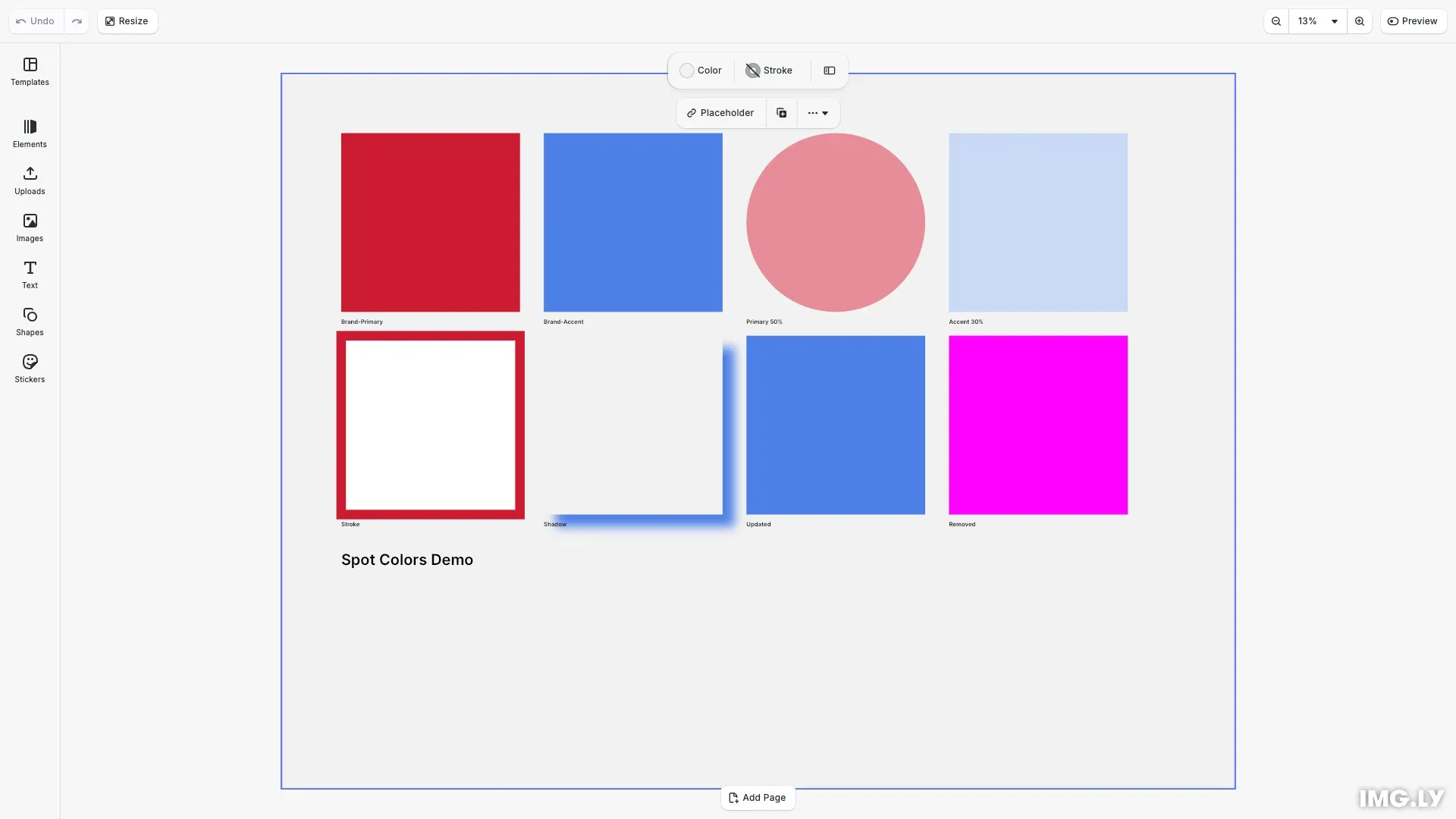
Spot colors are named colors reproduced using premixed inks in print production, providing exact color matching that CMYK process colors cannot guarantee. CE.SDK maintains a registry of spot color definitions at the editor level, where each spot color has a name and screen approximations (RGB and/or CMYK) for display purposes. The actual premixed ink is used during printing based on the color name.
This guide covers how to define spot colors with RGB and CMYK approximations, apply them to design elements with varying tints, query and update definitions, and assign spot colors to cutout types for die-cutting operations.
Understanding Spot Colors#
Spot colors differ from CMYK process colors in several important ways:
- Exact color matching - Premixed inks guarantee consistent color reproduction across print runs
- Brand consistency - Essential for logos and corporate brand colors
- Specialty effects - Enable metallic, fluorescent, and other specialty inks
- Color gamut - Some colors are unreproducible with CMYK process inks
In CE.SDK, spot colors have three components:
- Name - The identifier used in print output (e.g., “Brand-Red-485”)
- Approximations - RGB and/or CMYK values for screen display
- Tint - A value from 0.0 to 1.0 controlling color intensity
Define Spot Colors#
RGB Approximation#
We register spot colors using engine.editor.setSpotColorRGB(). This creates a new spot color if the name doesn’t exist, or updates the approximation if it does.
// Define a spot color with RGB approximation// RGB values range from 0.0 to 1.0engine.editor.setSpotColorRGB('Brand-Primary', 0.8, 0.1, 0.2);RGB approximations display the spot color on screen during editing. The values range from 0.0 to 1.0 for each channel.
CMYK Approximation#
We can add a CMYK approximation using engine.editor.setSpotColorCMYK(). This provides print-accurate previews alongside the RGB screen display.
// Add CMYK approximation for the same spot color// This provides print-accurate preview in addition to screen displayengine.editor.setSpotColorCMYK('Brand-Primary', 0.05, 0.95, 0.85, 0.0);
// Define another spot color with both approximationsengine.editor.setSpotColorRGB('Brand-Accent', 0.2, 0.4, 0.8);engine.editor.setSpotColorCMYK('Brand-Accent', 0.75, 0.5, 0.0, 0.0);
For best results, provide both RGB and CMYK approximations for each spot color. RGB displays on screen while CMYK enables accurate print preview.
Apply Spot Colors to Design Elements#
We apply spot colors to blocks using engine.block.setColor() with a SpotColor object containing name, tint, and externalReference.
// Apply spot colors to fills using SpotColor objects// The tint property (0.0 to 1.0) controls color intensity// The externalReference field stores metadata like color system originconst brandPrimary: SpotColor = {  name: 'Brand-Primary',  tint: 1.0,  externalReference: ''};
// Create a block and apply the Brand-Primary spot colorconst { fill: primaryFill } = createColorBlock(50, 50, 150, 150);engine.block.setColor(primaryFill, 'fill/color/value', brandPrimary);
The SpotColor object has these properties:
- name - Must match a defined spot color exactly (case-sensitive)
- tint - Controls intensity from 0.0 (transparent) to 1.0 (full strength)
- externalReference - Optional metadata identifying the color system origin (e.g., your in-house brand palette or a print vendor’s spot-color library)
Using Tints#
Tints create lighter variations without defining separate spot colors for each shade. A tint of 0.5 gives 50% color intensity.
// Use tints for lighter variations without defining new spot colors// Tint of 0.5 gives 50% color intensityconst brandPrimaryHalfTint: SpotColor = {  name: 'Brand-Primary',  tint: 0.5,  externalReference: ''};const { fill: tintedFill } = createColorBlock(390, 50, 150, 150, 'ellipse');engine.block.setColor(tintedFill, 'fill/color/value', brandPrimaryHalfTint);
// Create a gradient of tintsconst brandAccentLightTint: SpotColor = {  name: 'Brand-Accent',  tint: 0.3,  externalReference: ''};const { fill: lightTintFill } = createColorBlock(560, 50, 150, 150);engine.block.setColor(  lightTintFill,  'fill/color/value',  brandAccentLightTint);
Use tints for:
- Color variations in design systems
- Lighter backgrounds using brand colors
- Gradient-like effects with consistent spot color names
Strokes and Shadows#
Spot colors work with any color property, including strokes and drop shadows.
// Apply spot colors to strokes and shadowsconst { block: strokeBlock, fill: strokeBlockFill } = createColorBlock(  50,  220,  150,  150);// Set fill to whiteengine.block.setColor(strokeBlockFill, 'fill/color/value', {  r: 1.0,  g: 1.0,  b: 1.0,  a: 1.0});
// Enable stroke and apply spot colorengine.block.setStrokeEnabled(strokeBlock, true);engine.block.setStrokeWidth(strokeBlock, 8);const strokeColor: SpotColor = {  name: 'Brand-Primary',  tint: 1.0,  externalReference: ''};engine.block.setColor(strokeBlock, 'stroke/color', strokeColor);
// Apply spot color to drop shadowconst { block: shadowBlock, fill: shadowBlockFill } = createColorBlock(  220,  220,  150,  150);engine.block.setColor(shadowBlockFill, 'fill/color/value', {  r: 0.95,  g: 0.95,  b: 0.95,  a: 1.0});
engine.block.setDropShadowEnabled(shadowBlock, true);engine.block.setDropShadowOffsetX(shadowBlock, 10);engine.block.setDropShadowOffsetY(shadowBlock, 10);engine.block.setDropShadowBlurRadiusX(shadowBlock, 15);engine.block.setDropShadowBlurRadiusY(shadowBlock, 15);const shadowColor: SpotColor = {  name: 'Brand-Accent',  tint: 0.8,  externalReference: ''};engine.block.setColor(shadowBlock, 'dropShadow/color', shadowColor);
The stroke/color and dropShadow/color properties accept the same SpotColor objects as fill colors.
Query Spot Color Definitions#
List Defined Spot Colors#
We retrieve all defined spot colors with engine.editor.findAllSpotColors().
// Query all defined spot colorsconst spotColors = engine.editor.findAllSpotColors();console.log('Defined spot colors:', spotColors);
// Query RGB approximation for a spot colorconst rgbaApprox = engine.editor.getSpotColorRGBA('Brand-Primary');console.log('Brand-Primary RGB approximation:', rgbaApprox);
// Query CMYK approximation for a spot colorconst cmykApprox = engine.editor.getSpotColorCMYK('Brand-Primary');console.log('Brand-Primary CMYK approximation:', cmykApprox);
// Read back the color from a block and check if it's a spot colorconst retrievedColor = engine.block.getColor(  primaryFill,  'fill/color/value');if (isSpotColor(retrievedColor)) {  console.log(    `Retrieved SpotColor - Name: ${retrievedColor.name}, Tint: ${retrievedColor.tint}`  );}
This returns an array of spot color names currently registered in the editor.
Get Color Approximations#
Query individual color approximations with engine.editor.getSpotColorRGBA() or engine.editor.getSpotColorCMYK().
Querying an undefined spot color returns magenta values—use this to detect missing definitions.
Read Colors from Blocks#
When reading a color back from a block, engine.block.getColor() can return an RGBAColor, CMYKColor, or SpotColor. Use a type guard to check if it’s a SpotColor:
const isSpotColor = (color: unknown): color is SpotColor => {  return (    typeof color === 'object' &&    color !== null &&    'name' in color &&    'tint' in color &&    'externalReference' in color  );};
const retrievedColor = engine.block.getColor(fill, 'fill/color/value');if (isSpotColor(retrievedColor)) {  console.log(`Name: ${retrievedColor.name}, Tint: ${retrievedColor.tint}`);}
Update and Remove Spot Colors#
Update Approximations#
We update spot colors by calling the set methods again with the same name. This changes how the color appears on screen without affecting the color name in the print output.
// Update an existing spot color's approximation// This changes how the color appears on screen without affecting the color nameengine.editor.setSpotColorRGB('Brand-Accent', 0.3, 0.5, 0.9);console.log('Updated Brand-Accent RGB approximation');
// Show the updated color in a new blockconst { fill: updatedFill } = createColorBlock(390, 220, 150, 150);const updatedAccent: SpotColor = {  name: 'Brand-Accent',  tint: 1.0,  externalReference: ''};engine.block.setColor(updatedFill, 'fill/color/value', updatedAccent);
Existing blocks using that spot color automatically reflect the updated approximation.
Remove Spot Colors#
We remove spot colors with engine.editor.removeSpotColor() when they’re no longer needed.
// Define a temporary spot colorengine.editor.setSpotColorRGB('Temporary-Color', 0.5, 0.8, 0.3);
// Create a block using the temporary colorconst { fill: tempFill } = createColorBlock(560, 220, 150, 150);const tempColor: SpotColor = {  name: 'Temporary-Color',  tint: 1.0,  externalReference: ''};engine.block.setColor(tempFill, 'fill/color/value', tempColor);
// Remove the spot color definition// Blocks using this color will display magenta (default fallback)engine.editor.removeSpotColor('Temporary-Color');
console.log('Removed Temporary-Color - block now shows magenta fallback');
// Verify the color is no longer definedconst remainingSpotColors = engine.editor.findAllSpotColors();console.log('Remaining spot colors:', remainingSpotColors);
Removing a spot color doesn’t affect blocks already using it—they display magenta until redefined or until you apply a different color.
Spot Colors for Cutouts#
CE.SDK supports assigning spot colors to cutout types for die-cutting, embossing, and other print finishing operations.
// Assign spot colors to cutout types for die-cutting operations// First define a spot color for the die lineengine.editor.setSpotColorRGB('DieLine', 1.0, 0.0, 1.0);engine.editor.setSpotColorCMYK('DieLine', 0.0, 1.0, 0.0, 0.0);
// Associate the spot color with a cutout type// CutoutType can be 'Solid' or 'Dashed'engine.editor.setSpotColorForCutoutType('Solid', 'DieLine');
// Query the assigned spot colorconst cutoutSpotColor = engine.editor.getSpotColorForCutoutType('Solid');console.log('Cutout type Solid uses spot color:', cutoutSpotColor);
Use engine.editor.setSpotColorForCutoutType() to associate a spot color with a specific cutout type. Available cutout types are 'Solid' and 'Dashed', representing different die-line styles used in print finishing. All cutout blocks of that type automatically use the assigned spot color in the output. Query the assignment with engine.editor.getSpotColorForCutoutType().
Best Practices#
Define early - Register spot colors at initialization before applying them to blocks. Undefined colors display as magenta, which can confuse users.
Use descriptive names - Match your print vendor’s reference (e.g., “Brand-Red-485”) to ensure correct ink matching in production.
Provide both approximations - RGB for screen display, CMYK for print-accurate previews. This gives designers the best experience across different workflows.
Use tints sparingly - Prefer tints (0.0-1.0) for lighter variations rather than defining separate spot colors for each shade. This keeps your spot color list manageable.
Validate before export - Query findAllSpotColors() to verify all expected spot colors are defined before exporting for print.
Troubleshooting#
Spot Color Displays as Magenta#
The spot color hasn’t been defined. Call setSpotColorRGB() or setSpotColorCMYK() with the color name before applying it to blocks.
Color Approximation Looks Wrong#
Update the approximation values using setSpotColorRGB() or setSpotColorCMYK(). Remember that RGB values are for screen display while CMYK values are for print preview.
Spot Color Not in Output#
Verify the spot color name matches exactly (names are case-sensitive). Check that the block is using a SpotColor object, not an RGB or CMYK color value.
Can’t Remove Spot Color#
Ensure you’re using the exact name string. Note that removing a spot color doesn’t update existing blocks—they’ll show magenta until redefined or replaced with a different color.
API Reference#
| Method | Description |
|---|---|
engine.editor.setSpotColorRGB(name, r, g, b) |
Define/update spot color with RGB approximation |
engine.editor.setSpotColorCMYK(name, c, m, y, k) |
Define/update spot color with CMYK approximation |
engine.editor.findAllSpotColors() |
Get array of all defined spot color names |
engine.editor.getSpotColorRGBA(name) |
Query RGB approximation for a spot color |
engine.editor.getSpotColorCMYK(name) |
Query CMYK approximation for a spot color |
engine.editor.removeSpotColor(name) |
Remove a spot color from the registry |
engine.editor.setSpotColorForCutoutType(type, color) |
Assign spot color to a cutout type |
engine.editor.getSpotColorForCutoutType(type) |
Get spot color assigned to a cutout type |
engine.block.setColor(block, property, color) |
Apply color (including SpotColor) to a property |
engine.block.getColor(block, property) |
Read color from a block property |
Next Steps#
- Export for Printing - Export designs with spot colors for professional print production
- Apply Colors - Apply colors to fills, strokes, and shadows
- CMYK Colors - Work with CMYK process colors