Keep your designs and files in your own database and bucket, and let the agent read and save them there. You write a design store, a plugin module for your files, and a function that hands out exported files.
The code on this page is the reference: no example product runs it, and the
clients in yours.ts (your database, your bucket, your API) are yours to write.
Overview#
The agent works on your product’s designs and files, and they stay in your storage. The agent edits them with CE.SDK, IMG.LY’s design engine (the engine for short), which also powers IMG.LY’s embeddable web editor, the CE.SDK editor. Three kinds of data pass through code you write. For how the runner, the executor, and your storage fit together, see Architecture.
| What | The part you write | Where it runs |
|---|---|---|
| Designs: a design’s content and its version | A design store: two functions, read and write, passed to prepareCoDesign as designs |
Your agent runner, the code that runs the agent loop, a server process |
| Files: photos, logos, fonts, and new images the agent makes | A plugin module: one JavaScript file that registers your collections as asset sources (searchable lists of things a design can use), passed in plugins |
The executor, IMG.LY’s Docker image that runs the engine on your servers, and your CE.SDK editor |
| Exported files: a PNG or a PDF for the person | One function, uploadExport |
Your agent runner |
A design is stored as a scene, CE.SDK’s text document that lists every
page, text, and image in it, or as an .imgly archive, a zip file of the scene and the
images it holds. A design names its images by address, a URI, so each URI
has to still load next week.
The split is deliberate. The model’s code runs in the executor, apart from your store and keys ( Security). So the design store, and any credential it uses, stays in your runner, out of the model’s reach.
The Design Store#
The CoDesign SDK reads a design at the start of every tool call on it (each time the model asks the SDK to act on the design), and writes it after every change the model makes. Your store is the only way in:
read(id, { signal })returns the design, orundefinedwhen there is no such design or this person may not open it. The design has these fields, each explained below:content:{ scene },{ archive }, or{ uri }.version: the version this content is.cesdkVersion: the CE.SDK version that saved it. Required:nullwhen you do not know.title: the design’s title.editKey: the key the SDK wrote with this version.
write(id, content, { ifMatch, cesdkVersion, editKey, title, group, signal })stores the content only while the stored version is stillifMatch, and returns the new version. When someone saved meanwhile, it stores nothing and returnsundefined. WithoutifMatchit creates the design, only if the id is free.listSourceId(optional) names an asset source in your plugin module that lists the designs. With it, the model can list saved designs by title. An id that no plugin registers fails the first call that opens an engine with aCoDesignError, the SDK’s error, of kindinvalid_options, naming the id.titleandgroupcome with a new design’s first write only: its title and the folder your list shows it in.
A design id is your own name for a design, such as a row id. The SDK never parses it. A version is any value that changes on every save, such as a revision number or an ETag.
Over a SQL table and a bucket, with one bucket object per version:
import type {  DesignContent,  DesignStore,  DesignWriteOptions,  StoredDesign} from '@imgly/codesign-sdk';
import type { Bucket, Db } from './yours.js';
// The table, one row per design:// CREATE TABLE designs (//   tenant text NOT NULL, id text NOT NULL, title text NOT NULL,//   folder text,//   revision text,          -- the version: a new value on every write//   object_key text,        -- where this revision's content is in the bucket//   cesdk_version text, edit_key text,//   PRIMARY KEY (tenant, id));
export function designStoreFor(  db: Db,  bucket: Bucket,  tenantId: string // the signed-in person's tenant: every query is limited to it): DesignStore {  return {    // The source in your plugin module that lists this tenant's designs.    listSourceId: 'acme.designs',
    async read(id): Promise<StoredDesign | undefined> {      const [row] = await db.query<{        title: string;        revision: string | null;        object_key: string | null;        cesdk_version: string | null;        edit_key: string | null;      }>(        'SELECT title, revision, object_key, cesdk_version, edit_key FROM designs WHERE tenant = $1 AND id = $2',        [tenantId, id]      );      // Not this tenant's, or no such design: the call is refused as unknown_design.      if (row?.revision == null || row.object_key === null) return undefined;      return {        // One object per revision, never overwritten, so this URL holds exactly        // this version. The executor fetches it when an engine needs the design.        content: { uri: await bucket.signedUrl(row.object_key, 300) },        version: row.revision,        title: row.title,        cesdkVersion: row.cesdk_version, // the CE.SDK that saved it; null: unknown        ...(row.edit_key !== null ? { editKey: row.edit_key } : {})      };    },
async write( id, content: DesignContent<ArrayBuffer>, { ifMatch, cesdkVersion, editKey, title, group }: DesignWriteOptions ) { const revision = crypto.randomUUID(); const key = `designs/${tenantId}/${id}/${revision}`; // The content first, under a key nobody reads yet: a failed write below // leaves an object to delete, never a row that points at nothing. await bucket.put( key, content.archive ?? new TextEncoder().encode(content.scene), content.archive !== undefined ? 'application/zip' // an .imgly archive : 'application/octet-stream' // a scene string ); const values = [ tenantId, id, revision, key, cesdkVersion, editKey ?? null // every write replaces the edit key ]; const written = ifMatch === undefined ? // A new design, its id made up by the SDK: create it only if the id is free. await db.query<{ revision: string }>( `INSERT INTO designs (tenant, id, revision, object_key, cesdk_version, edit_key, title, folder) VALUES ($1, $2, $3, $4, $5, $6, $7, $8) ON CONFLICT (tenant, id) DO NOTHING RETURNING revision`, [...values, title ?? 'Untitled', group ?? null] ) : // Compare-and-set: only while the row is still at the version the SDK read. await db.query<{ revision: string }>( `UPDATE designs SET revision = $3, object_key = $4, cesdk_version = $5, edit_key = $6 WHERE tenant = $1 AND id = $2 AND revision = $7 RETURNING revision`, [...values, ifMatch] ); if (written.length === 0) { // Someone saved meanwhile (or the id is taken): the SDK tells the model. await bucket.delete(key); return undefined; } return revision; } };}yours.ts: the clients this page’s code calls
// The clients this page's code calls that are yours to write, over what your product already has.
/** Your database client, such as node-postgres's `Pool`, reduced to one call. */export interface Db {  query<T>(sql: string, params: readonly unknown[]): Promise<T[]>;}
/** Your object storage (S3, GCS, R2…), reduced to the calls this page makes. */export interface Bucket {  put(key: string, body: Uint8Array, contentType: string): Promise<void>;  delete(key: string): Promise<void>;  /** A URL anyone holding it can fetch for the next `expiresInSeconds`. */  signedUrl(key: string, expiresInSeconds: number): Promise<string>;}
export const db: Db = {  async query() {    throw new Error('yours to write');  }};
export const bucket: Bucket = {  async put() {    throw new Error('yours to write');  },  async delete() {    throw new Error('yours to write');  },  async signedUrl() {    throw new Error('yours to write');  }};
/** A short-lived token that opens only this person's files on your API, such as an HMAC of the user id and an expiry. */export function tokenFor(_userId: string): string {  throw new Error('yours to write');}
Build the store per request, for the signed-in person’s tenant (the
customer account that owns the data), and pass it to
prepareCoDesign:
export function prepareTools(req: { tenantId: string; userId: string; chatId: string; designId: string;}): CoDesign { return prepareCoDesign({ conversation: `${req.tenantId}.${req.chatId}`, executors: remoteExecutors({ acquire, token: process.env.EXECUTOR_TOKEN }), // Your designs: read and written in this runner, never on the executor. designs: designStoreFor(db, bucket, req.tenantId), design: req.designId, // the design open on the person's screen plugins: [ // Your files: searched, resolved, and kept on the executor, with this person's token. { module: acmeSources, options: { api: 'https://api.acme.com', token: tokenFor(req.userId) } }, googleFonts() ], uploadExport, // lets the agent hand people files gateway: false });}The other options, in one line each: conversation is your id for one
conversation (one chat, job, or MCP session), with the tenant in front;
every design it works on opens in one executor.
executors says how the SDK finds that executor: acquire is your function
that answers its address, and EXECUTOR_TOKEN a secret your runner and your
executor containers share; for both, see
Host the Executor.
design is the
design a call works on when the model names none. gateway: false leaves out
AI image generation.
What the store must do, and why:
- The version guards every write. Your editor and the agent can save one
design at the same moment.
writemust compare and update in one statement, asWHERE revision = ?does. If it does not, the last save wins, and the other change is lost with no error. The model is told when its write was refused, and works on the newer version ( Concurrent Edits). - There is no create function. When the model starts a design, the SDK
makes up its id (a UUID) and the first
write, withoutifMatch, creates it, with itstitle. So your table accepts ids it did not choose, and the insert refuses an id that is taken (ON CONFLICT DO NOTHING, orIf-None-Match: *on an object store). readrefuses ids outside the person’s tenant. Every id the model passes reachesread, whatever it is, so a tenant check in every query is how another tenant’s design stays closed.readruns on every tool call. Keep it one cheap query, and return exactly the content written for that version. An engine that already holds the versionreadnames loads nothing again.- Keep
cesdkVersionandeditKeywith the version. The SDK refuses to write over a design a newer CE.SDK saved, because an older CE.SDK deletes the settings it does not know ( Versions and Upgrades).readmust return thecesdkVersionit was given, ornullfor a design saved before you kept it, so a store cannot turn that check off by leaving it out. The edit key is a key the SDK derives from each edit. When your agent framework resends a tool call whose answer got lost, the SDK finds its own key inread’s answer and replies “already applied” instead of running the edit twice. Every write replaces it. - Keep archives as archives. A design that holds an image no source kept
is written as
{ archive }. Saved as a scene string, those images are lost.
Large designs can stay in your bucket. read may return { uri }, a URL
of exactly that version, as the store above does. The executor then fetches
the design itself, so it never passes through your runner. Your egress allow-list (the hosts the
executor’s network may reach) must include that host, and the bytes behind the URL must never change for
that version. A file overwritten in place, or cached by a CDN under the same
name, opens an older design, and the next save lands on top of the newer one.
A signed link is fine here, unlike in a design, because the executor fetches
it at once and nothing keeps it. What a { uri } answers is recognized by its
content, not its name: bytes that are neither a scene, an archive, nor another
file format the SDK reads (the URL of the wrong object, say) are refused with
kind unsupported_format.
Without designs, the SDK keeps designs in the memory of one
prepareCoDesign result. They are gone when you prepare the tools again for
the next message, and the model cannot start a new design. Pass a
store for anything a person keeps.
Your existing designs need no conversion. A scene your editor saved with
saveToString() loads as it is. Give each row a version ("0" is a version),
return cesdkVersion: null for it until its next save, and make sure the
image URLs it names can be fetched from the executor, or are answered by one
of your sources.
The design list is one more asset source in your plugin module: one asset
per design, its id the design id and its label the title. It only lists;
the store reads and writes:
// The tenant's designs, by title: the list the model searches for saved// designs, and your editor's "your designs" panel. It only lists.engine.asset.addSource({ id: 'acme.designs', // the design store's listSourceId description: "This team's saved designs, by title.", // A design is not a file to place or to be offered new files: no types. getSupportedMimeTypes: () => [], async findAssets(query) { const params = new URLSearchParams({ q: query.query ?? '', // the model searches by title page: String(query.page), // from 0 perPage: String(query.perPage) }); const found = await get(`/designs?${params}`); // the query behind your design grid return { assets: found.items.map((design) => ({ id: design.id, // the design id your store reads and writes label: design.title, meta: { thumbUri: design.thumbnailURL } // a preview for your editor's panel })), currentPage: query.page, ...(found.hasMore ? { nextPage: query.page + 1 } : {}), total: found.total }; }});Your Files#
Your photos, logos, and fonts reach the agent through a plugin module: one
JavaScript file whose default export is (options) => EnginePlugin, CE.SDK’s
own plugin shape. Its initialize({ engine }) registers each collection with
CE.SDK’s engine.asset.addSource. Your runner sends the file’s text and this
person’s options (an API address, a short-lived token) each time it calls
prepareCoDesign for a conversation. The
executor runs it, and your CE.SDK editor applies the same file, so both see the
same collections ( Your Editor).
A source that holds images, searched live through your API, and keeps the new images the agent makes:
engine.asset.addSource({ id: 'acme.media', // The model reads this line in search results: say what the source is for. description: "This team's photos and logos; groups are folders.", // What this source holds, and so which new files it is offered. getSupportedMimeTypes: () => [ 'image/png', 'image/jpeg', 'image/webp', 'image/svg+xml' ], // Live: a file uploaded a second ago is found. async findAssets(query) { const params = new URLSearchParams({ q: query.query ?? '', page: String(query.page), // from 0 perPage: String(query.perPage), folders: (query.groups ?? []).join(',') }); const found = await get(`/files?${params}`); return { assets: found.items.map(asAsset), currentPage: query.page, ...(found.hasMore ? { nextPage: query.page + 1 } : {}), total: found.total }; }, // null: no such file for this person. This is how another tenant's ids stay private. async fetchAsset(id) { const file = await get(`/files/${encodeURIComponent(id)}`); return file === undefined ? null : asAsset(file); }, // acme://3f9a → a URL the engine can fetch now; undefined: not my scheme. async resolve(uri) { if (!uri.startsWith('acme://')) return undefined; const id = encodeURIComponent(uri.slice('acme://'.length)); return (await get(`/files/${id}/signed-url`)).url; }, // Having this makes the source writable. It is offered every new file // its types admit: keep it and return its asset, or return undefined // to decline, and the next source is offered it. async uploadFile(file, { action, group, label, width, height }) { // Pictures inside an imported file stay inside that design. if (action === 'import') return undefined; const query = new URLSearchParams({ name: label ?? file.name, folder: group ?? 'Agent' }); // The image's size in pixels, read by the SDK from the bytes. Your API // keeps it and answers it as `width` and `height` (`asAsset` above). if (width !== undefined) query.set('width', String(width)); if (height !== undefined) query.set('height', String(height)); const response = await fetch(`${api}/files?${query}`, { method: 'POST', headers: { ...headers, 'content-type': file.type }, body: file }); if (!response.ok) throw new Error(`upload answered ${response.status}`); return asAsset(await response.json()); }});The whole module, acme.plugin.js
// Runs on the executor and in your CE.SDK editor. No imports: the executor// loads this text as it is (bundle it into one file if it uses a library).// `api` and `token` are this person's values for this conversation.export default function acmeSources({ api, token }) {  const headers = { authorization: `Bearer ${token}` };  // undefined: 404, not this token's.  const get = async (path) => {    const response = await fetch(`${api}${path}`, { headers });    if (response.status === 404) return undefined;    if (!response.ok) throw new Error(`${path} answered ${response.status}`);    return response.json();  };  // Your API's file as the asset CE.SDK and the agent place. `meta.uri` is  // what the design keeps for good: a stable address, never a presigned URL.  const asAsset = (file) => ({    id: file.id,    label: file.name,    groups: [file.folder], // groups are folders    meta: {      uri: `acme://${file.id}`, // your own scheme; `resolve` below makes it fetchable      thumbUri: `acme://${file.thumbnailId}`,      mimeType: file.mimeType,      width: file.width,      height: file.height    }  });
  return {    name: 'acme.sources', // shows in errors    version: '1.0.0',    initialize({ engine }) {      // The tenant's designs, by title: the list the model searches for saved      // designs, and your editor's "your designs" panel. It only lists.      engine.asset.addSource({        id: 'acme.designs', // the design store's listSourceId        description: "This team's saved designs, by title.",        // A design is not a file to place or to be offered new files: no types.        getSupportedMimeTypes: () => [],        async findAssets(query) {          const params = new URLSearchParams({            q: query.query ?? '', // the model searches by title            page: String(query.page), // from 0            perPage: String(query.perPage)          });          const found = await get(`/designs?${params}`); // the query behind your design grid          return {            assets: found.items.map((design) => ({              id: design.id, // the design id your store reads and writes              label: design.title,              meta: { thumbUri: design.thumbnailURL } // a preview for your editor's panel            })),            currentPage: query.page,            ...(found.hasMore ? { nextPage: query.page + 1 } : {}),            total: found.total          };        }      });
      engine.asset.addSource({        id: 'acme.media',        // The model reads this line in search results: say what the source is for.        description: "This team's photos and logos; groups are folders.",        // What this source holds, and so which new files it is offered.        getSupportedMimeTypes: () => [          'image/png',          'image/jpeg',          'image/webp',          'image/svg+xml'        ],        // Live: a file uploaded a second ago is found.        async findAssets(query) {          const params = new URLSearchParams({            q: query.query ?? '',            page: String(query.page), // from 0            perPage: String(query.perPage),            folders: (query.groups ?? []).join(',')          });          const found = await get(`/files?${params}`);          return {            assets: found.items.map(asAsset),            currentPage: query.page,            ...(found.hasMore ? { nextPage: query.page + 1 } : {}),            total: found.total          };        },        // null: no such file for this person. This is how another tenant's ids stay private.        async fetchAsset(id) {          const file = await get(`/files/${encodeURIComponent(id)}`);          return file === undefined ? null : asAsset(file);        },        // acme://3f9a → a URL the engine can fetch now; undefined: not my scheme.        async resolve(uri) {          if (!uri.startsWith('acme://')) return undefined;          const id = encodeURIComponent(uri.slice('acme://'.length));          return (await get(`/files/${id}/signed-url`)).url;        },        // Having this makes the source writable. It is offered every new file        // its types admit: keep it and return its asset, or return undefined        // to decline, and the next source is offered it.        async uploadFile(file, { action, group, label, width, height }) {          // Pictures inside an imported file stay inside that design.          if (action === 'import') return undefined;          const query = new URLSearchParams({            name: label ?? file.name,            folder: group ?? 'Agent'          });          // The image's size in pixels, read by the SDK from the bytes. Your API          // keeps it and answers it as `width` and `height` (`asAsset` above).          if (width !== undefined) query.set('width', String(width));          if (height !== undefined) query.set('height', String(height));          const response = await fetch(`${api}/files?${query}`, {            method: 'POST',            headers: { ...headers, 'content-type': file.type },            body: file          });          if (!response.ok)            throw new Error(`upload answered ${response.status}`);          return asAsset(await response.json());        }      });    }  };}
What each part does:
getSupportedMimeTypes()says which kinds of file the source holds, by MIME type (the standard label of a file’s kind, such asimage/png). From that one answer the SDK decides what the agent does with the source: search and place images, look up fonts, open files. When the first design opens, the executor asks each source for a few assets and checks them, and refuses a misspelled type such asimage/jpg, naming the source.findAssetsanswers every search, live, so a photo uploaded a second ago is found.fetchAssetreturnsnullfor an id this person may not see.uploadFilemakes the source writable. Every new file reaches the writable sources whose types admit it, in the order ofplugins, with anactionthat says where it came from:upload,import(a picture inside an imported file),generate(the optional image generation made it), orsaveComponent(the model saved blocks for reuse). The first source that returns an asset keeps the file. A source that returnsundefineddeclines. A file nobody keeps stays inside the design, which is then saved as an archive.- Every image carries its size in pixels, as
meta.widthandmeta.height(asAssetin the module sets them), as CE.SDK’s own image collections do. CE.SDK sizes a placed image from them, and the model frames an image at its aspect, so a logo is not cut by a frame of the wrong shape. The SDK reads the size from each new file’s bytes and tellsuploadFile(width,height); your API keeps it with the file and answers it in every listing. Fails loudly: a search that meets an image without a size fails withinvalid_asset, naming the source and the asset, and so does an upload whose size neither the asset nor the file gives. descriptionis one line the model reads in search results.
description, resolve, and uploadFile are members CE.SDK ignores and the
SDK reads; the rest is CE.SDK’s own asset source.
The module’s rules, each with its reason:
- No imports. The executor loads the text as it is. Bundle a module that
uses a library into one file first. Use only web-standard globals (
fetch,URL,URLSearchParams,TextEncoder, timers) and the engine, so the same file runs on a server and in a browser. Nothing checks this: a module that uses a Node.js-only global, such asBuffer, runs on the image and fails only in your editor, so open a design in your editor to catch it. The module is no sandbox. All the modules of one call together,googleFonts()included, may be at most 256 KB, because they are sent with every call. - Values for one person go in
options, never in the file’s text, so one file serves every tenant. - Sign the token for exactly this person, short-lived, and check on every route that its owner may open the path asked for, because the model’s code can read the token and acts with that person’s rights. Only your own engineers write modules, because a module runs with everything the executor can reach ( Security).
- Sign a new token as often as you like. The module’s text names the engine it runs on; its options do not. When a call brings new options, the executor sets your sources up again on the engine already open. Sign one per turn, valid until the last call that sends it ends: once it expires, the next download from your API fails.
- The executor must reach what the module calls. Your API (
options.api) and the hosts yourresolveanswers are fetched from the executor: add them to its egress allow-list ( Allow Only the Hosts the Executor Needs). A blocked host fails the first search or image load. Your browser editor, which applies the same module, fetches them from the person’s browser, so they must also send cross-origin resource sharing (CORS) headers for your editor’s origin.
A module that fails (it does not load, its default export is not a plugin
factory, or initialize throws or takes over 10 seconds), or a source that
fails its checks, fails the first call that opens an engine, with an error that
names it. URL queries, bearer tokens, and the values in its options are kept
out of the message.
Your API’s file routes check what they receive and serve:
- An upload is checked from its bytes. Read the type from the bytes, not
the file name, and refuse anything but PNG, JPEG, WebP, GIF, or SVG. Decode
the image in full, measure it, and make its thumbnail before you store
anything. Keep the
widthandheightthe module sends, and refuse the upload if your measurement disagrees. - Serve SVGs with
Content-Security-Policy: default-src 'none'andX-Content-Type-Options: nosniff, from an origin of their own, so a script inside an uploaded SVG never runs on your product’s origin. - A file outlives its place in the library. Removing a picture from the library is your product’s own route, which the module never calls. Keep the file, so a design that uses it still renders.
Stock photos are one more read-only source in the module (no
uploadFile), backed by your licensed provider. To try the agent before you
have one, list cesdkDemo({ include: ['ly.img.image'] }) in plugins:
CE.SDK’s sample images, for trials, not for your users’ content.
Private Buckets#
A design keeps its images’ URIs for good, so a URI must still load next week. There are two ways to get there.
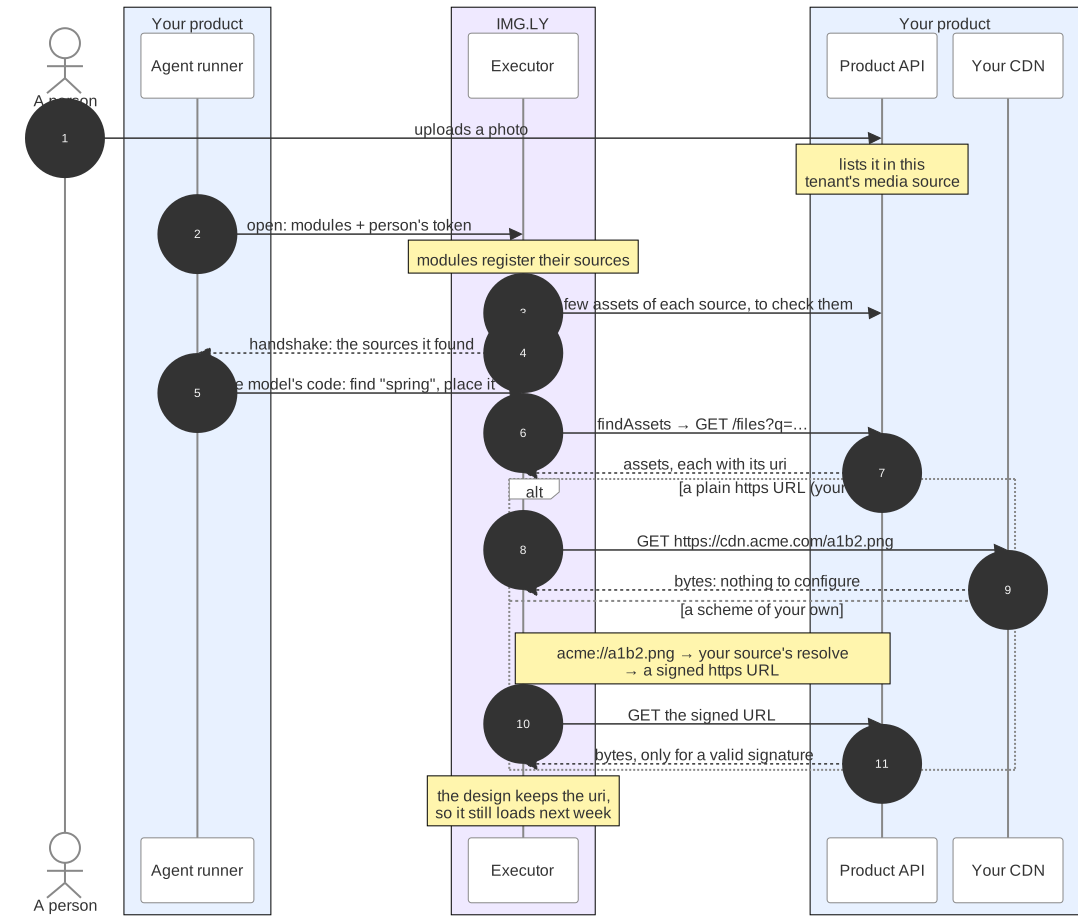
Blue: yours · purple: IMG.LY’s software, run by you.
If your files are public, you have no work to do. A file behind your CDN at
a permanent https address loads as it is. A source’s uploadFile can store a
new file in your bucket and answer https://cdn.acme.com/a1b2.png.
If your files are private, such as in an S3 bucket you read with presigned
GET requests behind a route of yours, a signed link does not work as a URI: it
expires, and the design would keep it. So the design keeps an address in a
scheme of your own, such as acme://3f9a, and the source’s resolve turns it
into a short-lived signed link each time the engine needs the file. The module
above does this for every file it lists, thumbnails included:
// acme://3f9a → a URL the engine can fetch now; undefined: not my scheme.async resolve(uri) { if (!uri.startsWith('acme://')) return undefined; const id = encodeURIComponent(uri.slice('acme://'.length)); return (await get(`/files/${id}/signed-url`)).url;},- Declare nothing. No option lists your scheme. The SDK installs one
resolver that asks each source’s
resolve. When the engine first refuses to save a design because it holds your scheme, the SDK allows that scheme and saves again. - Do not call CE.SDK’s
setURIResolverin your module. An engine has one resolver slot, and two modules that set one replace each other with no error. - Use
httpsfor every link the executor fetches, the signed links included. Nothing refuseshttp, but a design keeps its links, and an editor page served overhttpscannot fetch a plainhttpone: the browser blocks it as mixed content, and the image shows as empty. A signed link sent overhttpalso exposes its signature on the way.
Where a mistake shows. An image the model adds that cannot load fails its
edit, so the model tries another. An image already in the design that stops
loading (a wrong resolve, a revoked token, a deleted file) is kept, and every
edit, preview, and export names it with its URI. Your editor says
nothing: without the same resolver it shows the image as empty, with no
error. addPluginModules from @imgly/codesign-sdk/cesdk-utils installs that
resolver ( Your Editor). Test both: place an upload and
export it through the agent, and open the same design in your editor.
Exported Files#
When the person asks for a file, the model exports the design. The executor renders
the file and the SDK hands its bytes to your uploadExport, which stores them
and answers where the person gets them:
// Stores a file the model exported and answers where the person gets it.async function uploadExport( req: UploadExportRequest): Promise<UploadExportResult> { const key = `exports/${req.design}/${crypto.randomUUID()}.${req.format}`; await bucket.put(key, req.bytes, req.mimeType); return { downloadURL: await bucket.signedUrl(key, 24 * 3600) };}The whole runner, runner.ts
import { readFileSync } from 'node:fs';
import {  googleFonts,  prepareCoDesign,  remoteExecutors,  type AcquiredExecutor,  type CoDesign,  type UploadExportRequest,  type UploadExportResult} from '@imgly/codesign-sdk';
import { designStoreFor } from './design-store.js';import { bucket, db, tokenFor } from './yours.js';
// The plugin module's text: the executor receives the file, not a function.const acmeSources = readFileSync(  new URL('./acme.plugin.js', import.meta.url),  'utf8');
// Yours: hands a conversation its executor (see Host the Executor).async function acquire(_req: {  conversation: string;}): Promise<AcquiredExecutor | undefined> {  throw new Error('yours to write');}
// Stores a file the model exported and answers where the person gets it.async function uploadExport(  req: UploadExportRequest): Promise<UploadExportResult> {  const key = `exports/${req.design}/${crypto.randomUUID()}.${req.format}`;  await bucket.put(key, req.bytes, req.mimeType);  return { downloadURL: await bucket.signedUrl(key, 24 * 3600) };}
export function prepareTools(req: { tenantId: string; userId: string; chatId: string; designId: string;}): CoDesign { return prepareCoDesign({ conversation: `${req.tenantId}.${req.chatId}`, executors: remoteExecutors({ acquire, token: process.env.EXECUTOR_TOKEN }), // Your designs: read and written in this runner, never on the executor. designs: designStoreFor(db, bucket, req.tenantId), design: req.designId, // the design open on the person's screen plugins: [ // Your files: searched, resolved, and kept on the executor, with this person's token. { module: acmeSources, options: { api: 'https://api.acme.com', token: tokenFor(req.userId) } }, googleFonts() ], uploadExport, // lets the agent hand people files gateway: false });}- Answer
downloadURL, anotefor the model to pass on (“Sent to your downloads folder”), or both. An answer with neither fails the export, because the person would get nothing. - Without
uploadExport, the model cannot export. Your own code can still export withcodesign.export('png'), which returns the bytes and never callsuploadExport. - Exports are charged to your IMG.LY account, before your function runs, and a retry of the same export is charged once ( Billing). A throw fails the call.
- The bytes pass through your runner’s memory on the way, so size it for the largest export you allow.
Test Your Storage#
The mistakes above fail silently, so run the SDK’s checks in your CI, against a
test tenant. testDesignStore uses your store as the SDK does: it writes with
a stale ifMatch, writes twice to a new id, reads another tenant’s design,
checks that an archive comes back byte for byte and that each write’s
cesdkVersion and editKey read back, and reports each step that went
wrong. testAssetSource checks paging, search, image sizes, another tenant’s
ids, and which uploads a source keeps:
import { it } from 'vitest';
import type { CoDesignAssetSource } from '@imgly/codesign-sdk';import { testAssetSource, testDesignStore } from '@imgly/codesign-sdk/testing';
import acmeSources from './acme.plugin.js';import { designStoreFor } from './design-store.js';import type { Bucket, Db } from './yours.js';
// Yours: your database and bucket, for a test tenant; and a small PNG's bytes.const testDb: Db = yoursToWrite();const testBucket: Bucket = yoursToWrite();const png: Uint8Array<ArrayBuffer> = yoursToWrite();
function yoursToWrite(): never {  throw new Error('yours to write');}
it('keeps designs as the SDK needs', async () => {  const store = designStoreFor(testDb, testBucket, 'test-tenant');  // A design you seeded for another tenant: this tenant must not read it.  // Rejects with an AggregateError, one Error per problem.  await testDesignStore(store, { foreignIds: ['other-tenants-design'] });});
it('keeps uploads and declines pictures from imports', async () => {  // The module registers its sources only inside initialize: capture them  // with a stand-in engine that has only what the module calls.  const registered: CoDesignAssetSource[] = [];  await acmeSources({ api: 'https://api.test', token: 'test' }).initialize({    engine: {      asset: {        addSource: (source: CoDesignAssetSource) => registered.push(source)      }    }  });  const media = registered.find((s) => s.id === 'acme.media')!;  await testAssetSource(media, {    foreignIds: ['someone-elses-file'],    uploads: [      {        file: new File([png], 'a.png', { type: 'image/png' }),        action: 'upload',        expect: 'take'      },      {        file: new File([png], 'layer.png', { type: 'image/png' }),        action: 'import',        expect: 'decline'      }    ]  });});
Each check resolves when everything passes, and otherwise rejects with an
AggregateError that holds one Error per problem, so a plain await fails
the test. testDesignStore writes test designs and deletes none.
Next Steps#
- Concurrent Edits — handle versions and parallel calls, and work on a copy for approval.
- Bring Your Brand — add fonts, colors, and templates as sources.
- Your Editor — open and save the same designs in CE.SDK’s web editor.
- Add a Design Chat — see the store and the module in a whole product.