Let users brief an AI agent in a chat and get designs in each client’s brand, saved for people to keep editing. If your customers’ AI assistants should call the tools instead, follow Serve the Design Tools as an MCP Server.
This guide shows the chat product end to end; the pieces each turn uses are linked, not repeated. No example product runs it: the code on this page is checked against the CoDesign SDK’s types, every block is complete, and the functions that are yours to write are named in each file.
What You Will Build#
The running example is a platform that serves a social media agency and its clients. Each client is a tenant, the general term for a customer whose data is kept apart from every other’s. A user types “a launch post for Client X’s spring menu”. An AI agent makes the design in that client’s fonts and colors, shows its work as it goes, and saves the design to the client’s library, where a person can still open and edit it.
Your page, your product API, and your agent runner (the backend job that runs one chat message) are yours to build. The design engine, CE.SDK, IMG.LY’s design engine and editor, runs in executors: containers from IMG.LY’s published Docker image, which you run unchanged on your container platform. Four facts shape the rest of the guide:
- Your page never talks to an executor. The backend does, after it has decided who is asking.
- The design tools run in the agent runner. At the start of each tool call the SDK reads the design from your design store, two functions over your design table, sends it and the work to the executor, and after an edit writes the result back, but only if nobody wrote since. The store and its credentials never leave the runner.
- One chat, one executor. Each chat is one conversation, the unit of work the SDK routes by. The model’s code runs in the executor, apart from your store and keys, and one chat’s code never runs next to another chat’s designs or tokens; see What the Model Can Reach.
- An engine session is a cache. Every design the chat works on opens as an engine session, the design loaded in the chat’s engine. The design always lives in your store, and a call that finds no engine session for it loads it again.
Every file an executor exports, such as a PNG or a PDF, is charged to your
IMG.LY account, as described in Billing;
previews, the scene, and the .imgly design file are free.
Before You Start#
- What you need to know. How a web backend works: HTTP, a database, a job queue, Docker. For the terms (executor, conversation, engine session, asset source, plugin), see Terminology; for how the pieces fit together, see Architecture.
- The Quickstart, run once. The Quickstart starts one executor and makes one design on your machine, so you have seen the pieces this guide puts into a product.
- A CoDesign license key. Contact sales to get a CoDesign license key. It starts the engine, and pays for exports, model calls, and image generation.
- The executor image,
imgly/codesign-executor:1.84.0, which IMG.LY publishes on Docker Hub. - The SDK from npm, at the same version as the image, and, for the agent loop on this page, the Vercel AI SDK.
Install the SDK and the AI SDK at exact versions:
npm install --save-exact @imgly/codesign-sdk@1.84.0npm install --save-exact ai@7.0.118 @ai-sdk/openai-compatible@3.0.62Your credentials, each kept on your servers:
| Credential | What it does | Where it goes |
|---|---|---|
Your CoDesign license key (IMGLY_CESDK_LICENSE) |
Starts the engine in the executor and pays for every export. | The executor’s environment only. |
The same key, as IMGLY_GATEWAY_API_KEY here |
Pays for model calls and image generation through IMG.LY’s AI gateway. | Your agent runner only. |
EXECUTOR_TOKEN, a shared secret you choose |
Lets only your runner talk to your executors. | The executors’ environment and your runner. |
EXECUTOR_URLS (not a secret) |
The addresses of the executors you started, comma-separated. | Your runner. |
Sign-In and Tenant Identity#
Nothing in the SDK takes a tenant argument. You decide the client once, from the request. After that, the client lives in what you build for the turn:
| Bound to one client | By |
|---|---|
| Which client a request is for | The session cookie. A route that names another client answers 403. |
| A chat turn’s events | A job lookup that answers 404 for another client’s job (Run the Turn as a Job). |
| The designs | The design store you pass as designs, built for this client. Its read answers undefined for another client’s ids. |
| The executor | The conversation: the chat’s id with the client id in front, so no two clients’ chats can name the same executor. |
| Uploads, brand fonts, and colors | The plugin module’s options: a token signed for this client, sent to the chat’s executor only. |
| What the agent is told about the brand | A brand_library tool of yours, built per turn. |
The SDK knows nothing of clients: the conversation id is the only thing it
routes by. If your chat ids are unique only within a client, two clients could
send the same one and share an executor, so prefix it: ${clientId}.${chatId},
with a separator your ids cannot contain.
One Chat Turn#
Each chat message runs one turn. The diagram shows its steps:
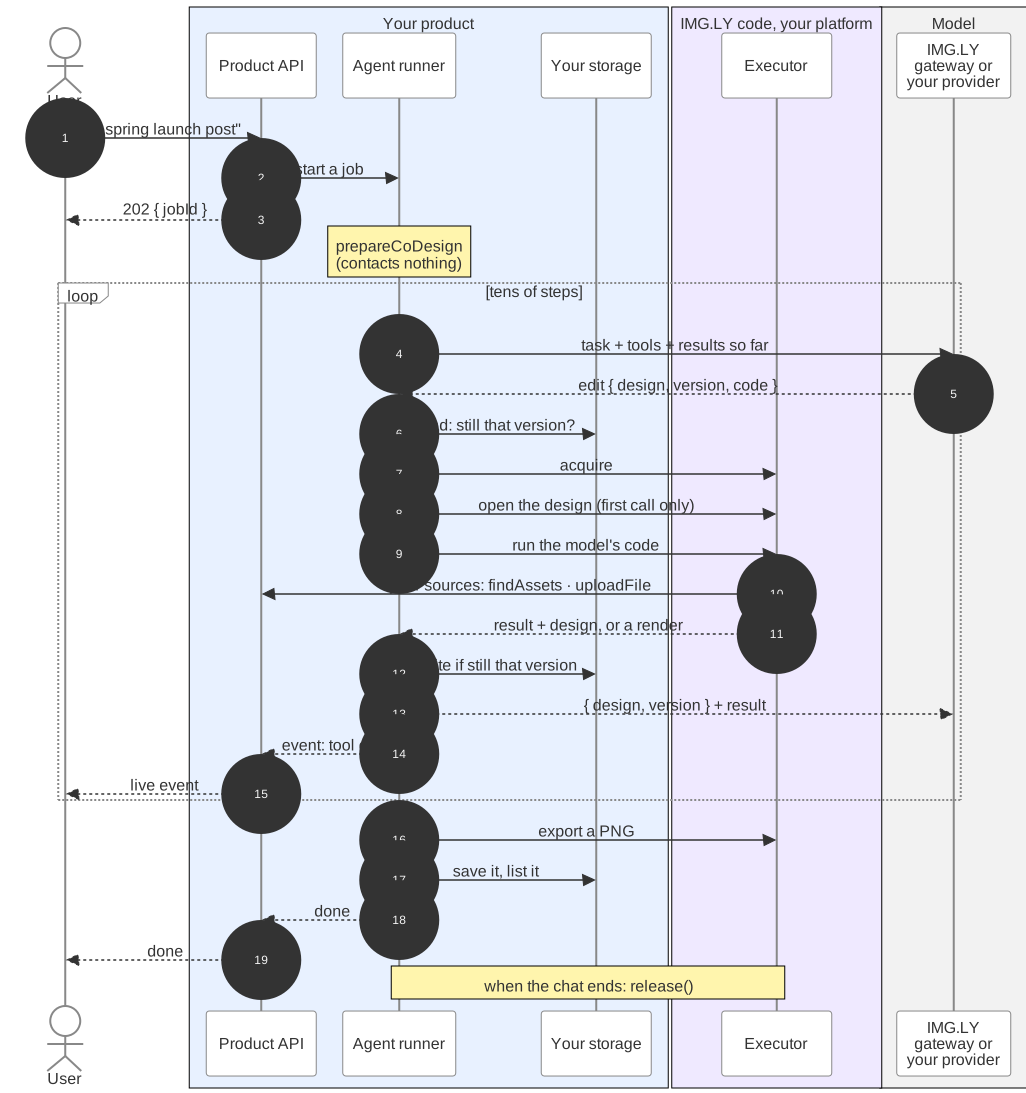
prepareCoDesign gives the model its tools. It opens nothing and runs none of
your plugin module. Every tool call reads its design through your store,
checks the version the model names, finds the chat’s executor (asking your
acquire function when it has none yet), and saves only if nobody saved
since. So a crash loses nothing, and a turn can run
on any worker.
const codesign = prepareCoDesign({ // Who the work is for: this chat, across all its messages. Every design it // touches opens in one executor that serves no other chat. The client id // in front keeps two clients' chat ids from ever naming the same executor. conversation: `${clientId}.${chatId}`, executors: remoteExecutors({ // Asked with the conversation before each design's engine session opens, // on release, and when its executor was lost; answers this chat's // executor every time, never another's. acquire: ({ conversation }) => pool.acquire(conversation), token: process.env.EXECUTOR_TOKEN // the executors' EXECUTOR_TOKEN }), // The CE.SDK plugins every engine applies, in order. The sources they // register are everything the agent can find, place, or store into; you do // not list them, the executor reports them. Their order ranks search // results, the font lookup (the first source holding the exact family wins) // and which source is offered a new file first. plugins: [ { module: AGENCY_PLUGIN, // This client's values for this turn. options: { api: `https://api.agency.example/clients/${clientId}`, token: tokenFor(clientId) } }, // Not added for you. The font lookup finds Google families after the // brand's, and every Photoshop, InDesign, PDF, or PowerPoint import needs it. googleFonts() ], // Your design store, for this client: read and written here, in this // runner, where the model's code cannot reach it. designs: designStoreFor(clientId), // The design on screen: the model works on it without naming it. design: designId, // A plan without exports leaves it out, and the agent cannot export at // all: uploadExport would see a file only after it was rendered and charged. uploadExport: (await planHasExports(clientId)) ? uploadExport : undefined, // Tools of your own; they come after the SDK's. tools: [brandTool(clientId)], // Image generation, over IMG.LY's AI gateway with the credential IMG.LY gives // you; it stays in this process. `false` leaves it out. gateway: process.env.IMGLY_GATEWAY_API_KEY ? { bearer: async () => process.env.IMGLY_GATEWAY_API_KEY } : false, // Each tool call's event, after the call: which design, and what it wrote. events: [{ on: 'tool.call', run: followed }]});The rest of the turn opens the design, runs the model, renders a thumbnail of each design it wrote, and remembers what it opened:
try { // Open the design on its engine before the model starts, so the first // tool call is fast; retries while the chat's executor starts, and tells // the person once. Saving as a scene is never charged. await waitForExecutor( () => codesign.export('scene'), () => emit({ type: 'status', text: 'waiting for an executor…' }) ); await runYourModel({ tools: codesign.tools, // the SDK's, then yours instructions: codesign.instructions, // appended to your system prompt prompt, onProgress: emit }); for (const id of touched) { await saveRender(id, await codesign.export('png', { design: id })); // a thumbnail for your grid }} finally { // Not released here: the chat's next message finds the engine still open. await rememberChatDesigns(chatId, [designId, ...opened]);}When the chat ends, endChat releases what the chat opened and tells the
executor pool (below) that the chat no longer holds its executor:
// When the chat ends (the person closes it, or your product decides it is// over): end the engine session of every design it opened. Releasing the last// one retires the chat's executor about 30 seconds later, so never do this// after every turn: the next message would wait for a fresh executor.export async function endChat(clientId: string, chatId: string) { const conversation = `${clientId}.${chatId}`; const codesign = prepareCoDesign({ conversation, executors: remoteExecutors({ acquire: ({ conversation }) => pool.acquire(conversation), token: process.env.EXECUTOR_TOKEN }), // The same module text as the turn's: an engine session is found by it // (the options may differ). plugins: [ { module: AGENCY_PLUGIN, options: { api: `https://api.agency.example/clients/${clientId}`, token: tokenFor(clientId) } }, googleFonts() ], designs: designStoreFor(clientId), gateway: false }); await Promise.all( (await chatDesigns(chatId)).map((id) => codesign.release({ design: id }).catch(() => undefined) ) ); // The pool hands the address out again once a fresh container answers there. pool.forget(conversation);}The whole turn, run-turn.ts
import { readFileSync } from 'node:fs';
import {  googleFonts,  prepareCoDesign,  remoteExecutors,  type ToolCallEvent,  type UploadExportRequest} from '@imgly/codesign-sdk';
import { runYourModel } from './agent-loop.js';import { brandTool } from './brand-tool.js';import { designStoreFor } from './design-store.js';import { executorPool } from './executor-pool.js';import { waitForExecutor, type TurnEvent } from './jobs.js';import {  chatDesigns,  planHasExports,  rememberChatDesigns,  saveRender,  signedDownloadLink,  tokenFor,  uploadToStorage} from './yours.js';
// The plugin module, sent as text. With a bundler: Vite's `?raw` import,// esbuild's `--loader:.plugin.js=text`, or on Cloudflare Workers a wrangler// rule `{ type = "Text", globs = ["**/*.plugin.js"] }`.const AGENCY_PLUGIN = readFileSync(  new URL('./agency.plugin.js', import.meta.url),  'utf8');
// The executors your platform started, e.g. 'http://executor-1:8080,http://executor-2:8080'.const pool = executorPool((process.env.EXECUTOR_URLS ?? '').split(','));
// One chat turn. `clientId` and `chatId` say who asks and in which chat;// `designId` is the design on screen (an id your store holds, or a new// crypto.randomUUID() for a chat that starts from nothing); `prompt` is what// the person typed; `emit` sends one event to the browser.export async function runTurn({  clientId,  chatId,  designId,  prompt,  emit}: {  clientId: string;  chatId: string;  designId: string;  prompt: string;  emit: (event: TurnEvent) => void;}): Promise<void> {  // Every design a call opened (each holds an engine session on the executor,  // released when the chat ends), and every design a call wrote this turn, to  // render for the grid at the end.  const opened = new Set<string>();  const touched = new Set<string>();  const followed = (e: ToolCallEvent) => {    if (e.design === undefined) return;    opened.add(e.design);    if (e.wrote === undefined) return; // `wrote` is the version the call wrote, as your store returned it    touched.add(e.design);    emit({ type: 'design', design: e.design });  };
  // Lets the agent hand people files: stores the rendered file and answers a link.  async function uploadExport(req: UploadExportRequest) {    const key = await uploadToStorage(clientId, req.bytes, req.mimeType);    const downloadURL = await signedDownloadLink(clientId, key); // valid for a while    emit({      type: 'file',      name: `${req.title}.${req.format}`,      format: req.format,      downloadURL    });    return { downloadURL }; // what the model tells the person  }
  const codesign = prepareCoDesign({    // Who the work is for: this chat, across all its messages. Every design it    // touches opens in one executor that serves no other chat. The client id    // in front keeps two clients' chat ids from ever naming the same executor.    conversation: `${clientId}.${chatId}`,    executors: remoteExecutors({      // Asked with the conversation before each design's engine session opens,      // on release, and when its executor was lost; answers this chat's      // executor every time, never another's.      acquire: ({ conversation }) => pool.acquire(conversation),      token: process.env.EXECUTOR_TOKEN // the executors' EXECUTOR_TOKEN    }),    // The CE.SDK plugins every engine applies, in order. The sources they    // register are everything the agent can find, place, or store into; you do    // not list them, the executor reports them. Their order ranks search    // results, the font lookup (the first source holding the exact family wins)    // and which source is offered a new file first.    plugins: [      {        module: AGENCY_PLUGIN,        // This client's values for this turn.        options: {          api: `https://api.agency.example/clients/${clientId}`,          token: tokenFor(clientId)        }      },      // Not added for you. The font lookup finds Google families after the      // brand's, and every Photoshop, InDesign, PDF, or PowerPoint import needs it.      googleFonts()    ],    // Your design store, for this client: read and written here, in this    // runner, where the model's code cannot reach it.    designs: designStoreFor(clientId),    // The design on screen: the model works on it without naming it.    design: designId,    // A plan without exports leaves it out, and the agent cannot export at    // all: uploadExport would see a file only after it was rendered and charged.    uploadExport: (await planHasExports(clientId)) ? uploadExport : undefined,    // Tools of your own; they come after the SDK's.    tools: [brandTool(clientId)],    // Image generation, over IMG.LY's AI gateway with the credential IMG.LY gives    // you; it stays in this process. `false` leaves it out.    gateway: process.env.IMGLY_GATEWAY_API_KEY      ? { bearer: async () => process.env.IMGLY_GATEWAY_API_KEY }      : false,    // Each tool call's event, after the call: which design, and what it wrote.    events: [{ on: 'tool.call', run: followed }]  });
  try {    // Open the design on its engine before the model starts, so the first    // tool call is fast; retries while the chat's executor starts, and tells    // the person once. Saving as a scene is never charged.    await waitForExecutor(      () => codesign.export('scene'),      () => emit({ type: 'status', text: 'waiting for an executor…' })    );    await runYourModel({      tools: codesign.tools, // the SDK's, then yours      instructions: codesign.instructions, // appended to your system prompt      prompt,      onProgress: emit    });    for (const id of touched) {      await saveRender(id, await codesign.export('png', { design: id })); // a thumbnail for your grid    }  } finally {    // Not released here: the chat's next message finds the engine still open.    await rememberChatDesigns(chatId, [designId, ...opened]);  }}
// When the chat ends (the person closes it, or your product decides it is// over): end the engine session of every design it opened. Releasing the last// one retires the chat's executor about 30 seconds later, so never do this// after every turn: the next message would wait for a fresh executor.export async function endChat(clientId: string, chatId: string) {  const conversation = `${clientId}.${chatId}`;  const codesign = prepareCoDesign({    conversation,    executors: remoteExecutors({      acquire: ({ conversation }) => pool.acquire(conversation),      token: process.env.EXECUTOR_TOKEN    }),    // The same module text as the turn's: an engine session is found by it    // (the options may differ).    plugins: [      {        module: AGENCY_PLUGIN,        options: {          api: `https://api.agency.example/clients/${clientId}`,          token: tokenFor(clientId)        }      },      googleFonts()    ],    designs: designStoreFor(clientId),    gateway: false  });  await Promise.all(    (await chatDesigns(chatId)).map((id) =>      codesign.release({ design: id }).catch(() => undefined)    )  );  // The pool hands the address out again once a fresh container answers there.  pool.forget(conversation);}
The names the turn imports, and where each is explained:
designStoreFor, the design store: Store the DesignAGENCY_PLUGINandtokenFor, the plugin module and its token: Give the Agent the Client’s Brand and FilesbrandTool: Tell the Agent What the Brand IsexecutorPool: Run an Executor per ConversationwaitForExecutor: When a Tool Call RejectsrunYourModel: Run the ModeluploadExport: Several Designs and Downloads
The other functions in yours.ts are yours to write over what your product
has:
yours.ts
// The functions and clients this guide's code calls that are yours to write, over what your product already has.
/** Your database client, such as node-postgres's `Pool`. */export const db = {  async query(    _sql: string,    _params: readonly unknown[]  ): Promise<{ rows: Record<string, any>[] }> {    throw new Error('yours to write');  }};
/** Two calls over your object storage. */export const bucket = {  async get(_key: string): Promise<Uint8Array<ArrayBuffer>> {    throw new Error('yours to write');  },  async put(_key: string, _bytes: Uint8Array): Promise<void> {    throw new Error('yours to write');  }};
/** A short-lived token that opens only this client's files and routes, such as an HMAC of the client id and an expiry. */export function tokenFor(_clientId: string): string {  throw new Error('yours to write');}
/** The client of the signed-in person, from your session cookie. */export function clientOf(_request: Request): string {  throw new Error('yours to write');}
/** Stores a file for this client and returns its key. */export async function uploadToStorage(  _clientId: string,  _bytes: Uint8Array,  _mimeType: string): Promise<string> {  throw new Error('yours to write');}
/** A download link to one stored file that expires after a while. */export async function signedDownloadLink(  _clientId: string,  _key: string): Promise<string> {  throw new Error('yours to write');}
/** The client's brand kit, from your API. */export async function brandKitOf(_clientId: string): Promise<{  typefaces: { name: string }[];  colors: { name: string; hex: string }[];  rules: string;}> {  throw new Error('yours to write');}
/** Keeps a rendered PNG of a design as its thumbnail in your design grid. */export async function saveRender(  _designId: string,  _png: Uint8Array): Promise<void> {  throw new Error('yours to write');}
/** Whether the client's plan lets the agent hand people files. */export async function planHasExports(_clientId: string): Promise<boolean> {  throw new Error('yours to write');}
/** Adds designs to your record of the ones a chat opened, for `endChat`. */export async function rememberChatDesigns(  _chatId: string,  _designIds: readonly string[]): Promise<void> {  throw new Error('yours to write');}
/** Every design your record says a chat opened. */export async function chatDesigns(_chatId: string): Promise<string[]> {  throw new Error('yours to write');}
How the turn works:
acquireanswers “which executor serves this conversation?” The SDK asks it before each design’s engine session opens, when a design is released, and again when the executor was lost. So it answers the same executor every time for one conversation.codesign.toolsare the SDK’s design tools, with exports when you giveuploadExportand image generation when you give agateway, then yours. Hand the model all of them.- The first call that opens a design waits for the executor, and the
executor answers a handshake: what it can do and which sources your module
registered. A module that fails to load, or a malformed source, fails here
with an
invalid_optionserror that names it.await codesign.handshake()runs this early, for example when the chat opens. - Every result names the design and its version, and every edit names
the version it builds on. When your code loads a starting file with
codesign.load(bytes), put the version it returns in the prompt, and the model’s first change is not refused for want of one. - Every successful edit is already in the store when the agent finishes.
The
pngexport at the end is a thumbnail for your grid, and it is charged. releaseends one design’s engine session. Nothing tells an executor that a chat is over, so without it the engine session stays until 3 minutes without a call; this is also what happens to a chat nobody ends. Once a conversation’s last engine session ends, the executor exits about 30 seconds later, and the chat’s next message waits for a new one fromacquire. So release when the chat ends (endChat), which frees the container within seconds instead of minutes, not after every turn: a person who answers within a few minutes finds the design still loaded.eventsreports each tool call after it ran: whichdesignit worked on and, when it changed it, the version itwrote, as yourwritereturned it. The turn uses it to know what to release and render, and to tell the browser to reload a design.codesign.loadandcodesign.createare your own calls and send no event.
Run the Model#
Hand codesign.tools and codesign.instructions to your agent loop: the
code that sends the prompt and the tools to the model, runs each tool the
model asks for, sends back the result, and repeats until the model is done.
The SDK ships no model client; any framework that can declare tools and send
their results, images included, back to the model works. A typical design job
takes around 3 minutes, depending on the model and how hard the brief is.
The loop below uses the Vercel AI SDK (the ai package, version 7) with
IMG.LY’s AI gateway as the model provider. The gateway speaks OpenAI’s Chat
Completions API at https://gateway.img.ly/v1, so the
@ai-sdk/openai-compatible provider reaches it, and model calls are paid from
the same IMG.LY credits as exports and generation:
import { createOpenAICompatible } from '@ai-sdk/openai-compatible';import type { CoDesignTool, ToolResult } from '@imgly/codesign-sdk';import {  generateText,  isStepCount,  jsonSchema,  tool,  type ModelMessage} from 'ai';
import type { TurnEvent } from './jobs.js';
// IMG.LY's AI gateway speaks OpenAI's Chat Completions.const gateway = createOpenAICompatible({  name: 'imgly',  baseURL: 'https://gateway.img.ly/v1',  apiKey: process.env.IMGLY_GATEWAY_API_KEY});// `@openrouter/` and an OpenRouter model id; the gateway's own ids: GET https://gateway.img.ly/v1/models with the key as Bearer.const model = gateway('@openrouter/anthropic/claude-haiku-5.5');
// Your product's standing instruction. It names your brand tool, none of the SDK's.const PRODUCT_PROMPT =  'You design for one client of a social media agency. Call brand_library ' +  'when the brief mentions the brand, and say in one sentence what you made ' +  'when you are done.';
// Stops a run after five failures in a row with the same error text, whichever// tools failed: a dead backend fails every tool the same way.function repeatedErrorGuard(stop: AbortController, limit = 5) {  let last: string | undefined;  let count = 0;  const guard = {    reason: undefined as string | undefined,    record(isError: boolean, text: string) {      const key = isError ? text.slice(0, 200) : undefined;      count = key === undefined ? 0 : key === last ? count + 1 : 1;      last = key;      if (count >= limit) {        guard.reason = `stopped after ${count} identical tool failures: ${key}`;        stop.abort();      }    }  };  return guard;}
export async function runYourModel({  tools,  instructions,  prompt,  onProgress = () => {}}: {  tools: readonly CoDesignTool[]; // codesign.tools  instructions: string; // codesign.instructions  prompt: string;  onProgress?: (event: TurnEvent) => void;}): Promise<string> {  const stop = new AbortController();  const guard = repeatedErrorGuard(stop);  const aiTools = Object.fromEntries(    tools.map((t) => [      t.name,      tool({        description: t.description,        inputSchema: jsonSchema(t.inputSchema),        execute: async (args, { abortSignal }) => {          onProgress({ type: 'tool_call', tool: t.name, args });          let result: ToolResult;          try {            result = await t.call(args, { signal: abortSignal });          } catch (err) {            // A tool call can reject too ("When a Tool Call Rejects"): your            // turn may end here instead; this loop reports it as a failure.            result = {              content: [{ type: 'text', text: String(err) }],              isError: true            };          }          const text = result.content            .map((part) => (part.type === 'text' ? part.text : ''))            .join('\n');          for (const part of result.content) {            if (part.type === 'image') {              onProgress({                type: 'preview',                tool: t.name,                dataUri: `data:${part.mimeType};base64,${part.data}`              });            }          }          onProgress({            type: 'tool_result',            tool: t.name,            text: text.slice(0, 500),            isError: result.isError === true          });          guard.record(result.isError === true, text); // aborts the run at the limit          // Throw on failure: the AI SDK then tells the model the call failed.          if (result.isError) throw new Error(text || `${t.name} failed`);          return result.content;        },        // Hand images to the model as images, not as JSON text.        toModelOutput: ({ output }) => ({          type: 'content' as const,          value: output.map((part) =>            part.type === 'text'              ? { type: 'text' as const, text: part.text }              : {                  type: 'file' as const,                  mediaType: part.mimeType,                  data: { type: 'data' as const, data: part.data }                }          )        })      })    ])  );  let result;  try {    result = await generateText({      model,      // Your instruction, then the SDK's.      instructions: `${PRODUCT_PROMPT}\n\n${instructions}`,      prompt,      tools: aiTools,      abortSignal: stop.signal,      // Before each model call: move tool-result images into a user message.      prepareStep: ({ messages }) => ({        messages: imagesAfterToolResults(messages)      }),      // Keep going while the model calls tools, up to a ceiling of yours.      stopWhen: isStepCount(60)    });  } catch (err) {    if (guard.reason) throw new Error(guard.reason);    throw err;  }  if (result.finishReason !== 'stop') {    throw new Error(`the model stopped early: ${result.finishReason}`);  }  onProgress({ type: 'message', text: result.text });  return result.text;}
// Chat Completions, the format the gateway speaks, defines a tool result as// text; images belong in a user message right after it.function imagesAfterToolResults(messages: ModelMessage[]): ModelMessage[] {  const out: ModelMessage[] = [];  let images: { type: 'file'; mediaType: string; data: unknown }[] = [];  const flush = () => {    if (images.length === 0) return;    out.push({      role: 'user',      content: [        { type: 'text', text: 'Attached image(s) from tool result:' },        ...(images as never[])      ]    });    images = [];  };  for (const message of messages) {    if (message.role !== 'tool') {      flush();      out.push(message);      continue;    }    out.push({      ...message,      content: message.content.map((part) => {        if (part.type !== 'tool-result' || part.output.type !== 'content')          return part;        const isImage = (item: { type: string; mediaType?: string }) =>          item.type === 'file' && item.mediaType?.startsWith('image') === true;        const kept = part.output.value.filter((item) => !isImage(item));        for (const item of part.output.value) {          if (item.type === 'file' && isImage(item)) images.push(item);        }        return {          ...part,          output: {            type: 'content' as const,            value:              kept.length > 0                ? kept                : [{ type: 'text' as const, text: '(see attached image)' }]          }        };      })    });  }  flush();  return out;}
Five mistakes here fail silently, and nothing in the SDK can catch them, because they are in your loop:
- No
stopWhen. The run ends after the model’s first tool call, with the design barely started. - No
toModelOutput. The AI SDK sends the result as JSON text, so the model reads a render as a long base64 string instead of seeing it. - Returning a failed result instead of throwing. The model reads the error text as a success and carries on as if the edit landed.
- Not checking
finishReason. A reply cut off at the model’s output limit (length) ends the loop with its tool calls unrun, and looks like a finished turn. - No
imagesAfterToolResults. Chat Completions has no images inside a tool result, so the renders must move into a message after it. Without that step nothing fails, but whether the model sees its work is not guaranteed.
Check them on one real turn: the run takes more than one tool call, the model’s request after a preview carries the render as an image, a failed edit shows up as an error, and a turn cut off at the output limit is reported as one.
The loop adds two limits of its own: a step ceiling of 60 steps, and a repeated-error guard, which stops a run after five identical tool failures in a row, because a dead backend fails every tool the same way. The SDK sets no cost limit, and the step ceiling bounds a turn’s length, not its cost. A cost cap is yours to add: the AI SDK reports the token counts of each step, which you price at your model’s rates and stop the run past your limit. Start with a fast, inexpensive model, and measure quality, cost, and time on your own briefs before you move to a larger one.
The System Prompt#
The system prompt has three parts, in this order:
- Your product’s own policy: the model designs for one client, calls
brand_librarywhen the brief mentions the brand, and ends with a sentence on what it made. codesign.instructions: a few sentences on how to work with the SDK’s tools.- The design the turn is on and any attached files.
Your prompt names none of the SDK’s tools, because their names can change
between SDK versions and codesign.instructions changes with them
( Tools). It says nothing about saving: there is
nothing to save.
Appending codesign.instructions is the one step the SDK cannot check. Left
out, nothing fails, but the model has only what the tools’ own descriptions
say, and its designs are worse for it. Log the system prompt of one turn and
check that it contains codesign.instructions.
Store the Design#
The SDK reads and writes the client’s designs through a design store: two
functions you write, read and write, passed to prepareCoDesign as
designs. Each design carries a version, a value that changes on every
save, and a write is stored only if the design is still at the version the
caller read. For what each function returns, the version check, the edit key,
archives, and large designs in a bucket, see
The Design Store. Over a
SQL table and a bucket, for one client:
design-store.ts
import type { DesignStore } from '@imgly/codesign-sdk';
import { bucket, db } from './yours.js';
// The table, one row per design://   designs(client_id, id, title, group_name, revision integer, content_key,//           is_archive boolean, cesdk_version, edit_key,//           primary key (client_id, id))export function designStoreFor(clientId: string): DesignStore {  return {    // The source in your plugin module that lists this client's designs.    listSourceId: 'agency.designs',
    async read(id) {      const { rows } = await db.query(        'SELECT * FROM designs WHERE client_id = $1 AND id = $2',        [clientId, id] // the client in every query: another client's id finds nothing      );      const row = rows[0];      if (row === undefined) return undefined;      const bytes = await bucket.get(row.content_key);      return {        content: row.is_archive          ? { archive: bytes }          : { scene: new TextDecoder().decode(bytes) },        version: String(row.revision), // changes on every write, never reused        cesdkVersion: row.cesdk_version ?? null, // the CE.SDK that saved it, as `write` got it; null: unknown        title: row.title,        editKey: row.edit_key ?? undefined // the edit that wrote this version      };    },
    async write(id, content, { ifMatch, cesdkVersion, editKey, title, group }) {      // Every version's bytes under a key of their own, so a row never points      // at bytes another write is still uploading. A write that loses leaves      // its bytes behind: let a bucket lifecycle rule remove unreferenced keys.      const key = `designs/${clientId}/${id}/${crypto.randomUUID()}`;      await bucket.put(        key,        content.archive ?? new TextEncoder().encode(content.scene)      );      const fields = [        clientId,        id,        key,        content.archive !== undefined,        cesdkVersion,        editKey ?? null // every write replaces the key; none clears it      ];      const { rows } =        ifMatch === undefined          ? // A new design, whose id the SDK just minted: create it only if            // the id is free. `title` and `group` come with this first write.            await db.query(              `INSERT INTO designs (client_id, id, content_key, is_archive,                 cesdk_version, edit_key, title, group_name, revision)               VALUES ($1, $2, $3, $4, $5, $6, $7, $8, 1)               ON CONFLICT DO NOTHING RETURNING revision`,              [...fields, title ?? 'Untitled', group ?? null]            )          : // An edit: store it only while the row is still at the revision            // the SDK read (compare-and-set).            await db.query(              `UPDATE designs SET content_key = $3, is_archive = $4,                 cesdk_version = $5, edit_key = $6, revision = revision + 1               WHERE client_id = $1 AND id = $2 AND revision = $7               RETURNING revision`,              [...fields, Number(ifMatch)]            );      // No row: someone wrote first, or the id is taken. Nothing was stored.      return rows[0] === undefined ? undefined : String(rows[0].revision);    }  };}
What matters for a chat:
- Build the store per client.
readanswersundefinedfor any id that is not one of this client’s designs, because the model sees the ids and passes them back. - The design on screen may not exist yet. When a chat starts from nothing,
pass a new
crypto.randomUUID()asdesign: it reads as empty until the model’s first write creates it. Your table accepts ids it did not choose. - Every changing edit writes at once. There are no drafts, and an export never writes a design. For a review step, see Proposal or Direct Edit.
- Without
designs, the SDK keeps designs in the memory of oneprepareCoDesignresult, which is gone when you build the tools again for the next message.
Give the Agent the Client’s Brand and Files#
Everything the agent can search, place, or store into reaches the executor as
one plugin module: a JavaScript file that registers the client’s
collections as asset sources. Your runner sends its text and this client’s
options with each call, and your editor applies the same file. For how a
module is written and its rules, see
Your Files, and its Private
Buckets section for private files in a scheme of your own.
This chat’s module registers five sources:
agency.designs, the list of the client’s designs that the design store names aslistSourceIdagency.fontsandagency.colors, the brandagency.photos, the client’s logos and photos, which also keeps new images the agent makes or a person uploadsagency.files, the files people attach to the chat, to open as designs
Private files are stored as agency-file://<file id>, and the resolve of
agency.photos turns that into a short-lived signed link each time the engine
needs the file.
agency.plugin.js
// Runs on the executor and in your editor. No imports: the executor loads// this text as it is (bundle it into one file if it uses a library).export default function agencyPlugin({ api, token }) {  const headers = { authorization: `Bearer ${token}` };  // undefined: 404, not this token's.  const call = async (path, init) => {    const response = await fetch(`${api}${path}`, {      ...init,      headers: { ...headers, ...(init?.headers ?? {}) }    });    if (response.status === 404) return undefined;    if (!response.ok) throw new Error(`${path} answered ${response.status}`);    return response;  };  const json = async (path) => (await call(path))?.json();  // A file of this client as an asset. `uri` is what the design keeps for good.  const asFile = (file) => ({    id: file.id,    label: file.name,    meta: {      uri: `agency-file://${file.id}`, // durable, never a signed link      thumbUri: `agency-file://${file.thumbId}`,      mimeType: file.mimeType,      width: file.width,      height: file.height    }  });  // query.page counts from 0.  const paged = (items, query) => {    const start = query.page * query.perPage;    const page = items.slice(start, start + query.perPage);    return {      assets: page,      currentPage: query.page,      ...(start + page.length < items.length        ? { nextPage: query.page + 1 }        : {}),      total: items.length    };  };  const matches = (query, text) =>    !query.query || text.toLowerCase().includes(query.query.toLowerCase());
  return {    name: 'agency.client',    version: '1.0.0',    initialize({ engine }) {      // The client's designs, by title: your editor's "your designs" panel,      // and the list the model searches for saved designs. It only lists: the      // design store in your runner reads and writes the designs, so this      // source holds no file types and the SDK never offers it a file.      engine.asset.addSource({        id: 'agency.designs',        description: "This client's saved designs, by title.",        getSupportedMimeTypes: () => [],        async findAssets(query) {          const params = new URLSearchParams({            q: query.query ?? '',            page: String(query.page),            perPage: String(query.perPage)          });          const page = await json(`/designs?${params}`); // the query behind your design grid          return {            // One asset per design: `id` the design id, `label` its title.            assets: page.items.map((row) => ({ id: row.id, label: row.title })),            currentPage: query.page,            ...(page.hasMore ? { nextPage: query.page + 1 } : {}),            total: page.total          };        }      });
      // Sources are asked in the order they are registered: the brand's typefaces come first.      engine.asset.addSource({        id: 'agency.fonts',        description: "The brand's typefaces. Use these before any other font.",        getSupportedMimeTypes: () => ['application/ubq-typeface'],        async findAssets(query) {          const families = (await json('/brand/typefaces')).filter((f) =>            matches(query, f.name)          );          // One asset per family, every font in `fonts`, `name` exactly the family's.          return paged(            families.map((family) => ({              id: family.id,              label: family.name,              payload: {                typeface: {                  name: family.name,                  fonts: family.files.map((file) => ({                    uri: file.url, // a stable https url, or a uri `resolve` answers                    subFamily: file.subFamily,                    weight: file.weight, // 'normal', 'bold', …                    style: file.style // 'normal' or 'italic'                  }))                }              }            })),            query          );        }      });
      engine.asset.addSource({        id: 'agency.colors',        description: "The brand's colors.",        getSupportedMimeTypes: () => ['application/ubq-color'],        async findAssets(query) {          const colors = (await json('/brand/colors')).filter((c) =>            matches(query, c.name)          );          return paged(            colors.map((c) => ({              id: c.id,              label: c.name,              payload: { color: { colorSpace: 'sRGB', r: c.r, g: c.g, b: c.b } } // channels 0 to 1            })),            query          );        }      });
      engine.asset.addSource({        id: 'agency.photos',        // The model reads this line in search results.        description:          "This client's logos and photos, including what people uploaded.",        getSupportedMimeTypes: () => [          'image/png',          'image/jpeg',          'image/webp',          'image/gif',          'image/svg+xml'        ],        // Live: a photo uploaded a second ago is found.        async findAssets(query) {          const files = (await json('/photos')).filter((f) =>            matches(query, f.name)          );          return paged(files.map(asFile), query);        },        // null: no such photo for this client. This keeps another client's ids private.        async fetchAsset(id) {          const file = await json(`/photos/${encodeURIComponent(id)}`);          return file === undefined ? null : asFile(file);        },        // agency-file://3f9a → a link the engine can fetch now; undefined: not this source's scheme.        async resolve(uri) {          if (!uri.startsWith('agency-file://')) return undefined;          const id = encodeURIComponent(uri.slice('agency-file://'.length));          return (await json(`/files/${id}/signed-url`)).url;        },        // Having this makes the source writable: it is offered every new        // image (a generated one, one a person uploads in the editor, a        // picture inside an imported file). Return its asset to keep it,        // undefined to decline.        async uploadFile(file, { action, label, width, height }) {          // Pictures inside an imported file belong to that design only:          // decline, and they stay inside it.          if (action === 'import') return undefined;          const query = new URLSearchParams({            name: label ?? file.name,            action          });          // The image's size in pixels, read by the SDK from the bytes. Your          // route keeps it, and /photos answers it as `width` and `height`.          if (width !== undefined) query.set('width', String(width));          if (height !== undefined) query.set('height', String(height));          const response = await call(`/photos?${query}`, {            method: 'POST',            headers: { 'content-type': file.type },            body: file          });          if (response === undefined) throw new Error('/photos answered 404');          return asFile(await response.json());        }      });
      engine.asset.addSource({        id: 'agency.files',        description:          'Files the person attached to the chat, to open as designs.',        getSupportedMimeTypes: () => [          'application/pdf',          'image/vnd.adobe.photoshop',          'application/vnd.adobe.indesign-idml-package'        ],        async findAssets(query) {          const files = (await json('/attachments')).filter((f) =>            matches(query, f.name)          );          return paged(files.map(asFile), query);        },        async fetchAsset(id) {          const file = await json(`/attachments/${encodeURIComponent(id)}`);          return file === undefined ? null : asFile(file);        }      });    }  };}
What a chat adds to the module’s rules:
- One module text for the whole chat. The options may change from call to
call; the text may not. A call whose module text differs from the one open
on the chat’s executor is refused with HTTP 409 (“send every session of a
conversation the same modules”), a plain error with no
kind. So deploy a new module between chats, not during one. - Sign one token per turn, for exactly this client.
tokenForis yours, for example an HMAC (a keyed hash) of the client id and an expiry time, made with a secret only your backend holds. The model’s code can read the token, so it opens only this client’s files and expires soon; every route the module calls checks that the token’s client owns the path asked for. When a call brings a new token, the executor sets the sources up again on the engine already open. Once a token expires, the next new download fails; images already loaded keep rendering.
The module calls these routes of yours, each authorized by the token and
answering only this client’s data (a 404 for anything else). A file in the
answers is { "id", "name", "mimeType", "width", "height", "thumbId" }, with
width and height in pixels:
| Route | What it answers |
|---|---|
GET /designs?q=…&page=…&perPage=… |
The client’s designs whose title matches q, one page (from 0): { "items": [{ "id", "title" }], "hasMore", "total" }. |
GET /brand/typefaces |
The brand’s font families: [{ "id", "name", "files": [{ "url", "subFamily", "weight", "style" }] }]. |
GET /brand/colors |
The brand’s colors: [{ "id", "name", "r", "g", "b" }], each channel from 0 to 1. |
GET /photos, GET /photos/:id |
The client’s pictures, newest first, or one, as files. |
POST /photos?name=…&action=…&width=…&height=… |
Adds a picture, up to 20 MB, and answers it as a file. action says where it came from, such as generate. |
GET /attachments, GET /attachments/:id |
The files the person attached to this chat, as files. |
GET /files/:id/signed-url |
{ "url" }: a link to one of this client’s files that expires soon. |
POST /photos checks each upload from its bytes and serves SVGs so they
cannot run script, as the file routes in Your Files describe. Serve these
routes from an origin of their own, and allow the executors only that origin.
The brand’s fonts follow four rules that fail silently when broken:
one asset per family, a unique family name, every weight listed, and a
lasting address. The module lists the brand’s typeface source first and the
runner lists the module before googleFonts(), so a brand family wins the
font lookup. For the rules, the typeface and color shapes, and their tests,
see Fonts and Colors
as a Plugin.
A file the person attaches goes into agency.files, which holds PDF,
Photoshop (PSD), and InDesign (IDML) files and so is never offered as a picture to place. In the prompt you pass
to runTurn, tell the model that the person attached a file and give the
asset’s id; it starts a new design from it. agency.photos declines the pictures inside an imported
file, so they stay inside the design, which is saved as an archive. Imports
need googleFonts() in plugins; for what an import keeps, see
Import.
Tell the Agent What the Brand Is#
The sources make the brand searchable, but the model uses them only when told
to. Give it a tool of your own, brand_library, that returns the client’s
colors and typefaces and says what is specific to the brand, such as
“headlines in Brand Sans bold, body in Brand Sans regular”:
import type { CoDesignTool } from '@imgly/codesign-sdk';
import { brandKitOf } from './yours.js';
export function brandTool(clientId: string): CoDesignTool {  return {    name: 'brand_library',    // The model decides from this text when to call the tool.    description:      "The client's brand: typefaces, colors and rules. Call it whenever the brief mentions the brand, the client's name or 'our'.",    inputSchema: { type: 'object', properties: {} },    async call() {      const kit = await brandKitOf(clientId);      return {        content: [          {            type: 'text',            text: JSON.stringify({              typefaces: kit.typefaces.map((t) => t.name), // search agency.fonts for these              colors: kit.colors, // { name, hex }              rules: kit.rules // "headlines in Brand Sans bold, body regular"            })          }        ]      };    }  };}
A tool of yours is a CoDesignTool, { name, description, inputSchema, call },
passed as tools to prepareCoDesign; codesign.tools lists it after the
SDK’s. A name the SDK reserves, or one two of your tools share, makes
prepareCoDesign throw tool_name_clash; see
Reserved Tool Names.
Nothing else enforces the brand: brand guidance lives in your tools’
descriptions and results, in each source’s description, and in your system
prompt.
Generated Images#
The gateway option lets the agent generate images through IMG.LY’s AI
gateway. gateway: { bearer } takes a function that returns your license key,
so the SDK never stores it: it calls the function per request, and again with
{ forceRefresh: true } after a 401. gateway: false leaves image generation
out; the option is required, so every integration chooses. A generated image
is offered to your writable sources with action: 'generate', and
agency.photos keeps it. When the gateway account is out of credits, the call
rejects with generation_refused; every other gateway problem reaches the
model as words it can act on.
Several Designs and Downloads#
A chat keeps many designs per client. With a design store, the model can start
a new design from a template or an attached file, copy or continue a saved
design, and, with listSourceId, list the client’s designs. With
uploadExport, it can hand the person a file, all in one turn:
// Lets the agent hand people files: stores the rendered file and answers a link.async function uploadExport(req: UploadExportRequest) { const key = await uploadToStorage(clientId, req.bytes, req.mimeType); const downloadURL = await signedDownloadLink(clientId, key); // valid for a while emit({ type: 'file', name: `${req.title}.${req.format}`, format: req.format, downloadURL }); return { downloadURL }; // what the model tells the person}- The model names the design. When the agent changes, looks at, or exports
a design, it names which one; without a name, it works on the design on
screen,
prepareCoDesign’sdesignoption. A request about several designs, such as a resize into three formats, names each. - A new design is written at once, and its id and version come back to
the model, so the next message, with a new
prepareCoDesign, finds it throughread. Your design list should show it from then on. uploadExportdecides where a file goes: it stores the rendered bytes and answers a link (downloadURL), a line for the model (note), or both. For the formats and what each costs, see Export.- A plan without exports leaves
uploadExportout, as the turn above does, and the agent cannot export at all. Decide it before the model runs: by the timeuploadExportsees a file, the executor has rendered and charged it.
Run an Executor per Conversation#
Run IMG.LY’s image unchanged, with your license key and EXECUTOR_TOKEN in
its environment. One executor serves one conversation: the first
conversation that opens a design on it binds it, and it refuses every other
with the error kind executor_bound. So:
- Give every conversation a new container, with no restart policy: a restarted container is still bound to its old conversation.
acquireanswers the same executor for a conversation while it lives, and an executor no other conversation used for a new one. When the executor is lost, the SDK callsacquireagain and reloads the design from your store, so a lost executor costs a load, not the work.- Never put a load balancer in front of the executors. Every call of a chat must reach that chat’s executor.
For the container settings, the hosts the executors may call, the private network between runner and executors, a pool shared by several runners, and sizing, see Host the Executor.
The smallest pool, over a fixed list of started executors that your platform replaces when they exit:
executor-pool.ts
import type { AcquiredExecutor } from '@imgly/codesign-sdk';
// `urls` are the addresses of executors your platform started, as the runner reaches them.export function executorPool(urls: readonly string[]) {  const held = new Map<string, string>(); // conversation → executor url  // Free: no conversation has bound it yet, and it accepts new sessions.  const unbound = async (url: string): Promise<boolean> => {    try {      const health = (await (await fetch(`${url}/health`)).json()) as {        result?: { bound?: boolean; accepting?: boolean };      };      return health.result?.bound === false && health.result.accepting === true;    } catch {      return false; // not answering: not a candidate now    }  };  const pick = async (    conversation: string  ): Promise<AcquiredExecutor | undefined> => {    const mine = held.get(conversation);    if (mine !== undefined) return { url: mine }; // the chat's own, every time    const taken = new Set(held.values());    for (const url of urls) {      if (taken.has(url) || !(await unbound(url))) continue;      held.set(conversation, url);      return { url };    }    return undefined; // every executor serves another chat: the call fails as unreachable  };  // One pick at a time, so two chats never claim the same executor between  // its health check and the claim.  let queue: Promise<unknown> = Promise.resolve();  return {    acquire(conversation: string): Promise<AcquiredExecutor | undefined> {      const picked = queue.then(() => pick(conversation));      queue = picked.catch(() => undefined);      return picked;    },    // Once the chat is over and its container replaced, its address is free again.    forget(conversation: string): void {      held.delete(conversation);    }  };}
endChat calls forget when a chat ends. The address is not handed out
again at once: acquire takes it only when GET /health answers
result.bound false, which is the fresh container your platform started there
after the old one exited.
A chat nobody ends keeps its entry, so expire entries too: drop one when the
executor’s GET /health answers result.bound false again, or from the job that
expires your chats.
When a Tool Call Rejects#
Most failures reach the model as a result it can act on. A call rejects
instead when the failure is nothing the model can fix, and your runner
decides. isCoDesignError(err) ? err.kind : undefined reads the error’s
kind; for every kind, see the error reference. In a
chat:
executor_unreachableorexecutor_capacity: queue the turn and tell the person they are waiting.executor_changed: call again.export_refusedorgeneration_refused: show the message and end the turn.- Anything else: fail the turn with the error’s message.
The loop in Run the Model hands a rejection to the model as a failed call, and its repeated-error guard ends the run. To act by kind as above, check the kind where it catches the rejection, and stop the run there.
Before the model starts, the turn opens the design with
codesign.export('scene'), which is free, and retries it by kind with
waitForExecutor, so the turn waits longer and the person is told once:
export async function waitForExecutor<T>( call: () => Promise<T>, // a first call that needs the engine onWait: () => void // tells the person, once): Promise<T> { const started = Date.now(); let told = false; for (;;) { try { return await call(); } catch (err) { const kind = isCoDesignError(err) ? err.kind : undefined; // Still restarting after the SDK's own minute: up to 5 minutes. // None answering, or none free: a container starts in seconds, so 30 s. const waitMs = kind === 'executor_capacity' ? 5 * 60_000 : kind === 'executor_unreachable' ? 30_000 : -1; // anything else does not go away by waiting if (Date.now() - started > waitMs) throw err; if (!told) onWait(); told = true; await new Promise((resolve) => setTimeout(resolve, 1000)); } }}Run the Turn as a Job#
A turn takes around 3 minutes, depending on the model and how hard the brief is, so do not hold a web request open:
POST /api/chatanswers202 { jobId }at once.GET /api/jobs/:id/eventsstreams server-sent events.
Keep every event on the job and replay them when the browser connects, then follow. The job starts before the browser opens the stream, so without replay the first tool call would be lost. Replay also lets a browser reconnect. Your queue may retry a job that failed: every change the first attempt saved is kept, a change it resends is answered “already applied”, and an export it repeats, such as the thumbnails, is charged once.
Reach jobs only through a two-method interface, so where a turn runs is one
swap. One implementation, yours to write, runs jobs in your API’s process;
another hands each to your queue’s workers. Both call the same runTurn with
an emit callback:
// What the browser asked for.export interface JobRequest {  clientId: string; // from the sign-in session, never from the request body  chatId: string;  designId: string; // the design on screen  prompt: string;  attachments?: string[]; // ids of files the person attached, in agency.files}
// What a turn sends to the browser, one event at a time.export type TurnEvent =  | { type: 'status'; text: string }  | { type: 'tool_call'; tool: string; args: unknown }  | { type: 'tool_result'; tool: string; text: string; isError: boolean }  | { type: 'preview'; tool: string; dataUri: string }  | { type: 'design'; design: string }  | { type: 'file'; name: string; format: string; downloadURL: string }  | { type: 'message'; text: string }  | { type: 'done'; design?: string }  | { type: 'failed'; error: string };
export interface Jobs {  start(request: JobRequest): Promise<string>; // the job id  /** undefined when there is no such job for this client */  events(jobId: string, clientId: string): Promise<Response | undefined>;}
jobs.ts
import { isCoDesignError } from '@imgly/codesign-sdk';
// What the browser asked for.export interface JobRequest {  clientId: string; // from the sign-in session, never from the request body  chatId: string;  designId: string; // the design on screen  prompt: string;  attachments?: string[]; // ids of files the person attached, in agency.files}
// What a turn sends to the browser, one event at a time.export type TurnEvent =  | { type: 'status'; text: string }  | { type: 'tool_call'; tool: string; args: unknown }  | { type: 'tool_result'; tool: string; text: string; isError: boolean }  | { type: 'preview'; tool: string; dataUri: string }  | { type: 'design'; design: string }  | { type: 'file'; name: string; format: string; downloadURL: string }  | { type: 'message'; text: string }  | { type: 'done'; design?: string }  | { type: 'failed'; error: string };
export interface Jobs {  start(request: JobRequest): Promise<string>; // the job id  /** undefined when there is no such job for this client */  events(jobId: string, clientId: string): Promise<Response | undefined>;}
export async function waitForExecutor<T>(  call: () => Promise<T>, // a first call that needs the engine  onWait: () => void // tells the person, once): Promise<T> {  const started = Date.now();  let told = false;  for (;;) {    try {      return await call();    } catch (err) {      const kind = isCoDesignError(err) ? err.kind : undefined;      // Still restarting after the SDK's own minute: up to 5 minutes.      // None answering, or none free: a container starts in seconds, so 30 s.      const waitMs =        kind === 'executor_capacity'          ? 5 * 60_000          : kind === 'executor_unreachable'            ? 30_000            : -1; // anything else does not go away by waiting      if (Date.now() - started > waitMs) throw err;      if (!told) onWait();      told = true;      await new Promise((resolve) => setTimeout(resolve, 1000));    }  }}
The events a turn emits:
type |
Payload | For the UI |
|---|---|---|
status |
{ text } |
Your words, such as “waiting for an executor…”. |
tool_call |
{ tool, args } |
Something is happening. |
tool_result |
{ tool, text, isError } |
Shorten it before showing it. |
preview |
{ tool, dataUri } |
The render the agent last looked at. |
design |
{ design } |
The agent wrote a design: reload it. |
file |
{ name, format, downloadURL } |
A download the agent handed over. |
message |
{ text } |
The agent’s closing sentence. |
done |
{ design? } |
Last: the grid refreshes. |
failed |
{ error } |
Last: the turn threw; show its message. |
Stream the previews. A blank spinner for minutes reads as a failure, and a design taking shape does not.
- Follow-up messages. Every chat message is its own job with its own
prepareCoDesign, passing the design on screen asdesign. Keep, per chat, its id, the design on screen, and a bounded message history (images make a turn expensive). The versions in that history may be stale by the next message. That is safe: an edit on an old version is refused with the current one, and the model looks again. Leave preview and download URLs out of the history you give the model; it cannot fetch them. - Several chats on one design, in two tabs or by two people, are two conversations, each on its own executor. Their edits never overwrite each other: each is written only on the version it started from, and the second is refused and redone on top.
- An abandoned chat costs storage, not memory. Its engine sessions and
executor end as
releasedescribes above. If the person comes back, the next message callsacquirefor the same conversation and reads the design from your store.
Proposal or Direct Edit#
For an agency, this is the most important product decision.
- Proposal (recommended). Before the turn, copy the design with
codesign.create({ title, from: { design: realDesignId } }), which creates a new design through your store’s firstwriteand returns its id, and run the turn on the copy. The account manager or client reviews it, and only on “Approve” does your code copy it over the real design. Remember the real design’s version when you make the copy; if it changed before “Approve”, show both rather than overwrite that edit. - Direct edits. Run the turn on the real design. This suits internal tools where speed matters more than review. If a designer fixes a headline by hand while the agent works, the agent’s next change is refused, so it looks at the updated design instead of overwriting the fix, as long as the designer’s save is conditional too.
For the proposal flow in detail, see Run a Turn on a Copy in Concurrent Edits.
Let People Finish by Hand#
Open the agent’s design in your CE.SDK editor, set up as the executor was: the
same plugin module, the same CE.SDK version, and a save route that refuses to
overwrite a newer version. Without the module’s resolver, an agency-file://
image shows as nothing, with no error. For the setup and the save route, see
Your Editor; the next message to the agent starts from
the designer’s version.
Before the First Real Tenant#
Check each of these before a real client uses the agent:
- One conversation per executor, in a container no other one used, with the client id in front of the chat id.
- A conditional save everywhere a design is written: your store’s
write, and your editor’s save route with itsIf-MatchandassertCanSavechecks. - Restricted outbound traffic for the executors.
- Signed links for every private file, with a token that reaches only this client’s files and expires soon.
- Plugin modules written only by your engineers.
- Proposals, not direct edits, wherever a person approves work.
- The person sees refusals.
export_refusedandgeneration_refusedreach the person as a message, not as a failed turn. - A test that the brand font appears in a finished design. A missing brand font is a substitution, not an error. Render the same words in the brand font and in another font, and check that the two pictures differ. Then do the same for Regular against Bold.
To test your turn with no license and no executor, pass fakeExecutors() from
@imgly/codesign-sdk/testing as executors, and run testDesignStore and
testAssetSource against your store and sources in CI; see
Testing in the API Reference.
Troubleshooting#
| Symptom | Cause | Fix |
|---|---|---|
| The run stops after one tool call, or the model never sees its previews | The agent loop lacks stopWhen, toModelOutput, or imagesAfterToolResults |
See the five mistakes in Run the Model. |
| A call fails with HTTP 409, “send every session of a conversation the same modules” | The chat’s calls send different plugin module text | Keep the module text fixed for a chat; only its options may change. |
executor_unreachable on a new chat |
acquire had no executor for it: every one in the pool is bound to another chat |
Start a new container per conversation, or add fresh ones to the pool. |
executor_bound |
acquire answered an executor another conversation already bound |
Answer each conversation its own executor; check /health for bound: false. |
executor_changed |
The chat’s executor was lost and the new one runs another CE.SDK or other plugins | Call again; then make every executor run the same image and plugins. |
| Text in a lookalike font | The brand’s source is listed after googleFonts(), or two typefaces share a name |
List it first; give each typeface its own name. |
| Images empty in the editor, fine in the preview | The editor lacks your scheme’s resolver | Apply the same plugins in the editor, as Your Editor shows. |
prepareCoDesign throws tool_name_clash |
A tool of yours has a name the SDK uses, or two share one | Rename the tool the message names. |
| The agent cannot hand people files | uploadExport is not given |
Pass uploadExport. |
export_refused or generation_refused |
No credits left, a license key without CoDesign, or a limit | Show the error’s message to the person; retrying does not help. |
For problems with the executor and the setup, see Troubleshooting.
Next Steps#
- Connect Your Storage — go deeper on storage, including private buckets and archives.
- Bring Your Brand — add the client’s fonts, colors, and templates.
- Concurrent Edits — handle versions, retries, parallel calls, and proposals.
- Host the Executor — run executors in production.
- Your Editor — hand designs off to CE.SDK’s editor in full.