Let the agent and the people in your product edit the same designs without losing anyone’s work. Your design store and editor save only over the version they read, and the CoDesign SDK refuses the model’s edits when the design has moved on.
The code on this page is the reference: no example product runs it, and
runYourModel, your agent loop, is yours to write.
The Stale Read#
A person resizes the logo in your editor while the model works from the design it saw a minute ago. The person says “the logo is too big”, and the model talks about the logo it placed, not the one the person resized. If either side then saves without a check, it overwrites the other’s change, and nobody gets an error.
The same happens with any other writer of a design:
- a person in your editor
- another conversation
- a second tool call that the model sent in the same message
- an agent framework that resends a call whose answer it lost
The fix is a version on every design, checked by every writer. Three places take part ( Architecture):
- The agent runner, your code that runs the agent loop, holds your
design store:
designs, two functions you write,readandwrite, over the table where your product keeps designs. - The executor, IMG.LY’s container that runs CE.SDK (IMG.LY’s design engine), runs the code the model writes. It cannot reach your store.
- The model calls tools, functions the SDK hands your agent framework, and reads the text each one returns.
The SDK writes through your store as each change is made: after every edit
that changed the design, every design the model starts, and every
codesign.create and codesign.load of your own. Your storage always has
every change that was saved. The engine can briefly be ahead of it, for
example after an aborted call; the next call on that design notices this and
loads the stored one.
Without designs, the SDK keeps designs in the runner’s memory for one run.
That suits a short job, such as a batch resize. The rest of this page is about
designs you keep.
The Version the Model Carries#
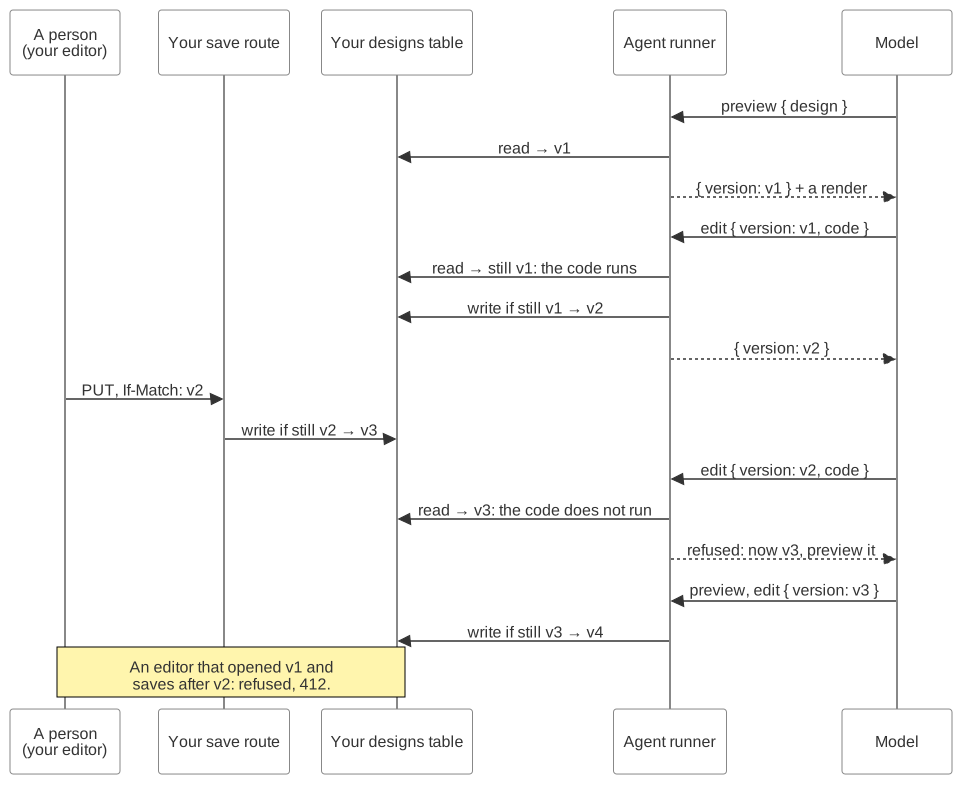
Every design has a version, a short opaque string that changes on every save; an empty design with nothing stored yet has one too. Every successful result the model gets names the design and its version, and the model passes the version back with each edit. The SDK compares it with your stored version before the model’s code runs.
The model sees your store’s version with a short hash of the design’s id in
front (b7b86c2a8e11.7 for your 7), so a version from another design never
passes. Your own code only ever sees your store’s version:
LoadResult.version, EditResult.version, and an event’s wrote. The model
accepts both forms, so you can hand it LoadResult.version directly.
| When the model is | What happens |
|---|---|
| Changing the design | Runs only on the current version. On an older version, or with none, it is refused and nothing runs. The refusal names the current version and tells the model to look first. The words are the SDK’s, so your prompt needs none of this. |
| Looking at it (a preview) | Never refuses over a version. On an older version, it renders the current one and says that the design changed. On an empty design, it says so and names its version. |
| Exporting it | Like a change: exports only the version the model names, so the file is what the model last checked. On an older version, or with none, it is refused with the current version. |
So on a new design the model either looks first, or takes one refusal that
hands it the version. Put the version from codesign.load in the user message
that starts the turn (one request from a person and the model’s tool calls
that answer it), so the model’s first edit is not refused.
Your own calls follow the same rules. codesign.edit takes a version option,
and it and codesign.load fail with a CoDesignError of kind
design_conflict when someone wrote in between.
The SDK keeps no version between calls; it always checks what the model passed. So the check also holds for a model that lost a result to its context limit, a conversation that resumes the next day, and a call that runs on another machine.
Your Store Saves Only Over the Version It Read#
The SDK checks the version before the model’s code runs. The conditional write
closes the gap after it: a person’s save, or a second edit, can land while an
edit runs. So write gets ifMatch, the version the call read, and stores the
content only while that is still the stored version, in one step, such as
UPDATE … WHERE revision = ? or an If-Match on an ETag. Otherwise it
stores nothing and returns undefined, and the model is told to look again.
A store that skips the condition fails silently: two writers that race
both land, and the last one wins with no error. For the whole store and the
test that catches this, testDesignStore, see
Connect Your Storage.
Your store also keeps the CE.SDK version that saved each design, because an
older CE.SDK silently drops what a newer one saved. The SDK refuses such a
save with kind older_saver
( Make Your Store Refuse a Damaging Save).
Your Editor’s Save#
A person’s save must be conditional too. Otherwise it overwrites what the
agent did while the editor was open, and neither the person nor the model is
told. Your save route stores only while the design is still at the version the
editor loaded, answers 412 otherwise, and refuses an older CE.SDK
( Your Editor).
On a conflict, your editor decides with the person: load the newer design, or keep theirs by saving again with the new version, over the agent’s work. Either way, the agent’s next edit is refused as stale, and the model looks before it builds on what the person did.
To check it: open the design in your editor, let the agent edit it, save in
the editor, and expect 412 from your route.
Parallel Calls#
Most agent frameworks run the tool calls of one model message at the same time. Two of them can be edits on one design. Both start from the same version. The conditional write keeps the first and refuses the second with the new version, and the model redoes the second. This holds whether the two calls run in one process or two, on one engine or two.
The tools that only read carry annotations: { readOnlyHint: true } in their
definition. If your framework lets you choose, run only those in parallel.
Resent Calls#
An agent framework that loses a tool’s answer can send the same call again, such as a durable workflow’s step retry. Running an edit twice would apply “font size +2” twice.
So the SDK derives an edit key from the call: the design, the version it
started from, and its code. It hands the key to your store’s write as
editKey. Your store keeps the key beside the version and returns it from
read.
| When the same call arrives again | What happens |
|---|---|
| Before its write landed | Nothing was stored, and the call runs normally. |
| After its write landed | The model gets “already applied” with the version it made. Nothing runs. |
| After someone else wrote on top | The key is gone. The call is refused as stale, so the model looks first. |
Every write replaces the key, and a write without one clears it. That is why your editor’s save passes none: a key kept past a person’s save could let a resent edit be answered “already applied” on top of their change. A resend with new code, where the framework asks the model again, is a new edit.
A resent image generation call generates the image again and is charged to your IMG.LY account again ( What It Costs).
Run a Turn on a Copy#
The SDK has no drafts. Every edit that changes the design writes to the design it works on, at once, and an export never writes a design. You choose what the agent works on in a turn:
- Live. Run the turn on the design itself. Every edit lands in the person’s design as it happens.
- On a copy. Start the turn from a copy, made with
codesign.create({ title, from: { design: originalId } }). The SDK makes the copy’s id, and yourwritecreates it. Run the turn with the copy’s id asdesign. When the person accepts, your code copies the result over the original in your own storage, as a conditional write on the version the copy was taken from, with the copy’scesdkVersionand noeditKey. If the original changed meanwhile, show the person both designs rather than overwrite that change.
import {  prepareCoDesign,  type CoDesign,  type CoDesignOptions,  type DesignStore} from '@imgly/codesign-sdk';
// Yours: your agent loop, with the tools of `codesign` (see the quickstart).async function runYourModel(  _codesign: CoDesign,  _brief: string,  _version: string // the version the model starts from, for its first change: your store's own): Promise<void> {  throw new Error('yours to write');}
export async function proposeOnACopy(  options: CoDesignOptions, // your usual options; `designs` is the store below  designs: DesignStore,  originalId: string,  brief: string) {  // Remember what the copy is taken from, so accepting it can be conditional.  const original = await designs.read(originalId, {});  if (!original) throw new Error(`no design ${originalId}`);
  // The SDK makes the copy's id; your `write` creates it.  const copy = await prepareCoDesign(options).create({    title: 'Proposal', // the copy's title    from: { design: originalId }  });
  // The turn runs on the copy: nothing in it can write the original.  await runYourModel(    prepareCoDesign({ ...options, design: copy.design }),    brief,    copy.version  );
  return { copyId: copy.design, takenFrom: original.version };}
// Yours: when the person accepts, copy the copy's content and `cesdkVersion`// over the original in your storage (no `editKey`), only while the original is// still at `takenFrom`.// Undefined when someone changed it meanwhile: show both rather than overwrite.export async function acceptCopy(  _copyId: string,  _originalId: string,  _takenFrom: string): Promise<string | undefined> {  throw new Error('yours to write');}
Nothing the agent does on the copy can touch the original, because only your runner writes designs. Prefer a copy in a product with an editor, so the person decides whether the agent’s change replaces their own last edit.
Keep What You Overwrite#
When a write replaces a design’s content, keep the previous one: the last few
versions, pruned on a schedule. That makes every mistake on this page
recoverable, including a person who chooses to save over the agent’s work. It
costs one branch in your write.
Stopping a Call#
codesign.create, load, edit, export, and every tool call take an
abort signal ({ signal }). Your agent framework usually hands one to each
tool call. An aborted call rejects at once with the signal’s reason and writes
nothing ( Cancellation).
The executor does not stop the work it started. The work finishes and is
ignored, and the next call on that design loads the stored design again.
Nothing needs closing afterwards: the design’s session on the executor closes
3 minutes after its last call, or at once with codesign.release(), and the
engine about 30 seconds after the conversation’s last session.
What the SDK Does Not Do#
- No merge. The SDK never combines two versions. The later writer is refused and looks at the stored one.
- No lock. Nothing stops your editor from writing while the agent works. The conditional write refuses whoever comes second.
- No notice to your editor. Nothing tells your editor that the agent
changed the design. Send that notice from your
designs.write, or from aneventslistener onprepareCoDesign: each tool call’s event names thedesignit worked on and, when it wrote, the version inwrote(your store’s own).
Next Steps#
- Connect Your Storage — build a complete design store over a SQL table and a bucket.
- Your Editor — make the editor’s save conditional.
- Versions and Upgrades — keep one CE.SDK for every saver of a design.
- Add a Design Chat — choose a proposal or a direct edit in a chat product.