See which parts of a design agent you run and which IMG.LY runs, where your keys live, and what you build.
With a design agent, your users type what they need, such as “a launch post for our spring blend”. An AI model designs it with the CoDesign SDK’s tools, and the user gets back a design they can keep editing. CE.SDK is IMG.LY’s design engine: it holds a design, edits it, and renders it. A tool is a function the model may ask your code to call. A conversation is your id for one chat, one job, or one request.
The Parts#
| Part | Who provides it | Where it runs | What it does |
|---|---|---|---|
| Agent runner | You | Your server or background job | Your code. It runs the agent loop: it sends the model the task and the tools, runs the tool calls the model asks for, and sends back the results. It reads and writes your designs. |
| Executor | IMG.LY, as a Docker image | Your container platform | Holds one CE.SDK engine for one conversation and runs the short programs the model writes to change a design. It charges every exported file to your IMG.LY account. You run it unchanged and write no executor code. |
| Your storage | You | Your database and file storage | Holds your designs and their files. Designs are never kept at IMG.LY; the executor holds a copy only while it works on one. |
| The model | IMG.LY’s AI gateway, or any provider whose models call tools | IMG.LY or the provider | Your agent runner calls it. The SDK never calls a model itself. |
| Browser editor, optional | IMG.LY’s CE.SDK, in your web app | The user’s browser | Lets people edit a design the agent made, with the same plugins, and saves it under the same rules ( Your Editor). |
Your existing app stays as it is: its sign-in, tenants (your customer accounts), and API start a job, and the agent runner does the work.
IMG.LY publishes the executor as imgly/codesign-executor on Docker Hub. You
run one container per conversation on your own infrastructure. The code the
model writes runs there, apart from your keys, your database, and other
conversations’ designs; only the runner calls the model and writes your
designs ( Security).

The agent runner gets its tools from the SDK, @imgly/codesign-sdk, with
prepareCoDesign. It reaches its executors through
remoteExecutors({ acquire, token }): acquire is your function that answers
the address of a conversation’s executor, and token is the executor token, a
secret your runner sends so that only it can use the executor. The runner never
runs an engine itself.
One Request, Start to Finish#
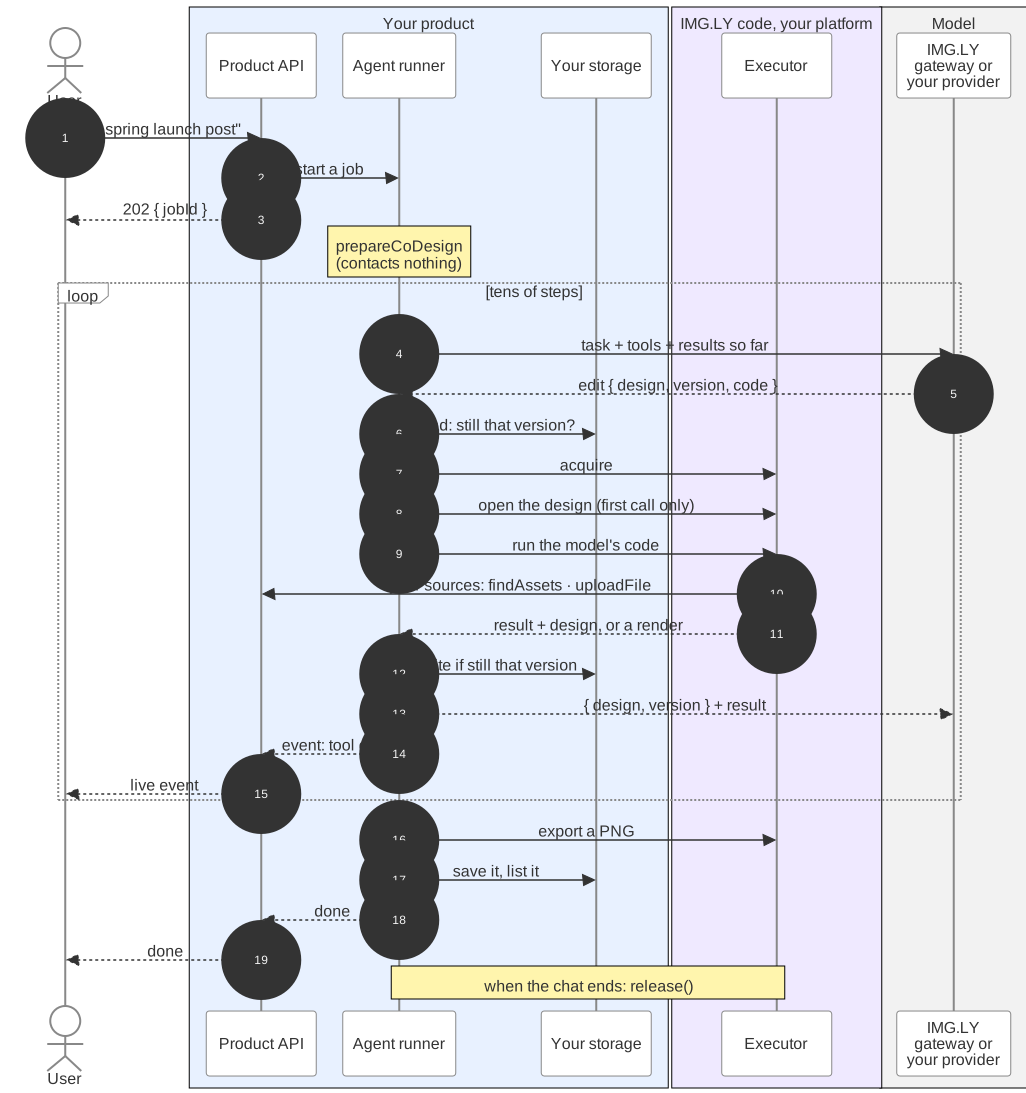
- A user asks for a design. Your API checks who they are, starts a job, and answers at once. The browser follows the job’s progress.
- The agent runner calls
prepareCoDesignfor this conversation. This contacts nothing. - The first tool call reads the design from your store, finds the
conversation’s executor through
acquire, and opens the design there with this tenant’s plugins (the files that add your brand and media, described below). Later calls find it loaded. - The model works in tens of steps. It reads the handbook, IMG.LY’s design
rules for the model, writes code that places text and pictures, looks at a
render, and fixes what is off.
- Every result tells the model the design’s version, and every edit names the version it builds on. So the model never builds on a design it has not seen.
- After every edit that succeeds, the runner saves the design to your storage, but only if nobody saved since. So nothing is lost if anything stops.
- At the end, the runner exports what the person asked for. When the
conversation is over, it calls
codesign.release()(codesignis the objectprepareCoDesignreturned), and the executor closes the design’s session, then its engine about 30 seconds later. Your platform starts a new container for the next conversation ( A New Container for Each Conversation).
A typical design job takes around 3 minutes, depending on the model and how hard the brief is.
What You Build#
You need not build all of it at once: a first version takes a file in and hands files out, with no store and no plugin of yours ( Choose How Deep to Integrate). A complete product has these parts:
- The agent runner. Your agent loop calls the model, hands it the SDK’s
tools, and appends
codesign.instructions, a few sentences from the SDK on how to use the tools, to your system prompt. The quickstart kits do this for six agent frameworks. acquire. It returns the same executor for a conversation while it lives, and one no other conversation used for a new conversation. Starting containers is your platform’s job ( Find a Conversation’s Executor).- A design store and an export function, small functions over storage you
already have ( Connect Your Storage).
designsreads a design and writes it only if it is still at the version the call read; without it, designs live in memory for one run.uploadExportstores a file the model exported and returns where the person gets it; with it, the agent can hand people files. - Your brand and files as a CE.SDK plugin. A plugin is one JavaScript file that adds something to a CE.SDK engine. Yours registers each tenant’s images, typefaces, and colors as asset sources, searchable catalogs in CE.SDK’s format. The runner sends it, with this person’s values, to the executor when it opens a design, so one executor image serves every tenant and a brand change needs no redeploy ( Bring Your Brand).
- Your own tools, optional, such as “find our logo”, which the model can call next to the SDK’s tools ( Tools).
- Product work. A job that runs for minutes, live progress to the browser, and a design list.
What You Need Before You Start#
- Node.js and the SDK.
@imgly/codesign-sdkfrom npm, installed at an exact version, because the executor and every CE.SDK that saves your designs must match it ( Versions and Upgrades). - The executor image.
imgly/codesign-executor, with the same tag as the SDK version. - A CoDesign license key. Contact sales to get a CoDesign license key. It starts the engine and pays for exports and for the AI gateway. It stays on your servers, never in a browser.
- A model. IMG.LY’s AI gateway, with your license key and no account with a model provider, or any provider whose models call tools.
- A place to run containers. Docker on your machine is enough to try it.
What It Costs#
Exports and AI use are charged in credits to your IMG.LY account. Your balance is in your IMG.LY dashboard. For prices, contact sales.
| What | Charged when | Charged to |
|---|---|---|
| Model tokens | Every step of the agent loop: tens of steps per design. | Your account, through IMG.LY’s AI gateway; or your own model provider. |
| Exports | Each exported PNG, JPEG, WebP, SVG, PDF, PDF/X (print-ready PDF), or HTML file, by its pages. | Your account, by the executor. |
| Generated media | Each image, video, or sound the agent generates, when you pass gateway. |
Your account, through the gateway. |
| Free | Edits, previews, saving the design, and failed renders. |
A model call is charged when the gateway answers it, so a run that fails or that you stop has paid for the calls answered before. An export is charged only when it is delivered: a refused export costs nothing, and a retried one is charged once. How an export is charged, and when it is refused, is in Billing.
The SDK sets no spending limit of its own. A step ceiling and a cost cap in
your agent loop bound a run
( Add Guardrails), and without
uploadExport only your own code exports, for example when a person approves
the design.
Next Steps#
- Quickstart — run a design agent on your machine.
- Starter Kits — start from a complete product.
- Host the Executor — run the image in production.
- Security — see what the model can reach and where your keys live.