Style text blocks programmatically with colors, backgrounds, typefaces, and formatting.
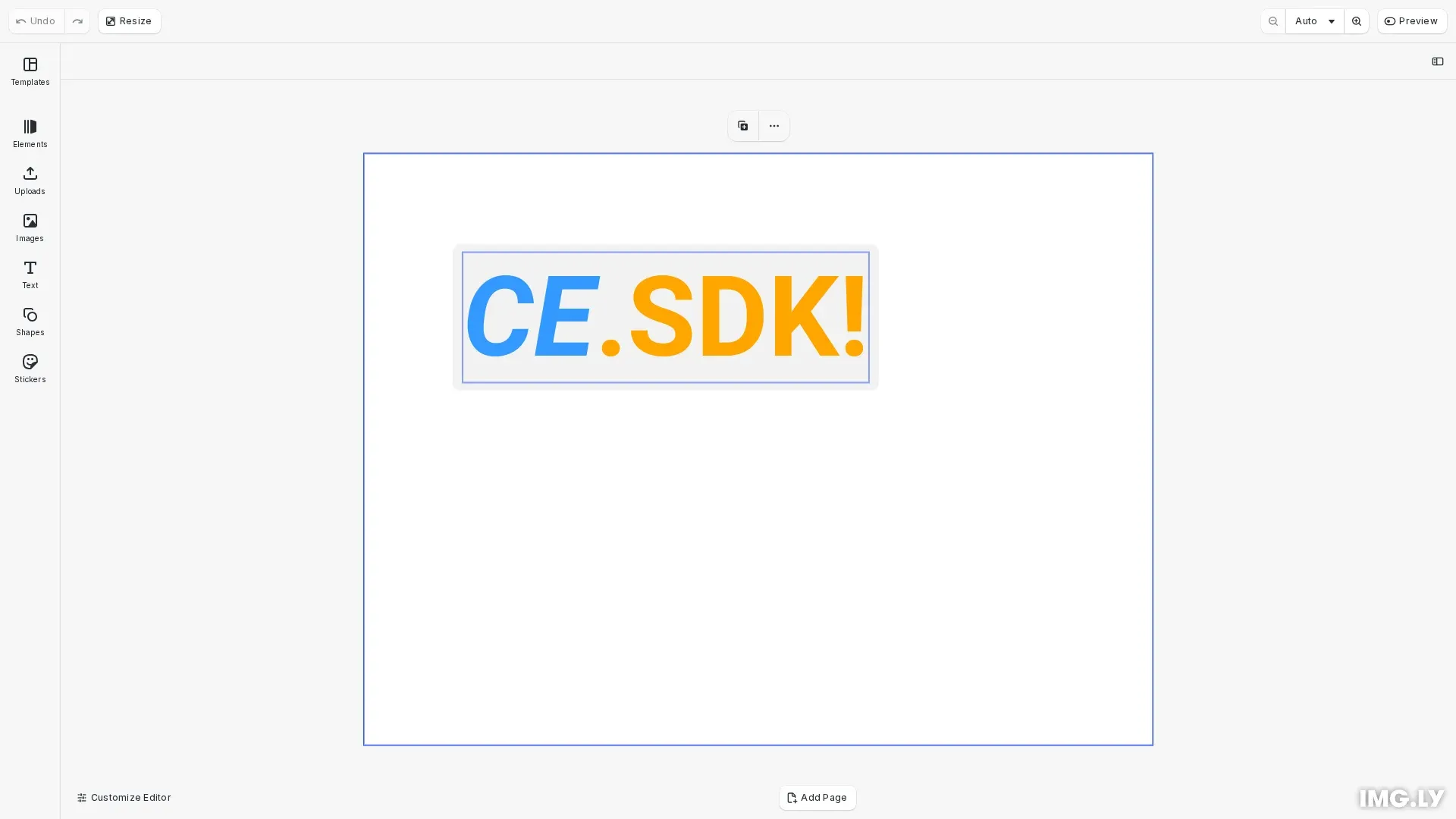
CE.SDK provides comprehensive text styling capabilities through the Block API. We can control text appearance through colors, backgrounds, typefaces, font weights, and case transformations, with the ability to apply different styling to specific character ranges within a single text block.
This guide covers editing text content, applying colors and backgrounds, managing typefaces, and controlling text case and font styles.
Editing Text Content#
We modify text using engine.block.replaceText() and engine.block.removeText(). Text ranges are specified using UTF-16 indices [from, to). When we omit indices, operations apply to the entire string.
// Edit text content using replaceText()engine.block.replaceText(text, "Hello World");
// Add a "!" at the end by inserting at position 11engine.block.replaceText(text, "!", 11);
// Replace "World" with "CE.SDK"engine.block.replaceText(text, "CE.SDK", 6, 11);
// Remove "Hello " (first 6 characters)engine.block.removeText(text, 0, 6);
The replaceText() method can replace the entire text, insert at a specific position, or replace a character range. The removeText() method removes characters from specified indices.
Text Colors#
We apply different colors to character ranges using engine.block.setTextColor() with RGBA or spot colors. The engine.block.getTextColors() method returns an ordered list of unique colors in the text.
// Apply colors to the entire textengine.block.setTextColor(text, { r: 1.0, g: 0.65, b: 0.0, a: 1.0 }); // Orange
// Apply different color to a specific range (characters 0-2)engine.block.setTextColor(text, { r: 0.2, g: 0.6, b: 1.0, a: 1.0 }, 0, 2); // Blue
CE.SDK supports applying different colors to individual character ranges within a single text block, enabling multi-colored text effects.
Text Backgrounds#
We add rectangular backgrounds using backgroundColor/* properties. The background is enabled with engine.block.setBool(), customized with engine.block.setColor(), and adjusted with engine.block.setFloat() for padding and corner radius.
// Enable and configure text backgroundengine.block.setBool(text, "backgroundColor/enabled", true);
// Set background colorengine.block.setColor(text, "backgroundColor/color", {  r: 0.95,  g: 0.95,  b: 0.95,  a: 1.0,}); // Light gray
// Configure padding on all sidesengine.block.setFloat(text, "backgroundColor/paddingLeft", 10);engine.block.setFloat(text, "backgroundColor/paddingRight", 10);engine.block.setFloat(text, "backgroundColor/paddingTop", 8);engine.block.setFloat(text, "backgroundColor/paddingBottom", 8);
// Add rounded cornersengine.block.setFloat(text, "backgroundColor/cornerRadius", 8);
Text backgrounds inherit animations assigned to their text block when the animation writing style is set to ‘Block’.
// Background inherits text block animations when writing style is 'Block'const animation = engine.block.createAnimation("slide");engine.block.setEnum(animation, "textAnimationWritingStyle", "Block");engine.block.setInAnimation(text, animation);Text Case Transformations#
We render text in different cases without modifying the underlying string value. The engine.block.setTextCase() method accepts Normal, Uppercase, Lowercase, or Titlecase values.
// Apply text case transformation (doesn't modify the string value)engine.block.setTextCase(text, "Uppercase");Text case transformations are visual modifiers - they change how the text renders without altering the actual string data.
Typefaces and Fonts#
We change fonts by providing a URI and typeface definition. The engine.block.setFont() method changes the font and resets existing formatting. The engine.block.setTypeface() method changes the typeface while preserving formatting.
// Define a typeface with multiple font variantsconst typeface = {  name: "Roboto",  fonts: [    {      uri: "https://cdn.img.ly/assets/v2/ly.img.typeface/fonts/Roboto/Roboto-Regular.ttf",      subFamily: "Regular",    },    {      uri: "https://cdn.img.ly/assets/v2/ly.img.typeface/fonts/Roboto/Roboto-Bold.ttf",      subFamily: "Bold",      weight: "bold" as const,    },    {      uri: "https://cdn.img.ly/assets/v2/ly.img.typeface/fonts/Roboto/Roboto-Italic.ttf",      subFamily: "Italic",      style: "italic" as const,    },    {      uri: "https://cdn.img.ly/assets/v2/ly.img.typeface/fonts/Roboto/Roboto-BoldItalic.ttf",      subFamily: "Bold Italic",      weight: "bold" as const,      style: "italic" as const,    },  ],};
// Change font and reset formattingengine.block.setFont(text, typeface.fonts[0].uri, typeface);
engine.block.setTextFontSize(text, 320);
A typeface definition includes the typeface name and a list of font definitions with URIs, subFamily names, weights, and styles. The engine.block.getTypeface() method returns the current typeface definition.
Font Weights and Styles#
We toggle between normal/bold weights and normal/italic styles using engine.block.toggleBoldFont() and engine.block.toggleItalicFont(). We first check availability with canToggleBoldFont() and canToggleItalicFont().
// Toggle bold font weightif (engine.block.canToggleBoldFont(text)) {  engine.block.toggleBoldFont(text);}
// Toggle italic font style on a specific rangeif (engine.block.canToggleItalicFont(text, 0, 2)) {  engine.block.toggleItalicFont(text, 0, 2);}
The typeface must include fonts matching the requested weight and style combination for toggling to work. We query current weights and styles with engine.block.getTextFontWeights() and engine.block.getTextFontStyles().
API Reference#
| Method | Purpose |
|---|---|
engine.block.replaceText() | Replace or insert text at specified indices |
engine.block.removeText() | Remove text at specified indices |
engine.block.setTextColor() | Set color for entire text or specific range |
engine.block.getTextColors() | Get ordered list of unique colors in text |
engine.block.setBool() | Enable/disable boolean properties |
engine.block.setColor() | Set color property values |
engine.block.getColor() | Get color property values |
engine.block.setFloat() | Set numeric property values |
engine.block.setTextCase() | Apply text case transformation |
engine.block.getTextCases() | Get ordered list of text cases in range |
engine.block.setFont() | Change font and reset formatting |
engine.block.setTypeface() | Change typeface and preserve formatting |
engine.block.getTypeface() | Get current typeface definition |
engine.block.canToggleBoldFont() | Check if bold toggle is possible |
engine.block.toggleBoldFont() | Toggle between normal and bold weight |
engine.block.canToggleItalicFont() | Check if italic toggle is possible |
engine.block.toggleItalicFont() | Toggle between normal and italic style |
engine.block.getTextFontWeights() | Get ordered list of font weights in range |
engine.block.getTextFontStyles() | Get ordered list of font styles in range |
Troubleshooting#
getTypeface() throws error: New text blocks don’t have explicit typefaces until setFont() is called.
Font toggle not working: Verify the typeface definition includes fonts for requested weight and style combinations.
Text background not visible: Ensure the backgroundColor/enabled property is set to true.
Unexpected text case rendering: Text case transformations don’t modify the underlying string value - they only affect rendering.
Font formatting lost: Use setTypeface() instead of setFont() to preserve existing formatting when changing fonts.