Apply bullet lists and numbered lists to text blocks programmatically using per-paragraph list styles and nesting levels.
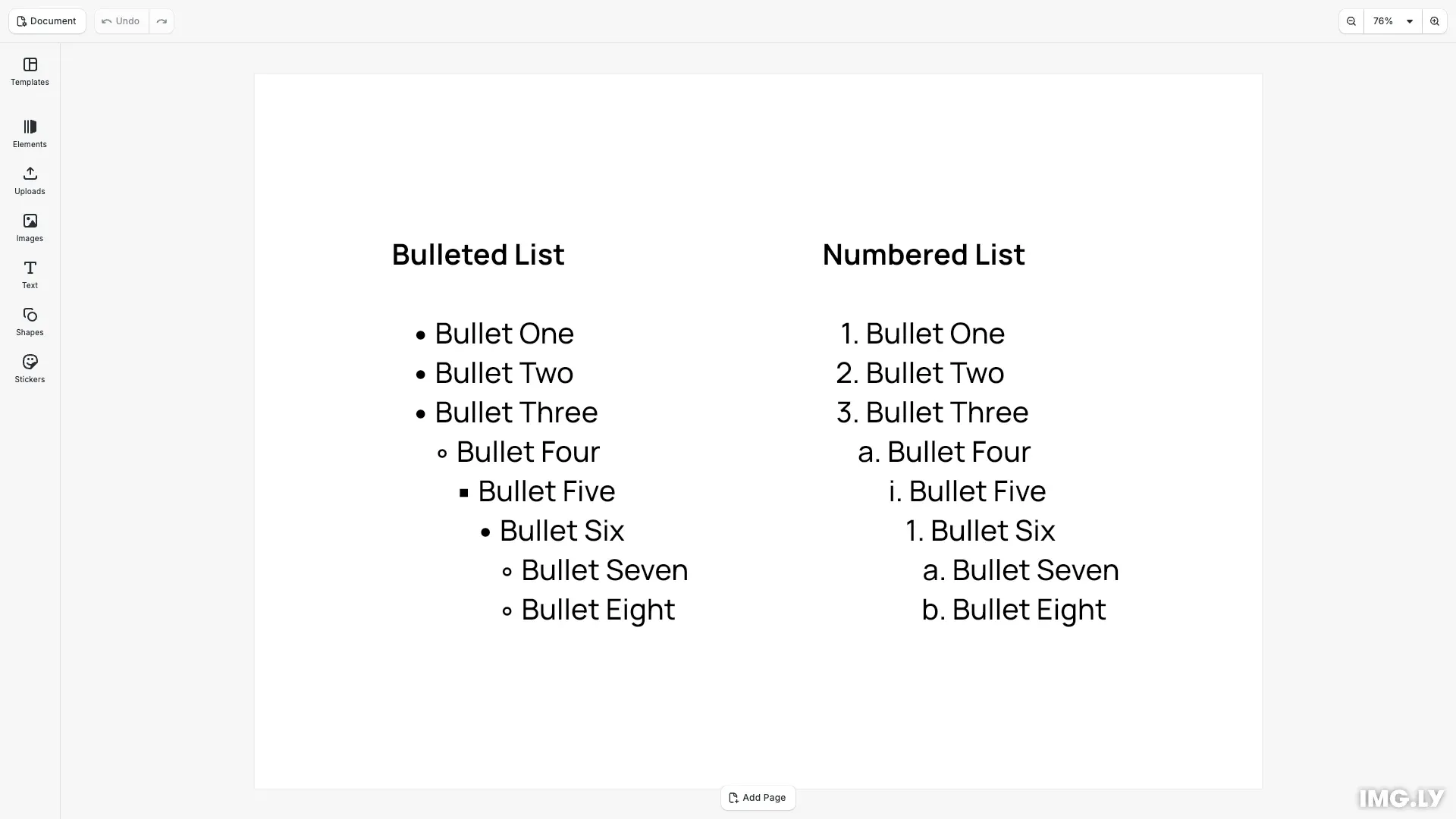
CE.SDK represents list formatting as per-paragraph properties on a text block. Each paragraph independently holds a list style ('None', 'Unordered', or 'Ordered') and a zero-based nesting level. A single call to setTextListStyle() targets either one paragraph or all paragraphs at once, making it straightforward to build structured lists without iterating manually.
This guide covers applying list styles, managing nesting levels, performing atomic style-and-level assignments, and resolving paragraph indices from text ranges.
Applying List Styles#
We start by creating a new design scene, then add a text block to it with three paragraphs separated by newlines. These paragraphs are the targets for all subsequent list operations.
// Create a new design scene with an 800×600 canvasawait cesdk.actions.run('scene.create', {  page: { width: 800, height: 600, unit: 'Pixel' }});
const engine = cesdk.engine;const page = engine.block.findByType('page')[0];
// Create a text block and populate it with three paragraphsconst textBlock = engine.block.create('text');engine.block.appendChild(page, textBlock);engine.block.replaceText(textBlock, 'First item\nSecond item\nThird item');engine.block.setTextFontSize(textBlock, 36);engine.block.setWidthMode(textBlock, 'Auto');engine.block.setHeightMode(textBlock, 'Auto');engine.block.setPositionX(textBlock, 80);engine.block.setPositionY(textBlock, 80);
We apply list styles with engine.block.setTextListStyle(). Omitting paragraphIndex (or passing -1) applies the style to all paragraphs simultaneously. Passing a non-negative index targets a single paragraph.
// Apply ordered list style to all paragraphs (paragraphIndex defaults to -1 = all)block.setTextListStyle(textBlock, 'Ordered');
// Override the third paragraph (index 2) to unorderedblock.setTextListStyle(textBlock, 'Unordered', 2);
After these two calls, paragraphs 0 and 1 are ordered (numbered) and paragraph 2 is unordered (bulleted).
Managing Nesting Levels#
We control the visual depth of list items with engine.block.setTextListLevel(). The listLevel parameter is zero-based: 0 is the outermost item and 1 is one indent deeper. Nesting has no visual effect when the list style is 'None'. We read the current level back with engine.block.getTextListLevel().
// Set the second paragraph (index 1) to nesting level 1 (one indent deep)block.setTextListLevel(textBlock, 1, 1);
// Read back the nesting level to confirmconst level = block.getTextListLevel(textBlock, 1);console.log('Second paragraph nesting level:', level); // 1
Atomic Style and Level Assignment#
We set both list style and nesting level in a single call by passing the optional listLevel parameter to setTextListStyle(). This saves a separate setTextListLevel() call when both properties need to change together.
// Atomically set both list style and nesting level in one call// Sets paragraph 0 to ordered style at nesting level 0 (outermost)block.setTextListStyle(textBlock, 'Ordered', 0, 0);Resolving Paragraph Indices from Text Ranges#
When working with a text selection or a known grapheme range, engine.block.getTextParagraphIndices() returns the 0-based paragraph indices that overlap the range. Passing negative values for from and to (the defaults) returns all indices in the block. This is useful before targeted per-paragraph operations.
// Get all paragraph indices in the text blockconst allIndices: number[] = block.getTextParagraphIndices(textBlock);console.log('All paragraph indices:', allIndices); // [0, 1, 2]
// Get indices overlapping a specific grapheme rangeconst rangeIndices = block.getTextParagraphIndices(textBlock, 0, 10);console.log('Indices for range [0, 10):', rangeIndices); // [0]
Querying List Styles#
We read back the current list style and nesting level for each paragraph using engine.block.getTextListStyle() and engine.block.getTextListLevel(). Both getters require a non-negative paragraphIndex—use getTextParagraphIndices() to discover valid indices.
// Read back the list style and nesting level for each paragraphconst styles = allIndices.map((i) => block.getTextListStyle(textBlock, i));const levels = allIndices.map((i) => block.getTextListLevel(textBlock, i));console.log('Paragraph styles:', styles); // ['Ordered', 'Ordered', 'Unordered']console.log('Paragraph levels:', levels); // [0, 1, 0]The logged output confirms styles ['Ordered', 'Ordered', 'Unordered'] and levels [0, 1, 0] across the three paragraphs.
Troubleshooting#
- List markers not visible: Verify the
text/characterscope is enabled on the text block before calling setters. getTextListStyle()throws: TheparagraphIndexmust be non-negative for getters. UsegetTextParagraphIndices()to retrieve valid indices.- Nesting level has no effect: Check that the list style is not
'None'—nesting only applies when a list style is active. - Numbered list restarting unexpectedly: Ordered numbering is calculated per-paragraph across the entire block. A
'None'paragraph between ordered items may reset the counter depending on the renderer.
API Reference#
| Method | Purpose |
|---|---|
engine.block. | Apply list style to one or all paragraphs, optionally setting nesting level atomically |
engine.block. | Get the list style of a specific paragraph |
engine.block. | Set the nesting level of one or all paragraphs |
engine.block. | Get the nesting level of a specific paragraph |
engine.block. | Get 0-based paragraph indices overlapping a grapheme range |