Control letter spacing, line height, and paragraph spacing in text blocks using the Block API.
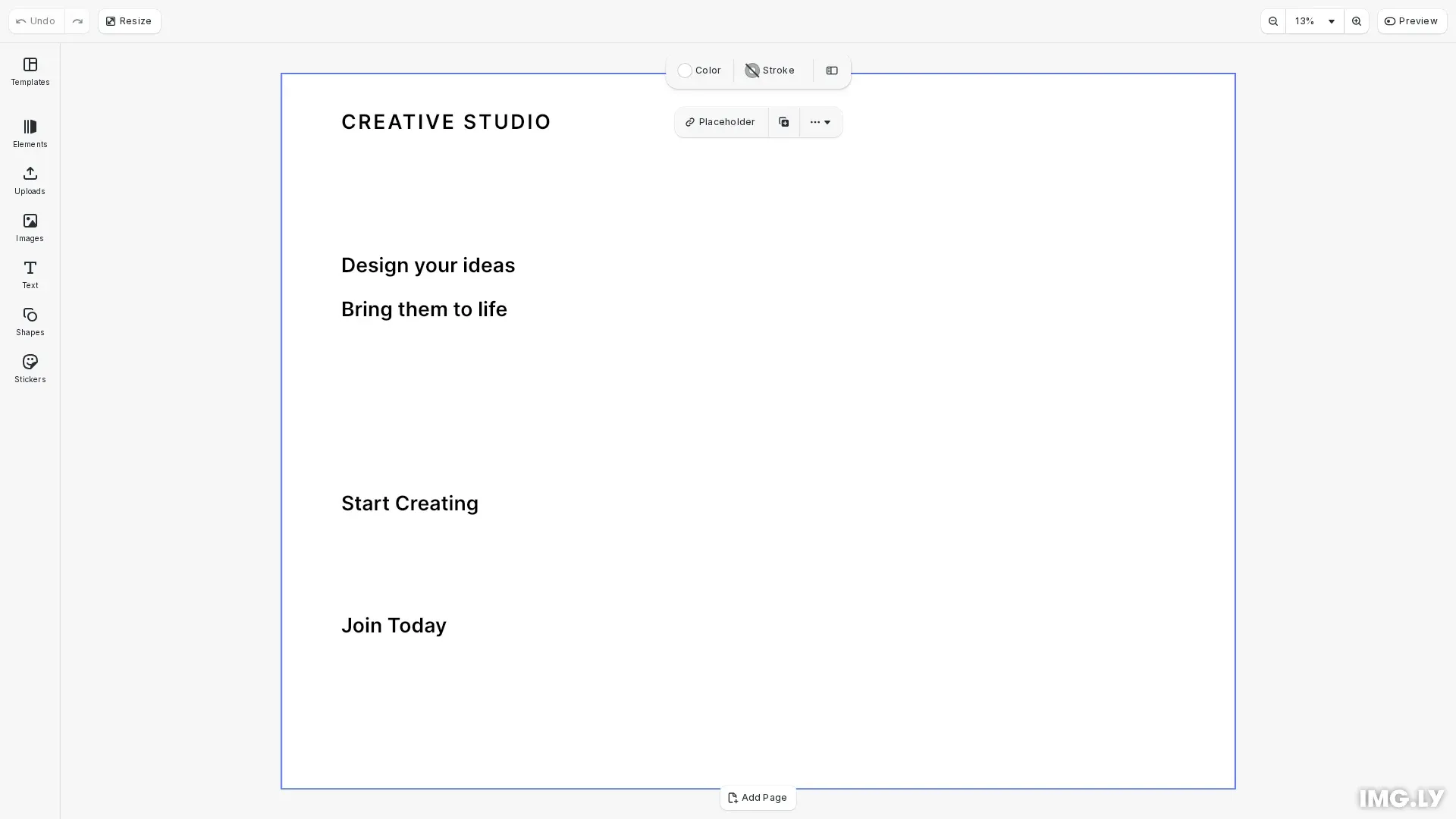
CE.SDK provides three text spacing properties: text/letterSpacing, text/lineHeight, and text/paragraphSpacing. All are float properties controlled via engine.block.setFloat() and engine.block.getFloat(). Text spacing adjustments are programmatic-only; there is no built-in UI for these properties.
This guide covers how to adjust letter spacing between characters, line height between lines, and paragraph spacing between paragraphs.
Letter Spacing#
We control the horizontal space between characters using engine.block.setFloat() with the text/letterSpacing property. Positive values increase spacing, negative values tighten characters.
// Text block 1: Letter Spacing Democonst textLetterSpacing = engine.block.create("text");engine.block.appendChild(page, textLetterSpacing);engine.block.setPositionX(textLetterSpacing, 50);engine.block.setPositionY(textLetterSpacing, 30);engine.block.setWidth(textLetterSpacing, 700);engine.block.setHeightMode(textLetterSpacing, "Auto");engine.block.replaceText(textLetterSpacing, "CREATIVE STUDIO");engine.block.setTextFontSize(textLetterSpacing, 48);
// Set letter spacing - controls space between characters// Positive values increase spacing, negative values tighten charactersengine.block.setFloat(textLetterSpacing, "text/letterSpacing", 0.1);
// Read current letter spacing valueconst letterSpacing = engine.block.getFloat(  textLetterSpacing,  "text/letterSpacing");console.log("Letter spacing:", letterSpacing);
Letter spacing (also known as tracking) helps adjust text density for improved readability or visual effect.
Line Height#
We control the vertical distance between lines using engine.block.setFloat() with the text/lineHeight property. Values are multipliers of the font size—for example, 1.5 means 150% of the font size.
// Text block 2: Line Height Democonst textLineHeight = engine.block.create("text");engine.block.appendChild(page, textLineHeight);engine.block.setPositionX(textLineHeight, 50);engine.block.setPositionY(textLineHeight, 150);engine.block.setWidth(textLineHeight, 700);engine.block.setHeightMode(textLineHeight, "Auto");engine.block.replaceText(  textLineHeight,  "Design your ideas\nBring them to life");engine.block.setTextFontSize(textLineHeight, 48);
// Set line height - controls vertical distance between lines// Values are multipliers of font size (1.5 = 150% of font size)engine.block.setFloat(textLineHeight, "text/lineHeight", 1.8);
// Read current line height valueconst lineHeight = engine.block.getFloat(textLineHeight, "text/lineHeight");console.log("Line height:", lineHeight);
Line height affects multi-line text. A single line of text won’t show visible differences.
Paragraph Spacing#
We add vertical space between paragraphs using engine.block.setFloat() with the text/paragraphSpacing property. The value is added after each paragraph break (newline characters in the text content).
// Text block 3: Paragraph Spacing Democonst textParagraphSpacing = engine.block.create("text");engine.block.appendChild(page, textParagraphSpacing);engine.block.setPositionX(textParagraphSpacing, 50);engine.block.setPositionY(textParagraphSpacing, 350);engine.block.setWidth(textParagraphSpacing, 700);engine.block.setHeightMode(textParagraphSpacing, "Auto");engine.block.replaceText(  textParagraphSpacing,  "Start Creating\nJoin Today");engine.block.setTextFontSize(textParagraphSpacing, 48);
// Set paragraph spacing - adds space after paragraph breaksengine.block.setFloat(textParagraphSpacing, "text/paragraphSpacing", 4);
// Read current paragraph spacing valueconst paragraphSpacing = engine.block.getFloat(  textParagraphSpacing,  "text/paragraphSpacing");console.log("Paragraph spacing:", paragraphSpacing);
Paragraph spacing only affects text with actual paragraph breaks. Single paragraphs won’t show visible differences.
API Reference#
| Method | Purpose |
|---|---|
engine.block.setFloat() | Set numeric spacing property values |
engine.block.getFloat() | Get current spacing property values |
Properties Reference#
| Property | Type | Purpose |
|---|---|---|
text/letterSpacing | Float | Space between characters (tracking) |
text/lineHeight | Float | Multiplier for vertical line distance |
text/paragraphSpacing | Float | Space added after paragraph breaks |
Troubleshooting#
Spacing changes not visible: Ensure the text block contains enough content to show the effect—multiple characters for letter spacing, multiple lines for line height, multiple paragraphs for paragraph spacing.
Unexpected line height behavior: Line height is a multiplier of font size, not an absolute value. A value of 1.5 means 150% of the current font size.
Paragraph spacing not working: Verify the text content contains actual paragraph breaks (newline characters).