Hide parts of a block with the linear wipe, radial wipe and venetian blinds effects, and animate a wipe to reveal a block over time.
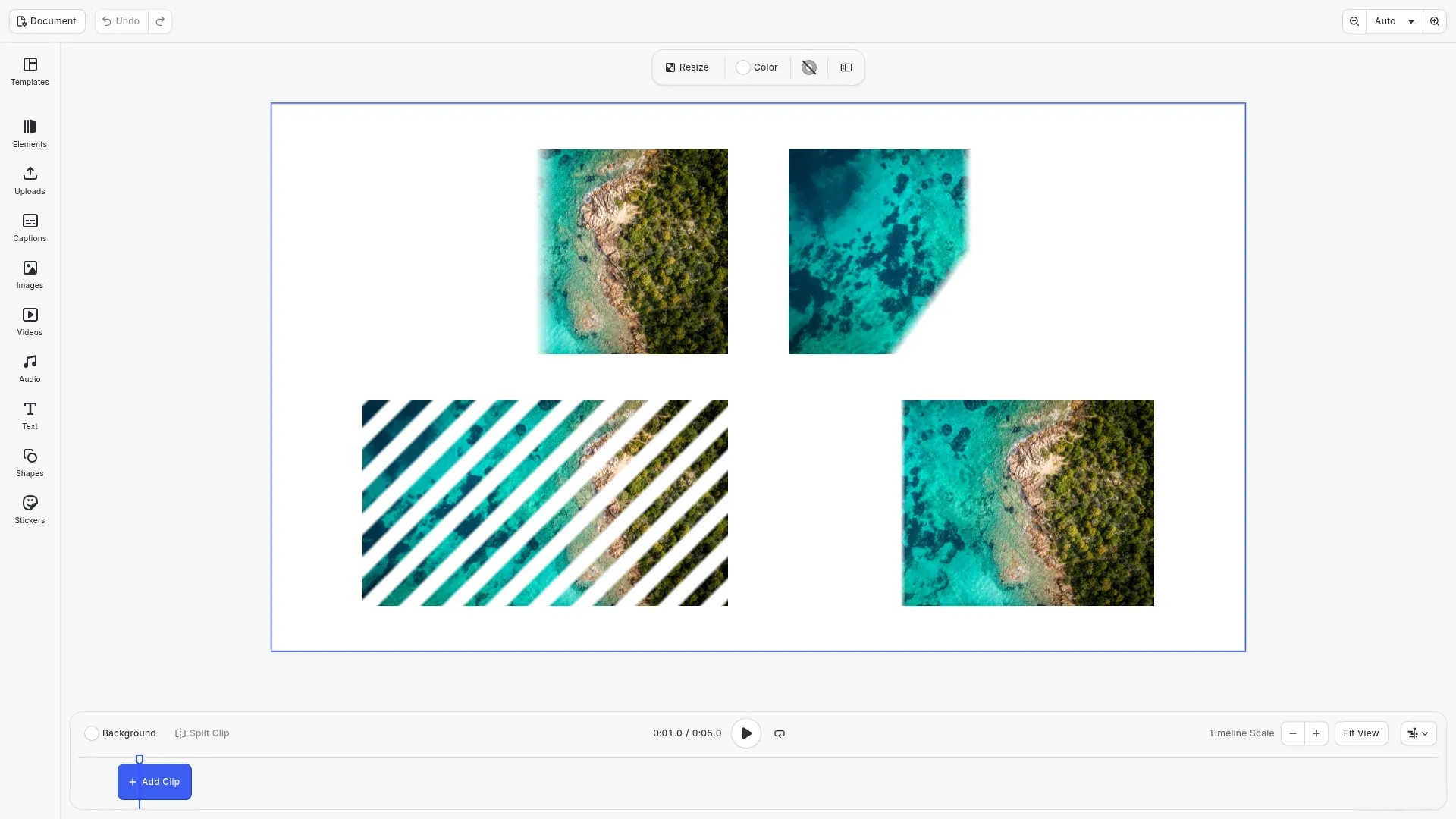
Wipe effects hide a part of a block. Their completion property sets the hidden part, from 0 (all shown) to 1 (all hidden), and feather sets the length of the soft edge in design units. They use the same effect API as all other effects: you create an effect with createEffect(), set its properties and add it to a block with appendEffect(). Scenes that use these effects do not open in earlier versions of CE.SDK. For the general effect API, see Apply a Filter or Effect.
This guide covers the three wipe effects and a reveal that animates completion with keyframes.
The Wipe Effects#
The Supported Filters and Effects guide lists the properties and default values of every type.
| Type | What it hides | Properties |
|---|---|---|
linear_wipe |
The block from one side, along a straight edge | completion, angle, feather |
radial_wipe |
A wedge that sweeps around a center | completion, startAngle, centerX, centerY, direction, feather |
venetian_blinds |
A part of each stripe in a set of repeating stripes | completion, direction, width, feather |
Creating the Image Blocks#
The reveal needs a timeline, so the example uses the video editor and a scene with the DepthStack layout, as the Keyframes guide does. A helper adds an image block at a position. We put four copies of one image on the page: three for the wipe effects and one for the reveal.
// Adds a 720 x 405 image block to the page at a positionconst imageUri = 'https://img.ly/static/ubq_samples/sample_1.jpg';const addImageBlock = async (x: number, y: number) => {  const block = await engine.block.addImage(imageUri, {    size: { width: 720, height: 405 }  });  engine.block.appendChild(page, block);  engine.block.setPositionX(block, x);  engine.block.setPositionY(block, y);  return block;};
const linearBlock = await addImageBlock(180, 90);const radialBlock = await addImageBlock(1020, 90);const blindsBlock = await addImageBlock(180, 585);const revealBlock = await addImageBlock(1020, 585);
Linear Wipe#
angle sets the direction of the wipe in degrees: 90 wipes from the left, 0 wipes from the bottom. A completion of 0.5 hides half of the block. feather is the length of the soft edge in design units, so it scales with the block.
// Hide the left half of the block with a soft edge of 40 design unitsconst linearWipe = engine.block.createEffect('linear_wipe');engine.block.setFloat(linearWipe, 'effect/linear_wipe/angle', 90);engine.block.setFloat(linearWipe, 'effect/linear_wipe/completion', 0.5);engine.block.setFloat(linearWipe, 'effect/linear_wipe/feather', 40);engine.block.appendEffect(linearBlock, linearWipe);Radial Wipe#
radial_wipe hides a wedge of the full circle around a center. startAngle is the angle where the wipe starts, in degrees clockwise from 12 o’clock. centerX and centerY place the center relative to the block size, from 0 to 1. direction is 'Clockwise', 'Counterclockwise' or 'Both'.
// Sweep clockwise from 12 o'clock and hide 60% of the circleconst radialWipe = engine.block.createEffect('radial_wipe');engine.block.setFloat(radialWipe, 'effect/radial_wipe/completion', 0.6);engine.block.setFloat(radialWipe, 'effect/radial_wipe/startAngle', 0);engine.block.setFloat(radialWipe, 'effect/radial_wipe/centerX', 0.5);engine.block.setFloat(radialWipe, 'effect/radial_wipe/centerY', 0.5);engine.block.setEnum( radialWipe, 'effect/radial_wipe/direction', 'Clockwise');engine.block.setFloat(radialWipe, 'effect/radial_wipe/feather', 20);engine.block.appendEffect(radialBlock, radialWipe);Venetian Blinds#
venetian_blinds hides the same part of each stripe. direction turns the stripes in degrees, and 0 gives vertical stripes. width is the width of one stripe in design units. The edge ramp is three times feather.
// Diagonal stripes 60 design units wide, each half hiddenconst blinds = engine.block.createEffect('venetian_blinds');engine.block.setFloat(blinds, 'effect/venetian_blinds/completion', 0.5);engine.block.setFloat(blinds, 'effect/venetian_blinds/direction', 45);engine.block.setFloat(blinds, 'effect/venetian_blinds/width', 60);engine.block.setFloat(blinds, 'effect/venetian_blinds/feather', 2);engine.block.appendEffect(blindsBlock, blinds);Revealing a Block over Time#
Effect properties accept keyframes. We give the fourth block a duration of 2 seconds and a linear wipe, and animate effect/linear_wipe/completion from 1 (all hidden) to 0 (all shown). Keyframe times are relative to the duration of the block that the effect is attached to, from 0 to 1. getKeyframes() reads the track back.
// Reveal the block from the right during its 2 secondsengine.block.setDuration(revealBlock, 2);const reveal = engine.block.createEffect('linear_wipe');engine.block.setFloat(reveal, 'effect/linear_wipe/angle', 90);engine.block.appendEffect(revealBlock, reveal);
// Keyframe times are relative to the block's duration, from 0 to 1engine.block.setKeyframes(reveal, 'effect/linear_wipe/completion', [  {    time: 0,    value: { type: 'Float', value: 1 },    easing: { type: 'Preset', preset: 'EaseOut' }  },  { time: 1, value: { type: 'Float', value: 0 } }]);console.log(  engine.block.getKeyframes(reveal, 'effect/linear_wipe/completion').length); // 2
The keyframes do not change the static value of the property, so getFloat() still returns the value that you set without keyframes. The example moves the playback time to 1 second with setPlaybackTime(), so the canvas shows the block partly revealed. Press play in the timeline to watch it. For easing, relative tracks and the other keyframe options, see Keyframes.
Troubleshooting#
- The whole block disappears:
completionis 1. Set a lower value, or check the keyframes at the current playback time. - The revealed block stays hidden: the playback time is at the start of the block, where
completionis 1. Move it withsetPlaybackTime(). - The soft edge looks too hard or too soft:
featheris in design units, so a block with a larger size needs a larger value for the same look.
API Reference#
| Method | Description |
|---|---|
block.createEffect(type) |
Create an effect, for example 'linear_wipe', 'radial_wipe' or 'venetian_blinds' |
block.appendEffect(block, effect) |
Add an effect to the end of the effect list of a block |
block.setFloat(effect, property, value) |
Set a number property, such as effect/linear_wipe/completion |
block.setEnum(effect, property, value) |
Set an option property, such as effect/radial_wipe/direction |
block.setDuration(block, duration) |
Set the duration of a block in seconds |
block.setKeyframes(block, property, keyframes) |
Animate a property of a block, such as the completion of an effect |
block.getKeyframes(block, property) |
Read the keyframes of a property |
block.setPlaybackTime(page, time) |
Move the playback position of a page |
Next Steps#
- Keyframes: animate effect properties over time.
- Apply a Filter or Effect: insert, disable and remove effects.
- Supported Filters and Effects: look up the properties of every effect type.
- Color Effects: remap the colors of a block.
- Distortion Effects: move the pixels of a block.