Customize the aspect ratio options users see when they open crop mode in the Android editor.
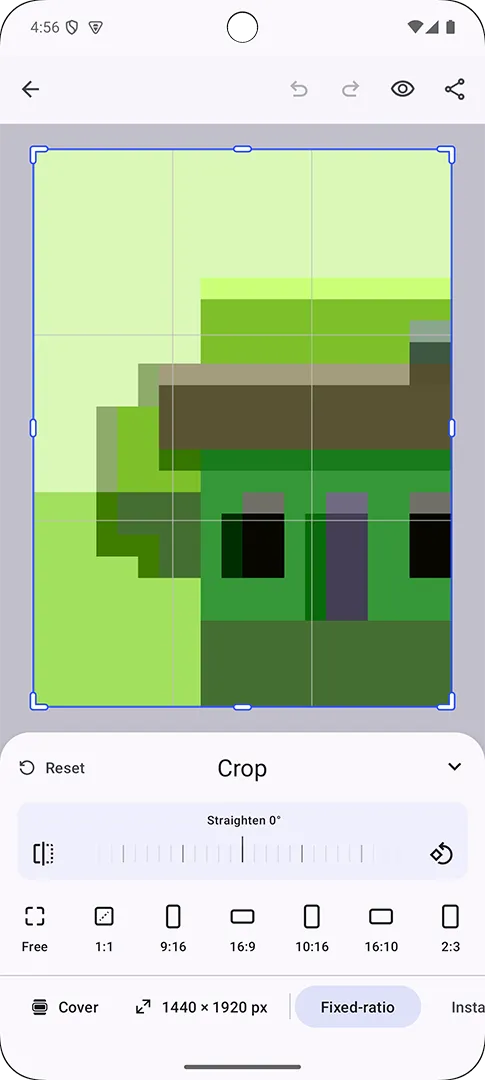
Crop presets are asset-source entries with a payload.transformPreset value. The Android image crop UI reads aspect ratio presets from ly.img.crop.presets.
Fixed-size page presets use the same transform preset model, but Android reads them from ly.img.page.presets. This guide covers how the built-in crop UI uses both sources, which preset types Android supports in content.json, and how to replace or merge preset content for your own editor.
Using the Built-in Crop UI#
The crop interface displays preset tiles when users enter crop mode. Aspect ratio crop presets from ly.img.crop.presets use their localized labels and render built-in icons from payload.transformPreset.
Fixed-size page presets from ly.img.page.presets use the regular asset list. Add thumbnail metadata, such as meta.thumbUri, so the page preset tile has an image to render. If thumbUri is missing, Android falls back to meta.uri, which is usually not a useful page preset thumbnail.
The default crop source includes free aspect ratio presets, fixed aspect ratio presets, and the Original content aspect ratio preset. The default page source includes fixed-size presets for common social and print dimensions. Use custom JSON when you want to add, replace, reorder, or merge the presets that appear in crop mode.
| Source ID | Use |
|---|---|
ly.img.crop.presets |
Free, fixed, and content aspect ratio presets for image or video crop frames |
ly.img.page.presets |
Fixed-size page presets that set page dimensions and DPI |
The Android editor does not expose a crop-preset library entry with multiple sourceIds. To replace, reorder, remove, or extend presets, change the assets inside the source that owns that preset family. Aspect ratio presets belong in ly.img.crop.presets; fixed-size page presets belong in ly.img.page.presets. To add custom presets alongside the defaults, copy the default content.json, merge your entries into the same source, and load the merged file.
Loading Default or Custom Sources#
CE.SDK includes a default crop preset source. For production apps, self-host or bundle those assets and load them during editor setup. See Serve Assets From Your Server for the default asset layout and baseUri setup.
To add, replace, reorder, or merge presets, load a content.json file whose id matches the source you want to update. If that source is already registered, remove it before loading a full replacement. engine.asset.addLocalSourceFromJSON(...) reads the source ID from the JSON file and supports all transform preset types shown below.
When your JSON uses {{base_url}} placeholders for page preset thumbnails, pass a valid base path when loading from a JSON string. For the default asset layout, that base path is the package asset root that contains ly.img.page.presets. When you load a content.json URI instead, keep thumbnail paths relative to that file’s parent directory.
Run the replacement from an editor setup callback where the engine is available. The snippet below replaces ly.img.crop.presets with the entries shown in cropPresetContent; it does not keep the other default crop presets. Use the same remove-and-load pattern with a JSON file whose id is ly.img.page.presets when you replace fixed-size page presets. To keep defaults plus custom presets, start from the default content.json, add your entries to that same file, and load the merged source with the same source ID:
val cropPresetSourceId = "ly.img.crop.presets"val cropPresetContent = """    {      "version": "7.0.0",      "id": "ly.img.crop.presets",      "assets": [        {          "id": "aspect-ratio-free",          "label": { "en": "Free" },          "payload": { "transformPreset": { "type": "FreeAspectRatio" } },          "groups": ["fixed-ratio"]        },        {          "id": "aspect-ratio-16-9",          "label": { "en": "16:9" },          "payload": {            "transformPreset": {              "type": "FixedAspectRatio",              "width": 16,              "height": 9            }          },          "groups": ["fixed-ratio"]        }      ]    }""".trimIndent()
if (cropPresetSourceId in editorContext.engine.asset.findAllSources()) {    editorContext.engine.asset.removeSource(cropPresetSourceId)}
editorContext.engine.asset.addLocalSourceFromJSON(    contentJSON = cropPresetContent,)
Creating Custom Crop Presets#
Each preset asset needs an id, localized label, optional groups, and a payload.transformPreset object. The groups array controls how presets are grouped in the crop sheet.
Free Aspect Ratio#
A free aspect ratio preset removes constraints from the crop frame so users can drag each side independently.
{ "id": "aspect-ratio-free", "label": { "en": "Free", "de": "Frei" }, "payload": { "transformPreset": { "type": "FreeAspectRatio" } }, "groups": ["fixed-ratio"]}Fixed Aspect Ratio#
A fixed aspect ratio preset locks the crop frame to a ratio. The width and height values define the ratio, not absolute dimensions.
{ "id": "aspect-ratio-16-9", "label": { "en": "16:9", "de": "16:9" }, "payload": { "transformPreset": { "type": "FixedAspectRatio", "width": 16, "height": 9 } }, "groups": ["fixed-ratio"]}Content Aspect Ratio#
A content aspect ratio preset snaps the crop frame back to the intrinsic ratio of the selected image or video content.
{ "id": "aspect-ratio-original", "label": { "en": "Original", "de": "Original" }, "payload": { "transformPreset": { "type": "ContentAspectRatio" } }, "groups": ["fixed-ratio"]}This preset only works for blocks whose image or video fill has resolvable intrinsic dimensions. Applying it to text, an empty placeholder, a page without matching content dimensions, or media that has not resolved dimensions yet returns an error.
Fixed Size#
A fixed-size preset sets exact page dimensions. Android applies FixedSize presets from ly.img.page.presets by updating the page width, page height, and scene DPI.
{ "id": "square-post", "label": { "en": "Square Post (1:1)", "de": "Quadratischer Post (1:1)" }, "meta": { "thumbUri": "{{base_url}}/ly.img.page.presets/thumbnails/instagram/ig-square.png" }, "payload": { "transformPreset": { "type": "FixedSize", "width": 1080, "height": 1080, "designUnit": "Pixel" } }, "groups": ["fixed-size"]}The designUnit value defines the measurement unit for the page dimensions. Use Pixel, Millimeter, or Inch. The thumbUri value points to the thumbnail rendered in the Android page preset list.
Configuring Source Content#
The crop preset source can contain free, content, and fixed aspect ratio presets:
{ "version": "7.0.0", "id": "ly.img.crop.presets", "assets": [ { "id": "aspect-ratio-free", "label": { "en": "Free" }, "payload": { "transformPreset": { "type": "FreeAspectRatio" } }, "groups": ["fixed-ratio"] }, { "id": "aspect-ratio-original", "label": { "en": "Original" }, "payload": { "transformPreset": { "type": "ContentAspectRatio" } }, "groups": ["fixed-ratio"] }, { "id": "aspect-ratio-16-9", "label": { "en": "16:9" }, "payload": { "transformPreset": { "type": "FixedAspectRatio", "width": 16, "height": 9 } }, "groups": ["fixed-ratio"] } ]}The page preset source contains fixed-size presets:
{ "version": "7.0.0", "id": "ly.img.page.presets", "assets": [ { "id": "square-post", "label": { "en": "Square Post (1:1)" }, "meta": { "thumbUri": "{{base_url}}/ly.img.page.presets/thumbnails/instagram/ig-square.png" }, "payload": { "transformPreset": { "type": "FixedSize", "width": 1080, "height": 1080, "designUnit": "Pixel" } }, "groups": ["fixed-size"] } ]}Keep labels localized with at least an en entry. Add more locale keys when your app supports multiple languages. For fixed-size page presets, keep thumbnail files under the base path used for {{base_url}}, or adjust thumbUri to match the relative layout used by your content.json URI.
Troubleshooting#
- Presets do not appear: verify the loaded JSON
idmatches the preset family:ly.img.crop.presetsfor aspect ratio presets, orly.img.page.presetsfor fixed-size page presets. Confirm the source is registered withengine.asset.findAllSources(). - Custom presets replace defaults unexpectedly: Android reads one source per preset family. Merge default and custom entries into the matching
content.jsonwhen you want both. - A preset has no label: add a
labelobject with anenvalue, and add locale-specific values such asdewhen needed. - A content aspect ratio preset fails: apply it only to image or video blocks whose intrinsic dimensions are available.
- A fixed-size preset tile has no thumbnail: add
meta.thumbUriand make sure the URL resolves. For JSON strings, passbasePathwhenthumbUriuses{{base_url}}; forcontent.jsonURIs, make the thumbnail path relative to the source file’s parent directory. - A fixed-size preset does not resize the page: put the asset in
ly.img.page.presetsand includewidth,height, anddesignUnitinpayload.transformPreset.
API Reference#
| API | Description |
|---|---|
engine.asset.addLocalSourceFromJSON(contentUri=_, matcher=_) |
Loads a content.json file and registers the source ID declared in that file |
engine.asset.addLocalSourceFromJSON(contentJSON=_, basePath=_, matcher=_) |
Loads source content from a JSON string and replaces {{base_url}} placeholders with basePath |
engine.asset.removeSource(sourceId=_) |
Removes an existing preset source before loading replacement content |
engine.asset.findAllSources() |
Lists registered source IDs for debugging and validation |
Preset Types#
| Type | Source | Effect |
|---|---|---|
FreeAspectRatio |
ly.img.crop.presets |
Enables unconstrained crop-frame resizing |
FixedAspectRatio |
ly.img.crop.presets |
Locks the crop frame to a width-to-height ratio |
ContentAspectRatio |
ly.img.crop.presets |
Matches the selected image or video content ratio |
FixedSize |
ly.img.page.presets |
Sets fixed page dimensions and scene DPI |