Dynamically replace content within templates using CE.SDK’s placeholder and variable systems. Find placeholder blocks by name, update text using variables, and swap image sources programmatically.
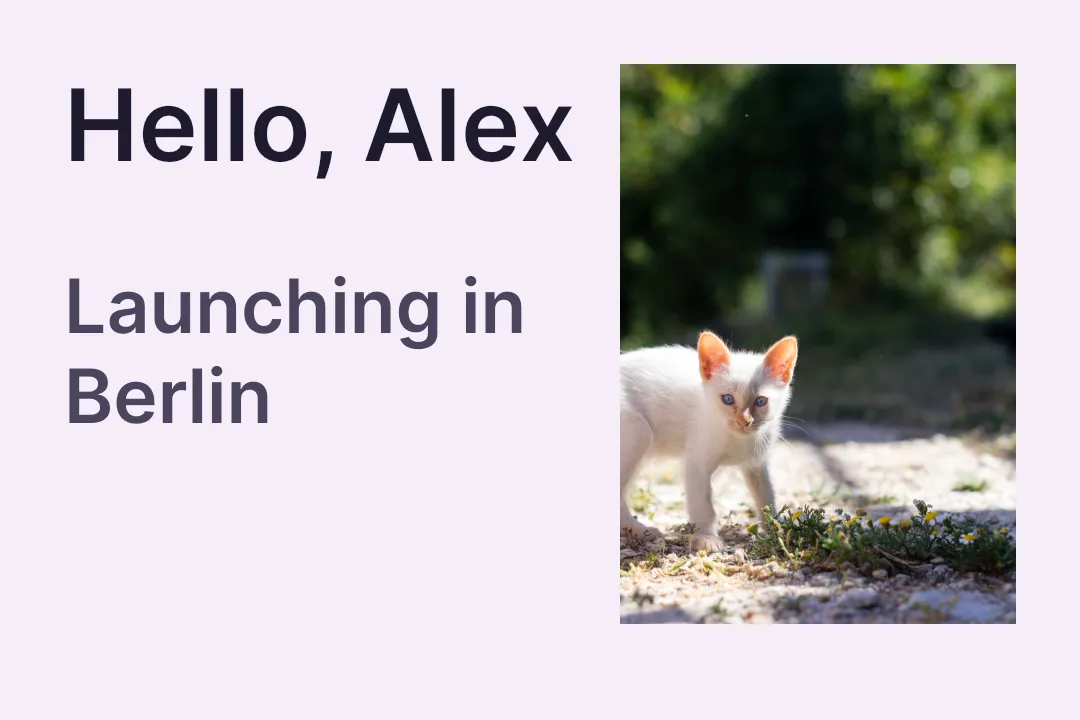
Template content replacement enables dynamic designs by swapping placeholder content programmatically. Templates contain blocks marked as placeholders that can be located by name or discovered in bulk for batch processing. Text replacement uses the variable system with {{variableName}} syntax, while images are updated by modifying fill properties.
This guide covers how to find placeholder blocks, replace text using variables, swap image content, and build data-driven template workflows. It assumes you already have a template loaded — see Templating for the model behind variables and placeholders.
Finding Placeholder Blocks#
Locate replaceable content with block discovery APIs. Use findByName() when you know the placeholder name, and keep those names stable across template revisions.
val namedPlaceholder = engine.block.findByName(name = "campaign-image").first()val namedPlaceholderName = engine.block.getName(namedPlaceholder)Discover All Placeholders#
Use findAllPlaceholders() to discover every placeholder block in a template and iterate through them programmatically.
val placeholderNames = engine.block.findAllPlaceholders() .map { placeholder -> engine.block.getName(placeholder) }Query Placeholder State#
Graphic blocks keep their replaceable content in a fill, so placeholder behavior is queried on the fill from getFill(). The interactive placeholder flag stays on the containing block.
val placeholderFill = engine.block.getFill(namedPlaceholder)val imagePlaceholderSupportsBehavior = engine.block.supportsPlaceholderBehavior(placeholderFill)val imagePlaceholderEnabled = engine.block.isPlaceholderEnabled(namedPlaceholder)Text Variable Replacement#
Replace text content through CE.SDK’s variable system. A text block containing {{first_name}} or another token updates automatically when you set the matching variable with engine.variable.set().
engine.variable.set(key = "first_name", value = "Alex")engine.variable.set(key = "city", value = "Berlin")
val firstName = engine.variable.get(key = "first_name")
Managing Variables#
List every variable currently stored on the engine with findAll(), read a value with get(), and remove values that no longer apply with remove().
engine.variable.set(key = "campaign_tag", value = "summer-2026")val variableNames = engine.variable.findAll()val campaignTag = engine.variable.get(key = "campaign_tag")engine.variable.remove(key = "campaign_tag")val campaignTagRemoved = "campaign_tag" !in engine.variable.findAll()findAll() reports variables that have values in the current engine session. It does not scan unresolved {{...}} tokens from text blocks.
Replacing Image Content#
Update an image placeholder by modifying the fill’s image source. Get the fill block with getFill(), then set the new URI on the fill/image/imageFileURI property with setUri().
val replacementImageUri = Uri.parse("https://img.ly/static/ubq_samples/sample_2.jpg")val replacementFill = engine.block.getFill(namedPlaceholder)engine.block.setUri( block = replacementFill, property = "fill/image/imageFileURI", value = replacementImageUri,)engine.block.resetCrop(namedPlaceholder)Resetting the crop after swapping the image keeps the placeholder framing consistent when source images have different aspect ratios.
Direct Text Replacement#
Replace the full text of a block without the variable system using replaceText(). This is useful when your app owns the exact final string and does not need reusable template tokens.
val subtitleBlock = engine.block.findByName(name = "campaign-subtitle").first()engine.block.replaceText(subtitleBlock, text = "Built for Android audiences")Data-Driven Template Workflows#
Build automated template population by iterating over data records. Load a fresh copy of the template for each record, update variables and placeholders, then export the page before processing the next record.
val records = listOf(    mapOf(        "first_name" to "Alex",        "city" to "Berlin",        "image_uri" to "https://img.ly/static/ubq_samples/sample_2.jpg",    ),    mapOf(        "first_name" to "Jordan",        "city" to "Tokyo",        "image_uri" to "https://img.ly/static/ubq_samples/sample_3.jpg",    ),)
val generatedDesigns = mutableListOf<GeneratedTemplateDesign>()for (record in records) {    engine.scene.load(scene = templateSceneString)
    engine.variable.set(key = "first_name", value = record.getValue("first_name"))    engine.variable.set(key = "city", value = record.getValue("city"))
    val imageBlock = engine.block.findByName(name = "campaign-image").first()    val fill = engine.block.getFill(imageBlock)    engine.block.setUri(        block = fill,        property = "fill/image/imageFileURI",        value = Uri.parse(record.getValue("image_uri")),    )    engine.block.resetCrop(imageBlock)
    val exportPage = engine.scene.getPages().first()    // Preload resources so remote image fills and text glyphs are ready before export.    engine.block.forceLoadResources(blocks = listOf(exportPage))    val pngBuffer = engine.block.export(exportPage, mimeType = MimeType.PNG)    generatedDesigns += GeneratedTemplateDesign(        label = record.getValue("first_name"),        pngBuffer = pngBuffer,    )}
Preload the page resources before export so remote image fills and text glyphs resolve before the offscreen render runs.
Troubleshooting#
Block Not Found by Name#
Verify the exact name string matches what’s set in the template. Names are case-sensitive. Use getName() to inspect existing block names.
Variable Not Replacing Text#
Ensure the {{variableName}} token in the text block matches the key passed to engine.variable.set() exactly, including casing.
Image Not Updating#
Confirm the block has an image fill by checking that getFill() returns a valid fill block. Verify the URI is reachable and properly formatted.
Placeholder State Queries Return False#
For a graphic block, query supportsPlaceholderBehavior() on its fill from getFill(), not on the block. Text blocks are queried on the block directly.
API Reference#
| Method | Description |
|---|---|
engine.block.findByName(name=_) |
Find blocks by name identifier. |
engine.block.getName(block=_) |
Get the name of a block. |
engine.block.findAllPlaceholders() |
Discover all placeholder blocks in the scene. |
engine.block.getFill(block=_) |
Get the fill block from a graphic block. |
engine.block.supportsPlaceholderBehavior(block=_) |
Verify a fill or text block supports placeholder behavior. |
engine.block.isPlaceholderEnabled(block=_) |
Check whether placeholder interaction is enabled on a block. |
engine.variable.set(key=_, value=_) |
Set a text variable value for dynamic replacement. |
engine.variable.get(key=_) |
Get the current value of a variable. |
engine.variable.findAll() |
List variable names that currently have values in the engine session. |
engine.variable.remove(key=_) |
Remove a variable value from the engine session. |
engine.block.setUri(block=_, property="fill/image/imageFileURI", value=_) |
Set the image URI on an image fill. |
engine.block.resetCrop(block=_) |
Reapply placeholder crop framing after swapping the image. |
engine.block.replaceText(block=_, text=_) |
Replace text content directly. |
engine.scene.load(scene=_) |
Load a serialized template scene for the next record. |
engine.scene.getPages() |
Get the page blocks from the current scene. |
engine.block.forceLoadResources(blocks=_) |
Resolve text and media resources before export. |
engine.block.export(block=_, mimeType=MimeType.PNG) |
Export the populated page as a PNG. |
Next Steps#
- Data Merge — Automate filling a template from structured data records.
- Product Variations — Generate multiple design variations from a single template.
- Templating — Learn the template model behind variables and placeholders.
- Placeholders — Configure placeholder behavior and controls in depth.