Use variable fonts to offer a full range of font weights and styles from a single font file.
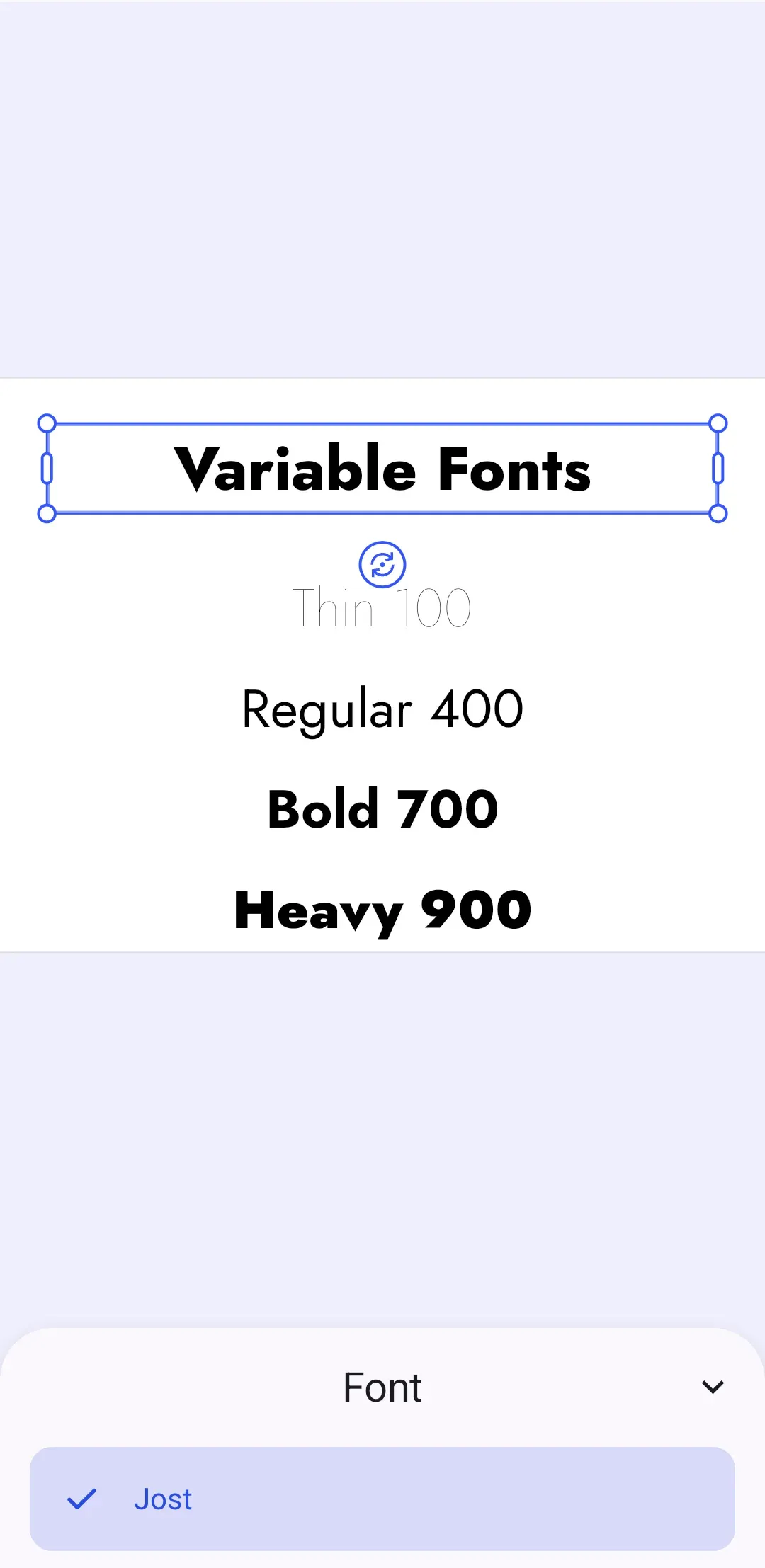
Variable fonts are OpenType fonts that pack multiple variations of a font family into a single file. Instead of loading one file per weight, you register a single file and CE.SDK renders each variant by applying variation axis values. This reduces network requests and simplifies font management, especially for typefaces with many weights.
This guide covers how CE.SDK detects variable fonts, how to build the font entries for a variable font file, how to register the result as a custom typeface, and how to switch between weights and styles both in the editor UI and programmatically.
How CE.SDK Handles Variable Fonts#
A Typeface is a font family with a fonts list, where each Font declares a uri, subFamily, weight and style. CE.SDK treats a typeface as a variable font when multiple fonts in the list share the same file URI. Internally, the engine encodes the selected weight and style as axis values on the font’s URI (for example font.woff2#wght=700&ital=1), so each variant has a unique identity while sharing one underlying font resource.
CE.SDK supports two variation axes:
wght— the font weight, mapped from the nineFontWeightvaluesTHIN(100) throughHEAVY(900)ital— the italic style, mapped fromFontStyle.NORMAL(0) andFontStyle.ITALIC(1)
Axis values outside the range the font file supports are clamped to the nearest supported value. Aside from how the fonts list is built, variable fonts need no special handling: the same typeface and font APIs work for static and variable fonts, and exports render the selected variant.
Generate Font Variants#
A variable font typeface needs one Font entry per weight and style combination, all pointing at the same file. The helper below derives those entries from the FontWeight and FontStyle enums, so the variants come from enum values rather than from registering a separate font file per weight.
The variantWeight flag controls weight variants: when true, the helper generates entries for all nine standard weights. The variantItalic flag controls italic variants: only pass true when the font file actually provides an ital axis, otherwise the italic entries would render upright. Jost, the font we use here, has a weight axis but no italic axis:
// Jost is a variable font: one file covers all weights from 100 to 900.private val JOST_VARIABLE_FONT_URI: Uri =    Uri.parse("https://cdn.jsdelivr.net/fontsource/fonts/jost:vf@5/latin-wght-normal.woff2")
// The sub-family name CE.SDK shows for each of the nine standard weights.private val WEIGHT_SUB_FAMILIES = linkedMapOf(    FontWeight.THIN to "Thin",    FontWeight.EXTRA_LIGHT to "Extra Light",    FontWeight.LIGHT to "Light",    FontWeight.NORMAL to "Regular",    FontWeight.MEDIUM to "Medium",    FontWeight.SEMI_BOLD to "Semi Bold",    FontWeight.BOLD to "Bold",    FontWeight.EXTRA_BOLD to "Extra Bold",    FontWeight.HEAVY to "Heavy",)
/** * Builds one [Font] entry per weight and style combination. Every entry points at the * same file, which is what marks the typeface as a variable font. */private fun variableFontCombinations(    uri: Uri,    variantWeight: Boolean,    variantItalic: Boolean,): List<Font> {    val weights = if (variantWeight) {        WEIGHT_SUB_FAMILIES.keys.toList()    } else {        listOf(FontWeight.NORMAL)    }    val styles = if (variantItalic) {        listOf(FontStyle.NORMAL, FontStyle.ITALIC)    } else {        listOf(FontStyle.NORMAL)    }
    return styles.flatMap { style ->        weights.map { weight ->            val weightLabel = WEIGHT_SUB_FAMILIES.getValue(weight)            Font(                uri = uri,                subFamily = if (style == FontStyle.ITALIC) "$weightLabel Italic" else weightLabel,                weight = weight,                style = style,            )        }    }}
private fun jostTypeface(): Typeface = Typeface(    name = "Jost",    fonts = variableFontCombinations(        uri = JOST_VARIABLE_FONT_URI,        variantWeight = true,        // This file has no `ital` axis, so italic entries would render upright.        variantItalic = false,    ),)
With both flags set to true, the helper returns 18 entries (nine weights, each in normal and italic).
Register the Variable Font Typeface#
We register the variable font like any custom font: create a local asset source and add an asset whose AssetPayload(typeface = ...) holds the generated fonts. See Customize Fonts for the full asset source workflow:
private fun jostTypefaceAsset() = AssetDefinition(    id = JOST_TYPEFACE_ASSET_ID,    label = mapOf("en" to "Jost"),    tags = mapOf("en" to listOf("variable", "sans")),    meta = mapOf("languages" to "latin"),    payload = AssetPayload(        typeface = jostTypeface(),    ),)
private fun createVariableFontSource(    engine: Engine,    sourceId: String = VARIABLE_TYPEFACE_SOURCE_ID,) {    if (sourceId in engine.asset.findAllSources()) {        engine.asset.removeSource(sourceId = sourceId)    }    engine.asset.addLocalSource(        sourceId = sourceId,        supportedMimeTypes = emptyList(),    )    engine.asset.addAsset(        sourceId = sourceId,        asset = jostTypefaceAsset(),    )    engine.asset.assetSourceContentsChanged(sourceId = sourceId)}
The sample removes an existing source with the same ID before adding it again so repeated launches stay deterministic.
Show the Font in the Typeface Library#
To make the variable font selectable in the editor, add the asset to the source the font sheet reads from, AssetSourceType.Typeface.sourceId. Adding to that source instead of replacing it keeps any typefaces an editor configuration already registered. A configuration that registers none leaves the source absent, so create it first when it is missing:
/** * Adds the variable font to the source the editor font sheet reads from, keeping the * built-in typefaces in place. */private fun addVariableFontToEditorLibrary(engine: Engine) { val typefaceSourceId = AssetSourceType.Typeface.sourceId if (typefaceSourceId !in engine.asset.findAllSources()) { // The font sheet source only exists once an editor configuration has registered it. engine.asset.addLocalSource( sourceId = typefaceSourceId, supportedMimeTypes = emptyList(), ) } engine.asset.addAsset( sourceId = typefaceSourceId, asset = jostTypefaceAsset(), ) engine.asset.assetSourceContentsChanged(sourceId = typefaceSourceId)}Registering the asset does not change which rows the built-in sheet shows. When you open SheetType.Font, pass the custom asset IDs through fontFamilies; otherwise the sheet uses its default font-family filter and hides typefaces that are not in that list:
@OptIn(UnstableEditorApi::class)private fun EditorScope.openVariableFontSheet(text: DesignBlock) { editorContext.eventHandler.send( EditorEvent.Sheet.Open( SheetType.Font( designBlock = text, fontFamilies = listOf(JOST_TYPEFACE_ASSET_ID), ), ), )}Call both from your editor configuration once the scene has loaded. Every generated variant then appears in the font style list, and switching between them updates the rendering without loading another file.
Apply Weights to Text Blocks#
Programmatically, we apply the variable font with engine.block.setTypeface() and pick a variant with engine.block.setTextFontWeight(). Here we create four text blocks at different weights, all rendered from the same file:
private data class WeightSample(    val weight: FontWeight,    val label: String,)
private val WEIGHT_SAMPLES = listOf(    WeightSample(weight = FontWeight.THIN, label = "Thin 100"),    WeightSample(weight = FontWeight.NORMAL, label = "Regular 400"),    WeightSample(weight = FontWeight.BOLD, label = "Bold 700"),    WeightSample(weight = FontWeight.HEAVY, label = "Heavy 900"),)
/** * Creates one text block per sample weight. Every block renders from the same font file, * because the typeface resolves the weight to an axis value instead of another file. */private fun createWeightSamples(    engine: Engine,    page: DesignBlock,    typeface: Typeface,): List<DesignBlock> = WEIGHT_SAMPLES.mapIndexed { index, sample ->    val text = engine.block.create(blockType = DesignBlockType.Text)    engine.block.appendChild(parent = page, child = text)    engine.block.replaceText(block = text, text = sample.label)    engine.block.setTextFontSize(block = text, fontSize = 56F)    engine.block.setTextHorizontalAlignment(block = text, alignment = HorizontalAlignment.Center)    engine.block.setWidthMode(block = text, mode = SizeMode.ABSOLUTE)    engine.block.setWidth(block = text, value = 700F)    engine.block.setHeightMode(block = text, mode = SizeMode.AUTO)    engine.block.setPositionX(block = text, value = 50F)    // 200 rather than 160 keeps the first sample clear of the headline's selection handles.    engine.block.setPositionY(block = text, value = 200F + index * 105F)
    engine.block.setTypeface(block = text, typeface = typeface)    engine.block.setTextFontWeight(block = text, fontWeight = sample.weight)    text}
Switch Weights and Styles#
Weight and style can change at any time, on whole blocks or on selected text ranges. The engine resolves the matching variant from the typeface, applies the axis values and renders it from the already loaded font file:
/** * Switches an existing text block to another weight. The engine resolves the matching * variant from the typeface and renders it from the already loaded font file. */private fun switchHeadlineWeight(    engine: Engine,    headline: DesignBlock,): List<FontWeight> {    engine.block.setTextFontWeight(block = headline, fontWeight = FontWeight.EXTRA_BOLD)
    // If the font file also provides an `ital` axis, styles switch the same way:    // engine.block.setTextFontStyle(block = headline, fontStyle = FontStyle.ITALIC)
    return engine.block.getTextFontWeights(block = headline)}
The from and to parameters of setTextFontWeight() and setTextFontStyle() are UTF-16 code unit offsets, so they count surrogate pairs as two positions. The same variants drive the editor UI: users switch between them in the font style list, and bold or italic toggles resolve against the generated font entries.
Troubleshooting#
- All weights render the same: The font file is not a variable font or lacks a
wghtaxis. Verify the file contains the axes you need, for example with a font inspection tool. - Italic variants render upright: The font file has no
italaxis. Only passtruefor italic variants when the file provides one; italic-only families often ship as a separate file. - A weight looks different than expected: Axis values outside the font’s supported range are clamped. For example, requesting
THIN(100) from a font whose weight axis starts at 300 renders at 300. - The font is not visible in the editor UI: Register the asset under
AssetSourceType.Typeface.sourceId, callengine.asset.assetSourceContentsChanged(), and openSheetType.FontwithfontFamiliescontaining your typeface asset ID. - The font file does not load: Check that the URI is reachable from the device and points to a valid TTF, OTF, WOFF, or WOFF2 file.
API Reference#
| Method | Purpose |
|---|---|
engine.asset.findAllSources() |
Check whether the typeface source is already registered |
engine.asset.removeSource(sourceId=_) |
Remove an existing source before re-registering the typeface |
engine.asset.addLocalSource(sourceId=_, supportedMimeTypes=_) |
Create a local source for the variable font typeface |
engine.asset.addAsset(sourceId=_, asset=_) |
Add the typeface asset definition to a source |
engine.asset.assetSourceContentsChanged(sourceId=_) |
Notify CE.SDK after changing the source contents |
editorContext.eventHandler.send(event=_) |
Dispatch editor UI events from an editor configuration callback |
EditorEvent.Sheet.Open(type=_) |
Open a bottom sheet in the CE.SDK editor UI |
SheetType.Font(designBlock=_, fontFamilies=_) |
Filter the font sheet to your typeface asset IDs |
engine.block.create(blockType=_) |
Create the text blocks used by the weight samples |
engine.block.appendChild(parent=_, child=_) |
Add each text block to the page |
engine.block.replaceText(block=_, text=_) |
Set the text block contents |
engine.block.setTextFontSize(block=_, fontSize=_) |
Set the sample text size |
engine.block.setTextHorizontalAlignment(block=_, alignment=_) |
Center the sample text blocks |
engine.block.setWidthMode(block=_, mode=_) |
Give the text block a fixed width instead of auto-sizing |
engine.block.setWidth(block=_, value=_) |
Set the sample text block width |
engine.block.setHeightMode(block=_, mode=_) |
Let the text block fit its content height |
engine.block.setPositionX(block=_, value=_) |
Position the text block on the x-axis |
engine.block.setPositionY(block=_, value=_) |
Position the text block on the y-axis |
engine.block.setTypeface(block=_, typeface=_, from=_, to=_) |
Apply the variable font typeface to a text block or range |
engine.block.setTextFontWeight(block=_, fontWeight=_, from=_, to=_) |
Switch the rendered weight of the variable font |
engine.block.setTextFontStyle(block=_, fontStyle=_, from=_, to=_) |
Switch between normal and italic rendering |
engine.block.getTextFontWeights(block=_, from=_, to=_) |
Query the font weights used in a text range |
Next Steps#
- Customize Fonts — the full custom typeface workflow, including static multi-file fonts
- Text Styling — fills, sizing, color, and alignment for text blocks