Style text blocks programmatically with colors, backgrounds, typefaces, and formatting.
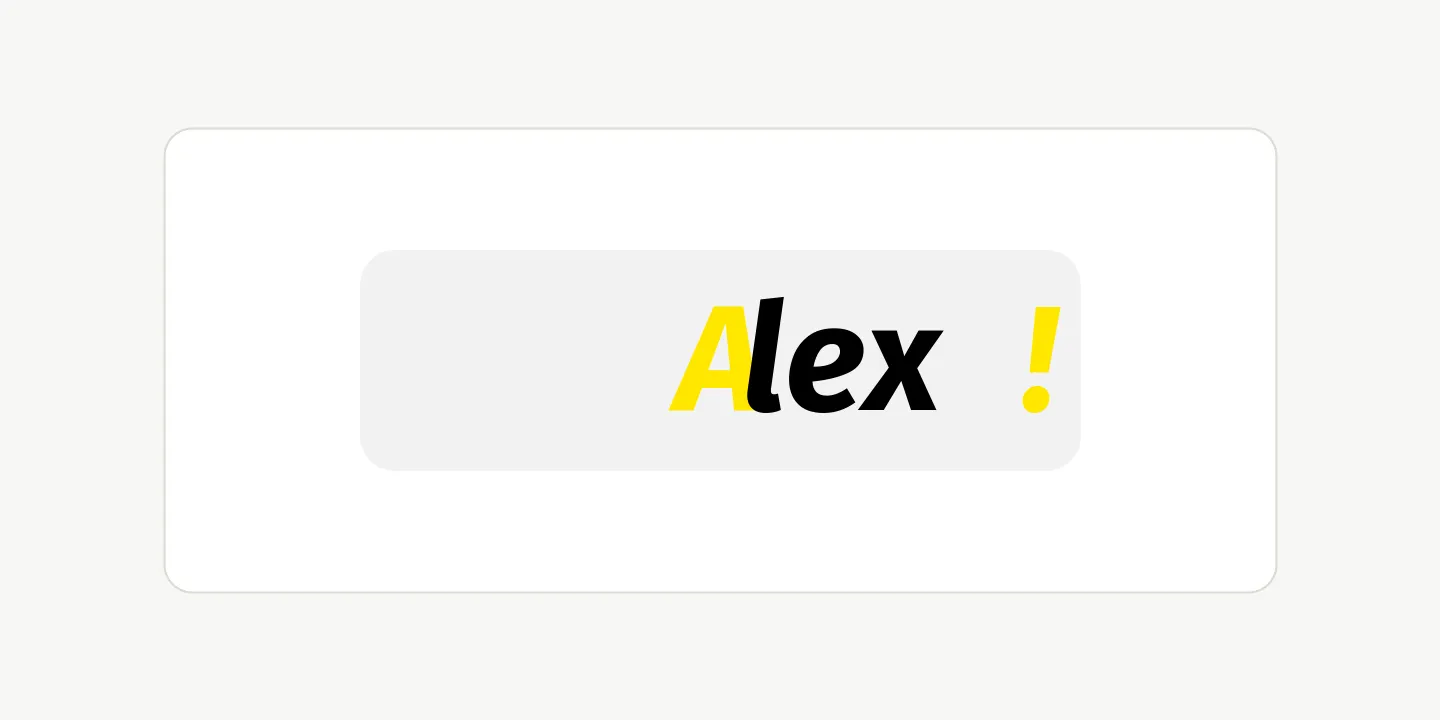
CE.SDK exposes text styling through the Block API. We can edit text content, apply colors and backgrounds, manage typefaces, and control case, weight, and style for a whole text block or for UTF-16 text ranges.
Editing Text Content#
Use engine.block.replaceText() and engine.block.removeText() to replace, insert, or remove text. The optional from and to parameters are UTF-16 code unit offsets in the half-open range [from, to).
engine.block.replaceText(text, text = "Hello World")
// Insert a "!" at the UTF-16 offset after "Hello World".engine.block.replaceText(text, text = "!", from = 11)
// Replace "World" with "Alex".engine.block.replaceText(text, text = "Alex", from = 6, to = 11)
// Remove "Hello ".engine.block.removeText(text, from = 0, to = 6)
When both range arguments are omitted, replaceText() replaces the entire string. Passing only from inserts at that offset, while passing both from and to replaces the selected range.
Text Colors#
Use engine.block.setTextColor() to color the whole text block or a specific range. engine.block.getTextColors() returns the unique colors in the order they appear in the requested text range.
val yellow = Color.fromRGBA(r = 255, g = 230, b = 0)val black = Color.fromRGBA(r = 0, g = 0, b = 0)
engine.block.setTextColor(text, color = yellow)engine.block.setTextColor(text, color = black, from = 1, to = 4)
val allColors = engine.block.getTextColors(text)val colorsInRange = engine.block.getTextColors(text, from = 2, to = 5)
The example first applies yellow to the complete string, then changes the middle range to black. Querying the range from 2 to 5 returns black first because that color appears first inside the requested range.
Text Run Backgrounds#
Use engine.block.setTextBackgroundColor() to draw a background color behind the whole text block or a specific range. engine.block.getTextBackgroundColors() returns the unique background colors in the order they appear in the requested text range. Text without a background color is reported as a fully transparent color.
engine.block.setTextBackgroundColor(text, color = yellow, from = 1, to = 4)// A fully transparent color removes the background again:// engine.block.setTextBackgroundColor(text, color = Color.fromRGBA(r = 0, g = 0, b = 0, a = 0), from = 1, to = 4)
val allBackgroundColors = engine.block.getTextBackgroundColors(text)val backgroundColorsInRange = engine.block.getTextBackgroundColors(text, from = 2, to = 5)
// Grow the background around the text and round its cornersengine.block.setFloat(text, "text/backgroundPadding/left", 4F)engine.block.setFloat(text, "text/backgroundPadding/right", 4F)engine.block.setFloat(text, "text/backgroundPadding/top", 2F)engine.block.setFloat(text, "text/backgroundPadding/bottom", 2F)engine.block.setFloat(text, "text/backgroundCornerRadius", 4F)
A fully transparent color removes the background from a range. The run background is independent of the block-level background color and is drawn on top of the block-level background.
The text/backgroundPadding/* properties grow the background around the text. The text/backgroundCornerRadius property rounds its corners. Both apply to every text run of the block. Caption blocks get the same properties under caption/, and a caption track keeps them in sync.
Text Backgrounds#
Use the typed background color APIs to check support, enable the background, and set or read its color. Padding and corner radius still use block property access because Android does not expose typed helpers for those text background properties.
if (engine.block.supportsBackgroundColor(text)) {    engine.block.setBackgroundColorEnabled(text, enabled = true)    val backgroundColorEnabled = engine.block.isBackgroundColorEnabled(text)
    val backgroundColor = engine.block.getBackgroundColor(text)    engine.block.setBackgroundColor(text, color = Color.fromRGBA(r = 242, g = 242, b = 242))
    engine.block.setFloat(text, property = "backgroundColor/paddingLeft", value = 10F)    engine.block.setFloat(text, property = "backgroundColor/paddingRight", value = 10F)    engine.block.setFloat(text, property = "backgroundColor/paddingTop", value = 8F)    engine.block.setFloat(text, property = "backgroundColor/paddingBottom", value = 8F)    engine.block.setFloat(text, property = "backgroundColor/cornerRadius", value = 8F)}
Text backgrounds inherit animations from their text block when the animation writing style is set to Block.
val animation = engine.block.createAnimation(AnimationType.Slide)engine.block.setEnum(animation, property = "textAnimationWritingStyle", value = "Block")engine.block.setInAnimation(text, animation = animation)engine.block.setOutAnimation(text, animation = animation)Text Case Transformations#
Use engine.block.setTextCase() to change how text renders without changing the stored string value. Available values are TextCase.NORMAL, TextCase.UPPER_CASE, TextCase.LOWER_CASE, and TextCase.TITLE_CASE.
engine.block.setTextCase(text, textCase = TextCase.TITLE_CASE)
val textCases = engine.block.getTextCases(text)
engine.block.getTextCases() returns the ordered list of text case transformations in the requested range.
Typefaces and Fonts#
Use engine.block.setFont() when you want to change the font and reset existing text formatting. Use engine.block.setTypeface() when you want to change the typeface while preserving existing formatting as far as the new typeface supports it.
The sample expects the Fira Sans font files to be bundled under the app asset path assets/imgly-assets/.... Bundle your own fonts at a matching app asset path, or replace the URIs with font URIs your app can resolve.
val bundledAssetsBaseUri = "file:///android_asset/imgly-assets"val typeface = Typeface(    name = "Fira Sans",    fonts = listOf(        Font(            uri = Uri.parse(                "$bundledAssetsBaseUri/ly.img.typeface/fonts/FiraSans/FiraSans-Regular.ttf",            ),            subFamily = "Regular",            weight = FontWeight.NORMAL,            style = FontStyle.NORMAL,        ),        Font(            uri = Uri.parse(                "$bundledAssetsBaseUri/ly.img.typeface/fonts/FiraSans/FiraSans-Bold.ttf",            ),            subFamily = "Bold",            weight = FontWeight.BOLD,            style = FontStyle.NORMAL,        ),        Font(            uri = Uri.parse(                "$bundledAssetsBaseUri/ly.img.typeface/fonts/FiraSans/FiraSans-Italic.ttf",            ),            subFamily = "Italic",            weight = FontWeight.NORMAL,            style = FontStyle.ITALIC,        ),        Font(            uri = Uri.parse(                "$bundledAssetsBaseUri/ly.img.typeface/fonts/FiraSans/FiraSans-BoldItalic.ttf",            ),            subFamily = "Bold Italic",            weight = FontWeight.BOLD,            style = FontStyle.ITALIC,        ),    ),)val regularFont = typeface.fonts.firstOrNull {    it.weight == FontWeight.NORMAL && it.style == FontStyle.NORMAL} ?: error("Typeface must include a normal regular font.")
engine.block.setFont(text, fontFileUri = regularFont.uri, typeface = typeface)engine.block.setTypeface(text, typeface = typeface, from = 1, to = 4)
val currentDefaultTypeface = engine.block.getTypeface(text)val currentTypefaces = engine.block.getTypefaces(text)val currentTypefacesOfRange = engine.block.getTypefaces(text, from = 1, to = 4)
A Typeface contains the typeface name and the available font variants. Select variants by metadata such as weight and style so the code does not depend on font list order.
Font Weights and Styles#
Use engine.block.canToggleBoldFont() and engine.block.canToggleItalicFont() before calling the corresponding toggle methods. The typeface must include the requested weight and style combination.
if (engine.block.canToggleBoldFont(text)) {    engine.block.toggleBoldFont(text)}
if (engine.block.canToggleItalicFont(text, from = 1, to = 4)) {    engine.block.toggleItalicFont(text, from = 1, to = 4)}
engine.block.setTextFontWeight(text, fontWeight = FontWeight.BOLD)val fontWeights = engine.block.getTextFontWeights(text)
engine.block.setTextFontStyle(text, fontStyle = FontStyle.ITALIC)val fontStyles = engine.block.getTextFontStyles(text)
For direct formatting, engine.block.setTextFontWeight() and engine.block.setTextFontStyle() apply weight or style to the requested text range. Use the corresponding getters to inspect the active values.
API Reference#
| Method | Purpose |
|---|---|
engine.block.replaceText(block=_, text=_, from=_, to=_) |
Replace or insert text at UTF-16 offsets |
engine.block.removeText(block=_, from=_, to=_) |
Remove text at UTF-16 offsets |
engine.block.setTextColor(block=_, color=_, from=_, to=_) |
Set the text color for all text or a range |
engine.block.getTextColors(block=_, from=_, to=_) |
Get ordered unique text colors for a range |
engine.block.setTextBackgroundColor(block=_, color=_, from=_, to=_) |
Set the text background color for all text or a range |
engine.block.getTextBackgroundColors(block=_, from=_, to=_) |
Get ordered unique text background colors for a range |
engine.block.supportsBackgroundColor(block=_) |
Check whether a block supports background color properties |
engine.block.setBackgroundColorEnabled(block=_, enabled=_) |
Enable or disable the text background |
engine.block.isBackgroundColorEnabled(block=_) |
Check whether the text background is enabled |
engine.block.getBackgroundColor(block=_) |
Read the text background color |
engine.block.setBackgroundColor(block=_, color=_) |
Set the text background color |
engine.block.setFloat(block=_, property="backgroundColor/paddingLeft", value=_) |
Set one background padding side |
engine.block.setFloat(block=_, property="backgroundColor/paddingRight", value=_) |
Set one background padding side |
engine.block.setFloat(block=_, property="backgroundColor/paddingTop", value=_) |
Set one background padding side |
engine.block.setFloat(block=_, property="backgroundColor/paddingBottom", value=_) |
Set one background padding side |
engine.block.setFloat(block=_, property="backgroundColor/cornerRadius", value=_) |
Set the background corner radius |
engine.block.createAnimation(type=_) |
Create an animation block |
engine.block.setEnum(block=_, property="textAnimationWritingStyle", value="Block") |
Make text background animation follow the text block |
engine.block.setInAnimation(block=_, animation=_) |
Assign an in-animation to the text block |
engine.block.setOutAnimation(block=_, animation=_) |
Assign an out-animation to the text block |
engine.block.setTextCase(block=_, textCase=_, from=_, to=_) |
Apply a text case transformation |
engine.block.getTextCases(block=_, from=_, to=_) |
Get ordered text case transformations for a range |
engine.block.setFont(block=_, fontFileUri=_, typeface=_) |
Change the font and reset existing formatting |
engine.block.setTypeface(block=_, typeface=_, from=_, to=_) |
Change the typeface while preserving formatting |
engine.block.getTypeface(block=_) |
Get the text block’s default typeface |
engine.block.getTypefaces(block=_, from=_, to=_) |
Get ordered unique typefaces for a range |
engine.block.canToggleBoldFont(block=_, from=_, to=_) |
Check whether bold can be toggled |
engine.block.toggleBoldFont(block=_, from=_, to=_) |
Toggle normal and bold font weight |
engine.block.canToggleItalicFont(block=_, from=_, to=_) |
Check whether italic can be toggled |
engine.block.toggleItalicFont(block=_, from=_, to=_) |
Toggle normal and italic font style |
engine.block.setTextFontWeight(block=_, fontWeight=_, from=_, to=_) |
Set font weight for all text or a range |
engine.block.getTextFontWeights(block=_, from=_, to=_) |
Get ordered unique font weights for a range |
engine.block.setTextFontStyle(block=_, fontStyle=_, from=_, to=_) |
Set font style for all text or a range |
engine.block.getTextFontStyles(block=_, from=_, to=_) |
Get ordered unique font styles for a range |
Troubleshooting#
getTypeface() throws an error: New text blocks do not have an explicit typeface until you call setFont().
Font toggles do nothing: Check that the active typeface contains the weight and style variant you want to toggle to.
The text background is not visible: Make sure setBackgroundColorEnabled() is called with enabled = true. This switch belongs to the block background. A run background needs no switch, and text on a path hides only the block background.
Text case looks different from the string value: Text case transformations affect rendering only. They do not rewrite the text string.
Formatting resets after changing fonts: Use setTypeface() instead of setFont() when you want to preserve existing formatting.