Add visual depth and interest to text blocks using drop shadows and stroke outlines.
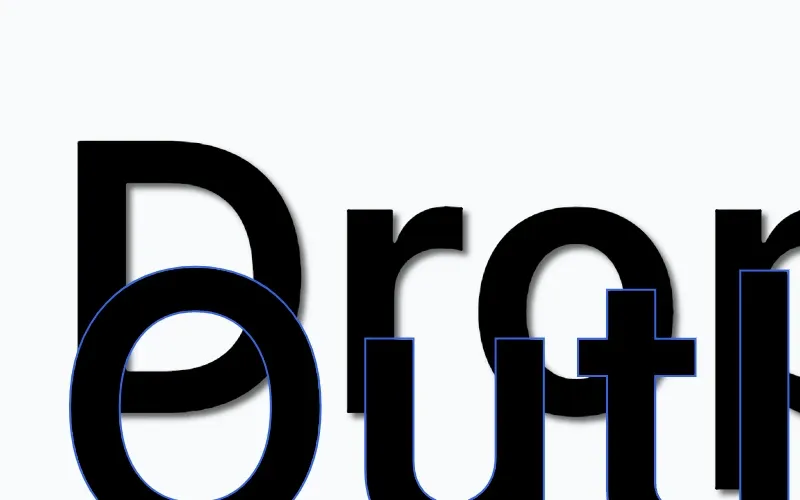
Text effects that are directly supported on text blocks include drop shadows for depth and stroke outlines for text borders. These visual effects are distinct from text styling properties like colors, fonts, and backgrounds.
This guide covers how to apply text effects programmatically using the Block API.
Using the Built-in Effects UI#
The CE.SDK editor UI exposes stroke controls for selected text blocks through the Fill & Stroke sheet when supportsStroke() is true and the stroke/change scope is allowed for the block. Drop shadows are not exposed through the current Android editor UI; configure text shadows programmatically with the Block API as shown below.
For complete editor UI setup, start with the Design Editor Starter Kit. Generic blur, filter, and effect-stack controls belong to Filters & Effects and apply only to visual blocks that report support.
Drop Shadows#
Drop shadows add depth and emphasis to text. In Android integrations, configure text shadow properties programmatically with dedicated Block API methods.
check(engine.block.supportsDropShadow(block = shadowText))engine.block.setDropShadowEnabled(block = shadowText, enabled = true)engine.block.setDropShadowColor( block = shadowText, color = Color.fromRGBA(r = 0F, g = 0F, b = 0F, a = 0.6F),)engine.block.setDropShadowOffsetX(block = shadowText, offsetX = 5F)engine.block.setDropShadowOffsetY(block = shadowText, offsetY = 5F)engine.block.setDropShadowBlurRadiusX(block = shadowText, blurRadiusX = 10F)engine.block.setDropShadowBlurRadiusY(block = shadowText, blurRadiusY = 10F)The drop shadow API provides control over color, position, and blur. The offset values position the shadow relative to the text, while the blur radius controls shadow softness. Horizontal and vertical blur can be configured independently for asymmetric effects.
Stroke Outlines#
Stroke outlines add a colored border around text. Enable stroke with setStrokeEnabled(), then configure width, color, style, and position.
check(engine.block.supportsStroke(block = outlineText))engine.block.setStrokeEnabled(block = outlineText, enabled = true)engine.block.setStrokeWidth(block = outlineText, width = 2F)engine.block.setStrokeColor( block = outlineText, color = Color.fromRGBA(r = 0.2F, g = 0.4F, b = 0.9F, a = 1F),)engine.block.setStrokeStyle(block = outlineText, style = StrokeStyle.SOLID)engine.block.setStrokePosition(block = outlineText, position = StrokePosition.CENTER)The stroke width is specified in design units. Text blocks support StrokePosition.CENTER, StrokePosition.INNER, and StrokePosition.OUTER via setStrokePosition(). Stroke styles include StrokeStyle.SOLID, StrokeStyle.DASHED, StrokeStyle.DOTTED, and other line patterns.
The stroke also outlines the underline, strikethrough, and overline of the text.
Other Effects#
Text blocks do not support the blur or effect-stack APIs. Use supportsBlur() and supportsEffects() before applying those APIs to other block types, and see Filters & Effects Overview for generic block effects.
API Reference#
| Method | Purpose |
|---|---|
engine.block.supportsDropShadow(block=_) |
Check whether a block supports drop shadows |
engine.block.setDropShadowEnabled(block=_, enabled=_) |
Enable or disable the drop shadow |
engine.block.isDropShadowEnabled(block=_) |
Check whether the drop shadow is enabled |
engine.block.setDropShadowColor(block=_, color=_) |
Set the shadow color |
engine.block.getDropShadowColor(block=_) |
Get the current shadow color |
engine.block.setDropShadowOffsetX(block=_, offsetX=_) |
Set the horizontal shadow offset |
engine.block.getDropShadowOffsetX(block=_) |
Get the current horizontal shadow offset |
engine.block.setDropShadowOffsetY(block=_, offsetY=_) |
Set the vertical shadow offset |
engine.block.getDropShadowOffsetY(block=_) |
Get the current vertical shadow offset |
engine.block.setDropShadowBlurRadiusX(block=_, blurRadiusX=_) |
Set the horizontal blur radius |
engine.block.getDropShadowBlurRadiusX(block=_) |
Get the current horizontal blur radius |
engine.block.setDropShadowBlurRadiusY(block=_, blurRadiusY=_) |
Set the vertical blur radius |
engine.block.getDropShadowBlurRadiusY(block=_) |
Get the current vertical blur radius |
engine.block.supportsStroke(block=_) |
Check whether a block supports strokes |
engine.block.setStrokeEnabled(block=_, enabled=_) |
Enable or disable the stroke |
engine.block.isStrokeEnabled(block=_) |
Check whether the stroke is enabled |
engine.block.setStrokeWidth(block=_, width=_) |
Set the stroke width |
engine.block.getStrokeWidth(block=_) |
Get the current stroke width |
engine.block.setStrokeColor(block=_, color=_) |
Set the stroke color |
engine.block.getStrokeColor(block=_) |
Get the current stroke color |
engine.block.setStrokeStyle(block=_, style=_) |
Set the stroke line pattern |
engine.block.getStrokeStyle(block=_) |
Get the current stroke line pattern |
engine.block.setStrokePosition(block=_, position=_) |
Set the stroke position relative to the text edge |
engine.block.getStrokePosition(block=_) |
Get the current stroke position |
Troubleshooting#
Drop shadow not visible: Ensure setDropShadowEnabled() is called with true. Verify supportsDropShadow() returns true for the text block, then adjust the shadow color, offset, and blur so the shadow is visible against the background.
Stroke not visible: Ensure setStrokeEnabled() is called with true and stroke width is greater than 0F.
Stroke too thick or thin: Adjust the value passed to setStrokeWidth() to control outline thickness.
Next Steps#
- Text Styling - Configure fonts, colors, alignment, and other styling options.
- Using Strokes - Work with stroke controls beyond text outlines.
- Filters & Effects Overview - Explore visual effects such as blur, duotone, LUTs, and chroma keying.
- Apply a Filter or Effect - Apply, configure, stack, and manage filters and effects.