Create and configure text blocks in CE.SDK with custom fonts, rich text styling, and dynamic sizing options.
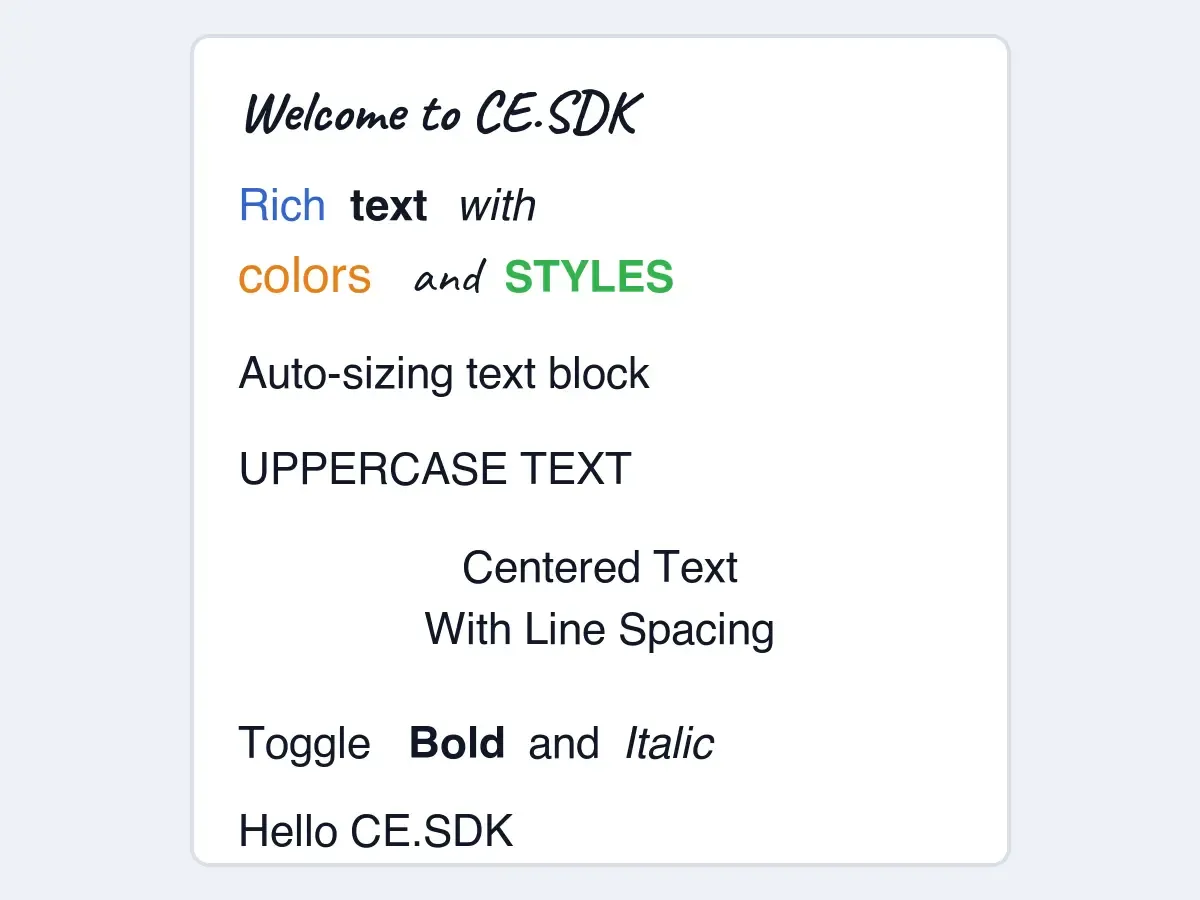
Text blocks are fundamental design elements for displaying titles, captions, labels, and body text. CE.SDK provides range-based styling APIs so a single text block can contain multiple colors, font weights, font styles, and text cases.
The snippets below assume you already have an Engine instance and the target page block you want to add text to.
Create Text Blocks#
Create a text block with engine.block.create(DesignBlockType.Text) and attach it to a page with appendChild(). Use replaceText() for both initial text and later text replacements.
val titleBlock = engine.block.create(DesignBlockType.Text)engine.block.appendChild(parent = page, child = titleBlock)engine.block.replaceText(titleBlock, text = "Welcome to CE.SDK")
engine.block.setWidthMode(titleBlock, mode = SizeMode.AUTO)engine.block.setHeightMode(titleBlock, mode = SizeMode.AUTO)engine.block.setPositionX(titleBlock, value = margin)engine.block.setPositionY(titleBlock, value = margin)
Text blocks can use automatic sizing. Set the width and height modes to SizeMode.AUTO when the block should fit its text content.
Apply Fonts and Typefaces#
Apply a font with setFont(). Android expects both the concrete font file Uri and a Typeface that describes the font family and available variants.
// Use a reachable location for the CE.SDK font assets.val cesdkTypefaceBaseUri = defaultBaseUri    .buildUpon()    .appendPath("ly.img.typeface")    .appendPath("fonts")    .build()
fun fontUri(    family: String,    fileName: String,): Uri = cesdkTypefaceBaseUri    .buildUpon()    .appendPath(family)    .appendPath(fileName)    .build()
val caveatRegular = Font(    uri = fontUri(family = "Caveat", fileName = "Caveat-Regular.ttf"),    subFamily = "Regular",    weight = FontWeight.NORMAL,    style = FontStyle.NORMAL,)val caveatBold = Font(    uri = fontUri(family = "Caveat", fileName = "Caveat-Bold.ttf"),    subFamily = "Bold",    weight = FontWeight.BOLD,    style = FontStyle.NORMAL,)val caveatTypeface = Typeface(name = "Caveat", fonts = listOf(caveatRegular, caveatBold))
engine.block.setFont(titleBlock, fontFileUri = caveatBold.uri, typeface = caveatTypeface)engine.block.setTextFontSize(titleBlock, fontSize = fontSize)
Use setFont() when you want to replace the block’s active font file. Use setTypeface() when you want CE.SDK to keep current formatting, such as bold or italic, as far as the new typeface supports it.
The sample uses public CE.SDK CDN font assets so the code can run as published. Replace the base URI with the location where your integration bundles or hosts CE.SDK assets.
When later snippets apply weight, style, or toggle formatting, use a typeface that includes the variants those operations need.
val robotoTypeface = Typeface( name = "Roboto", fonts = listOf( Font( uri = fontUri(family = "Roboto", fileName = "Roboto-Regular.ttf"), subFamily = "Regular", weight = FontWeight.NORMAL, style = FontStyle.NORMAL, ), Font( uri = fontUri(family = "Roboto", fileName = "Roboto-Bold.ttf"), subFamily = "Bold", weight = FontWeight.BOLD, style = FontStyle.NORMAL, ), Font( uri = fontUri(family = "Roboto", fileName = "Roboto-Italic.ttf"), subFamily = "Italic", weight = FontWeight.NORMAL, style = FontStyle.ITALIC, ), Font( uri = fontUri(family = "Roboto", fileName = "Roboto-BoldItalic.ttf"), subFamily = "Bold Italic", weight = FontWeight.BOLD, style = FontStyle.ITALIC, ), ),)val robotoRegular = robotoTypeface.fonts.firstOrNull { it.weight == FontWeight.NORMAL && it.style == FontStyle.NORMAL} ?: error("Roboto regular font variant is required for text styling.")Style Text Ranges#
Style part of a text block by passing from and to to the range-based text APIs. Android uses start-inclusive and end-exclusive UTF-16 code unit offsets for these ranges.
// "Rich" (UTF-16 range [0, 4)) in blue.engine.block.setTextColor( block = richTextBlock, color = Color.fromRGBA(r = 0.2F, g = 0.4F, b = 0.8F, a = 1F), from = 0, to = 4,)// "text" (UTF-16 range [5, 9)) in bold.engine.block.setTextFontWeight( block = richTextBlock, fontWeight = FontWeight.BOLD, from = 5, to = 9,)// "with" (UTF-16 range [10, 14)) in italic.engine.block.setTextFontStyle( block = richTextBlock, fontStyle = FontStyle.ITALIC, from = 10, to = 14,)// "colors" (UTF-16 range [15, 21)) in orange and larger type.engine.block.setTextColor( block = richTextBlock, color = Color.fromRGBA(r = 0.9F, g = 0.5F, b = 0.1F, a = 1F), from = 15, to = 21,)engine.block.setTextFontSize( block = richTextBlock, fontSize = 96F, from = 15, to = 21,)// "and" (UTF-16 range [22, 25)) uses another typeface.engine.block.setTypeface( block = richTextBlock, typeface = caveatTypeface, from = 22, to = 25,)// "styles" (UTF-16 range [26, 32)) in green uppercase.engine.block.setTextColor( block = richTextBlock, color = Color.fromRGBA(r = 0.2F, g = 0.7F, b = 0.3F, a = 1F), from = 26, to = 32,)engine.block.setTextCase( block = richTextBlock, textCase = TextCase.UPPER_CASE, from = 26, to = 32,)The same range pattern applies to text colors, font weights, font styles, font sizes, typefaces, and text cases. Use UTF-16 code unit offsets for every range, especially when text contains emoji or surrogate pairs.
Configure Auto-Sizing#
Combine a fixed width with an automatic height when text should wrap and grow vertically with its content.
val autoSizeBlock = engine.block.create(DesignBlockType.Text)engine.block.appendChild(parent = page, child = autoSizeBlock)engine.block.replaceText(autoSizeBlock, text = "Auto-sizing text block")engine.block.setPositionX(autoSizeBlock, value = margin)engine.block.setPositionY(autoSizeBlock, value = margin + lineSpacing * 2)
engine.block.setWidth(autoSizeBlock, value = pageWidth - margin * 2)engine.block.setWidthMode(autoSizeBlock, mode = SizeMode.ABSOLUTE)engine.block.setHeightMode(autoSizeBlock, mode = SizeMode.AUTO)engine.block.setTextFontSize(autoSizeBlock, fontSize = fontSize)
Use SizeMode.ABSOLUTE when a dimension should use an explicit design-unit value, SizeMode.PERCENT when it should follow the parent size, and SizeMode.AUTO when CE.SDK should derive it from content.
Apply Text Case Transformations#
Use setTextCase() to change the rendered casing without changing the underlying text string.
val caseBlock = engine.block.create(DesignBlockType.Text)engine.block.appendChild(parent = page, child = caseBlock)engine.block.replaceText(caseBlock, text = "uppercase text")engine.block.setPositionX(caseBlock, value = margin)engine.block.setPositionY(caseBlock, value = margin + lineSpacing * 3)engine.block.setWidthMode(caseBlock, mode = SizeMode.AUTO)engine.block.setHeightMode(caseBlock, mode = SizeMode.AUTO)engine.block.setTextFontSize(caseBlock, fontSize = fontSize)
engine.block.setTextCase(caseBlock, textCase = TextCase.UPPER_CASE)
Available text cases are TextCase.NORMAL, TextCase.UPPER_CASE, TextCase.LOWER_CASE, and TextCase.TITLE_CASE.
Set Text Alignment and Spacing#
Set paragraph alignment with the typed Android helper when possible. Use typed line-height APIs for paragraph line height, and keep the generic float property only for letter spacing.
val alignedBlock = engine.block.create(DesignBlockType.Text)engine.block.appendChild(parent = page, child = alignedBlock)engine.block.replaceText(alignedBlock, text = "Centered Text\nWith Line Spacing")engine.block.setPositionX(alignedBlock, value = margin)engine.block.setPositionY(alignedBlock, value = margin + lineSpacing * 4)engine.block.setWidth(alignedBlock, value = pageWidth - margin * 2)engine.block.setWidthMode(alignedBlock, mode = SizeMode.ABSOLUTE)engine.block.setHeightMode(alignedBlock, mode = SizeMode.AUTO)engine.block.setTextFontSize(alignedBlock, fontSize = fontSize)
engine.block.setTextHorizontalAlignment(alignedBlock, alignment = HorizontalAlignment.Center)engine.block.setTextLineHeight(alignedBlock, lineHeight = 1.5F)engine.block.setFloat(alignedBlock, property = "text/letterSpacing", value = 0.05F)
val lineHeight = engine.block.getTextLineHeight(alignedBlock, paragraphIndex = 0)val letterSpacing = engine.block.getFloat(alignedBlock, property = "text/letterSpacing")
Line height is a multiplier of the font size, so 1.5F means 150%. Letter spacing is a proportion of the font size.
Toggle Bold and Italic#
Use the toggle helpers when you want CE.SDK to switch between normal and formatted variants. Check support first because each toggle needs a matching counterpart variant for the current range and style. Include normal, bold, italic, and bold italic variants when both toggles should work across normal, bold, italic, and bold italic text.
val canToggleBold = engine.block.canToggleBoldFont(toggleBlock, from = 7, to = 11)if (canToggleBold) {    engine.block.toggleBoldFont(toggleBlock, from = 7, to = 11)}
val canToggleItalic = engine.block.canToggleItalicFont(toggleBlock, from = 16, to = 22)if (canToggleItalic) {    engine.block.toggleItalicFont(toggleBlock, from = 16, to = 22)}
The from and to arguments target the same UTF-16 code unit ranges used by the styling APIs.
Modify Text Content#
Use replaceText() with a range to replace part of the text while keeping surrounding content. Omitting from and to replaces the full text string.
val modifyBlock = engine.block.create(DesignBlockType.Text)engine.block.appendChild(parent = page, child = modifyBlock)engine.block.replaceText(modifyBlock, text = "Hello World")engine.block.setPositionX(modifyBlock, value = margin)engine.block.setPositionY(modifyBlock, value = margin + lineSpacing * 8)engine.block.setWidthMode(modifyBlock, mode = SizeMode.AUTO)engine.block.setHeightMode(modifyBlock, mode = SizeMode.AUTO)engine.block.setTextFontSize(modifyBlock, fontSize = fontSize)
engine.block.replaceText(modifyBlock, text = "CE.SDK", from = 6, to = 11)
Use removeText() with the same range convention when you need to delete text from a block.
Troubleshooting#
Text Not Displaying#
- Verify that
replaceText()set the text content. - Check that
appendChild()attaches the text block to a page. - Ensure the text block has a width or uses automatic sizing.
Font Not Loading#
- Verify the font
Uriis reachable from the device. - Check that the
Typefacemetadata matches the font files. - Include every font variant needed by bold and italic toggles.
Range Styling Not Applying#
- Verify that
fromis less thanto. - Count ranges as UTF-16 code unit offsets, especially when text contains emoji or surrogate pairs.
- Check that the active typeface supports the requested font weight or style.
API Reference#
| API | Category | Purpose |
|---|---|---|
engine.block.create(blockType=_) |
Block | Create a new text block. |
engine.block.appendChild(parent=_, child=_) |
Block | Attach the text block to a page or scene hierarchy. |
engine.block.replaceText(block=_, text=_) |
Text | Set or replace text content. |
engine.block.replaceText(block=_, text=_, from=_, to=_) |
Text | Replace a UTF-16 text range. |
engine.block.removeText(block=_, from=_, to=_) |
Text | Remove a UTF-16 text range. |
engine.block.setFont(block=_, fontFileUri=_, typeface=_) |
Text | Bind a concrete font file and typeface to a text block. |
engine.block.setTypeface(block=_, typeface=_, from=_, to=_) |
Text | Apply a typeface while preserving compatible formatting. |
engine.block.getTypefaces(block=_, from=_, to=_) |
Text | Read typefaces applied to a UTF-16 range. |
engine.block.setTextFontSize(block=_, fontSize=_) |
Text | Set the font size for the whole text block. |
engine.block.setTextFontSize(block=_, fontSize=_, from=_, to=_) |
Text | Apply font size to a UTF-16 range. |
engine.block.getTextFontSizes(block=_, from=_, to=_) |
Text | Read font sizes applied to a UTF-16 range. |
engine.block.setTextColor(block=_, color=_, from=_, to=_) |
Text | Apply text color to a UTF-16 range. |
engine.block.getTextColors(block=_, from=_, to=_) |
Text | Read text colors applied to a UTF-16 range. |
engine.block.setTextFontWeight(block=_, fontWeight=_, from=_, to=_) |
Text | Apply font weight to a UTF-16 range. |
engine.block.getTextFontWeights(block=_, from=_, to=_) |
Text | Read font weights applied to a UTF-16 range. |
engine.block.setTextFontStyle(block=_, fontStyle=_, from=_, to=_) |
Text | Apply font style to a UTF-16 range. |
engine.block.getTextFontStyles(block=_, from=_, to=_) |
Text | Read font styles applied to a UTF-16 range. |
engine.block.setTextCase(block=_, textCase=_) |
Text | Apply a visual text case transformation. |
engine.block.setTextCase(block=_, textCase=_, from=_, to=_) |
Text | Apply a visual text case transformation to a UTF-16 range. |
engine.block.getTextCases(block=_, from=_, to=_) |
Text | Read text case transformations applied to a UTF-16 range. |
engine.block.canToggleBoldFont(block=_, from=_, to=_) |
Text | Check whether a UTF-16 range can switch to or from bold. |
engine.block.toggleBoldFont(block=_, from=_, to=_) |
Text | Toggle bold styling for a UTF-16 range. |
engine.block.canToggleItalicFont(block=_, from=_, to=_) |
Text | Check whether a UTF-16 range can switch to or from italic. |
engine.block.toggleItalicFont(block=_, from=_, to=_) |
Text | Toggle italic styling for a UTF-16 range. |
engine.block.setWidthMode(block=_, mode=_) |
Layout | Set how CE.SDK resolves a block width. |
engine.block.setHeightMode(block=_, mode=_) |
Layout | Set how CE.SDK resolves a block height. |
engine.block.setWidth(block=_, value=_) |
Layout | Set an explicit block width. |
engine.block.setHeight(block=_, value=_) |
Layout | Set an explicit block height. |
engine.block.setPositionX(block=_, value=_) |
Layout | Set a block’s horizontal position. |
engine.block.setPositionY(block=_, value=_) |
Layout | Set a block’s vertical position. |
engine.block.setTextHorizontalAlignment(block=_, alignment=_) |
Text | Set horizontal alignment for the block and clear paragraph-level overrides. |
engine.block.getTextHorizontalAlignment(block=_) |
Text | Read the block-level horizontal alignment. |
engine.block.setTextLineHeight(block=_, lineHeight=_) |
Text | Set line height for all paragraphs. |
engine.block.getTextLineHeight(block=_, paragraphIndex=_) |
Text | Read paragraph line height. |
engine.block.setFloat(block=_, property="text/letterSpacing", value=_) |
Text | Set letter spacing relative to font size. |
engine.block.getFloat(block=_, property="text/letterSpacing") |
Text | Read letter spacing relative to font size. |
Next Steps#
- Text Styling - Apply fonts, colors, alignment, and other styling options to customize text appearance.
- Auto-Size — Configure text blocks to automatically adapt their dimensions or font size for dynamic content.
- Adjust Text Spacing - Control letter spacing, line height, and paragraph spacing in CE.SDK text blocks for precise typographic control.
- Emojis - Insert and style emojis alongside text for expressive, modern typographic designs.
- Text Effects — Apply visual effects to text blocks including drop shadows and stroke outlines.