Combine multiple shapes using boolean operations to create custom compound designs programmatically.
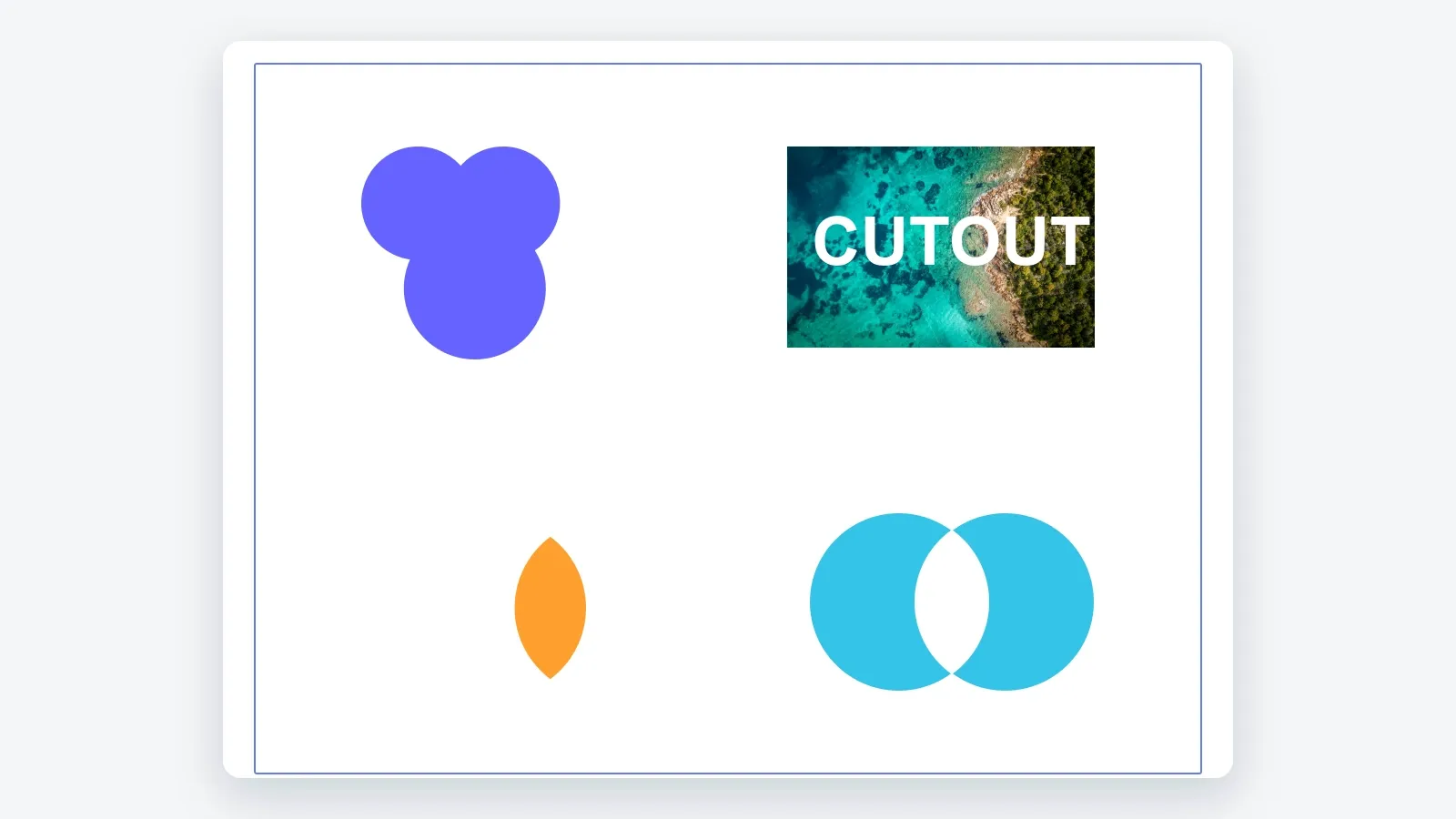
CE.SDK provides four boolean operations for graphic and text blocks: Union, Difference, Intersection, and XOR. Use them to merge simple primitives, create cutouts, isolate overlapping areas, or remove overlaps from a compound shape.
This guide covers checking combinability, applying the four operations with Android’s BooleanOperation enum, controlling fill inheritance through block order, and avoiding common scope issues.
Understanding Boolean Operations#
Boolean operations create a new block from the geometry of multiple input blocks. The result replaces the input blocks when the required scopes allow CE.SDK to duplicate and destroy them.
| Operation | Android enum | Result |
|---|---|---|
| Union | BooleanOperation.UNION |
Merges all block areas into one compound shape |
| Difference | BooleanOperation.DIFFERENCE |
Subtracts upper blocks from the bottom-most base block |
| Intersection | BooleanOperation.INTERSECTION |
Keeps only the areas where all blocks overlap |
| XOR | BooleanOperation.XOR |
Keeps non-overlapping areas and removes intersections |
For Union and XOR, the new block inherits the fill from the top-most block. For Difference and Intersection, it inherits the fill from the bottom-most block. The operation order follows visual stacking order, not the order of the block IDs in the list. Reorder blocks with engine.block.bringToFront(...) or engine.block.sendToBack(...) before combining when fill inheritance matters.
Check If Blocks Can Be Combined#
Before combining blocks, call engine.block.isCombinable(...). It returns true only when the selection contains at least two compatible graphic or text blocks on the same page and each block has the lifecycle/duplicate scope enabled.
val unionBlocks = listOf(circle1, circle2, circle3)val canCombineUnion = engine.block.isCombinable(unionBlocks)check(canCombineUnion) { "Choose graphic or text blocks that can be combined." }Use the same set of blocks for the later combine(...) call so the checked selection and the mutated selection cannot drift.
Combining with Union#
Union merges several blocks into one compound outline. In this sample, three overlapping circles become a single block and inherit the blue fill from the top-most circle.
val unionResult = engine.block.combine( blocks = unionBlocks, op = BooleanOperation.UNION,)Use Union for merged logos, compound icons, and shapes built from simple primitives.
Combining with Difference#
Difference subtracts upper blocks from the bottom-most base block. Place the base block behind the subtracting blocks before combining so the result keeps the intended fill.
engine.block.sendToBack(imageBlock)// Load the image fill and text font resources before combining.engine.block.forceLoadResources(listOf(imageBlock, textBlock))val differenceBlocks = listOf(imageBlock, textBlock)check(engine.block.isCombinable(differenceBlocks))val differenceResult = engine.block.combine( blocks = differenceBlocks, op = BooleanOperation.DIFFERENCE,)The sample places an image block behind a text block, loads the image resource, and then removes the text shape from the image.
engine.block.forceLoadResources(...) loads both the image fill and text font resources before the operation reads their shapes.
Combining with Intersection#
Intersection keeps only the area shared by all selected blocks. The result inherits the bottom-most block’s fill. The sample uses two overlapping circles to create a lens-shaped result.
val intersectionBlocks = listOf(intersectionCircle1, intersectionCircle2)check(engine.block.isCombinable(intersectionBlocks))val intersectionResult = engine.block.combine( blocks = intersectionBlocks, op = BooleanOperation.INTERSECTION,)Use Intersection for overlap effects, lens shapes, and geometric masks.
Combining with XOR#
XOR keeps the non-overlapping areas of the selected blocks and removes their intersections.
val xorBlocks = listOf(xorCircle1, xorCircle2)check(engine.block.isCombinable(xorBlocks))val xorResult = engine.block.combine( blocks = xorBlocks, op = BooleanOperation.XOR,)Use XOR for exclusion shapes, cut-through overlaps, and inverted intersection patterns.
Understanding Fill Inheritance#
Combined blocks inherit fill and related appearance properties from the prioritized block. For Union and XOR, the prioritized block is the top-most input block. For Difference and Intersection, it is the bottom-most input block.
Control this before combining by moving the block whose fill should be inherited with engine.block.bringToFront(...) or engine.block.sendToBack(...).
Scope Requirements#
Combining blocks uses the same scope system as other block mutations:
lifecycle/duplicatemust be enabled for every input block.engine.block.isCombinable(...)checks this, along with the two-block and same-page requirements, before you callcombine(...).lifecycle/destroymust be enabled when the input blocks should be replaced by the combined result.
If scoped content blocks a combination workflow, inspect the relevant scope with engine.block.isScopeEnabled(...) and update it with engine.block.setScopeEnabled(...) only when your editing rules allow that change.
Troubleshooting#
Combination Fails#
- Check the block list with
engine.block.isCombinable(...)before callingcombine(...). - Make sure every input is a graphic or text block.
- Select at least two compatible blocks on the same page.
- Verify that the selected blocks still exist and have not already been consumed by a previous boolean operation.
Wrong Fill on the Result#
- For Union and XOR, move the block whose fill should be inherited to the front.
- For Difference and Intersection, send the block whose fill should be inherited to the back.
- Re-run the combinability check after changing the selection or replacing any block.
Original Blocks Remain#
If the combined result appears but the original blocks remain, the input blocks may not have lifecycle/destroy enabled. Check that scope with engine.block.isScopeEnabled(...) and only enable it with engine.block.setScopeEnabled(...) when your app’s editing rules allow the originals to be removed.
Unexpected Shape Result#
- Boolean operations use block order. Union and XOR start from the highest sort order; Difference and Intersection start from the lowest sort order.
- Control visual stacking with
engine.block.bringToFront(...)orengine.block.sendToBack(...)before combining. - Load image fill and text font resources before combining those blocks so the operation can resolve their shapes.
API Reference#
| Method | Description |
|---|---|
engine.block.isCombinable(blocks=_) |
Check whether blocks can be combined |
engine.block.combine(blocks=_, op=_) |
Perform a boolean operation on compatible blocks |
engine.block.create(blockType=DesignBlockType.Graphic) |
Create a graphic block |
engine.block.create(blockType=DesignBlockType.Text) |
Create a text block |
engine.block.createShape(type=_) |
Create a shape for a graphic block |
engine.block.setShape(block=_, shape=_) |
Assign a shape to a graphic block |
engine.block.createFill(fillType=_) |
Create a fill block |
engine.block.setFill(block=_, fill=_) |
Assign a fill to a block |
engine.block.setFillSolidColor(block=_, color=_) |
Set a solid color fill |
Color.fromRGBA(r=_, g=_, b=_, a=_) |
Create an RGBA color value |
engine.block.setWidth(block=_, value=_) |
Set the block width |
engine.block.setHeight(block=_, value=_) |
Set the block height |
engine.block.setPositionX(block=_, value=_) |
Set the block’s x position |
engine.block.setPositionY(block=_, value=_) |
Set the block’s y position |
engine.block.appendChild(parent=_, child=_) |
Add a block to a parent |
engine.block.replaceText(block=_, text=_) |
Replace text block content |
engine.block.setTextFontSize(block=_, fontSize=_) |
Set text size |
engine.block.setString(block=_, property="fill/image/imageFileURI", value=_) |
Set an image fill URI |
engine.block.forceLoadResources(blocks=_) |
Load resources needed by blocks |
engine.block.bringToFront(block=_) |
Move a block to the highest sort order |
engine.block.sendToBack(block=_) |
Move a block to the lowest sort order |
engine.block.isScopeEnabled(block=_, key=_) |
Check whether a scope is enabled |
engine.block.setScopeEnabled(block=_, key=_, enabled=_) |
Enable or disable a scope |
Next Steps#
- Create Shapes — Draw the building-block shapes that boolean operations combine.
- Edit Shapes — Modify shape properties before or after combining.
- Create Cutout — Generate cutout paths for die-cut prints and stickers.