Add a background removal action to your Android editor so users can remove an image background and continue editing the result.
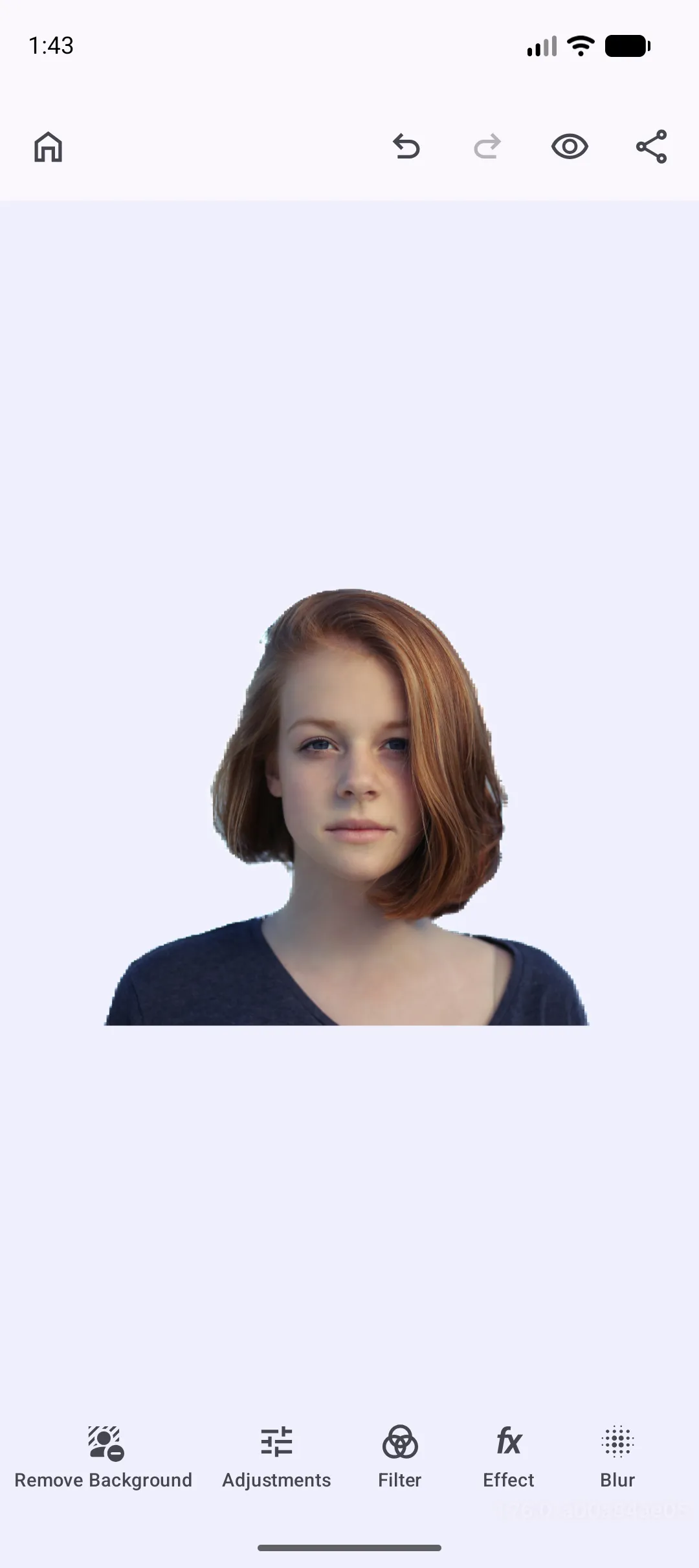
The Background Removal plugin adds a dock action that processes the current page image and replaces its fill with a transparent-background result. This guide explores the IMG.LY ONNX implementation, the Google ML Kit implementation, and a custom remover implementation.
For a complete Photo Editor setup, see the Photo Editor starter kit.
IMG.LY Implementation#
The IMG.LY implementation runs an ONNX segmentation model on the device. Use it when you want to control the model variant, model asset location, and model loading behavior.
dependencies { implementation("ly.img:plugin-background-removal-imgly:1.78.0")}Minimal Implementation#
Compose IMGLYBackgroundRemovalPlugin with your editor configuration. The plugin inserts the dock button and uses the default IMG.LY configuration.
Editor( license = license, configuration = { EditorConfiguration .remember(::PhotoConfigurationBuilder) { onCreate = { onCreate( createScene = { editorContext.engine.scene.createFromImage( imageUri = "https://images.unsplash.com/photo-1438761681033-6461ffad8d80".toUri(), ) }, ) } } .then(::IMGLYBackgroundRemovalPlugin) }, onClose = onClose,)Configuration Options#
Configure IMGLYBackgroundRemovalPlugin when you need to select a model, change where model files are loaded from, control eager or lazy loading, customize network timeouts, or move the dock button.
Editor( license = license, configuration = { EditorConfiguration .remember(::PhotoConfigurationBuilder) .then(::IMGLYBackgroundRemovalPlugin) { config = IMGLYBackgroundRemovalConfig( model = IMGLYBackgroundRemovalConfig.Model.FP16, modelBaseUri = "https://staticimgly.com/imgly/plugin-mobile-background-removal/1.0.0".toUri(), loadMode = IMGLYBackgroundRemovalConfig.LoadMode.EAGER, httpClient = OkHttpClient.Builder() .connectTimeout(15, TimeUnit.SECONDS) .readTimeout(120, TimeUnit.SECONDS) .writeTimeout(120, TimeUnit.SECONDS) .build(), ) dockModifier = { addFirst { Dock.Button.rememberBackgroundRemoval(config = it) } } } }, onClose = onClose,)| Option | Default | Description |
|---|---|---|
config.model |
IMGLYBackgroundRemovalConfig.Model.FP16 |
Chooses the ONNX model variant. FP32 favors quality and file size is largest, FP16 is the default balance, and QUINT8 is smaller and faster with a stronger quality trade-off. |
config.modelBaseUri |
https://staticimgly.com/imgly/plugin-mobile-background-removal/1.0.0 |
Base URI used to resolve the selected model file. The plugin appends config.model.key, for example isnet_fp16.onnx. You can download the models and store them in your own CDN, or download the files into the assets folder of your app and set modelBaseUri = "file:///android_asset".toUri(). |
config.loadMode |
IMGLYBackgroundRemovalConfig.LoadMode.EAGER |
EAGER starts loading the model during plugin initialization. LAZY waits until the first removal action. |
config.httpClient |
Default OkHttpClient |
HTTP client used to load source images and remote model assets. Override it for app-specific timeouts or interceptors. |
dockModifier |
Adds the button first | Changes where Dock.Button.rememberBackgroundRemoval() is inserted in the dock. |
Google Implementation#
The Google implementation uses Google’s on-device ML Kit segmentation backend. Use it when you want an on-device segmentation option with the same dock button placement controls.
dependencies { implementation("ly.img:plugin-background-removal-google:1.78.0")}Minimal Implementation#
Compose GoogleBackgroundRemovalPlugin with your editor configuration.
Editor( license = license, configuration = { EditorConfiguration .remember(::PhotoConfigurationBuilder) .then(::GoogleBackgroundRemovalPlugin) }, onClose = onClose,)Configuration Options#
Configure GoogleBackgroundRemovalPlugin when you need to customize the HTTP client or move the dock button.
Editor( license = license, configuration = { EditorConfiguration .remember(::PhotoConfigurationBuilder) .then(::GoogleBackgroundRemovalPlugin) { config = GoogleBackgroundRemovalConfig( httpClient = OkHttpClient.Builder() .connectTimeout(15, TimeUnit.SECONDS) .readTimeout(120, TimeUnit.SECONDS) .writeTimeout(120, TimeUnit.SECONDS) .build(), ) dockModifier = { addFirst { Dock.Button.rememberBackgroundRemoval(config = it) } } } }, onClose = onClose,)| Option | Default | Description |
|---|---|---|
config.httpClient |
Default OkHttpClient |
HTTP client used by the plugin when it loads source images. Override it for app-specific timeouts or interceptors. |
dockModifier |
Adds the button first | Changes where Dock.Button.rememberBackgroundRemoval() is inserted in the dock. |
Custom Background Remover#
For custom segmentation, include the base plugin package and implement BackgroundRemover. Your config object selects the remover, and BackgroundRemovalPlugin keeps the same dock action and editor integration.
dependencies { implementation("ly.img:plugin-background-removal:1.78.0")}Minimal Implementation#
Implement BackgroundRemovalConfig to select your remover, then compose the base plugin with your custom config. initialize() prepares your backend, and processImage() returns the foreground mask.
private data class CustomBackgroundRemovalConfig(    override val httpClient: OkHttpClient = OkHttpClient(),) : BackgroundRemovalConfig {    override val remover: BackgroundRemover<*> = CustomBackgroundRemover()}
private class CustomBackgroundRemover : BackgroundRemover<CustomBackgroundRemovalConfig> {    override fun EditorScope.initialize() {        // Prepare local models, SDK clients, or service credentials here.    }
    override suspend fun EditorScope.processImage(bitmap: Bitmap): BackgroundRemovalMask {        val width = bitmap.width        val height = bitmap.height        val buffer = ByteBuffer            .allocateDirect(width * height * Float.SIZE_BYTES)            .order(ByteOrder.nativeOrder())
        // Dummy data filled with 1s.        repeat(width * height) {            buffer.putFloat(1f)        }        buffer.rewind()
return BackgroundRemovalMask( buffer = buffer, width = width, height = height, ) }}Editor( license = license, configuration = { EditorConfiguration .remember(::PhotoConfigurationBuilder) .then(::BackgroundRemovalPlugin) { config = CustomBackgroundRemovalConfig() } }, onClose = onClose,)Configuration Options#
Configure BackgroundRemovalPlugin when you need to move the dock button.
Editor( license = license, configuration = { EditorConfiguration .remember(::PhotoConfigurationBuilder) .then(::BackgroundRemovalPlugin) { config = CustomBackgroundRemovalConfig() dockModifier = { addFirst { Dock.Button.rememberBackgroundRemoval(config = it) } } } }, onClose = onClose,)| Option | Default | Description |
|---|---|---|
dockModifier |
Adds the button first | Changes where Dock.Button.rememberBackgroundRemoval() is inserted in the dock. |
Troubleshooting#
- If the button is missing, verify that the selected plugin is composed with the editor configuration.
- If removal fails, check that the current page block has an image fill.
- If the IMG.LY implementation cannot load a model, verify that
modelBaseUriplus the selected model filename resolves to a readable.onnxfile. - If the first IMG.LY run feels slow, use
LoadMode.EAGERor bundle the selected model in app assets.
API Reference#
| API | Purpose |
|---|---|
IMGLYBackgroundRemovalPlugin |
Adds the background removal action with the IMG.LY ONNX Runtime backend. |
IMGLYBackgroundRemovalConfig |
Configures IMG.LY model selection, model URI, loading behavior, and HTTP loading. |
GoogleBackgroundRemovalPlugin |
Adds the background removal action with Google’s on-device segmentation backend. |
GoogleBackgroundRemovalConfig |
Configures HTTP loading for the Google implementation. |
BackgroundRemovalPlugin |
Base plugin used with a custom BackgroundRemovalConfig. |
BackgroundRemover.initialize() |
Prepares a custom remover before use. |
BackgroundRemover.processImage(bitmap=_) |
Produces the foreground mask for an image. |
Dock.Button.rememberBackgroundRemoval(config=_) |
Creates the reusable background removal dock button. |
EditorConfiguration.then() |
Composes the selected plugin with the base editor configuration. |
Next Steps#
- Configuration - Configure the editor for your app.
- Photo Editor - Start from the Photo Editor starter kit.
- Open the Editor From an Image - Start the editor with image content.
- Dock - Customize dock items and ordering.