Load the built-in CE.SDK asset sources on Android, then fetch and apply assets such as vector shapes, stickers, and sample images from those sources.
CE.SDK ships asset catalogs for core editor content and sample media. Register the catalogs you need with engine.asset.addLocalSourceFromJSON(), then use the regular asset APIs to query, fetch, and apply entries to the active scene.
What Are Default and Demo Assets?#
IMG.LY provides two groups of JSON-backed asset sources.
Default assets are core editor components:
| Source ID | Description |
|---|---|
ly.img.sticker |
Stickers, emojis, and decorations |
ly.img.vector.shape |
Vector shapes such as stars, arrows, and polygons |
ly.img.color.palette |
Default color palette |
ly.img.filter |
Color filters |
ly.img.effect |
Visual effects |
ly.img.blur |
Blur effects |
ly.img.typeface |
Font families |
ly.img.crop.presets |
Crop presets |
ly.img.page.presets |
Page size presets |
ly.img.text.components |
Text component presets |
ly.img.text, ly.img.text.styles, ly.img.text.curves |
Text style presets |
ly.img.caption.presets |
Caption presets |
Demo assets are sample content for development:
| Source ID | Description |
|---|---|
ly.img.image |
Sample images |
ly.img.video |
Sample videos |
ly.img.audio |
Sample audio tracks |
ly.img.templates |
Design templates |
Versioned CDN URLs#
Build asset URLs from the Android package version so the JSON catalogs match the SDK in your app. Keep the asset base URI app-provided, so you can swap the CDN URL for a bundled or self-hosted URI without changing the loading code.
fun defaultAssetsUri(cesdkVersion: String): Uri = Uri.parse( "https://cdn.img.ly/packages/imgly/cesdk-android/$cesdkVersion/assets",)Loading Asset Sources#
List the source IDs you want to register. Load only the sources your app needs; the editor UI or your own asset browser can query them after registration.
val defaultAssetSourceIds = listOf(    "ly.img.sticker",    "ly.img.vector.shape",    "ly.img.color.palette",    "ly.img.filter",    "ly.img.effect",    "ly.img.blur",    "ly.img.typeface",    "ly.img.crop.presets",    "ly.img.page.presets",    "ly.img.text.components",    "ly.img.text",    "ly.img.text.styles",    "ly.img.text.curves",    "ly.img.caption.presets",)
val demoAssetSourceIds = listOf(    "ly.img.image",    "ly.img.video",    "ly.img.audio",    "ly.img.templates",)
Loading Default Asset Sources#
Use addLocalSourceFromJSON(contentUri=_) to load each default source from its content.json manifest.
val loadedDefaultSourceIds = defaultAssetSourceIds.map { sourceId -> engine.asset.addLocalSourceFromJSON( contentUri = assetBaseUri.buildUpon() .appendPath(sourceId) .appendPath("content.json") .build(), )}Loading Demo Asset Sources#
Demo sources use the same registration API. They are useful for examples, prototypes, and smoke tests, but production apps usually replace them with app-owned media.
val loadedDemoSourceIds = demoAssetSourceIds.map { sourceId -> engine.asset.addLocalSourceFromJSON( contentUri = assetBaseUri.buildUpon() .appendPath(sourceId) .appendPath("content.json") .build(), )}Loading Assets from a JSON String#
Use addLocalSourceFromJSON(contentJSON=_, basePath=_, matcher=_) when your app already has the JSON content in memory. The JSON contains the source ID and an assets array with the same metadata keys used by file-backed catalogs.
val jsonSourceId = engine.asset.addLocalSourceFromJSON( contentJSON = """ { "version": "1.0.0", "id": "my-json-shapes", "assets": [ { "id": "brand-star", "label": { "en": "Brand Star" }, "meta": { "blockType": "${DesignBlockType.Graphic.key}", "shapeType": "${ShapeType.Star.key}" } } ] } """.trimIndent(), basePath = null, matcher = null,)Filtering Assets with Matcher#
Pass matcher while registering a JSON source to keep only matching asset IDs. The sample reloads the sticker source with one emoji asset, then queries the filtered source.
val stickerSourceId = "ly.img.sticker"engine.asset.removeSource(sourceId = stickerSourceId)val filteredStickerSourceId = engine.asset.addLocalSourceFromJSON(    contentUri = assetBaseUri.buildUpon()        .appendPath(stickerSourceId)        .appendPath("content.json")        .build(),    matcher = listOf("ly.img.sticker.emoji.happyface"),)
val filteredStickerCount = engine.asset.findAssets(    sourceId = filteredStickerSourceId,    query = FindAssetsQuery(page = 0, perPage = 10),).total
Matcher patterns support * wildcards, and an asset is included when its ID matches any pattern in the list.
Creating Blocks from Assets#
Create a scene and page before applying assets. applyAssetSourceAsset() adds the new block to the active scene when the source can materialize the asset.
val scene = engine.scene.create()val page = engine.block.create(DesignBlockType.Page)engine.block.setWidth(page, value = 800F)engine.block.setHeight(page, value = 600F)engine.block.appendChild(parent = scene, child = page)Fetch the individual assets by ID, apply them through their source, and position the returned blocks on the page.
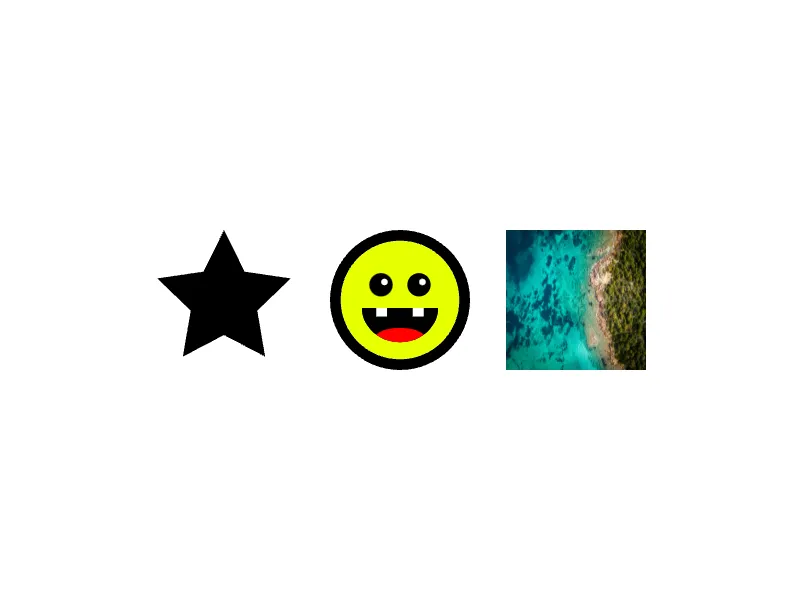
val assetsToAdd = listOf(    "ly.img.vector.shape" to "ly.img.vector.shape.filled.star",    filteredStickerSourceId to "ly.img.sticker.emoji.happyface",    "ly.img.image" to "ly.img.image.sample_1",)
val blockSize = 140Fval spacing = 36Fval startX = (800F - (assetsToAdd.size * blockSize + (assetsToAdd.size - 1) * spacing)) / 2Fval centerY = (600F - blockSize) / 2F
val createdBlocks = assetsToAdd.mapIndexed { index, (sourceId, assetId) ->    val asset = checkNotNull(        engine.asset.fetchAsset(            sourceId = sourceId,            assetId = assetId,        ),    ) {        "Missing asset $assetId from $sourceId."    }
    val block = checkNotNull(        engine.asset.applyAssetSourceAsset(            sourceId = sourceId,            asset = asset,        ),    ) {        "Asset $assetId did not create a block."    }
    engine.block.setWidth(block, value = blockSize)    engine.block.setHeight(block, value = blockSize)    engine.block.setPositionX(block, value = startX + index * (blockSize + spacing))    engine.block.setPositionY(block, value = centerY)    block}
The example applies a star from ly.img.vector.shape, a filtered sticker from ly.img.sticker, and a sample image from ly.img.image.
Exporting the Result#
Force resource loading before export so externally referenced media is available to the renderer.
engine.block.forceLoadResources(blocks = listOf(page) + createdBlocks)val exportedPng = engine.block.export( block = page, mimeType = MimeType.PNG, options = ExportOptions(targetWidth = 800F, targetHeight = 600F),)The exported PNG confirms that the registered sources can produce visible scene content.
API Reference#
| Method | Description |
|---|---|
engine.asset.addLocalSourceFromJSON(contentUri=_, matcher=_) |
Register a local asset source from a JSON manifest URI |
engine.asset.addLocalSourceFromJSON(contentJSON=_, basePath=_, matcher=_) |
Register a local asset source from a JSON string |
engine.asset.findAssets(sourceId=_, query=_) |
Query assets from a registered source |
engine.asset.fetchAsset(sourceId=_, assetId=_) |
Fetch one asset by ID |
engine.asset.applyAssetSourceAsset(sourceId=_, asset=_) |
Apply an asset through its source and return the created block when available |
engine.asset.removeSource(sourceId=_) |
Remove an existing source before registering it again |
engine.scene.create() |
Create a scene for the applied assets |
engine.block.create(blockType=DesignBlockType.Page) |
Create a page block |
engine.block.appendChild(parent=_, child=_) |
Attach the page to the scene |
engine.block.setWidth(block=_, value=_) |
Set block width |
engine.block.setHeight(block=_, value=_) |
Set block height |
engine.block.setPositionX(block=_, value=_) |
Set the horizontal block position |
engine.block.setPositionY(block=_, value=_) |
Set the vertical block position |
engine.block.forceLoadResources(blocks=_) |
Load external resources before export |
engine.block.export(block=_, mimeType=MimeType.PNG, options=_) |
Export the page as a PNG |
Next Steps#
- Serve Assets - Self-host assets for production deployments
- Customize Asset Library - Configure the asset library UI and entries
- Basics — Explore the core functionality of the asset library and how users browse, search, and insert media.
- Import From Remote Source - Load assets from external URLs