Create smooth color transitions on design blocks with linear, radial, and conical gradient fills.
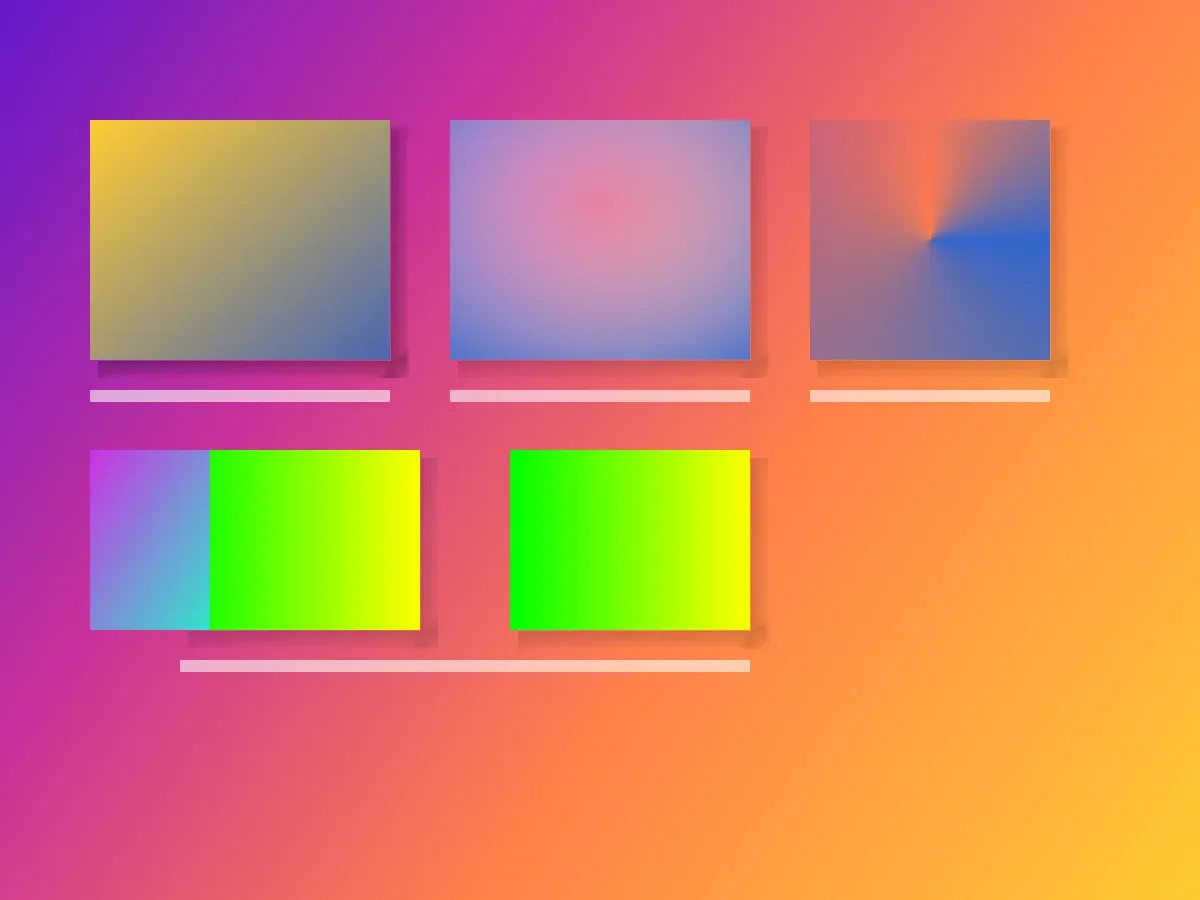
Gradient fills are part of CE.SDK’s fill system. They paint supported blocks with color transitions instead of a single solid color, image, or video.
This guide shows the Android Engine APIs for creating gradient fills, applying them to blocks, configuring color stops, and positioning each gradient type.
Understanding Gradient Fills#
What Is a Gradient Fill?#
A gradient fill is a fill block attached to a design block. Android exposes the three gradient fill types as FillType.LinearGradient, FillType.RadialGradient, and FillType.ConicalGradient.
Each gradient stores color stops on fill/gradient/colors and type-specific positioning properties on the fill block.
Gradient Types Comparison#
| Type | Android fill type | Best for |
|---|---|---|
| Linear | FillType.LinearGradient | Backgrounds, banners, buttons, and directional color transitions |
| Radial | FillType.RadialGradient | Spotlights, button highlights, vignettes, and depth effects |
| Conical | FillType.ConicalGradient | Circular progress, color wheels, spinners, and pie-chart style fills |
Gradient vs Other Fill Types#
Use gradient fills when a block needs a transition between multiple colors. Use color fills for uniform color, image fills for raster media, and video fills for animated media.
Color Stops Explained#
Color stops define the colors and positions in the transition. Each GradientColorStop has a color and a normalized stop value from 0.0 to 1.0.
Use two or more color stops when you want a visible transition. Keep stop positions in ascending order, make each position unique, use values from 0.0 to 1.0, and adjust each stop’s alpha channel when the gradient needs transparency.
Using the Built-in Gradient UI#
The CE.SDK editor UI exposes fill controls through the fill and stroke sheet. The current Android UI lets users switch between no fill, solid fill, and linear gradient fill, then edit two gradient colors and the linear gradient angle.
Radial and conical gradients are available through the Engine APIs shown below. For a complete Android editing surface that includes the fill controls, see the Design Editor Starter Kit.
Checking Gradient Fill Support#
Verifying Block Compatibility#
Check support before reading or changing fill data. Scenes do not support fills, while pages, graphics, and text blocks report fill support.
val sceneSupportsFill = engine.block.supportsFill(scene)val pageSupportsFill = engine.block.supportsFill(page)val graphicSupportsFill = engine.block.supportsFill(linearBlock)val textSupportsFill = engine.block.supportsFill(textBlock)supportsFill() only tells you whether a block has fill support. Scenes do not support fills. Pages and graphic blocks can receive gradient fills, while text blocks are limited to solid color fills.
Creating Gradient Fills#
Create gradient fill blocks with the type-safe Android FillType constants.
val pageGradient = engine.block.createFill(FillType.LinearGradient)val linearGradient = engine.block.createFill(FillType.LinearGradient)val radialGradient = engine.block.createFill(FillType.RadialGradient)val conicalGradient = engine.block.createFill(FillType.ConicalGradient)A created fill exists independently until you attach it to a block. Destroy unused fills if you create them and then decide not to attach them.
Applying Gradient Fills#
Setting a Gradient Fill on a Block#
Attach a gradient fill to a supported block with engine.block.setFill(), then inspect the fill with getFill() and getType().
val previousPageFill = engine.block.getFill(page)val previousLinearFill = engine.block.getFill(linearBlock)engine.block.setFill(page, fill = pageGradient)engine.block.setFill(linearBlock, fill = linearGradient)// Only destroy previous fills when you know they are not shared by other blocks.if (engine.block.isValid(previousPageFill)) {    engine.block.destroy(previousPageFill)}if (engine.block.isValid(previousLinearFill)) {    engine.block.destroy(previousLinearFill)}
val pageFillType = engine.block.getType(engine.block.getFill(page))val currentFill = engine.block.getFill(linearBlock)val currentFillType = engine.block.getType(currentFill)
getFill() returns another block ID. Pass that fill handle into property APIs such as setGradientColorStops(), setFloat(), and getFloat().
Use gradient fills for pages, graphics, and other blocks that accept non-solid fill types.
Text Fill Compatibility#
Text blocks support fill APIs for solid colors only. When a fill type is unsupported, setFill() throws; the sample uses runCatching to guard the call and then destroys the unattached gradient fill. Use setFillSolidColor() and getFillSolidColor() when styling text with a solid fill color.
val textSolidColor = Color.fromRGBA(r = 0.1F, g = 0.1F, b = 0.1F, a = 1F)engine.block.setFillSolidColor(textBlock, color = textSolidColor)val currentTextColor = engine.block.getFillSolidColor(textBlock)
val rejectedTextGradient = engine.block.createFill(FillType.LinearGradient)val textRejectsGradientFill = runCatching {    engine.block.setFill(textBlock, fill = rejectedTextGradient)}.isFailureif (textRejectsGradientFill) {    engine.block.destroy(rejectedTextGradient)}
Configuring Gradient Color Stops#
Setting Color Stops#
Use GradientColorStop values with normalized positions. For visible transitions, pass two or more stops. Keep each stop between 0.0 and 1.0, make stop positions unique, and order them from the start of the gradient to the end. Android color stops can use any CE.SDK Color value, including sRGB, CMYK, and Spot Color.
val linearColorStops = listOf( GradientColorStop(stop = 0F, color = Color.fromRGBA(r = 1F, g = 0.8F, b = 0.2F, a = 1F)), GradientColorStop(stop = 1F, color = Color.fromRGBA(r = 0.3F, g = 0.4F, b = 0.7F, a = 1F)),)engine.block.setGradientColorStops( block = linearGradient, property = "fill/gradient/colors", colorStops = linearColorStops,)val currentColorStops = engine.block.getGradientColorStops( block = linearGradient, property = "fill/gradient/colors",)Getting Color Stops#
Read the same fill/gradient/colors property to inspect the current color stop list. The setting snippet above includes the matching getGradientColorStops() readback after the update.
Using Different Color Spaces#
Gradient stops accept any CE.SDK Color value. The snippet below combines Android-native app colors from a hex string and 0-255 channel values with CMYK and Spot Color values for print-oriented stops. Define a spot color before referencing it with Color.fromSpotColor().
engine.editor.setSpotColor( name = "BrandPrimary", color = Color.fromRGBA(r = 0.2F, g = 0.4F, b = 0.8F, a = 1F),)val colorSpaceStops = listOf( GradientColorStop(stop = 0F, color = Color.fromHex("#3366CC")), GradientColorStop(stop = 0.25F, color = Color.fromRGBA(r = 255, g = 204, b = 0, a = 255)), GradientColorStop( stop = 0.75F, color = Color.fromCMYK(c = 0F, m = 1F, y = 1F, k = 0F, tint = 1F), ), GradientColorStop( stop = 1F, color = Color.fromSpotColor(name = "BrandPrimary", tint = 1F), ),)engine.block.setGradientColorStops( block = linearGradient, property = "fill/gradient/colors", colorStops = colorSpaceStops,)Positioning Linear Gradients#
Setting Start and End Points#
Linear gradients use normalized start and end coordinates relative to the block frame. (0, 0) is the top-left corner and (1, 1) is the bottom-right corner.
engine.block.setFloat(linearGradient, property = "fill/gradient/linear/startPointX", value = 0F)engine.block.setFloat(linearGradient, property = "fill/gradient/linear/startPointY", value = 0F)engine.block.setFloat(linearGradient, property = "fill/gradient/linear/endPointX", value = 1F)engine.block.setFloat(linearGradient, property = "fill/gradient/linear/endPointY", value = 1F)
val linearStartX = engine.block.getFloat(linearGradient, property = "fill/gradient/linear/startPointX")val linearStartY = engine.block.getFloat(linearGradient, property = "fill/gradient/linear/startPointY")val linearEndX = engine.block.getFloat(linearGradient, property = "fill/gradient/linear/endPointX")val linearEndY = engine.block.getFloat(linearGradient, property = "fill/gradient/linear/endPointY")
Common Linear Gradient Directions#
| Direction | Start | End |
|---|---|---|
| Left to right | (0, 0.5) | (1, 0.5) |
| Top to bottom | (0.5, 0) | (0.5, 1) |
| Top-left to bottom-right | (0, 0) | (1, 1) |
Getting Current Position#
Use engine.block.getFloat() with the same position property keys to read start and end points. The start and end point snippet above includes the matching readbacks for each linear gradient coordinate.
Positioning Radial Gradients#
Setting Center Point and Radius#
Radial gradients use a normalized center point and a radius relative to the smaller side of the block frame.
engine.block.setFloat(radialGradient, property = "fill/gradient/radial/centerPointX", value = 0.5F)engine.block.setFloat(radialGradient, property = "fill/gradient/radial/centerPointY", value = 0.5F)engine.block.setFloat(radialGradient, property = "fill/gradient/radial/radius", value = 0.8F)
val radialCenterX = engine.block.getFloat(radialGradient, property = "fill/gradient/radial/centerPointX")val radialCenterY = engine.block.getFloat(radialGradient, property = "fill/gradient/radial/centerPointY")val radialRadius = engine.block.getFloat(radialGradient, property = "fill/gradient/radial/radius")
Common Radial Patterns#
| Pattern | Center | Radius |
|---|---|---|
| Centered circle | (0.5, 0.5) | 0.7 |
| Top-left highlight | (0, 0) | 1.0 |
| Bottom-right vignette | (1, 1) | 1.5 |
Positioning Conical Gradients#
Setting Center Point#
Conical gradients sweep around a normalized center point using the configured color stops. The sweep starts from the positive X direction, which appears as 3 o’clock from that center point, and later stop values advance clockwise around the center.
engine.block.setFloat(conicalGradient, property = "fill/gradient/conical/centerPointX", value = 0.5F)engine.block.setFloat(conicalGradient, property = "fill/gradient/conical/centerPointY", value = 0.5F)
val conicalCenterX = engine.block.getFloat(conicalGradient, property = "fill/gradient/conical/centerPointX")val conicalCenterY = engine.block.getFloat(conicalGradient, property = "fill/gradient/conical/centerPointY")
There is no separate rotation or angle property for conical gradients.
Additional Techniques#
Sharing Gradient Fills#
Multiple blocks can share the same gradient fill. Changing the shared fill updates every block that uses it.
val sharedGradient = engine.block.createFill(FillType.LinearGradient)val previousSharedFillA = engine.block.getFill(sharedBlockA)val previousSharedFillB = engine.block.getFill(sharedBlockB)engine.block.setFill(sharedBlockA, fill = sharedGradient)engine.block.setFill(sharedBlockB, fill = sharedGradient)// Only destroy previous fills when you know they are not shared by other blocks.if (engine.block.isValid(previousSharedFillA)) {    engine.block.destroy(previousSharedFillA)}if (engine.block.isValid(previousSharedFillB)) {    engine.block.destroy(previousSharedFillB)}
val sharedGradientStops = listOf(    GradientColorStop(stop = 0F, color = Color.fromRGBA(r = 0F, g = 1F, b = 0F, a = 1F)),    GradientColorStop(stop = 1F, color = Color.fromRGBA(r = 1F, g = 1F, b = 0F, a = 1F)),)engine.block.setGradientColorStops(sharedGradient, property = "fill/gradient/colors", colorStops = sharedGradientStops)
Duplicating Gradient Fills#
Duplicating a block with its own gradient fill creates an independent fill for the duplicate. Updating the duplicate’s fill leaves the original block’s fill unchanged.
val duplicateBlock = engine.block.duplicate(linearBlock)val duplicateGradient = engine.block.getFill(duplicateBlock)engine.block.setGradientColorStops( block = duplicateGradient, property = "fill/gradient/colors", colorStops = listOf( GradientColorStop(stop = 0F, color = Color.fromRGBA(r = 0.8F, g = 0.2F, b = 0.9F, a = 1F)), GradientColorStop(stop = 1F, color = Color.fromRGBA(r = 0.2F, g = 0.9F, b = 0.8F, a = 1F)), ),)Common Use Cases#
The following recipes configure gradient fills after they have been attached to supported page or graphic blocks. Use them as compact starting points for common visual effects.
Modern Page Background (Aurora Effect)#
Use multiple linear gradient stops to create a soft page or banner background.
val auroraStops = listOf( GradientColorStop(stop = 0F, color = Color.fromRGBA(r = 0.4F, g = 0.1F, b = 0.8F, a = 1F)), GradientColorStop(stop = 0.3F, color = Color.fromRGBA(r = 0.8F, g = 0.2F, b = 0.6F, a = 1F)), GradientColorStop(stop = 0.6F, color = Color.fromRGBA(r = 1F, g = 0.5F, b = 0.3F, a = 1F)), GradientColorStop(stop = 1F, color = Color.fromRGBA(r = 1F, g = 0.8F, b = 0.2F, a = 1F)),)engine.block.setGradientColorStops( block = pageGradient, property = "fill/gradient/colors", colorStops = auroraStops,)Button Highlight Effect#
Use a radial gradient for a focused highlight or vignette on a graphic block.
val buttonHighlightStops = listOf( GradientColorStop(stop = 0F, color = Color.fromRGBA(r = 1F, g = 1F, b = 1F, a = 0.3F)), GradientColorStop(stop = 1F, color = Color.fromRGBA(r = 0.2F, g = 0.4F, b = 0.8F, a = 1F)),)engine.block.setFloat(radialGradient, property = "fill/gradient/radial/centerPointX", value = 0.5F)engine.block.setFloat(radialGradient, property = "fill/gradient/radial/centerPointY", value = 0.35F)engine.block.setFloat(radialGradient, property = "fill/gradient/radial/radius", value = 0.9F)engine.block.setGradientColorStops( block = radialGradient, property = "fill/gradient/colors", colorStops = buttonHighlightStops,)Loading Spinner (Conical)#
Use a conical gradient with transparent intermediate stops for circular indicators or color-wheel style graphics.
val spinnerStops = listOf( GradientColorStop(stop = 0F, color = Color.fromRGBA(r = 0.2F, g = 0.4F, b = 0.8F, a = 1F)), GradientColorStop(stop = 0.75F, color = Color.fromRGBA(r = 0.2F, g = 0.4F, b = 0.8F, a = 0F)), GradientColorStop(stop = 1F, color = Color.fromRGBA(r = 0.2F, g = 0.4F, b = 0.8F, a = 1F)),)engine.block.setGradientColorStops( block = conicalGradient, property = "fill/gradient/colors", colorStops = spinnerStops,)Transparency Overlay#
Use alpha values on linear gradient stops to fade a block from transparent to opaque.
val transparencyStops = listOf( GradientColorStop(stop = 0F, color = Color.fromRGBA(r = 0F, g = 0F, b = 0F, a = 0F)), GradientColorStop(stop = 1F, color = Color.fromRGBA(r = 0F, g = 0F, b = 0F, a = 0.7F)),)engine.block.setGradientColorStops( block = pageGradient, property = "fill/gradient/colors", colorStops = transparencyStops,)Duotone Effect#
Use two saturated linear gradient stops for a simple duotone treatment.
val duotoneStops = listOf( GradientColorStop(stop = 0F, color = Color.fromRGBA(r = 0.8F, g = 0.2F, b = 0.9F, a = 1F)), GradientColorStop(stop = 1F, color = Color.fromRGBA(r = 0.2F, g = 0.9F, b = 0.8F, a = 1F)),)engine.block.setGradientColorStops( block = linearGradient, property = "fill/gradient/colors", colorStops = duotoneStops,)Troubleshooting#
Gradient Not Visible#
- Confirm the block supports fills with
engine.block.supportsFill(block=_). - Confirm the target block accepts gradient fills. Text blocks support solid color fills only.
- Check that fill rendering is enabled with
engine.block.isFillEnabled(block=_). - Verify the block has non-zero width and height and is attached to the scene.
Gradient Looks Different Than Expected#
- Keep color stop positions in ascending order between
0.0and1.0. - Check whether you chose the intended fill type: linear, radial, or conical.
- Confirm the position properties use normalized coordinates, not pixels.
Color Stops Not Updating#
Call engine.block.setGradientColorStops() on the gradient fill block returned by createFill() or getFill(), not on the parent page or graphic block. Use the exact "fill/gradient/colors" property string when updating the stop list.
Memory Leaks#
setFill() does not destroy a block’s previous fill automatically. Destroy a previous fill only when you know it is unshared and no longer referenced. Do not destroy a shared fill that remains attached to other blocks.
API Reference#
Core Methods#
| Method | Description |
|---|---|
engine.block.createFill(fillType=FillType.LinearGradient) | Create a linear gradient fill block. |
engine.block.createFill(fillType=FillType.RadialGradient) | Create a radial gradient fill block. |
engine.block.createFill(fillType=FillType.ConicalGradient) | Create a conical gradient fill block. |
engine.block.supportsFill(block=_) | Check whether a block has fill support. This does not guarantee every fill type is valid for that block. |
engine.block.setFill(block=_, fill=_) | Assign a compatible fill block to a design block. |
engine.block.getFill(block=_) | Get the fill block attached to a design block. |
engine.block.setFillSolidColor(block=_, color=_) | Set a block’s solid fill color with an RGBAColor. |
engine.block.getFillSolidColor(block=_) | Read a block’s solid fill color. |
engine.block.getType(block=_) | Read the type key for a block or fill. |
engine.block.setGradientColorStops(block=_, property="fill/gradient/colors", colorStops=_) | Set gradient color stops. |
engine.block.getGradientColorStops(block=_, property="fill/gradient/colors") | Read gradient color stops. |
engine.block.setFloat(block=_, property="fill/gradient/linear/startPointX", value=_) | Set the linear gradient start X coordinate. |
engine.block.setFloat(block=_, property="fill/gradient/linear/startPointY", value=_) | Set the linear gradient start Y coordinate. |
engine.block.setFloat(block=_, property="fill/gradient/linear/endPointX", value=_) | Set the linear gradient end X coordinate. |
engine.block.setFloat(block=_, property="fill/gradient/linear/endPointY", value=_) | Set the linear gradient end Y coordinate. |
engine.block.getFloat(block=_, property="fill/gradient/linear/startPointX") | Read the linear gradient start X coordinate. |
engine.block.getFloat(block=_, property="fill/gradient/linear/startPointY") | Read the linear gradient start Y coordinate. |
engine.block.getFloat(block=_, property="fill/gradient/linear/endPointX") | Read the linear gradient end X coordinate. |
engine.block.getFloat(block=_, property="fill/gradient/linear/endPointY") | Read the linear gradient end Y coordinate. |
engine.block.setFloat(block=_, property="fill/gradient/radial/centerPointX", value=_) | Set the radial gradient center X coordinate. |
engine.block.setFloat(block=_, property="fill/gradient/radial/centerPointY", value=_) | Set the radial gradient center Y coordinate. |
engine.block.setFloat(block=_, property="fill/gradient/radial/radius", value=_) | Set the radial gradient radius. |
engine.block.getFloat(block=_, property="fill/gradient/radial/centerPointX") | Read the radial gradient center X coordinate. |
engine.block.getFloat(block=_, property="fill/gradient/radial/centerPointY") | Read the radial gradient center Y coordinate. |
engine.block.getFloat(block=_, property="fill/gradient/radial/radius") | Read the radial gradient radius. |
engine.block.setFloat(block=_, property="fill/gradient/conical/centerPointX", value=_) | Set the conical gradient center X coordinate. |
engine.block.setFloat(block=_, property="fill/gradient/conical/centerPointY", value=_) | Set the conical gradient center Y coordinate. |
engine.block.getFloat(block=_, property="fill/gradient/conical/centerPointX") | Read the conical gradient center X coordinate. |
engine.block.getFloat(block=_, property="fill/gradient/conical/centerPointY") | Read the conical gradient center Y coordinate. |
engine.block.isFillEnabled(block=_) | Check whether fill rendering is enabled. |
engine.block.setFillEnabled(block=_, enabled=_) | Enable or disable fill rendering. |
engine.block.isValid(block=_) | Check whether a fill handle is valid before destroying it. |
engine.block.destroy(block=_) | Destroy a fill block that is no longer attached or needed. |
engine.block.duplicate(block=_, attachToParent=true) | Duplicate a block. In the sample, a fill owned only by the original is copied for the duplicate, so changing the duplicate fill does not change the original. By default, the duplicate is attached to the same parent; pass attachToParent=false to leave it detached. |
Color.fromColor(color=_) | Create an sRGB color stop color from an Android @ColorInt. |
Color.fromResource(colorResource=_, context=_) | Create an sRGB color stop color from an Android @ColorRes resource. The context parameter is optional; omit it to use the application context. |
Color.fromHex(colorString=_) | Create an sRGB color stop color from a hex string. |
Color.fromRGBA(r=_, g=_, b=_, a=255) | Create an sRGB color stop color from 0-255 channel values. |
Color.fromRGBA(r=_, g=_, b=_, a=1F) | Create an sRGB color stop color from 0.0-1.0 channel values. |
Color.fromCMYK(c=_, m=_, y=_, k=_, tint=1F) | Create a CMYK color stop color. |
Color.fromSpotColor(name=_, tint=1F, externalReference=null) | Reference a registered spot color in a gradient stop, optionally with tint and the external source guide name. |
engine.editor.setSpotColor(name=_, color=Color.fromRGBA(r=_, g=_, b=_, a=_)) | Register the RGB representation of a spot color before using it in a gradient stop. The alpha channel is ignored. |
engine.editor.setSpotColor(name=_, color=Color.fromCMYK(c=_, m=_, y=_, k=_, tint=_)) | Register the CMYK representation of a spot color before using it in a gradient stop. |
Gradient Properties#
| Property | Applies to | Type | Default | Description |
|---|---|---|---|---|
fill/gradient/colors | Linear, radial, conical | List<GradientColorStop> | White to black | Normalized gradient color stops in ascending order. |
fill/gradient/linear/startPointX | Linear | Float | 0.5 | Horizontal start position. |
fill/gradient/linear/startPointY | Linear | Float | 0 | Vertical start position. |
fill/gradient/linear/endPointX | Linear | Float | 0.5 | Horizontal end position. |
fill/gradient/linear/endPointY | Linear | Float | 1 | Vertical end position. |
fill/gradient/radial/centerPointX | Radial | Float | 0 | Horizontal center position. |
fill/gradient/radial/centerPointY | Radial | Float | 0 | Vertical center position. |
fill/gradient/radial/radius | Radial | Float | 1 | Radius relative to the smaller side of the block frame. |
fill/gradient/conical/centerPointX | Conical | Float | 0 | Horizontal sweep center position. |
fill/gradient/conical/centerPointY | Conical | Float | 0 | Vertical sweep center position. |
For conical gradients, stop = 0.0 starts at the positive X, or 3 o’clock, direction from centerPointX/Y, and later stop values proceed clockwise. There is no separate rotation or angle property.
GradientColorStop Type#
| Property | Type | Description |
|---|---|---|
stop | Float | Normalized position from 0.0 to 1.0. |
color | Color | sRGB, CMYK, or Spot Color value. |
Next Steps#
- Fills Overview - Understand the fill system across color, gradient, image, and video fills
- Apply Colors - Apply colors to design elements programmatically
- Blocks - Learn how blocks define elements in a scene