Apply duotone effects to images with the CE.SDK Engine, mapping image tones to two colors for stylized visuals, vintage aesthetics, and brand-consistent treatments.
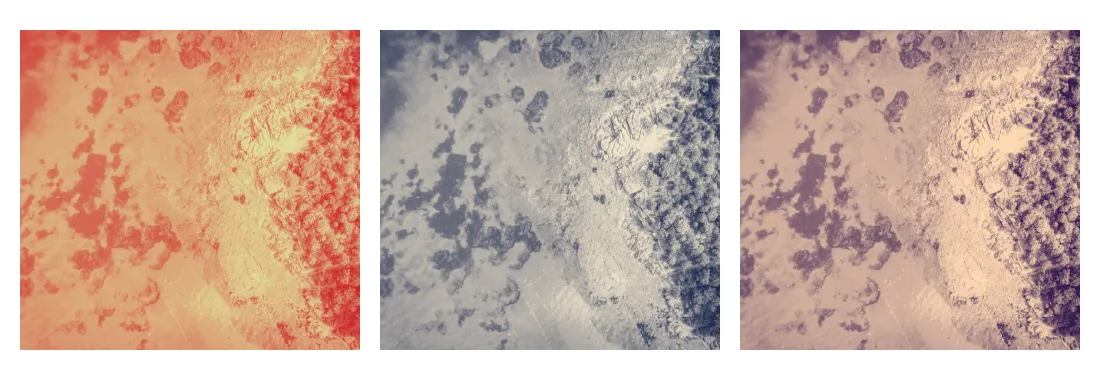
Duotone is a color effect that maps image brightness to two colors: a dark color for shadows and a light color for highlights. The result is a two-tone image where the original colors are replaced by gradations between your chosen pair. This guide covers applying duotone presets from the asset library, creating custom color combinations, combining duotone with other effects, and managing applied effects.
Understanding Duotone#
Unlike filters that tint or shift colors, duotone remaps the tonal range of an image. The effect reads each pixel’s brightness and assigns a color based on where it falls between black and white:
- Dark tones (shadows, blacks) adopt the dark color.
- Light tones (highlights, whites) adopt the light color.
- Midtones blend between the two colors.
This produces a consistent palette regardless of the original colors, which makes duotone effective for:
- Brand consistency - Apply your brand colors across diverse imagery.
- Visual cohesion - Unify photos from different sources in one design.
- Vintage aesthetics - Recreate classic print techniques like cyanotype or sepia.
- Bold statements - Create eye-catching visuals for social media or marketing.
An intensity value from -1.0 to 1.0 controls the tonal balance: negative values push the mapping toward the dark color, positive values toward the light color, and 0.0 maps tones evenly between the two. The output is always a two-color image; intensity shifts the balance rather than fading back toward the original colors.
Using the Built-in Duotone UI#
The default Android editor exposes duotone presets through its Filter appearance control when the current selection supports effects. Users can choose a preset and adjust its intensity. The Engine API below applies the same duotone effect programmatically. See Apply a Filter or Effect for the unified effects system.
Check Effect Support#
Not all blocks accept effects. Verify support with supportsEffects() before applying anything. Duotone is most useful on graphic blocks with an image or video fill, since it remaps the tones of visible pixel content.
val canApplyEffects = engine.block.supportsEffects(presetImage)check(canApplyEffects) { "The image block must support effects." }Applying an effect to a block that does not support effects throws, so gate the call on supportsEffects().
Applying Duotone Presets#
CE.SDK ships a library of built-in duotone presets. Each preset defines a dark/light color pair as hex strings in its metadata.
Query Built-in Presets#
Register the bundled filter source and query it with the Asset API. The sample receives assetBaseUri from app configuration so it can point at bundled Android assets, a branch asset server, or the SDK default without embedding a versioned CDN URL. The matcher argument limits the registered assets to duotone presets, and the query reads the duotone group from the merged ly.img.filter source.
val filterSourceId = "ly.img.filter"if (filterSourceId !in engine.asset.findAllSources()) {    val filterContentUri = assetBaseUri.buildUpon()        .appendPath(filterSourceId)        .appendPath("content.json")        .build()    engine.asset.addLocalSourceFromJSON(        contentUri = filterContentUri,        matcher = listOf("ly.img.filter.duotone.*"),    )}
val presetResult = engine.asset.findAssets(    sourceId = filterSourceId,    query = FindAssetsQuery(        query = null,        page = 0,        groups = listOf("duotone"),        perPage = 10,    ),)val duotonePresets = presetResult.assets
Each preset exposes darkColor and lightColor in meta as hex strings. Convert them to the engine’s Color type before applying them.
Create the Effect Block#
Create a duotone effect with createEffect(), passing the type-safe EffectType.DuoToneFilter value. The effect is a standalone block you configure and then attach to an image.
val presetEffect = engine.block.createEffect(type = EffectType.DuoToneFilter)Configure Preset Colors#
Apply the converted preset colors to the effect with setColor(), and set intensity with setFloat(). intensity ranges from -1.0 to 1.0 (default 0.0): negative values emphasize the dark color, positive values emphasize the light color, and 0.0 keeps the two balanced.
val preset = checkNotNull(duotonePresets.firstOrNull()) { "The filter source did not return any duotone presets."}val darkHex = checkNotNull(preset.meta?.get("darkColor")) { "The selected duotone preset is missing darkColor."}val lightHex = checkNotNull(preset.meta?.get("lightColor")) { "The selected duotone preset is missing lightColor."}engine.block.setColor( block = presetEffect, property = "effect/duotone_filter/darkColor", value = Color.fromHex(darkHex),)engine.block.setColor( block = presetEffect, property = "effect/duotone_filter/lightColor", value = Color.fromHex(lightHex),)engine.block.setFloat( block = presetEffect, property = "effect/duotone_filter/intensity", value = 0.9F,)Append the Effect#
Attach the configured effect to the image block. The duotone takes effect as soon as it joins the block’s effect stack.
engine.block.appendEffect(block = presetImage, effectBlock = presetEffect)Creating Custom Colors#
For brand-specific treatments, define your own pair directly with setColor(). The dark color maps to shadows and the light color to highlights.
val customEffect = engine.block.createEffect(type = EffectType.DuoToneFilter)// Dark color maps to shadows, light color maps to highlights.engine.block.setColor( block = customEffect, property = "effect/duotone_filter/darkColor", value = Color.fromRGBA(r = 0.1F, g = 0.15F, b = 0.3F, a = 1.0F),)engine.block.setColor( block = customEffect, property = "effect/duotone_filter/lightColor", value = Color.fromRGBA(r = 0.95F, g = 0.9F, b = 0.8F, a = 1.0F),)engine.block.setFloat( block = customEffect, property = "effect/duotone_filter/intensity", value = 0.85F,)engine.block.appendEffect(block = customImage, effectBlock = customEffect)Choosing Effective Color Pairs#
The relationship between the dark and light colors determines the final look:
| Color Relationship | Visual Effect | Example Use Case |
|---|---|---|
| High contrast | Bold, graphic look | Social media, posters |
| Low contrast | Subtle, sophisticated | Editorial, luxury brands |
| Warm to cool | Dynamic temperature shift | Lifestyle, fashion |
| Monochromatic | Tinted photography style | Vintage aesthetic |
Classic combinations to try:
- Cyanotype: deep blue to light cyan
- Sepia: dark brown to cream
- Corporate: navy to silver
Combining with Other Effects#
Effects apply in stack order, so you can pair duotone with adjustments, blur, or other effects. Here, brightness and contrast adjustments run first, then duotone maps the adjusted tones.
// Adjustments run first, then duotone maps the adjusted tones.val adjustments = engine.block.createEffect(type = EffectType.Adjustments)engine.block.setFloat(adjustments, property = "effect/adjustments/brightness", value = 0.1F)engine.block.setFloat(adjustments, property = "effect/adjustments/contrast", value = 0.15F)engine.block.appendEffect(block = combinedImage, effectBlock = adjustments)
val combinedDuotone = engine.block.createEffect(type = EffectType.DuoToneFilter)engine.block.setColor(    block = combinedDuotone,    property = "effect/duotone_filter/darkColor",    value = Color.fromRGBA(r = 0.2F, g = 0.1F, b = 0.3F, a = 1.0F),)engine.block.setColor(    block = combinedDuotone,    property = "effect/duotone_filter/lightColor",    value = Color.fromRGBA(r = 1.0F, g = 0.85F, b = 0.7F, a = 1.0F),)engine.block.setFloat(    block = combinedDuotone,    property = "effect/duotone_filter/intensity",    value = 0.75F,)engine.block.appendEffect(block = combinedImage, effectBlock = combinedDuotone)
Reversing the order - duotone first, then adjustments - produces a different result, because the adjustments would then operate on the duotone output rather than the original image.
Managing Duotone Effects#
Once effects are applied, you can list, toggle, and remove them.
List Applied Effects#
Retrieve the ordered list of effect IDs attached to a block with getEffects().
val appliedEffects = engine.block.getEffects(presetImage)Log.i(TAG, "Image has ${appliedEffects.size} effect(s) applied")Toggle Effect Visibility#
Disable an effect without removing it using setEffectEnabled(), and query its state with isEffectEnabled(). Disabled effects are skipped when the block renders.
appliedEffects.firstOrNull()?.let { firstEffect -> engine.block.setEffectEnabled(effectBlock = firstEffect, enabled = false) disabledPresetEffectEnabled = engine.block.isEffectEnabled(firstEffect) Log.i(TAG, "Effect enabled: $disabledPresetEffectEnabled") engine.block.setEffectEnabled(effectBlock = firstEffect, enabled = true) restoredPresetEffectEnabled = engine.block.isEffectEnabled(firstEffect)}Remove and Destroy Effects#
Detach an effect from a block by its index with removeEffect(). Effects are independent blocks that persist after removal, so destroy the detached effect with destroy() to free its resources.
val customEffects = engine.block.getEffects(customImage)val customEffectsBeforeRemoval = customEffects.sizecustomEffects.firstOrNull()?.let { effectToRemove -> // Detach the effect from the block's stack, then destroy it to free resources. engine.block.removeEffect(block = customImage, index = 0) engine.block.destroy(effectToRemove)}Troubleshooting#
Duotone Not Visible#
Confirm the block supports effects with supportsEffects(). Duotone also needs visible image or video content to remap; a solid color fill maps to a single flat tone.
Colors Look Wrong#
Color.fromRGBA() Float channels run from 0.0 to 1.0, not 0 to 255. Use Color.fromRGBA(r = 0.5F, g = 0.5F, b = 0.5F, a = 1.0F) rather than raw byte values.
Duotone Leans Too Dark or Too Light#
The intensity property controls the tonal balance, not opacity. If the result leans too dark, raise intensity toward 1.0 to emphasize the light color; if it leans too light, lower it toward -1.0 to emphasize the dark color. 0.0 maps tones evenly.
API Reference#
Methods#
| Method | Description |
|---|---|
engine.asset.findAllSources() |
Returns registered asset source IDs |
engine.asset.addLocalSourceFromJSON(contentUri=_, matcher=_) |
Registers a local asset source from a JSON URI, optionally filtered by asset ID pattern |
engine.asset.findAssets(sourceId=_, query=_) |
Queries assets from a registered asset source |
engine.block.supportsEffects(block=_) |
Returns whether a block can have effects applied |
engine.block.createEffect(type=EffectType.DuoToneFilter) |
Creates a duotone effect block |
engine.block.createEffect(type=EffectType.Adjustments) |
Creates an adjustments effect block used before duotone in a stack |
Color.fromHex(colorString=_) |
Converts a hex string to a Color value |
Color.fromRGBA(r=_, g=_, b=_, a=_) |
Creates a Color value from normalized Float channels |
engine.block.setColor(block=_, property="effect/duotone_filter/darkColor", value=_) |
Sets the duotone shadow color |
engine.block.getColor(block=_, property="effect/duotone_filter/darkColor") |
Returns the duotone shadow color |
engine.block.setColor(block=_, property="effect/duotone_filter/lightColor", value=_) |
Sets the duotone highlight color |
engine.block.getColor(block=_, property="effect/duotone_filter/lightColor") |
Returns the duotone highlight color |
engine.block.setFloat(block=_, property="effect/duotone_filter/intensity", value=_) |
Sets the tonal balance from -1.0 to 1.0 |
engine.block.getFloat(block=_, property="effect/duotone_filter/intensity") |
Returns the current duotone tonal balance |
engine.block.setFloat(block=_, property="effect/adjustments/brightness", value=_) |
Sets brightness before duotone in an effect stack |
engine.block.getFloat(block=_, property="effect/adjustments/brightness") |
Returns the current brightness adjustment |
engine.block.setFloat(block=_, property="effect/adjustments/contrast", value=_) |
Sets contrast before duotone in an effect stack |
engine.block.getFloat(block=_, property="effect/adjustments/contrast") |
Returns the current contrast adjustment |
engine.block.appendEffect(block=_, effectBlock=_) |
Adds an effect to a block’s effect stack |
engine.block.getEffects(block=_) |
Returns the ordered effect blocks attached to a block |
engine.block.setEffectEnabled(effectBlock=_, enabled=_) |
Enables or disables an effect block |
engine.block.isEffectEnabled(effectBlock=_) |
Returns whether an effect block is enabled |
engine.block.removeEffect(block=_, index=_) |
Removes an effect from a block’s effect stack by index |
engine.block.destroy(block=_) |
Destroys a detached or unused effect block |
Properties#
| Property | Type | Description |
|---|---|---|
effect/duotone_filter/darkColor |
Color | Color applied to shadows and dark tones |
effect/duotone_filter/lightColor |
Color | Color applied to highlights and light tones |
effect/duotone_filter/intensity |
Float | Tonal balance from -1.0 to 1.0 (default 0.0); negative emphasizes the dark color, positive emphasizes the light color |
Next Steps#
- Apply a Filter or Effect - Learn about the unified effects system.
- Blur Effects - Apply blur for depth and focus.
- Create a Custom LUT Filter - Build custom color grading filters.