Transform images by swapping specific colors with the Recolor effect or by removing background colors with the Green Screen effect in CE.SDK.
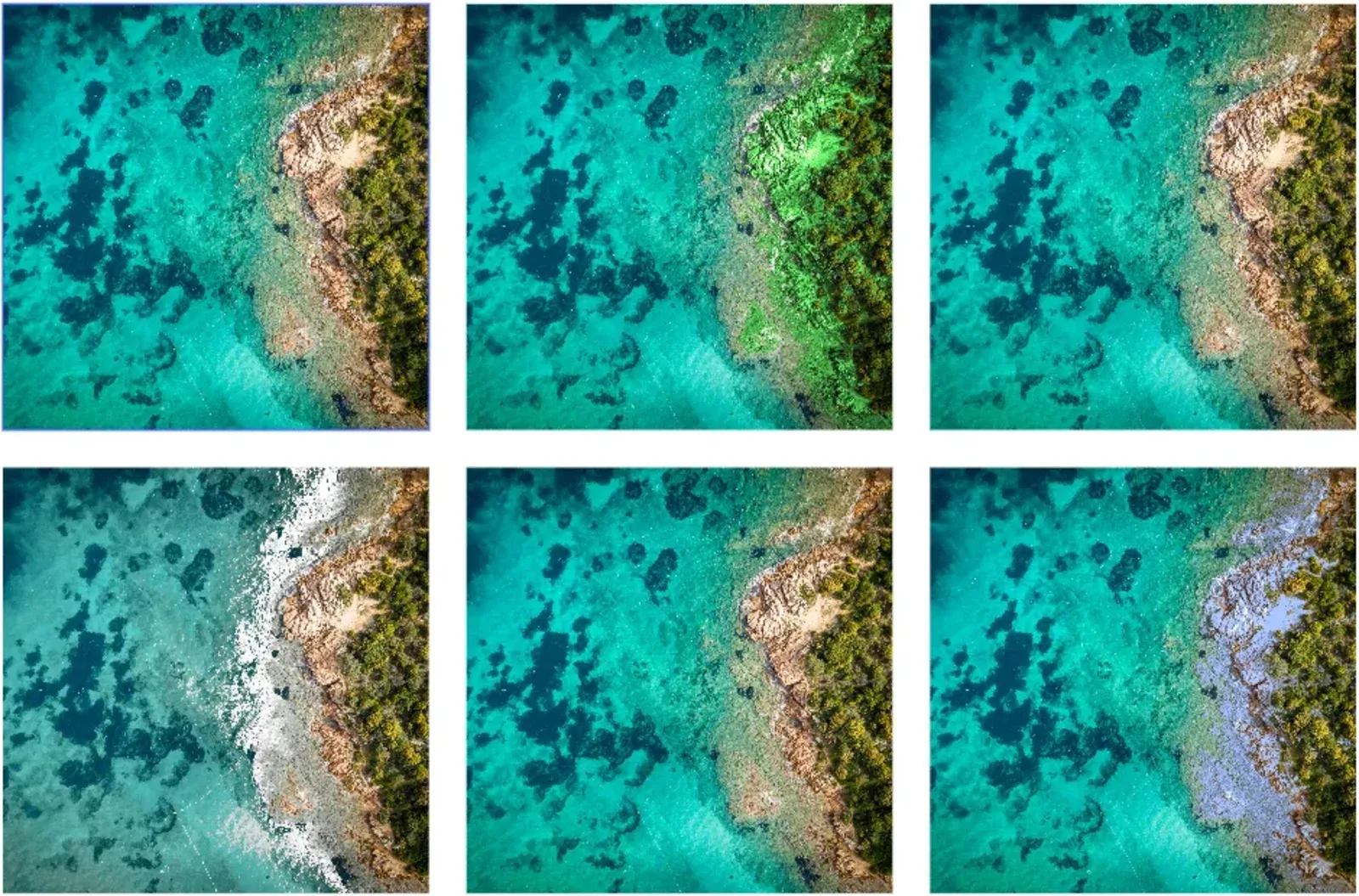
CE.SDK offers two color replacement effects. The Recolor effect swaps one color for another while preserving image details. The Green Screen effect removes matching colors so the background can become transparent.
This guide covers the default Android effects UI and the Engine APIs you can use when your app needs to apply the same color replacement programmatically.
Using the Built-in Effects UI#
The default Android editor exposes effects through its built-in appearance controls when users select a compatible image-backed graphic block. Users can choose Recolor and pick source and replacement colors, or choose Green Screen and pick the source color to remove. They can then adjust matching controls and preview the result immediately.
The built-in controls write to the same effect blocks and properties shown below. Use the Engine APIs when you need presets, batch processing, or app-specific automation.
Programmatic Color Replacement#
Prepare an Image Block#
Color replacement effects attach to blocks that support effects. This sample creates a scene, adds a page, and uses a helper to create image-backed graphic blocks for the later examples.
val scene = engine.scene.create()
val page = engine.block.create(DesignBlockType.Page)engine.block.setWidth(page, value = 800F)engine.block.setHeight(page, value = 600F)engine.block.appendChild(parent = scene, child = page)
val imageUri = Uri.parse("https://img.ly/static/ubq_samples/sample_1.jpg")
fun addImageBlock( x: Float, y: Float,): DesignBlock { val block = engine.block.create(DesignBlockType.Graphic) engine.block.setShape(block, shape = engine.block.createShape(ShapeType.Rect)) engine.block.setPositionX(block, value = x) engine.block.setPositionY(block, value = y) engine.block.setWidth(block, value = 200F) engine.block.setHeight(block, value = 150F) engine.block.appendChild(parent = page, child = block)
val fill = engine.block.createFill(FillType.Image) engine.block.setUri( block = fill, property = "fill/image/imageFileURI", value = imageUri, ) engine.block.setFill(block, fill = fill)
return block}Creating and Applying Recolor Effects#
The Recolor effect swaps one color for another throughout an image. Create an EffectType.Recolor block, write the source and target colors, then append the effect to the image block.
val recolorBlock = addImageBlock(x = 50F, y = 50F)val recolorEffect = engine.block.createEffect(type = EffectType.Recolor)engine.block.setColor( block = recolorEffect, property = "effect/recolor/fromColor", value = Color.fromRGBA(r = 1F, g = 0F, b = 0F, a = 1F),)engine.block.setColor( block = recolorEffect, property = "effect/recolor/toColor", value = Color.fromRGBA(r = 0F, g = 0.5F, b = 1F, a = 1F),)engine.block.appendEffect(block = recolorBlock, effectBlock = recolorEffect)Color values use Color.fromRGBA() with channel values from 0F to 1F. The fromColor property selects the color to match, and toColor defines the replacement color.
Configuring Color Matching#
Tune Recolor matching with float properties on the effect block. Higher colorMatch values include a broader range of source colors, while higher brightnessMatch values require pixels to be closer in brightness. Lower brightnessMatch when the matched color should include brighter or darker areas of the same hue and saturation.
val tolerancesBlock = addImageBlock(x = 300F, y = 50F)val tolerancesEffect = engine.block.createEffect(type = EffectType.Recolor)
engine.block.setColor(    block = tolerancesEffect,    property = "effect/recolor/fromColor",    value = Color.fromRGBA(r = 0.8F, g = 0.6F, b = 0.4F, a = 1F),)engine.block.setColor(    block = tolerancesEffect,    property = "effect/recolor/toColor",    value = Color.fromRGBA(r = 0.3F, g = 0.7F, b = 0.3F, a = 1F),)engine.block.setFloat(tolerancesEffect, property = "effect/recolor/colorMatch", value = 0.3F)engine.block.setFloat(tolerancesEffect, property = "effect/recolor/brightnessMatch", value = 0.2F)engine.block.setFloat(tolerancesEffect, property = "effect/recolor/smoothness", value = 0.1F)engine.block.appendEffect(block = tolerancesBlock, effectBlock = tolerancesEffect)
The Recolor effect supports these matching properties:
| Property | Description |
|---|---|
effect/recolor/colorMatch |
Controls how broadly source colors can differ from fromColor |
effect/recolor/brightnessMatch |
Controls how closely pixel brightness must match; lower values allow more brightness variation |
effect/recolor/smoothness |
Blends replacement edges to reduce artifacts |
Creating and Applying Green Screen Effects#
The Green Screen effect removes pixels that match a source color. Create an EffectType.GreenScreen block, set effect/green_screen/fromColor, and append it to the image block.
val greenScreenBlock = addImageBlock(x = 550F, y = 50F)val greenScreenEffect = engine.block.createEffect(type = EffectType.GreenScreen)engine.block.setColor( block = greenScreenEffect, property = "effect/green_screen/fromColor", value = Color.fromRGBA(r = 0F, g = 1F, b = 0F, a = 1F),)engine.block.appendEffect(block = greenScreenBlock, effectBlock = greenScreenEffect)This is useful for solid-color backgrounds and keyed product images where the matched color should become transparent.
Fine-Tuning Green Screen Removal#
Adjust the Green Screen tolerance, edge blending, and spill suppression through float properties on the effect block.
val spillBlock = addImageBlock(x = 50F, y = 250F)val spillEffect = engine.block.createEffect(type = EffectType.GreenScreen)
engine.block.setColor(    block = spillEffect,    property = "effect/green_screen/fromColor",    value = Color.fromRGBA(r = 0.2F, g = 0.8F, b = 0.3F, a = 1F),)engine.block.setFloat(spillEffect, property = "effect/green_screen/colorMatch", value = 0.4F)engine.block.setFloat(spillEffect, property = "effect/green_screen/smoothness", value = 0.2F)engine.block.setFloat(spillEffect, property = "effect/green_screen/spill", value = 0.5F)engine.block.appendEffect(block = spillBlock, effectBlock = spillEffect)
The Green Screen effect supports these properties:
| Property | Description |
|---|---|
effect/green_screen/colorMatch |
Controls how broadly background colors can differ from fromColor |
effect/green_screen/smoothness |
Feathers the edge between kept and removed pixels |
effect/green_screen/spill |
Reduces color contamination from the removed background |
Managing Multiple Effects#
Blocks keep effects in an ordered stack. Read the stack with getEffects(), toggle effects for before/after previews, and remove effects by their stack index when they are no longer needed.
val stackedBlock = addImageBlock(x = 300F, y = 250F)val redToBlue = engine.block.createEffect(type = EffectType.Recolor)engine.block.setColor(    block = redToBlue,    property = "effect/recolor/fromColor",    value = Color.fromRGBA(r = 1F, g = 0F, b = 0F, a = 1F),)engine.block.setColor(    block = redToBlue,    property = "effect/recolor/toColor",    value = Color.fromRGBA(r = 0F, g = 0F, b = 1F, a = 1F),)engine.block.appendEffect(block = stackedBlock, effectBlock = redToBlue)
val stackedGreenScreen = engine.block.createEffect(type = EffectType.GreenScreen)engine.block.setColor(    block = stackedGreenScreen,    property = "effect/green_screen/fromColor",    value = Color.fromRGBA(r = 0F, g = 1F, b = 0F, a = 1F),)engine.block.appendEffect(block = stackedBlock, effectBlock = stackedGreenScreen)
val stackedEffects = engine.block.getEffects(stackedBlock)check(stackedEffects == listOf(redToBlue, stackedGreenScreen))
engine.block.setEffectEnabled(effectBlock = stackedEffects[0], enabled = false)val isFirstEffectEnabled = engine.block.isEffectEnabled(stackedEffects[0])
engine.block.removeEffect(block = stackedBlock, index = 1)engine.block.destroy(stackedGreenScreen)
Effect order matters because CE.SDK renders effects sequentially. Use insertEffect() instead of appendEffect() when a new effect needs a specific position in the stack.
Batch Processing Multiple Images#
For presets or automated workflows, find image blocks and apply the same effect configuration to each compatible target.
val allGraphicBlocks = engine.block.findByType(type = DesignBlockType.Graphic)for (block in allGraphicBlocks) {    if (engine.block.getEffects(block).isNotEmpty()) {        continue    }
    val batchRecolor = engine.block.createEffect(type = EffectType.Recolor)    engine.block.setColor(        block = batchRecolor,        property = "effect/recolor/fromColor",        value = Color.fromRGBA(r = 0.8F, g = 0.7F, b = 0.6F, a = 1F),    )    engine.block.setColor(        block = batchRecolor,        property = "effect/recolor/toColor",        value = Color.fromRGBA(r = 0.6F, g = 0.7F, b = 0.9F, a = 1F),    )    engine.block.setFloat(batchRecolor, property = "effect/recolor/colorMatch", value = 0.25F)    engine.block.appendEffect(block = block, effectBlock = batchRecolor)}
This pattern is useful for product variants, brand color updates, or bulk image cleanup. The sample skips blocks that already have effects so it does not overwrite earlier examples.
Troubleshooting#
| Issue | Fix |
|---|---|
| Effect is not visible | Check that the target block supports effects, verify the effect is attached with getEffects(), and confirm the effect is enabled. |
| Wrong colors are replaced | Lower colorMatch for a narrower match or adjust brightnessMatch for Recolor effects with lighting variation. |
| Edges look harsh | Increase smoothness; for Green Screen effects, adjust spill to reduce background color contamination. |
| Multiple effects render unexpectedly | Inspect the order returned by getEffects() and use insertEffect() when an effect needs a specific stack index. |
API Reference#
| API | Description |
|---|---|
engine.scene.create() |
Creates the scene that contains the image examples |
engine.block.create(blockType=DesignBlockType.Page) |
Creates the page that holds the image blocks |
engine.block.create(blockType=DesignBlockType.Graphic) |
Creates the image-backed graphic blocks used by the sample |
engine.block.createShape(type=ShapeType.Rect) |
Creates the rectangular shape for each graphic block |
engine.block.setShape(block=_, shape=_) |
Assigns the shape to the graphic block |
engine.block.setWidth(block=_, value=_) |
Sets page and block width values |
engine.block.setHeight(block=_, value=_) |
Sets page and block height values |
engine.block.setPositionX(block=_, value=_) |
Positions a graphic block horizontally |
engine.block.setPositionY(block=_, value=_) |
Positions a graphic block vertically |
engine.block.appendChild(parent=_, child=_) |
Adds pages and blocks to the scene hierarchy |
engine.block.createFill(fillType=FillType.Image) |
Creates an image fill for the graphic block |
engine.block.setUri(block=_, property="fill/image/imageFileURI", value=_) |
Assigns the image URI used by the fill |
engine.block.setFill(block=_, fill=_) |
Applies the image fill to the graphic block |
engine.block.supportsEffects(block=_) |
Checks whether a block can render effects |
Color.fromRGBA(r=_, g=_, b=_, a=_) |
Creates normalized RGBA colors for effect properties |
engine.block.createEffect(type=EffectType.Recolor) |
Creates a Recolor effect block |
engine.block.createEffect(type=EffectType.GreenScreen) |
Creates a Green Screen effect block |
engine.block.appendEffect(block=_, effectBlock=_) |
Adds an effect to the end of a block’s effect stack |
engine.block.insertEffect(block=_, effectBlock=_, index=_) |
Inserts an effect at a specific stack index |
engine.block.getEffects(block=_) |
Returns the effects attached to a block |
engine.block.removeEffect(block=_, index=_) |
Removes the effect at the specified stack index |
engine.block.setEffectEnabled(effectBlock=_, enabled=_) |
Enables or disables an effect block |
engine.block.isEffectEnabled(effectBlock=_) |
Returns whether an effect block is enabled |
engine.block.setColor(block=_, property="effect/recolor/fromColor", value=_) |
Writes the source color that Recolor matches |
engine.block.setColor(block=_, property="effect/recolor/toColor", value=_) |
Writes the replacement color for Recolor |
engine.block.setColor(block=_, property="effect/green_screen/fromColor", value=_) |
Writes the color that Green Screen removes |
engine.block.getColor(block=_, property="effect/recolor/fromColor") |
Reads the source color that Recolor matches |
engine.block.getColor(block=_, property="effect/recolor/toColor") |
Reads the replacement color for Recolor |
engine.block.getColor(block=_, property="effect/green_screen/fromColor") |
Reads the color that Green Screen removes |
engine.block.setFloat(block=_, property="effect/recolor/colorMatch", value=_) |
Writes Recolor color matching tolerance |
engine.block.setFloat(block=_, property="effect/recolor/brightnessMatch", value=_) |
Writes Recolor brightness matching tolerance |
engine.block.setFloat(block=_, property="effect/recolor/smoothness", value=_) |
Writes Recolor edge smoothing |
engine.block.getFloat(block=_, property="effect/recolor/colorMatch") |
Reads Recolor color matching tolerance |
engine.block.getFloat(block=_, property="effect/recolor/brightnessMatch") |
Reads Recolor brightness matching tolerance |
engine.block.getFloat(block=_, property="effect/recolor/smoothness") |
Reads Recolor edge smoothing |
engine.block.setFloat(block=_, property="effect/green_screen/colorMatch", value=_) |
Writes Green Screen color matching tolerance |
engine.block.setFloat(block=_, property="effect/green_screen/smoothness", value=_) |
Writes Green Screen edge smoothing |
engine.block.setFloat(block=_, property="effect/green_screen/spill", value=_) |
Writes Green Screen spill suppression |
engine.block.getFloat(block=_, property="effect/green_screen/colorMatch") |
Reads Green Screen color matching tolerance |
engine.block.getFloat(block=_, property="effect/green_screen/smoothness") |
Reads Green Screen edge smoothing |
engine.block.getFloat(block=_, property="effect/green_screen/spill") |
Reads Green Screen spill suppression |
engine.block.findByType(type=DesignBlockType.Graphic) |
Finds graphic blocks for batch processing |
engine.block.destroy(block=_) |
Destroys unused effect blocks after removal |
Next Steps#
- Adjust Colors - Fine-tune image-backed graphic blocks by adjusting brightness, contrast, saturation, exposure, and other color properties.
- Apply a Filter or Effect — Apply, configure, stack, and manage filters and effects
- Export Designs - Save your color-replaced images in various formats.