Modify existing templates and manage their lifecycle in Android asset sources with CE.SDK Engine.
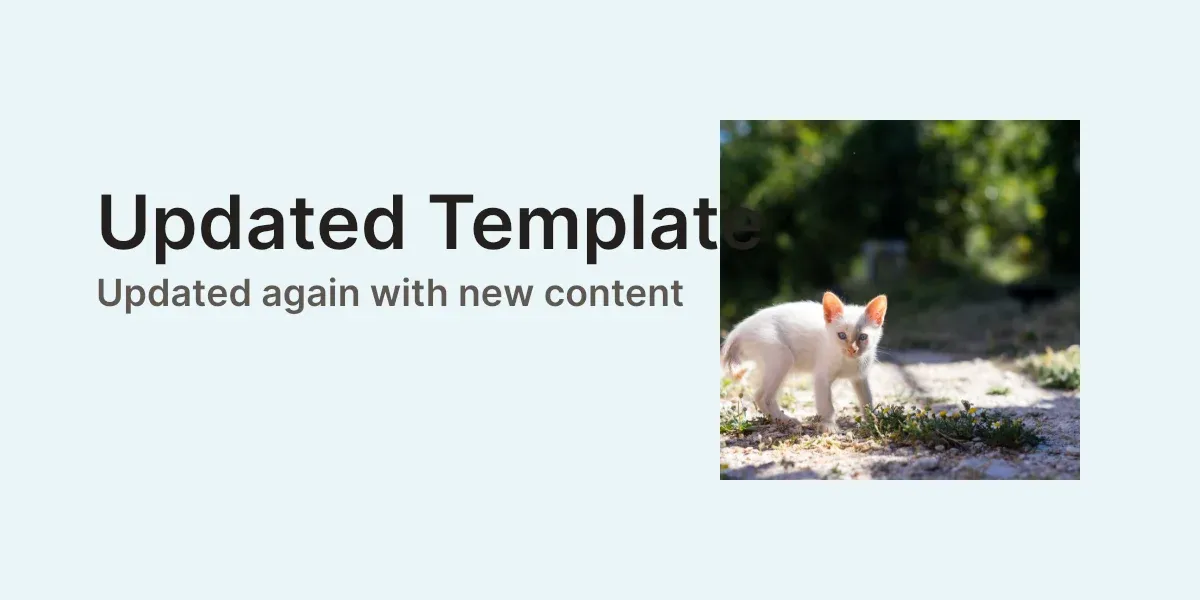
Templates evolve as designs change. You might need to update brand copy, fix content errors, remove outdated entries, or replace one stored version with another.
This guide uses a headless Engine workflow: create a local source, save a template scene into asset metadata, load it back for editing, update block content and template metadata, validate the result, remove stale entries, and re-add updated versions.
Adding Templates#
Use an app-owned storage helper for thumbnails generated from exported page previews. The file URI returned by this helper is what the sample stores in meta.thumbUri.
suspend fun writeTemplateThumbnailFile( prefix: String, pngData: ByteBuffer,): File { val thumbnailFile = withContext(Dispatchers.IO) { File.createTempFile(prefix, ".png").apply { outputStream().use { output -> val thumbnailBuffer = pngData.asReadOnlyBuffer() while (thumbnailBuffer.hasRemaining()) { output.channel.write(thumbnailBuffer) } } } } return thumbnailFile}Create a local asset source for the templates your app manages. The sample stores serialized scene strings directly in a template/content metadata key, so the apply callback reads that string and passes it to engine.scene.applyTemplate(template = ...).
val templateMimeType = MimeType.BINARY.key
engine.asset.addLocalSource(    sourceId = templateSourceId,    supportedMimeTypes = listOf(templateMimeType),    applyAsset = { asset ->        val templateContent = requireNotNull(asset.meta?.get(templateContentKey))        engine.scene.applyTemplate(template = templateContent)        null    },)
Applying a template updates the active scene instead of creating a new design block, so the callback returns null.
Next, create the template scene. Named text blocks make later edits stable because the update code can find them by name instead of relying on block order.
val scene = engine.scene.create()val page = engine.block.create(DesignBlockType.Page)engine.block.setWidth(page, value = 1200F)engine.block.setHeight(page, value = 600F)engine.block.appendChild(parent = scene, child = page)
val backgroundBlock = engine.block.create(DesignBlockType.Graphic)engine.block.setShape(backgroundBlock, shape = engine.block.createShape(ShapeType.Rect))engine.block.setFill(backgroundBlock, fill = engine.block.createFill(FillType.Color))engine.block.setFillSolidColor(backgroundBlock, color = Color.fromHex("#FFF4F0EA"))engine.block.setWidth(backgroundBlock, value = 1200F)engine.block.setHeight(backgroundBlock, value = 600F)engine.block.appendChild(parent = page, child = backgroundBlock)
val imageBlock = engine.block.create(DesignBlockType.Graphic)engine.block.setName(imageBlock, name = "template-image")engine.block.setShape(imageBlock, shape = engine.block.createShape(ShapeType.Rect))engine.block.setWidth(imageBlock, value = 360F)engine.block.setHeight(imageBlock, value = 360F)engine.block.setPositionX(imageBlock, value = 744F)engine.block.setPositionY(imageBlock, value = 120F)val imageFill = engine.block.createFill(FillType.Image)engine.block.setUri(    block = imageFill,    property = "fill/image/imageFileURI",    value = Uri.parse("https://img.ly/static/ubq_samples/sample_1.jpg"),)engine.block.setFill(block = imageBlock, fill = imageFill)engine.block.setContentFillMode(block = imageBlock, mode = ContentFillMode.COVER)engine.block.setPlaceholderEnabled(block = imageBlock, enabled = true)engine.block.appendChild(parent = page, child = imageBlock)
val titleBlock = engine.block.create(DesignBlockType.Text)engine.block.setName(titleBlock, name = "template-title")engine.block.replaceText(titleBlock, text = "Original Template")engine.block.setTextFontSize(titleBlock, fontSize = 18F)engine.block.setTextColor(titleBlock, color = Color.fromHex("#FF23201D"))engine.block.setWidth(titleBlock, value = 960F)engine.block.setWidthMode(titleBlock, mode = SizeMode.ABSOLUTE)engine.block.setHeightMode(titleBlock, mode = SizeMode.AUTO)engine.block.setBoolean(titleBlock, property = "text/clipLinesOutsideOfFrame", value = false)engine.block.setPositionX(titleBlock, value = 96F)engine.block.setPositionY(titleBlock, value = 176F)engine.block.appendChild(parent = page, child = titleBlock)
val subtitleBlock = engine.block.create(DesignBlockType.Text)engine.block.setName(subtitleBlock, name = "template-subtitle")engine.block.replaceText(subtitleBlock, text = "Stored in a local template source")engine.block.setTextFontSize(subtitleBlock, fontSize = 9F)engine.block.setTextColor(subtitleBlock, color = Color.fromHex("#FF5F5953"))engine.block.setWidth(subtitleBlock, value = 960F)engine.block.setWidthMode(subtitleBlock, mode = SizeMode.ABSOLUTE)engine.block.setHeightMode(subtitleBlock, mode = SizeMode.AUTO)engine.block.setBoolean(subtitleBlock, property = "text/clipLinesOutsideOfFrame", value = false)engine.block.setPositionX(subtitleBlock, value = 96F)engine.block.setPositionY(subtitleBlock, value = 270F)engine.block.appendChild(parent = page, child = subtitleBlock)
Save the scene with engine.scene.saveToString, keep the returned string as template content, export the page preview for meta.thumbUri, and add both values to the local source with engine.asset.addAsset.
val originalTemplate = engine.scene.saveToString(scene = scene)val originalTemplateThumbnail = engine.block.export( block = page, mimeType = MimeType.PNG, options = ExportOptions(targetWidth = 1200F, targetHeight = 600F),)val originalTemplateThumbnailFile = writeTemplateThumbnailFile( prefix = "original-template-thumbnail", pngData = originalTemplateThumbnail,)val originalAsset = AssetDefinition( id = "template-original", label = mapOf("en" to "Original Template"), tags = mapOf("en" to listOf("template", "brand")), groups = listOf("brand"), meta = mapOf( templateContentKey to originalTemplate, "thumbUri" to originalTemplateThumbnailFile.toURI().toString(), "mimeType" to templateMimeType, ),)engine.asset.addAsset(sourceId = templateSourceId, asset = originalAsset)The template/content metadata field contains the serialized template string. meta.thumbUri points to the thumbnail shown by asset-library UIs that read this source.
Editing Templates#
Fetch the stored asset, read the serialized template from template/content, and load it with engine.scene.load(scene = ...) before making changes. The snippet then finds the named text blocks, updates the title, and inserts a {{campaign}} token into the subtitle.
val storedTemplate = requireNotNull(    engine.asset.fetchAsset(        sourceId = templateSourceId,        assetId = "template-original",    ),)val editableTemplate = requireNotNull(storedTemplate.meta?.get(templateContentKey))
engine.scene.load(scene = editableTemplate, waitForResources = true)
val editableTitle = engine.block.findByName("template-title").first()val editableSubtitle = engine.block.findByName("template-subtitle").first()engine.block.replaceText(editableTitle, text = "Updated Template")engine.block.replaceText(editableSubtitle, text = "Campaign: {{campaign}}")
Templates can contain the same block types and template behaviors as regular scenes. Update image fills, shape styling, placeholder state, positions, and the variable that resolves the subtitle token with the matching Android Engine APIs before saving.
val editableImage = engine.block.findByName("template-image").first()val editableImageFill = engine.block.getFill(editableImage)engine.block.setUri(    block = editableImageFill,    property = "fill/image/imageFileURI",    value = Uri.parse("https://img.ly/static/ubq_samples/sample_2.jpg"),)engine.block.setPlaceholderEnabled(block = editableImage, enabled = false)engine.block.setPositionX(block = editableImage, value = 720F)
val editableBackground = engine.block.getChildren(engine.scene.getPages().first()).first()engine.block.setFillSolidColor(editableBackground, color = Color.fromHex("#FFEAF4F8"))
engine.variable.set(key = "campaign", value = "Spring Launch")
Before persisting changes, validate that required blocks and variables still exist and that template-only controls are in the expected state. Keep these checks close to the save step so invalid template edits fail before your app updates the asset source.
val requiredBlocks = listOf("template-title", "template-subtitle", "template-image")val templateHasRequiredBlocks = requiredBlocks.all { name ->    engine.block.findByName(name).isNotEmpty()}val templateHasCampaignVariable = "campaign" in engine.variable.findAll()val templateHasCampaignText = engine.block    .getString(block = editableSubtitle, property = "text/text")    .contains("{{campaign}}")
check(templateHasRequiredBlocks)check(templateHasCampaignVariable)check(templateHasCampaignText)check(!engine.block.isPlaceholderEnabled(editableImage))
Use engine.scene.saveToString for lightweight string storage and engine.scene.saveToArchive when the template should be bundled with reachable resources. Archive output is loaded through engine.scene.load.
val updatedScene = requireNotNull(engine.scene.get())val updatedTemplate = engine.scene.saveToString(scene = updatedScene)val updatedTemplateArchive = engine.scene.saveToArchive(scene = updatedScene)// Archive APIs load from a URI, so write the buffer to app-owned storage first.val updatedTemplateArchiveFile = File.createTempFile("updated-template", ".imgly")withContext(Dispatchers.IO) { updatedTemplateArchiveFile.outputStream().use { output -> val archiveBuffer = updatedTemplateArchive.asReadOnlyBuffer() while (archiveBuffer.hasRemaining()) { output.channel.write(archiveBuffer) } }}val archivedTemplateScene = engine.scene.load( sceneUri = Uri.fromFile(updatedTemplateArchiveFile), waitForResources = true,)val archiveLoaded = archivedTemplateScene == engine.scene.get()After editing and validation, save the scene again and add it as a new asset entry. This keeps the original template available while introducing the updated version.
Update asset metadata at the same time as the serialized scene: replace the template/content string with the newly saved template, change label for the displayed name, update tags for search and filtering, and set meta.thumbUri to the exported thumbnail shown in asset-library UIs.
val updatedTemplateThumbnail = engine.block.export( block = engine.scene.getPages().first(), mimeType = MimeType.PNG, options = ExportOptions(targetWidth = 1200F, targetHeight = 600F),)val updatedTemplateThumbnailFile = writeTemplateThumbnailFile( prefix = "updated-template-thumbnail", pngData = updatedTemplateThumbnail,)engine.asset.addAsset( sourceId = templateSourceId, asset = AssetDefinition( id = "template-updated", label = mapOf("en" to "Spring Launch Template"), tags = mapOf("en" to listOf("template", "spring", "updated")), groups = listOf("brand"), meta = mapOf( templateContentKey to updatedTemplate, "thumbUri" to updatedTemplateThumbnailFile.toURI().toString(), "mimeType" to templateMimeType, ), ),)Removing Templates#
Use engine.asset.removeAsset to remove an asset entry from a local source. Removal is permanent for that source, so maintain your own backup or soft-delete state if users need recovery.
engine.asset.removeAsset( sourceId = templateSourceId, assetId = "template-temporary",)Saving Updated Templates#
Android local asset sources do not replace an existing asset ID in place. To update a template under the same ID, remove the old asset first, then add the refreshed asset definition.
engine.scene.load(scene = updatedTemplate, waitForResources = true)val finalSubtitle = engine.block.findByName("template-subtitle").first()engine.block.replaceText(finalSubtitle, text = "Updated again with new content")
val refreshedScene = requireNotNull(engine.scene.get())val refreshedTemplate = engine.scene.saveToString(scene = refreshedScene)val refreshedPage = engine.scene.getPages().first()val refreshedTemplatePreview = engine.block.export(    block = refreshedPage,    mimeType = MimeType.PNG,    options = ExportOptions(targetWidth = 1200F, targetHeight = 600F),)val refreshedTemplateThumbnailFile = writeTemplateThumbnailFile(    prefix = "refreshed-template-thumbnail",    pngData = refreshedTemplatePreview,)
engine.asset.removeAsset(sourceId = templateSourceId, assetId = "template-updated")engine.asset.addAsset(    sourceId = templateSourceId,    asset = AssetDefinition(        id = "template-updated",        label = mapOf("en" to "Spring Launch Template"),        tags = mapOf("en" to listOf("template", "spring", "updated")),        groups = listOf("brand"),        meta = mapOf(            templateContentKey to refreshedTemplate,            "thumbUri" to refreshedTemplateThumbnailFile.toURI().toString(),            "mimeType" to templateMimeType,        ),    ),)
The built-in engine.asset.removeAsset and engine.asset.addAsset calls notify listeners after successful local-source changes. Call engine.asset.assetSourceContentsChanged only when your app mutates a custom or external source outside those built-in add and remove APIs.
Best Practices#
Versioning Strategies#
When managing template updates, choose a predictable versioning strategy:
- Replace in place: Remove the existing asset, then add the updated template with the same ID.
- Version suffixes: Add new entries such as
template-v2while keeping older versions available. - Archive old versions: Move deprecated templates to a separate source before removing them from the active library.
Batch Operations#
When adding, updating, or removing many templates through engine.asset.addAsset and engine.asset.removeAsset, each successful call updates the local source and notifies listeners. If your app changes a custom or external source through its own storage layer, finish the batch first, then call engine.asset.assetSourceContentsChanged once for that source.
Template IDs#
Use descriptive, stable IDs that reflect the template purpose. Consistent names make templates easier to fetch, update, and remove programmatically.
Thumbnails#
Store a meaningful thumbUri for every template asset. Good thumbnails improve discoverability when the same source is shown in an asset library.
Storage Considerations#
Keep serialized template strings in your app’s persistence layer, for example a database row or backend record keyed by the asset ID. Store .scene URIs only when your source really points to local, content, or remote scene files.
Troubleshooting#
Template not loading: Pass serialized template strings from template/content to engine.scene.load(scene = ..., waitForResources = true) when editing a stored template. Use engine.scene.applyTemplate(template = ...) inside the asset-source apply callback for string templates. Use engine.scene.load(sceneUri = ...) or engine.scene.applyTemplate(templateUri = ...) only for real local, content, or remote URIs; load(sceneUri = ...) opens scene and archive files alike.
Duplicate asset ID: engine.asset.addAsset fails if the local source already contains that ID. Remove the old asset before adding the updated definition.
Template source not found: Confirm the source ID exists in engine.asset.findAllSources() before adding, fetching, or removing assets.
Library not refreshed: If your UI reads from a custom source that changes outside addAsset and removeAsset, call engine.asset.assetSourceContentsChanged(sourceId = ...).
API Reference#
| Method | Description |
|---|---|
engine.asset.findAllSources() |
List registered asset source IDs. |
engine.asset.addLocalSource(sourceId=_, supportedMimeTypes=_, applyAsset=_) |
Create the local source used to manage templates and provide the callback that applies selected template assets. |
engine.asset.removeSource(sourceId=_) |
Remove the local template source during cleanup. |
engine.scene.create() |
Create the scene that becomes the template. |
engine.block.create(blockType=_) |
Create page, graphic, and text blocks for the template. |
engine.block.createShape(type=_) |
Create the rectangle shape used by the template background. |
engine.block.setShape(block=_, shape=_) |
Assign a shape to a graphic block. |
engine.block.createFill(fillType=_) |
Create the fill used by the template background. |
engine.block.setFill(block=_, fill=_) |
Assign a fill to a block. |
engine.block.getFill(block=_) |
Read an existing fill block before updating its resource URI. |
engine.block.setUri(block=_, property=_, value=_) |
Update URI-backed properties such as image fill resources. |
engine.block.setFillSolidColor(block=_, color=_) |
Set the background fill color. |
engine.block.setContentFillMode(block=_, mode=_) |
Control how image fills fit inside a graphic block. |
engine.block.setWidth(block=_, value=_) |
Set fixed page, background, and text frame widths. |
engine.block.setHeight(block=_, value=_) |
Set fixed page and background heights. |
engine.block.appendChild(parent=_, child=_) |
Add page, graphic, and text blocks to the scene hierarchy. |
engine.block.getChildren(block=_) |
Read child blocks from a page before updating an existing block. |
engine.block.export(block=_, mimeType=_, options=_) |
Export a page preview that can be stored as the template thumbnail. |
engine.block.setName(block=_, name=_) |
Assign stable names to blocks that later update code needs to find. |
engine.block.replaceText(block=_, text=_) |
Replace text content in a template block. |
engine.block.setPlaceholderEnabled(block=_, enabled=_) |
Enable or disable placeholder behavior for a template block. |
engine.block.isPlaceholderEnabled(block=_) |
Validate placeholder state before saving. |
engine.block.setTextFontSize(block=_, fontSize=_) |
Set the text size for template text blocks. |
engine.block.setTextColor(block=_, color=_, from=_, to=_) |
Set text color; optional from and to values target UTF-16 code unit offsets in the text. |
engine.block.setWidthMode(block=_, mode=_) |
Use fixed text frame widths for predictable exported layout. |
engine.block.setHeightMode(block=_, mode=SizeMode.AUTO) |
Let text blocks size to their content vertically. |
engine.block.setBoolean(block=_, property=_, value=_) |
Set text frame behavior such as line clipping. |
engine.block.setPositionX(block=_, value=_) |
Position a block on the page horizontally. |
engine.block.setPositionY(block=_, value=_) |
Position a block on the page vertically. |
engine.block.getString(block=_, property=_) |
Validate that the edited text block still contains the expected variable token. |
engine.scene.saveToString(scene=_) |
Serialize a scene so it can be stored as template content. |
engine.scene.saveToArchive(scene=_) |
Serialize a scene and its reachable resources as a self-contained archive. |
engine.scene.load(scene=_, waitForResources=_) |
Load serialized template scene content before editing it. |
engine.scene.load(sceneUri=_, waitForResources=_) |
Load a stored scene or archive template from a local, content, or remote URI. |
engine.asset.addAsset(sourceId=_, asset=_) |
Add a template asset definition to a local source. |
engine.asset.findAssets(sourceId=_, query=_) |
Query templates in an asset source. |
engine.asset.fetchAsset(sourceId=_, assetId=_) |
Fetch one stored template asset by ID. |
engine.scene.applyTemplate(template=_) |
Apply serialized template scene content. |
engine.scene.applyTemplate(templateUri=_) |
Apply a template from a local, content, or remote .scene URI. |
engine.scene.get() |
Read the currently loaded scene before saving updates. |
engine.scene.getPages() |
Read the pages in the loaded scene before editing page children or exporting a preview. |
engine.block.findByName(name=_) |
Find named blocks in the loaded template. |
engine.variable.set(key=_, value=_) |
Update a text variable used by a template. |
engine.variable.findAll() |
Validate that required variables exist before saving. |
engine.asset.removeAsset(sourceId=_, assetId=_) |
Remove a template asset from a local source. |
engine.asset.assetSourceContentsChanged(sourceId=_) |
Notify listeners after custom or external source mutations that happen outside addAsset and removeAsset. |
Next Steps#
- Create From Scratch - Build new templates programmatically.
- Text Variables - Add dynamic text content to templates.
- Placeholders - Configure image, video, or text placeholders.