Turn image, video, or text content into replaceable areas while keeping the surrounding template layout under your control.
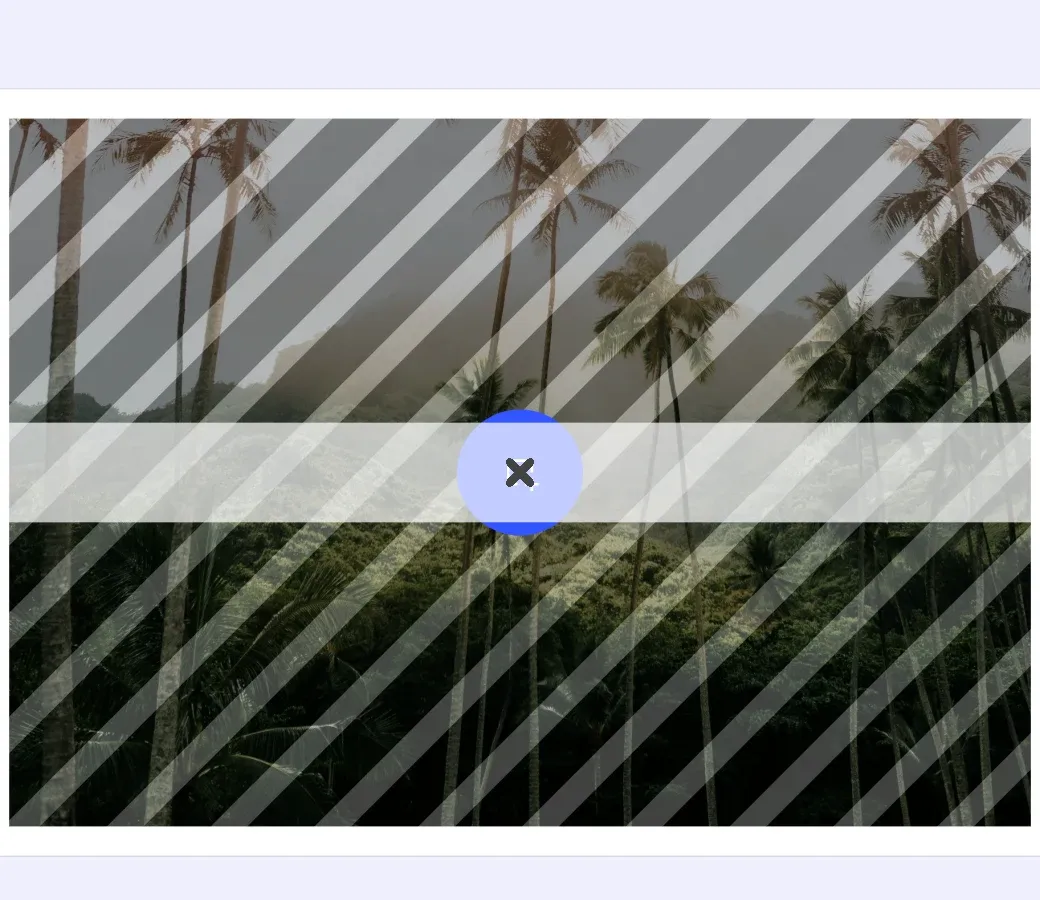
Placeholders separate replaceable content from the template block that positions and styles it. This guide checks support, enables placeholder behavior and interaction, configures visual controls, and applies placeholder settings to multiple blocks.
Placeholder Fundamentals#
Placeholder configuration has three parts:
- Placeholder behavior marks content as replaceable.
- Placeholder interaction marks the containing block as available to an Adopter.
- Placeholder controls display the overlay and Replace button in an editor UI.
Block-Level vs Fill-Level Behavior#
The behavior target depends on the block type:
- For graphic blocks with image or video content, enable placeholder behavior on the fill returned by
engine.block.getFill. Enable interaction and controls on the graphic block. - For text blocks, enable behavior and interaction on the text block. Text blocks do not support placeholder controls.
Checking Placeholder Support#
Check each target before enabling its placeholder feature. The image fill supports behavior, the graphic block supports controls, and the text block supports behavior directly.
val imagePlaceholderFill = engine.block.getFill(imagePlaceholder)val imageBehaviorSupported = engine.block.supportsPlaceholderBehavior(imagePlaceholderFill)val imageControlsSupported = engine.block.supportsPlaceholderControls(imagePlaceholder)
val textBehaviorSupported = engine.block.supportsPlaceholderBehavior(textPlaceholder)val textControlsSupported = engine.block.supportsPlaceholderControls(textPlaceholder)
The support predicates let your app skip unsupported block types without relying on type assumptions.
Enabling Placeholder Behavior#
Placeholder behavior turns supported content into a replacement target.
For Graphic Blocks#
Read the graphic block’s fill, then enable and verify behavior on that fill.
val imageBehaviorEnabled = if (imageBehaviorSupported) { engine.block.setPlaceholderBehaviorEnabled(imagePlaceholderFill, enabled = true) engine.block.isPlaceholderBehaviorEnabled(imagePlaceholderFill)} else { false}The same pattern applies to image and video fills.
For Text Blocks#
Text content belongs directly to the text block, so use that block as the behavior target.
val textBehaviorEnabled = if (textBehaviorSupported) { engine.block.setPlaceholderBehaviorEnabled(textPlaceholder, enabled = true) engine.block.isPlaceholderBehaviorEnabled(textPlaceholder)} else { false}Enabling Adopter Interaction#
Enable placeholder interaction on the block a user selects or replaces, not on its fill.
engine.block.setPlaceholderEnabled(imagePlaceholder, enabled = true)engine.block.setPlaceholderEnabled(textPlaceholder, enabled = true)
val imagePlaceholderEnabled = engine.block.isPlaceholderEnabled(imagePlaceholder)val textPlaceholderEnabled = engine.block.isPlaceholderEnabled(textPlaceholder)
setPlaceholderEnabled marks the block as a placeholder for Adopter workflows and prepares its interaction state for the role switch:
- Adopter selectability: While the current role is Creator,
setPlaceholderEnabled(block, enabled)writes the same value to the block-leveleditor/selectscope. Adopter global scopes defer to this setting, so enabling keeps the block selectable after the switch, while disabling makes it unselectable. - Creator selection: The current Creator can still select the block because Creator scopes are globally allowed.
- Image and video replacement: After an Adopter replaces an image or video asset through the CE.SDK editor UI, the editor clears the block’s placeholder flag.
- Text editing: When an Adopter edits placeholder text interactively through the CE.SDK editor UI, the editor disables placeholder behavior on the text block without clearing its placeholder flag. Creator edits and programmatic
replaceTextcalls do not trigger this automatic change.
Configuring Visual Feedback#
Graphic placeholders can show an overlay pattern and a Replace button. Enable these controls only after supportsPlaceholderControls returns true.
val overlayEnabled: Booleanval buttonEnabled: Booleanif (imageControlsSupported) { engine.block.setPlaceholderControlsOverlayEnabled(imagePlaceholder, enabled = true) engine.block.setPlaceholderControlsButtonEnabled(imagePlaceholder, enabled = true) overlayEnabled = engine.block.isPlaceholderControlsOverlayEnabled(imagePlaceholder) buttonEnabled = engine.block.isPlaceholderControlsButtonEnabled(imagePlaceholder)} else { overlayEnabled = false buttonEnabled = false}The controls appear in editor preview surfaces and are excluded from exports.
Scope Requirements#
Scopes determine whether an Adopter may replace placeholder content. Enable fill/change for graphic placeholders and text/edit for text placeholders.
engine.block.setScopeEnabled(imagePlaceholder, key = "fill/change", enabled = true)engine.block.setScopeEnabled(textPlaceholder, key = "text/edit", enabled = true)The active role and global scope settings also participate in the final permission. Use editing constraints to protect movement, resizing, and other layout operations separately.
Working with Multiple Placeholders#
After creating candidate graphic and text blocks, apply the same placeholder configuration to them in one pass. Pair each selectable block with the target that owns its placeholder behavior: the fill for graphic content, or the block itself for text content.
val batchTargets = listOf( Triple(batchImageBlock, batchImageFill, "fill/change"), Triple(batchTextBlock, batchTextBlock, "text/edit"),)batchTargets.forEach { (block, behaviorTarget, contentScope) -> if (engine.block.supportsPlaceholderBehavior(behaviorTarget)) { engine.block.setPlaceholderBehaviorEnabled(behaviorTarget, enabled = true) engine.block.setPlaceholderEnabled(block, enabled = true) engine.block.setScopeEnabled(block, key = contentScope, enabled = true) } if (engine.block.supportsPlaceholderControls(block)) { engine.block.setPlaceholderControlsOverlayEnabled(block, enabled = true) engine.block.setPlaceholderControlsButtonEnabled(block, enabled = true) }}For each block whose target supports placeholder behavior, the loop enables behavior on that target plus interaction and the required content scope on the containing block; visual controls are enabled only on blocks that support them.
Discovering Configured Placeholders#
After configuration, use findAllPlaceholders to retrieve the blocks whose placeholder interaction flag is enabled.
val placeholders = engine.block.findAllPlaceholders()Use the returned collection to inspect or validate the configured placeholder set. It is a discovery API; it does not identify blocks that still need placeholder configuration.
API Reference#
| Method | Purpose |
|---|---|
engine.block.getFill(block=_) |
Get the fill that carries replaceable image or video content. |
engine.block.supportsPlaceholderBehavior(block=_) |
Check whether a fill or text block supports placeholder behavior. |
engine.block.setPlaceholderBehaviorEnabled(block=_, enabled=_) |
Enable or disable placeholder behavior on a supported target. |
engine.block.isPlaceholderBehaviorEnabled(block=_) |
Read the placeholder behavior state. |
engine.block.setPlaceholderEnabled(block=_, enabled=_) |
Enable or disable Adopter interaction on a placeholder block. |
engine.block.isPlaceholderEnabled(block=_) |
Read the block’s placeholder interaction state. |
engine.block.supportsPlaceholderControls(block=_) |
Check whether a block supports placeholder controls. |
engine.block.setPlaceholderControlsOverlayEnabled(block=_, enabled=_) |
Show or hide the placeholder overlay. |
engine.block.isPlaceholderControlsOverlayEnabled(block=_) |
Read the overlay visibility state. |
engine.block.setPlaceholderControlsButtonEnabled(block=_, enabled=_) |
Show or hide the Replace button. |
engine.block.isPlaceholderControlsButtonEnabled(block=_) |
Read the Replace button visibility state. |
engine.block.setScopeEnabled(block=_, key=_, enabled=_) |
Configure a block-level editing scope. |
engine.block.isScopeEnabled(block=_, key=_) |
Read whether a block-level editing scope is enabled. |
engine.block.findAllPlaceholders() |
Find all instantiated placeholder blocks, including blocks not attached to a scene. |
Next Steps#
- Lock the Template - Restrict editing access to specific elements or properties to enforce design rules.
- Text Variables - Define dynamic text elements that can be populated with custom values.