Apply sRGB colors to design elements for screen-based output using RGBA values with red, green, blue, and alpha components.
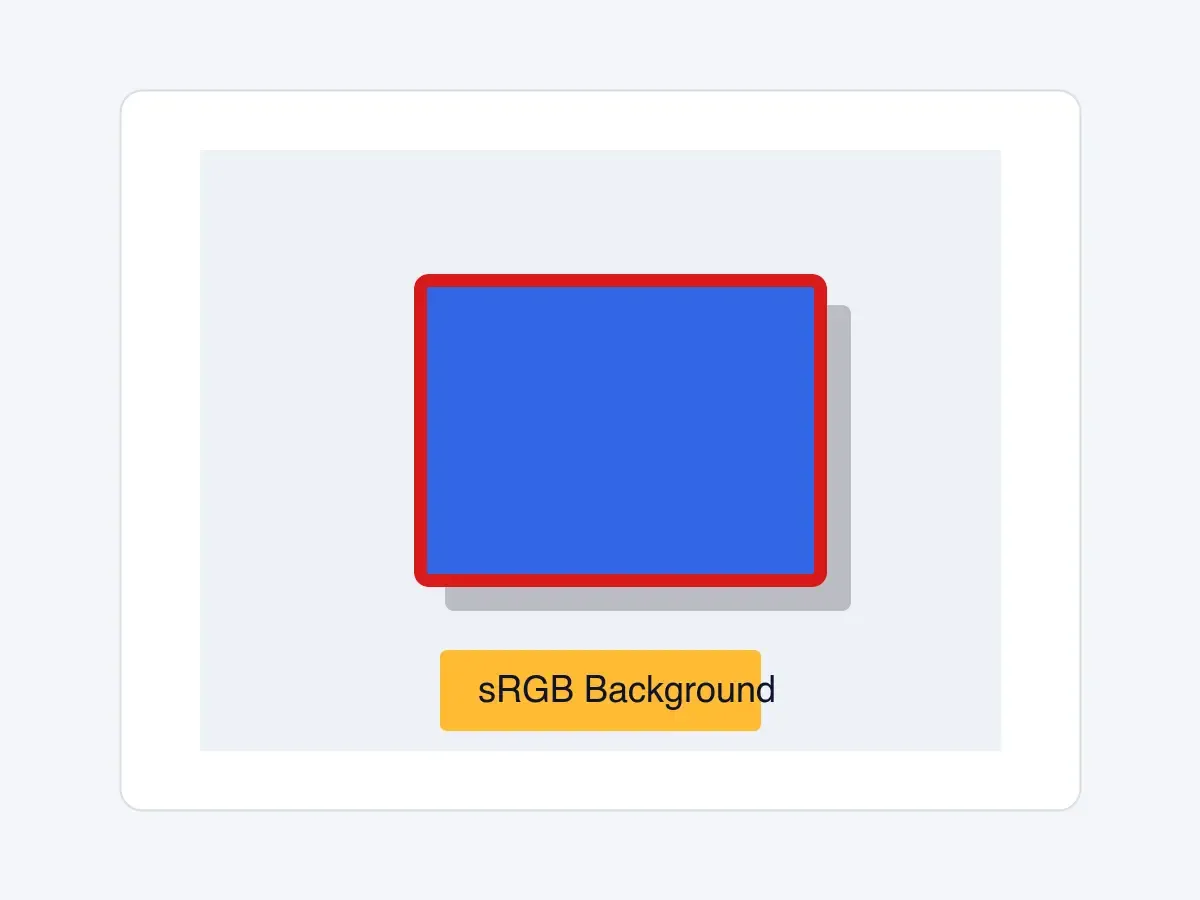
sRGB is the standard color space for screen displays. In the Android engine API, sRGB values are represented by RGBAColor objects. Each red, green, blue, and alpha component uses a floating-point value from 0F to 1F, not the 0 to 255 integer range used by many Android and design-tool color utilities.
The built-in Android editor color controls also work with sRGB preview colors. Users can choose from a saturation/value picker, hue slider, preset swatches, and an opacity slider where the edited property supports transparency. Configure reusable brand choices through color palettes; use the engine API below when your app needs to set exact values programmatically.
Creating sRGB Colors Programmatically#
Create sRGB colors with Color.fromRGBA. The float overload returns an RGBAColor, and the alpha parameter defaults to 1F for fully opaque colors. Android also provides an integer overload for 0 to 255 RGBA components where alpha defaults to 255, plus factory helpers for hex strings, @ColorInt values, and color resources.
val rgbaBlue = Color.fromRGBA(r = 0.2F, g = 0.4F, b = 0.9F, a = 1F)val rgbaBlueFromInts = Color.fromRGBA(r = 51, g = 102, b = 230, a = 255)val rgbaRed = Color.fromHex("#FFD91A1A")val rgbaNavy = Color.fromColor(android.graphics.Color.rgb(13, 20, 46))val rgbaOrange = Color.fromResource(android.R.color.holo_orange_light)Working with Transparency#
The alpha component controls transparency: 1F is fully opaque and 0F is fully transparent. Use values in between for overlays, shadows, and layered effects.
val semiTransparentBlack = Color.fromRGBA(r = 0F, g = 0F, b = 0F, a = 0.5F)Applying sRGB Colors to Fills#
Use setFillSolidColor when a graphic block already has a color fill. The method writes the block’s fill color without exposing the fill property path.
engine.block.setFillSolidColor(block = block, color = rgbaBlue)Applying sRGB Colors to Text#
Use setTextColor to color all text in a text block, or pass from and to to color a specific UTF-16 text range. Read back text colors with getTextColors, which returns the ordered unique colors in the range.
engine.block.setTextColor(block = textBlock, color = rgbaNavy)Applying sRGB Colors to Strokes#
Stroke colors are stored on the design block. Enable the stroke first, set a visible width, then assign the sRGB color with setStrokeColor.
engine.block.setStrokeEnabled(block = block, enabled = true)engine.block.setStrokeWidth(block = block, width = 8F)engine.block.setStrokeColor(block = block, color = rgbaRed)Applying sRGB Colors to Backgrounds#
Background colors use typed Android helpers as well. For a text block, enable the background, then assign an RGBAColor with setBackgroundColor.
engine.block.setBackgroundColorEnabled(block = textBlock, enabled = true)engine.block.setBackgroundColor(block = textBlock, color = rgbaOrange)Applying sRGB Colors to Shadows#
Drop shadow colors also accept RGBAColor. Enable the shadow before setting offsets and color so the configured value is visible when the block renders.
engine.block.setDropShadowEnabled(block = block, enabled = true)engine.block.setDropShadowOffsetX(block = block, offsetX = 15F)engine.block.setDropShadowOffsetY(block = block, offsetY = 15F)engine.block.setDropShadowColor(block = block, color = semiTransparentBlack)Retrieving Colors from Elements#
Read colors back with the matching getter for each property you changed. Fill and background helpers return RGBAColor, text returns an ordered Color list, and stroke or drop shadow helpers return the shared Color interface because those properties can hold sRGB, CMYK, or spot colors.
val currentFillColor = engine.block.getFillSolidColor(block)val currentTextColors = engine.block.getTextColors(block = textBlock)val currentBackgroundColor = engine.block.getBackgroundColor(textBlock)val currentStrokeColor = engine.block.getStrokeColor(block)val currentShadowColor = engine.block.getDropShadowColor(block)Identifying sRGB Colors#
Android represents color spaces as implementations of the Color interface. Use a Kotlin type check for RGBAColor before reading the r, g, b, and a components.
when (currentStrokeColor) {    is RGBAColor -> {        check(currentStrokeColor.r == rgbaRed.r)        check(currentStrokeColor.g == rgbaRed.g)        check(currentStrokeColor.b == rgbaRed.b)        check(currentStrokeColor.a == rgbaRed.a)    }
    is CMYKColor -> error("Expected sRGB color, got CMYK: $currentStrokeColor")    is SpotColor -> error("Expected sRGB color, got spot color: $currentStrokeColor")}
Converting Colors to sRGB#
Use engine.editor.convertColorToColorSpace with ColorSpace.SRGB when you need an sRGB representation of another color space, such as CMYK.
// Converting CMYK reads the document CMYK profile, which is a resource. Load it once first.engine.editor.loadCMYKProfile()val cmykOrange = Color.fromCMYK(c = 0F, m = 0.5F, y = 1F, k = 0F, tint = 1F)val convertedToSrgb = engine.editor.convertColorToColorSpace( color = cmykOrange, colorSpace = ColorSpace.SRGB,)check(convertedToSrgb is RGBAColor)Color conversions are approximations because CMYK has a smaller gamut than sRGB, so vibrant colors may appear muted after conversion.
Troubleshooting#
Colors appear incorrect: Check which overload of Color.fromRGBA you passed. Float components use 0F to 1F; integer components use 0 to 255, with 255 representing fully opaque alpha.
Color not visible: Make sure the target property is enabled. For example, call setStrokeEnabled before expecting stroke color to render, setBackgroundColorEnabled before expecting a background color to render, and setDropShadowEnabled before expecting a shadow to render.
Type checks fail: A value returned as Color may be RGBAColor, CMYKColor, or SpotColor. Convert to ColorSpace.SRGB or handle each type explicitly before reading RGBA components.
API Reference#
| Method | Description |
|---|---|
Color.fromRGBA(r=_, g=_, b=_, a=1F) |
Create an sRGB color from 0F to 1F float components |
Color.fromRGBA(r=_, g=_, b=_, a=255) |
Create an sRGB color from 0 to 255 integer components |
Color.fromColor(color=_) |
Create an sRGB color from an Android @ColorInt value |
Color.fromHex(colorString=_) |
Create an sRGB color from an Android hex color string |
Color.fromResource(colorResource=_) |
Create an sRGB color from an Android color resource |
Color.fromCMYK(c=_, m=_, y=_, k=_, tint=_) |
Create a CMYK source color before converting it to sRGB |
engine.block.supportsFill(block=_) |
Check whether a block supports fill properties before setting fill colors |
engine.block.setFillSolidColor(block=_, color=_) |
Apply an sRGB color to a block’s color fill |
engine.block.getFillSolidColor(block=_) |
Read a block’s color fill as RGBAColor |
engine.block.setTextColor(block=_, color=_, from=_, to=_) |
Apply a color to all text or a UTF-16 text range |
engine.block.getTextColors(block=_, from=_, to=_) |
Read the ordered unique colors from all text or a UTF-16 text range |
engine.block.supportsBackgroundColor(block=_) |
Check whether a block supports background color properties |
engine.block.setBackgroundColorEnabled(block=_, enabled=_) |
Enable or disable background color rendering |
engine.block.isBackgroundColorEnabled(block=_) |
Read whether background color rendering is enabled |
engine.block.setBackgroundColor(block=_, color=_) |
Apply an sRGB color to a block background |
engine.block.getBackgroundColor(block=_) |
Read a block’s background color as RGBAColor |
engine.block.supportsStroke(block=_) |
Check whether a block supports stroke properties |
engine.block.setStrokeEnabled(block=_, enabled=_) |
Enable or disable stroke rendering |
engine.block.isStrokeEnabled(block=_) |
Read whether stroke rendering is enabled |
engine.block.setStrokeWidth(block=_, width=_) |
Set stroke width |
engine.block.getStrokeWidth(block=_) |
Read stroke width |
engine.block.setStrokeColor(block=_, color=_) |
Apply a color to a block stroke |
engine.block.getStrokeColor(block=_) |
Read a block’s stroke color as Color |
engine.block.supportsDropShadow(block=_) |
Check whether a block supports drop shadow properties |
engine.block.setDropShadowEnabled(block=_, enabled=_) |
Enable or disable drop shadow rendering |
engine.block.isDropShadowEnabled(block=_) |
Read whether drop shadow rendering is enabled |
engine.block.setDropShadowOffsetX(block=_, offsetX=_) |
Set a block’s drop shadow x offset |
engine.block.getDropShadowOffsetX(block=_) |
Read a block’s drop shadow x offset |
engine.block.setDropShadowOffsetY(block=_, offsetY=_) |
Set a block’s drop shadow y offset |
engine.block.getDropShadowOffsetY(block=_) |
Read a block’s drop shadow y offset |
engine.block.setDropShadowColor(block=_, color=_) |
Apply a color to a block drop shadow |
engine.block.getDropShadowColor(block=_) |
Read a block’s drop shadow color as Color |
engine.editor.convertColorToColorSpace(color=_, colorSpace=_) |
Convert a color to another color space |
Next Steps#
- CMYK Colors — Work with CMYK colors in CE.SDK for professional print production workflows with support for color space conversion and tint control.
- Spot Colors - Use named spot colors for brand consistency
- Color Conversion - Convert colors between sRGB, CMYK, and spot color spaces
- Apply Colors - Comprehensive color application guide