Create a brand color palette for the Android editor and keep the underlying colors reusable as engine assets.
Color libraries in Android are regular local asset sources that contain color assets. Use the local source when your app needs reusable color definitions for custom UI, asset queries, or workflows outside the built-in editor controls. Use EditorConfiguration.colorPalette to choose which screen-preview colors appear as swatches in the built-in Android editor color controls.
This guide keeps both parts connected with a small BrandColorAsset bridge: the asset definition stores the reusable engine color, and paletteColor stores the Compose Color preview required by Android swatches. Applying colors to blocks programmatically is covered in Apply Colors.
Defining Color Assets#
Colors are added to an asset source as AssetDefinition objects. Define stable source and asset IDs, then give each asset an id, localized label and tags, and an AssetPayload.color value. The same local data also provides the Compose preview swatches that EditorConfiguration.colorPalette needs later.
private const val BRAND_COLOR_SOURCE_ID = "my-brand-colors"private const val BRAND_CORAL_ID = "brand-coral"
private data class BrandColorAsset(    val definition: AssetDefinition,    val paletteColor: ComposeColor?,)
private fun brandColorAssets() = listOf(    BrandColorAsset(        definition = AssetDefinition(            id = "brand-blue",            label = mapOf("en" to "Brand Blue"),            tags = mapOf("en" to listOf("brand", "blue", "primary")),            payload = AssetPayload(                color = AssetColor.RGB(r = 0.2F, g = 0.4F, b = 0.8F),            ),        ),        paletteColor = ComposeColor(red = 0.2F, green = 0.4F, blue = 0.8F),    ),    BrandColorAsset(        definition = AssetDefinition(            id = BRAND_CORAL_ID,            label = mapOf("en" to "Brand Coral"),            tags = mapOf("en" to listOf("brand", "coral", "secondary")),            payload = AssetPayload(                color = AssetColor.RGB(r = 0.95F, g = 0.45F, b = 0.4F),            ),        ),        paletteColor = ComposeColor(red = 0.95F, green = 0.45F, blue = 0.4F),    ),    BrandColorAsset(        definition = AssetDefinition(            id = "print-magenta",            label = mapOf("en" to "Print Magenta"),            tags = mapOf("en" to listOf("print", "magenta", "cmyk")),            payload = AssetPayload(                color = AssetColor.CMYK(c = 0F, m = 0.9F, y = 0.2F, k = 0F),            ),        ),        paletteColor = ComposeColor(red = 1F, green = 0.1F, blue = 0.8F),    ),    BrandColorAsset(        definition = AssetDefinition(            id = "metallic-gold",            label = mapOf("en" to "Metallic Gold"),            tags = mapOf("en" to listOf("spot", "metallic", "gold")),            payload = AssetPayload(                color = AssetColor.SpotColor(                    name = "Metallic Gold Ink",                    externalReference = "Custom Inks",                    representation = AssetColor.RGB(r = 0.85F, g = 0.65F, b = 0.13F),                ),            ),        ),        paletteColor = ComposeColor(red = 0.85F, green = 0.65F, blue = 0.13F),    ),)
private fun brandPaletteColors() = brandColorAssets().mapNotNull { it.paletteColor }
sRGB Colors#
sRGB colors use AssetColor.RGB with r, g, and b components from 0F to 1F. Use them for screen-based brand colors such as “Brand Blue” and “Brand Coral”.
CMYK Colors#
CMYK colors use AssetColor.CMYK with c, m, y, and k components from 0F to 1F. The example keeps “Print Magenta” in the reusable asset source and supplies an sRGB preview color for the Android editor swatch.
Spot Colors#
Spot colors use AssetColor.SpotColor with a name, optional externalReference, and an RGB or CMYK representation. The representation gives the editor and custom UI a predictable preview color for named inks such as “Metallic Gold Ink”.
Creating a Color Library#
Create a local asset source with engine.asset.addLocalSource(), add each color with engine.asset.addAsset(), then notify listeners that the source changed.
private fun createBrandColorLibrary(engine: Engine) { // Keep repeated guide launches idempotent inside the same editor process. if (BRAND_COLOR_SOURCE_ID in engine.asset.findAllSources()) { engine.asset.removeSource(sourceId = BRAND_COLOR_SOURCE_ID) } engine.asset.addLocalSource( sourceId = BRAND_COLOR_SOURCE_ID, supportedMimeTypes = emptyList(), ) brandColorAssets().forEach { color -> engine.asset.addAsset(sourceId = BRAND_COLOR_SOURCE_ID, asset = color.definition) } engine.asset.assetSourceContentsChanged(sourceId = BRAND_COLOR_SOURCE_ID)}The source ID my-brand-colors identifies this library when you query, update, or remove its assets. You can create multiple local sources when your app needs separate brand, print, or campaign palettes.
Registering the Library#
Call the helper from EditorConfiguration.onCreate so the local source is registered during the editor and engine initialization block. When you provide a custom onCreate, create or load the scene there as well.
onCreate = {    val scene = editorContext.engine.scene.create()    val page = editorContext.engine.block.create(DesignBlockType.Page)    editorContext.engine.block.setWidth(block = page, value = 1080F)    editorContext.engine.block.setHeight(block = page, value = 1080F)    editorContext.engine.block.appendChild(parent = scene, child = page)
    createBrandColorLibrary(editorContext.engine)}
Configuring Palette Labels#
Android color assets carry their display metadata on each AssetDefinition. Put user-facing names in label and searchable terms in tags so custom palette UIs and asset queries can present the colors consistently.
The built-in Android editor swatch row does not render asset-source section labels from translation keys. Use EditorConfiguration.colorPalette for the mobile editor controls, and use the asset labels when you build a grouped or searchable color picker in your own UI.
Configuring the Editor Palette#
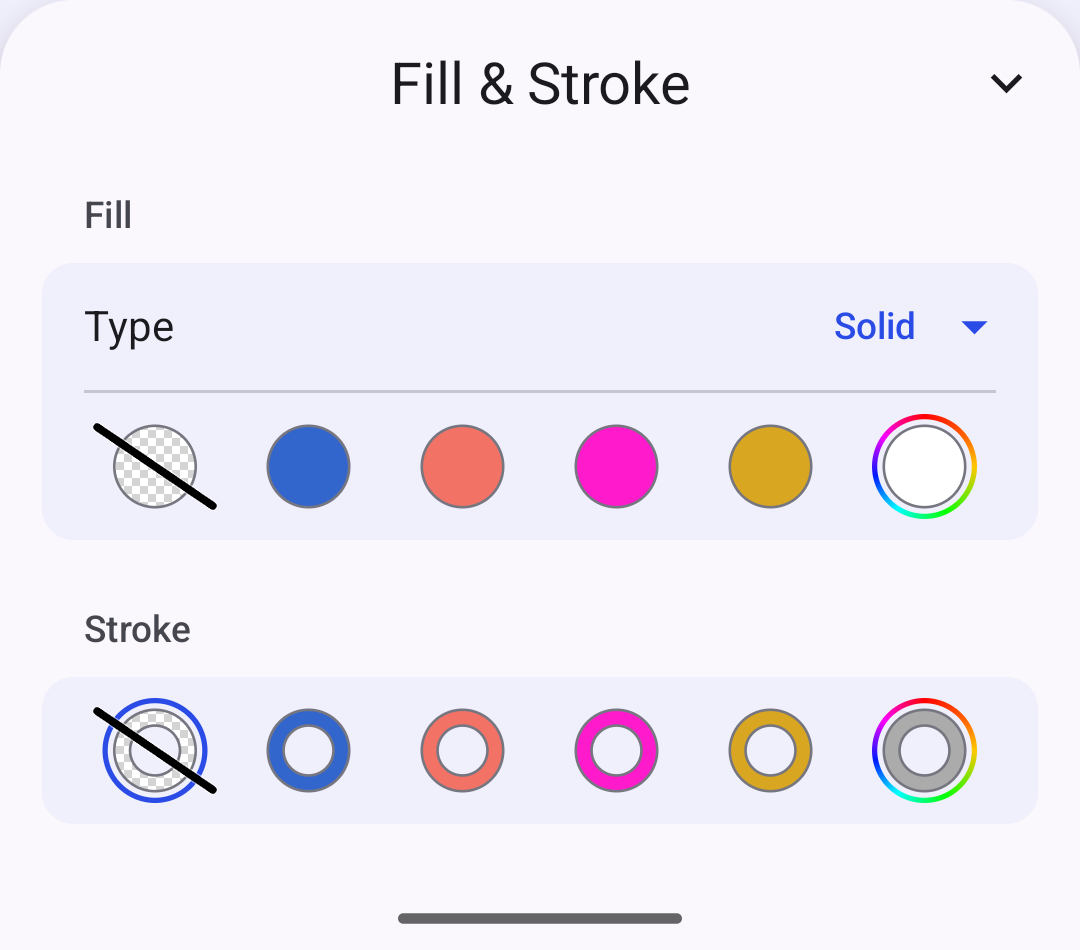
Pass a list of Compose Color values through EditorConfiguration.colorPalette. The example derives those swatches from the same BrandColorAsset entries used for the asset source, and Android shows the swatches in the same order as the list.
colorPalette = { remember { brandPaletteColors() }}The palette appears in Android editor controls that expose predefined color options, such as fill and stroke color controls. When you provide a custom list, it replaces the built-in default swatches; include any default colors you still want to offer. CMYK and Spot entries need an sRGB preview color because Android UI swatches are screen colors.
Removing Colors#
Remove an individual color from the local source with engine.asset.removeAsset(), then mark the source as changed.
private fun removeBrandColor( engine: Engine, assetId: String = BRAND_CORAL_ID,) { engine.asset.removeAsset(sourceId = BRAND_COLOR_SOURCE_ID, assetId = assetId) engine.asset.assetSourceContentsChanged(sourceId = BRAND_COLOR_SOURCE_ID)}This removes the asset from future queries against the local color library. Update the colorPalette list as well if the color is also visible in the built-in editor swatches.
Troubleshooting#
Colors Not Available from the Asset Source#
- Verify the source was created with
engine.asset.addLocalSource()before adding assets. - Check that every color uses a unique asset ID.
- Call
engine.asset.assetSourceContentsChanged()after mutating a local source.
Palette Swatches Not Changing#
- Confirm
EditorConfiguration.colorPalettereturns the colors you want the mobile editor to show. - Keep the desired swatch order in the list, and include default colors manually if you still want them available.
- Reopen the color controls after changing the configuration so the editor reads the updated swatch list.
Spot Color Preview Looks Wrong#
- Provide a valid RGB or CMYK
representationfor everyAssetColor.SpotColor. - Keep the spot color
namestable so exported designs can preserve the intended named ink.
API Reference#
| Method | Description |
|---|---|
engine.scene.create(sceneLayout=_) |
Create the scene that hosts the sample page |
engine.block.create(blockType=_) |
Create the page block used by the sample scene |
engine.block.setWidth(block=_, value=_, maintainCrop=_) |
Set the sample page width |
engine.block.setHeight(block=_, value=_, maintainCrop=_) |
Set the sample page height |
engine.block.appendChild(parent=_, child=_) |
Add the page block to the created scene |
engine.asset.findAllSources() |
List registered asset source IDs before replacing the sample source |
engine.asset.removeSource(sourceId=_) |
Remove an existing local source with the same ID |
engine.asset.addLocalSource(sourceId=_, supportedMimeTypes=_) |
Create a local asset source for color assets |
engine.asset.addAsset(sourceId=_, asset=_) |
Add a color asset to a local source |
engine.asset.removeAsset(sourceId=_, assetId=_) |
Remove a color asset from a local source |
engine.asset.assetSourceContentsChanged(sourceId=_) |
Notify listeners that a local source changed |
EditorConfiguration.colorPalette |
Provide the ordered swatch list for Android editor color controls, replacing the default palette when set |
| Type | Description |
|---|---|
AssetDefinition |
Stores a color asset ID, labels, tags, and payload |
AssetPayload(color=_) |
Carries the color data inside an asset definition |
AssetColor.RGB |
Defines an sRGB color with normalized RGB components |
AssetColor.CMYK |
Defines a CMYK color with normalized CMYK components |
AssetColor.SpotColor |
Defines a named spot color with a preview representation |
Next Steps#
- Color Basics — Review the three color spaces CE.SDK supports and when to use each
- Apply Colors — Apply colors to design elements programmatically
- CMYK Colors — Work with CMYK colors in CE.SDK for professional print production workflows with support for color space conversion and tint control
- Spot Colors — Define and manage spot colors for specialized printing