Populate a reusable template from application data and export the finished design with CE.SDK’s Android Engine API.
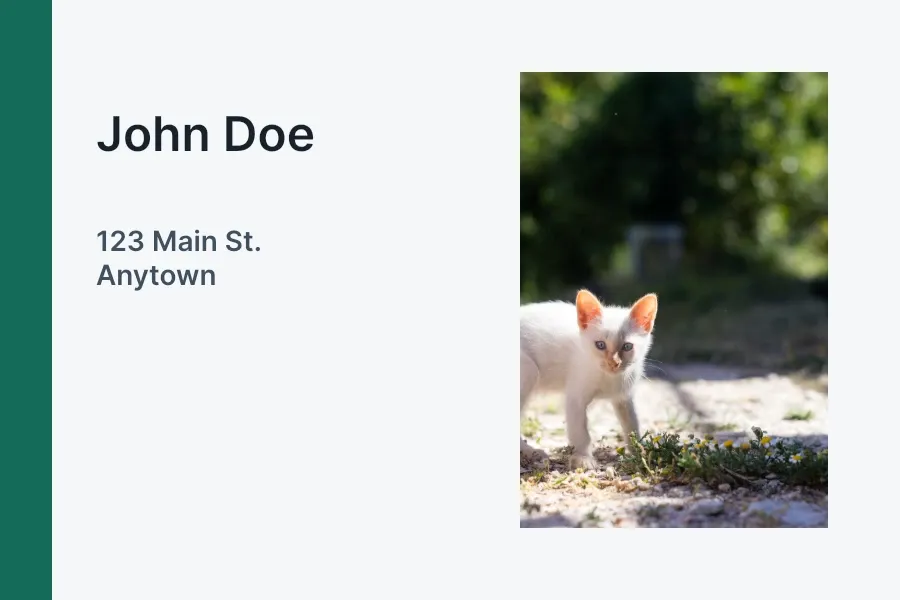
Each generation job starts from a pristine template and resolves its current block IDs before applying one record. This keeps template state isolated without turning the mobile workflow into a batch-processing service.
Load a Template#
Load a bundled or remote .scene through Android’s Uri type. overrideEditorConfig = true imports serialized settings and merges the template’s variables into the Engine, replacing matching keys without clearing unrelated variables. waitForResources = true waits for initial resources before returning. The sample receives an initialized Engine and runs Engine calls on engine.dispatcher, which uses the Engine’s main-thread dispatcher.
engine.scene.load( sceneUri = templateUri, overrideEditorConfig = true, waitForResources = true,)val page = checkNotNull(engine.scene.getPages().singleOrNull()) { "The template must contain exactly one page."}Resolve the export page and all other block IDs after each load. IDs from an earlier scene do not remain valid for a newly loaded template.
Map and Validate Data#
Map one native record to the template contract before changing the scene. Read each loaded text block’s text/text property and extract its {{token}} keys; findAll() is engine-wide and can still contain variables from a previously loaded scene.
data class DesignRecord(    val firstName: String,    val lastName: String,    val address: String,    val city: String,    val imageUri: Uri,)
val record = DesignRecord(    firstName = "John",    lastName = "Doe",    address = "123 Main St.",    city = "Anytown",    imageUri = replacementImageUri,)val requiredVariableKeys = setOf("first_name", "last_name", "address", "city")val textBlocks = engine.block.findByType(DesignBlockType.Text)check(textBlocks.any { textBlock -> engine.block.referencesAnyVariables(block = textBlock) }) {    "Template text blocks must reference at least one variable."}val variableTokenPattern = Regex("""\{\{\s*([^{}]+?)\s*\}\}""")val referencedVariableKeys = textBlocks    .flatMap { textBlock ->        variableTokenPattern.findAll(engine.block.getString(block = textBlock, property = "text/text"))            .map { match -> match.groupValues[1].trim() }            .toList()    }    .toSet()val missingVariableKeys = requiredVariableKeys - referencedVariableKeyscheck(missingVariableKeys.isEmpty()) {    "Template text is missing variable references: ${missingVariableKeys.sorted().joinToString()}"}
val imageBlockName = "profile-photo"val imageBlocks = engine.block.findByName(name = imageBlockName)val imageBlock = checkNotNull(imageBlocks.singleOrNull()) {    "Template must contain exactly one block named '$imageBlockName'."}val imageFill = engine.block.getFill(block = imageBlock)val imageFillType = engine.block.getType(block = imageFill)check(imageFillType == FillType.Image.key) {    "Block '$imageBlockName' must use an image fill."}
The validation confirms every required text reference and that exactly one block named profile-photo owns an image fill. Variable names and block names are case-sensitive, so failing before mutation makes a changed or incomplete template easier to diagnose.
Populate Text Variables#
Set each string value with the variable API. Text blocks that reference {{first_name}}, {{last_name}}, {{address}}, and {{city}} use these values when CE.SDK renders the page.
engine.variable.set(key = "first_name", value = record.firstName)engine.variable.set(key = "last_name", value = record.lastName)engine.variable.set(key = "address", value = record.address)engine.variable.set(key = "city", value = record.city)Use get() for preflight checks or readback and remove() only when restoring values that your application owns. Do not clear unrelated variables from a shared Engine session.
Replace a Named Image#
Reuse the image fill supplied by the template and update its fill/image/imageFileURI property with setUri(). Resetting the crop reframes replacement images whose dimensions differ from the original.
val imageUriProperty = "fill/image/imageFileURI"engine.block.setUri( block = imageFill, property = imageUriProperty, value = record.imageUri,)engine.block.resetCrop(block = imageBlock)val storedImageUri = engine.block.getUri(block = imageFill, property = imageUriProperty)Creating a new fill here would hide a broken template contract, so the sample rejects missing blocks, duplicate names, and non-image fills instead.
Export the Design#
Force the page’s changed resources to load before exporting it. The PNG export remains a ByteBuffer; the sample rewinds it and streams it to a file on Dispatchers.IO without creating an intermediate byte array.
engine.block.forceLoadResources(blocks = listOf(page))val exportedPng = engine.block.export(block = page, mimeType = MimeType.PNG).apply {    rewind()}
withContext(Dispatchers.IO) {    FileOutputStream(outputFile).channel.use { channel ->        val readablePng = exportedPng.asReadOnlyBuffer()        while (readablePng.hasRemaining()) {            channel.write(readablePng)        }    }}
Use MimeType.JPEG with a .jpeg file or MimeType.PDF with a .pdf file when those formats better match your delivery workflow. For multiple records, start each job from the original template input and resolve fresh IDs; use the dedicated data merge workflow for orchestration.
API Reference#
| Method | Purpose |
|---|---|
engine.scene.load(sceneUri=_, overrideEditorConfig=_, waitForResources=_) |
Load a .scene template from an Android Uri |
engine.scene.getPages() |
Resolve pages from the currently loaded scene |
engine.variable.findAll() |
List engine-wide variable keys; this is not a per-template inventory |
engine.variable.set(key=_, value=_) |
Set a string variable value |
engine.variable.get(key=_) |
Read a variable value |
engine.variable.remove(key=_) |
Remove an application-owned variable value |
engine.block.findByType(type=DesignBlockType.Text) |
Resolve text blocks with the type-safe overload |
engine.block.referencesAnyVariables(block=_) |
Confirm that template text references variables |
engine.block.getString(block=_, property="text/text") |
Read text content to validate its exact variable keys |
engine.block.findByName(name=_) |
Find blocks by their stable template name |
engine.block.getFill(block=_) |
Read the fill attached to a block |
engine.block.getType(block=_) |
Read the fill’s type for validation |
engine.block.setUri(block=_, property="fill/image/imageFileURI", value=_) |
Set the current image URI |
engine.block.getUri(block=_, property="fill/image/imageFileURI") |
Read back the current image URI |
engine.block.resetCrop(block=_) |
Reframe replaced media to cover its block |
engine.block.forceLoadResources(blocks=_) |
Wait for changed page resources |
engine.block.export(block=_, mimeType=MimeType.PNG) |
Export the populated page as a ByteBuffer |
Next Steps#
- Use Templates — Prepare and load reusable templates.
- Text Variables — Work with variable-backed text.
- Data Merge — Process structured records and media placeholders.
- Export — Configure output formats and quality.