Apply distortion effects to warp, shift, and transform images and videos for dynamic artistic visuals.
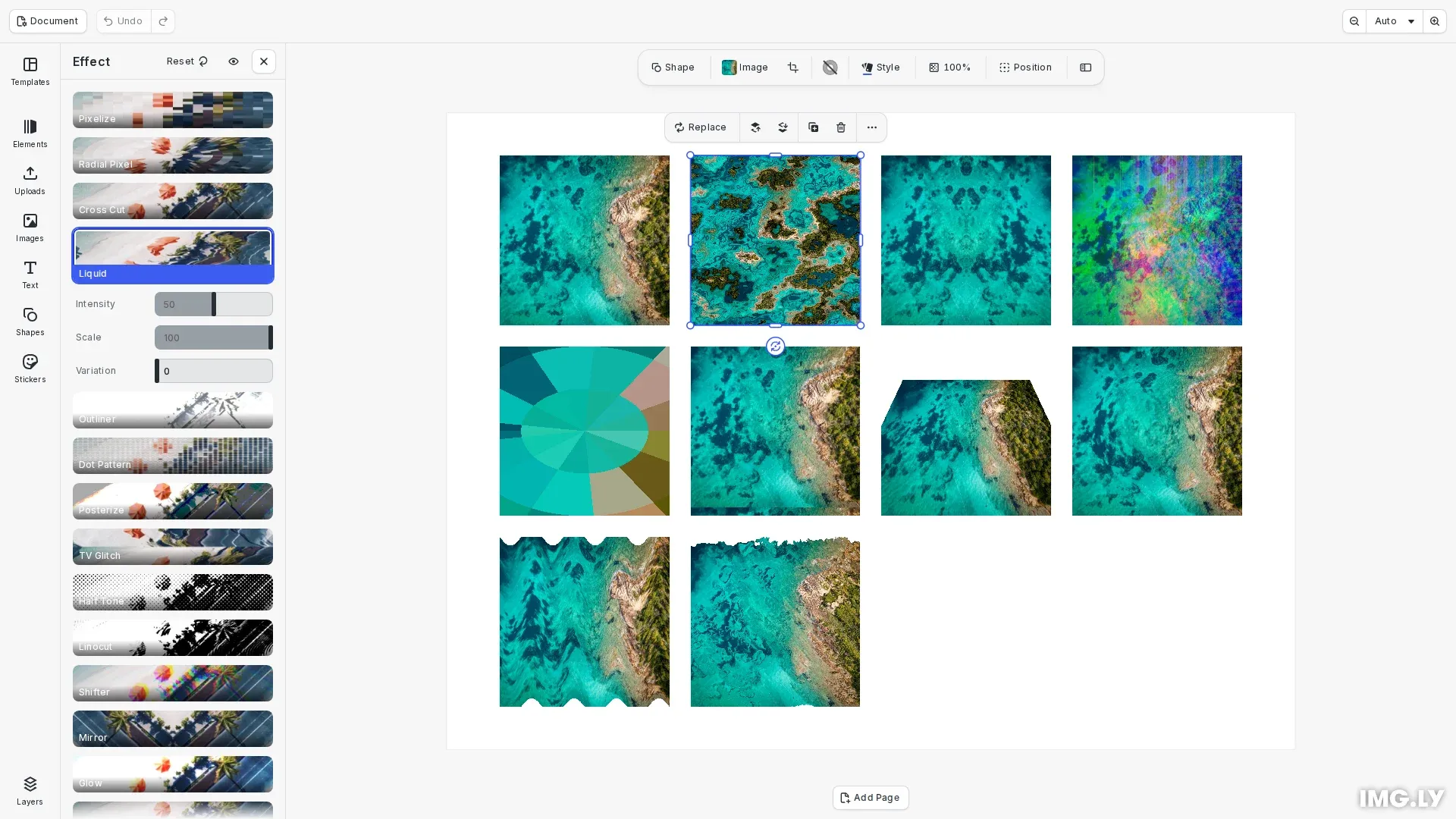
Distortion effects differ from color filters in that they modify the geometry and spatial arrangement of pixels rather than their color values. CE.SDK provides several distortion effect types: liquid warping, mirror reflections, color channel shifting, radial pixelation, TV glitch, corner pin, bulge, wave warp, and displacement maps. The displacement map reads a second block as its map. Each effect offers configurable parameters to control the intensity and style of the distortion.
This guide covers how to enable distortion effects in the built-in UI and how to apply and configure them programmatically using the block API.
Using the Built-in Distortion UI#
To enable distortion effects in the inspector panel, use the Feature API:
// Enable effects in the inspector panel using the Feature APIcesdk.feature.enable('ly.img.effect');Once enabled, users can access distortion effects from the inspector when selecting an image or video block. The effects panel displays available distortions with real-time preview as parameters are adjusted.
Check Effect Support#
Before applying distortion effects, verify the block supports them. Graphic blocks with image or video fills support effects, while scene blocks do not.
// Create a sample block to demonstrate effect support checkingconst sampleBlock = await engine.block.addImage(imageUri, {  size: blockSize});engine.block.appendChild(page, sampleBlock);
// Check if a block supports effects before applying themconst supportsEffects = engine.block.supportsEffects(sampleBlock);console.log('Block supports effects:', supportsEffects);
Apply Liquid Effect#
The liquid effect creates organic, flowing distortions that warp the image as if viewed through water. We can configure the intensity and scale of the warping.
// Create an image block for liquid distortion demonstrationconst liquidBlock = await engine.block.addImage(imageUri, {  size: blockSize});engine.block.appendChild(page, liquidBlock);
// Create and apply liquid effect - creates flowing, organic warpingconst liquidEffect = engine.block.createEffect('liquid');engine.block.setFloat(liquidEffect, 'effect/liquid/amount', 0.5);engine.block.setFloat(liquidEffect, 'effect/liquid/scale', 1.0);engine.block.setFloat(liquidEffect, 'effect/liquid/time', 0.0);engine.block.appendEffect(liquidBlock, liquidEffect);
The liquid effect parameters:
- amount (0.0 to 1.0) - Controls the intensity of the warping
- scale - Adjusts the size of the liquid pattern
- time - Animation time offset for animated liquid distortions
Apply Mirror Effect#
The mirror effect reflects the image along a configurable side, creating symmetrical compositions.
// Create an image block for mirror effect demonstrationconst mirrorBlock = await engine.block.addImage(imageUri, {  size: blockSize});engine.block.appendChild(page, mirrorBlock);
// Create and apply mirror effect - reflects image along a sideconst mirrorEffect = engine.block.createEffect('mirror');// Side values: 0 = Left, 1 = Right, 2 = Top, 3 = Bottomengine.block.setInt(mirrorEffect, 'effect/mirror/side', 0);engine.block.appendEffect(mirrorBlock, mirrorEffect);
The side parameter uses integer values: 0 (Left), 1 (Right), 2 (Top), or 3 (Bottom) to specify the reflection axis.
Apply Shifter Effect#
The shifter effect displaces color channels at an angle, creating chromatic aberration commonly seen in glitch art and retro visuals.
// Create an image block for shifter effect demonstrationconst shifterBlock = await engine.block.addImage(imageUri, {  size: blockSize});engine.block.appendChild(page, shifterBlock);
// Create and apply shifter effect - displaces color channelsconst shifterEffect = engine.block.createEffect('shifter');engine.block.setFloat(shifterEffect, 'effect/shifter/amount', 0.3);engine.block.setFloat(shifterEffect, 'effect/shifter/angle', 0.785);engine.block.appendEffect(shifterBlock, shifterEffect);
The shifter effect parameters:
- amount (0.0 to 1.0) - Controls the displacement distance
- angle - Sets the direction of the shift in radians
Apply Radial Pixel Effect#
The radial pixel effect pixelates the image in a circular pattern emanating from the center, useful for focus effects or stylized treatments.
// Create an image block for radial pixel effect demonstrationconst radialPixelBlock = await engine.block.addImage(imageUri, {  size: blockSize});engine.block.appendChild(page, radialPixelBlock);
// Create and apply radial pixel effect - pixelates in circular patternconst radialPixelEffect = engine.block.createEffect('radial_pixel');engine.block.setFloat(radialPixelEffect, 'effect/radial_pixel/radius', 0.5);engine.block.setFloat(  radialPixelEffect,  'effect/radial_pixel/segments',  0.5);engine.block.appendEffect(radialPixelBlock, radialPixelEffect);
The radial pixel effect parameters:
- radius (0.0 to 1.0) - Controls the size of the pixelation effect
- segments (0.0 to 1.0) - Controls the angular segmentation intensity
Apply TV Glitch Effect#
The TV glitch effect simulates analog television interference with horizontal distortion and rolling effects, popular for retro and digital aesthetics.
// Create an image block for TV glitch effect demonstrationconst tvGlitchBlock = await engine.block.addImage(imageUri, {  size: blockSize});engine.block.appendChild(page, tvGlitchBlock);
// Create and apply TV glitch effect - simulates analog TV interferenceconst tvGlitchEffect = engine.block.createEffect('tv_glitch');engine.block.setFloat(tvGlitchEffect, 'effect/tv_glitch/distortion', 0.4);engine.block.setFloat(tvGlitchEffect, 'effect/tv_glitch/distortion2', 0.2);engine.block.setFloat(tvGlitchEffect, 'effect/tv_glitch/speed', 0.5);engine.block.setFloat(tvGlitchEffect, 'effect/tv_glitch/rollSpeed', 0.1);engine.block.appendEffect(tvGlitchBlock, tvGlitchEffect);
The TV glitch effect parameters:
- distortion - Primary horizontal distortion intensity
- distortion2 - Secondary distortion layer
- speed - Animation speed for the glitch effect
- rollSpeed - Vertical roll speed simulating signal sync issues
Apply Corner Pin Effect#
The corner pin effect moves the four corners of the block and stretches the image between them. Each corner position is relative to the block size: (0, 0) is the upper left corner and (1, 1) the lower right corner.
// Create an image block for corner pin demonstrationconst cornerPinBlock = await engine.block.addImage(imageUri, {  size: blockSize});engine.block.appendChild(page, cornerPinBlock);
// Move the two upper corners inward; positions are relative to the block sizeconst cornerPinEffect = engine.block.createEffect('corner_pin');engine.block.setFloat(  cornerPinEffect,  'effect/corner_pin/upperLeftX',  0.25);engine.block.setFloat(cornerPinEffect, 'effect/corner_pin/upperLeftY', 0.2);engine.block.setFloat(  cornerPinEffect,  'effect/corner_pin/upperRightX',  0.75);engine.block.setFloat(  cornerPinEffect,  'effect/corner_pin/upperRightY',  0.2);engine.block.appendEffect(cornerPinBlock, cornerPinEffect);
The corner pin effect has eight properties: upperLeftX, upperLeftY, upperRightX, upperRightY, lowerLeftX, lowerLeftY, lowerRightX and lowerRightY.
Apply Bulge Effect#
The bulge effect magnifies an elliptical area of the block. A negative height pinches the area instead.
// Create an image block for bulge demonstrationconst bulgeBlock = await engine.block.addImage(imageUri, {  size: blockSize});engine.block.appendChild(page, bulgeBlock);
// Magnify an ellipse in the center; the radii are in design unitsconst bulgeEffect = engine.block.createEffect('bulge');engine.block.setFloat(bulgeEffect, 'effect/bulge/centerX', 0.5);engine.block.setFloat(bulgeEffect, 'effect/bulge/centerY', 0.5);engine.block.setFloat(  bulgeEffect,  'effect/bulge/horizontalRadius',  blockWidth * 0.4);engine.block.setFloat(  bulgeEffect,  'effect/bulge/verticalRadius',  blockHeight * 0.4);engine.block.setFloat(bulgeEffect, 'effect/bulge/height', 1.5);engine.block.appendEffect(bulgeBlock, bulgeEffect);
The bulge effect parameters:
- centerX, centerY (0.0 to 1.0) - The center of the ellipse, relative to the block size
- horizontalRadius, verticalRadius - The radii of the ellipse in design units
- height (-4.0 to 4.0) - The strength. Positive values magnify, negative values pinch
Apply Wave Warp Effect#
The wave warp effect moves the pixels of the block with a wave.
// Create an image block for wave warp demonstrationconst waveWarpBlock = await engine.block.addImage(imageUri, {  size: blockSize});engine.block.appendChild(page, waveWarpBlock);
// Height and width are in design units, so derive them from the block sizeconst waveWarpEffect = engine.block.createEffect('wave_warp');engine.block.setEnum(waveWarpEffect, 'effect/wave_warp/waveType', 'Sine');engine.block.setFloat(  waveWarpEffect,  'effect/wave_warp/height',  blockHeight * 0.05);engine.block.setFloat(  waveWarpEffect,  'effect/wave_warp/width',  blockWidth * 0.25);engine.block.appendEffect(waveWarpBlock, waveWarpEffect);
The wave warp effect parameters:
- waveType -
'Sine','Square','Triangle'or'Sawtooth' - height - The largest displacement in design units
- width - The distance between two wave crests in design units
- direction - The direction in which the wave travels, in degrees. 0 points up and 90 to the right
- phase - The position in the wave cycle, in degrees
height and width are in design units, so they scale with the block. The example derives them from the block size.
Apply Displacement Map Effect#
The displacement map effect moves each pixel by the value of a second block, the map, at the same place. A value of 0.5 does not move the pixel. Higher and lower values move it up to maxHorizontal and maxVertical design units. horizontalChannel and verticalChannel pick the channel of the map that each direction reads.
// Create an image block for displacement map demonstrationconst displacedBlock = await engine.block.addImage(imageUri, {  size: blockSize});engine.block.appendChild(page, displacedBlock);
// The map is a hidden image block. The effect still reads it.const mapBlock = await engine.block.addImage(imageUri, {  size: blockSize});engine.block.appendChild(page, mapBlock);engine.block.setVisible(mapBlock, false);
const displacementMapEffect = engine.block.createEffect('displacement_map');engine.block.setEnum(  displacementMapEffect,  'effect/displacement_map/horizontalChannel',  'Luminance');engine.block.setFloat(  displacementMapEffect,  'effect/displacement_map/maxHorizontal',  blockWidth * 0.08);engine.block.setEnum(  displacementMapEffect,  'effect/displacement_map/verticalChannel',  'Luminance');engine.block.setFloat(  displacementMapEffect,  'effect/displacement_map/maxVertical',  blockHeight * 0.08);engine.block.setEnum(  displacementMapEffect,  'effect/displacement_map/mapBehavior',  'Stretch');engine.block.appendEffect(displacedBlock, displacementMapEffect);
// Set the map block as the source of the effectengine.block.setEffectSource(displacementMapEffect, mapBlock);
Effect Sources#
setEffectSource() sets the block that an effect reads as its map, and null removes it. These rules apply to effect sources:
- Only the displacement map effect reads a source.
- A graphic, text or group block can be the source. The block that owns the effect can be its own source.
- The effect reads the source without its position and rotation. It also reads a hidden source, so hide a block that you only use as a map.
- The source still draws on the page when it is visible.
mapBehaviorplaces the map on the block:'Center','Stretch'or'Tile'.- Without a source, the effect does not move any pixels.
setEffectSource()needs theappearance/effectscope on every block that the effect is attached to.
getEffectSource() returns the source block, or null when the effect has no source.
const effectSource = engine.block.getEffectSource(displacementMapEffect);console.log('Effect source is the map block:', effectSource === mapBlock);The source link takes part in the usual block operations:
- Destroying the source clears the link. Undo restores it.
- Undo and redo restore the source.
- Saving and loading a scene keeps the source.
- Duplicating the block that owns the effect keeps the same source. Duplicating a group with the owner and the source links the copy to the copied source.
List Applied Effects#
Retrieve all effects applied to a block to inspect or iterate over them.
// Get all effects applied to a blockconst effects = engine.block.getEffects(tvGlitchBlock);console.log('Applied effects:', effects);
// Get the type of each effecteffects.forEach((effect, index) => {  const effectType = engine.block.getType(effect);  console.log(`Effect ${index}: ${effectType}`);});
This returns an array of effect IDs in the order they were applied.
Enable and Disable Effects#
Toggle effects on and off without removing them from the block. This preserves all effect parameters while controlling visibility.
// Check if an effect is enabledconst isEnabled = engine.block.isEffectEnabled(liquidEffect);console.log('Liquid effect enabled:', isEnabled);
// Disable an effect without removing itengine.block.setEffectEnabled(liquidEffect, false);console.log(  'Liquid effect now disabled:',  !engine.block.isEffectEnabled(liquidEffect));
// Re-enable the effectengine.block.setEffectEnabled(liquidEffect, true);
Disabled effects remain attached to the block but won’t be rendered until re-enabled. This is useful for before/after comparisons or performance optimization.
Remove Effects#
Remove effects from a block when they’re no longer needed. Always destroy removed effects to free memory.
// To remove an effect, get its index and use removeEffectconst shifterEffects = engine.block.getEffects(shifterBlock);const effectIndex = shifterEffects.indexOf(shifterEffect);if (effectIndex !== -1) {  // Remove effect at the specified index  engine.block.removeEffect(shifterBlock, effectIndex);
  // Destroy the removed effect to free memory  engine.block.destroy(shifterEffect);}
// Re-add the effect for display purposesconst newShifterEffect = engine.block.createEffect('shifter');engine.block.setFloat(newShifterEffect, 'effect/shifter/amount', 0.3);engine.block.setFloat(newShifterEffect, 'effect/shifter/angle', 0.785);engine.block.appendEffect(shifterBlock, newShifterEffect);
Discover Effect Properties#
Use findAllProperties() to discover all available properties for any effect type.
// Find all available properties for an effectconst tvGlitchProperties = engine.block.findAllProperties(tvGlitchEffect);console.log('TV glitch properties:', tvGlitchProperties);This returns an array of property paths that can be used with setFloat(), setInt(), or setEnum().
Handling Errors#
Invalid input to setEffectSource() throws an error. Its code names the problem.
try {  // Only the displacement map effect reads a source  engine.block.setEffectSource(liquidEffect, mapBlock);} catch (error) {  if (isEngineError(error)) {    console.log(error.code); // 'BLOCK.EFFECT_SOURCE_UNSUPPORTED'  }}
try { // A page cannot be a source engine.block.setEffectSource(displacementMapEffect, page);} catch (error) { if (isEngineError(error)) { console.log(error.code); // 'BLOCK.EFFECT_SOURCE_INVALID' }}Troubleshooting#
- The effect does not accept a source (
BLOCK.EFFECT_SOURCE_UNSUPPORTED): only adisplacement_mapeffect reads a source.getEffectSource()also throws for other effects. - The block cannot be a source (
BLOCK.EFFECT_SOURCE_INVALID): use a graphic, text or group block. A page, scene, fill, shape or effect cannot be a source. - The displacement map does not move anything: set a source with
setEffectSource(), and check thatmaxHorizontalormaxVerticalis not 0. - The effect is not visible: check that the block supports effects and that the effect is enabled.
API Reference#
| Method | Description |
|---|---|
engine.block.supportsEffects(id) |
Check if a block supports effects |
engine.block.createEffect(type) |
Create a new effect instance |
engine.block.appendEffect(id, effectId) |
Add an effect to a block |
engine.block.getEffects(id) |
Get all effects applied to a block |
engine.block.setEffectEnabled(effectId, enabled) |
Enable or disable an effect |
engine.block.isEffectEnabled(effectId) |
Check if an effect is enabled |
engine.block.removeEffect(id, index) |
Remove an effect at a specific index |
engine.block.findAllProperties(id) |
Discover all properties of an effect |
engine.block.setFloat(id, property, value) |
Set a float property value |
engine.block.setInt(id, property, value) |
Set an integer property value |
engine.block.setEnum(id, property, value) |
Set an option property, such as effect/wave_warp/waveType |
engine.block.setEffectSource(effectId, source) |
Set or remove the block that a displacement map effect reads |
engine.block.getEffectSource(effectId) |
Get the block that a displacement map effect reads |
engine.block.destroy(id) |
Destroy a block to free memory |
engine.block.getType(id) |
Get the type of a block |
Available Distortion Effects#
| Effect Type | Description | Key Properties |
|---|---|---|
liquid |
Flowing, organic warping | amount, scale, time |
mirror |
Reflection along a side | side (0=Left, 1=Right, 2=Top, 3=Bottom) |
shifter |
Chromatic aberration | amount, angle |
radial_pixel |
Circular pixelation | radius, segments |
tv_glitch |
Analog TV interference | distortion, distortion2, speed, rollSpeed |
corner_pin |
Moves the four corners | upperLeftX, upperLeftY, upperRightX, upperRightY, lowerLeftX, lowerLeftY, lowerRightX, lowerRightY |
bulge |
Magnifies or pinches an elliptical area | centerX, centerY, horizontalRadius, verticalRadius, height |
wave_warp |
Moves pixels with a wave | waveType, height, width, direction, phase |
displacement_map |
Moves pixels by the values of a source block | horizontalChannel, maxHorizontal, verticalChannel, maxVertical, mapBehavior, wrapPixels |
Next Steps#
- Apply Filters and Effects - Learn the foundational effect APIs
- Blur Effects - Apply blur techniques for depth and focus effects
- Color Effects - Remap the colors of a block
- Wipe Effects - Hide parts of a block