Start with a design agent that turns one file into another, then add what your product needs: your design store, your files and brand, files the agent hands out, and media it generates.
This guide covers what the start and each add-on let the agent do, what you
implement, where designs and files live, what is billed, and what you secure.
No example product runs the code on this page; it is checked against the
CoDesign SDK’s types. The functions in its yours.ts, and the design store
and clients it takes from Connect Your Storage, are
yours to write.
One Start and Four Add-Ons#
Every product starts with files in and files out: your code hands the agent a
design and keeps the files it makes. Each add-on is one more option to the
same call, prepareCoDesign, and hands the agent one more thing of yours. You
can add any of them, in any combination, and none changes the code you wrote
before it. This guide lists them by how much each one trusts the agent with,
from least to most:
| Add-on | Option |
|---|---|
| Your design store | designs (and design) |
| Your files and brand | a plugin module of yours in plugins |
| Exports | uploadExport |
| Generated media | gateway: { bearer } instead of gateway: false |
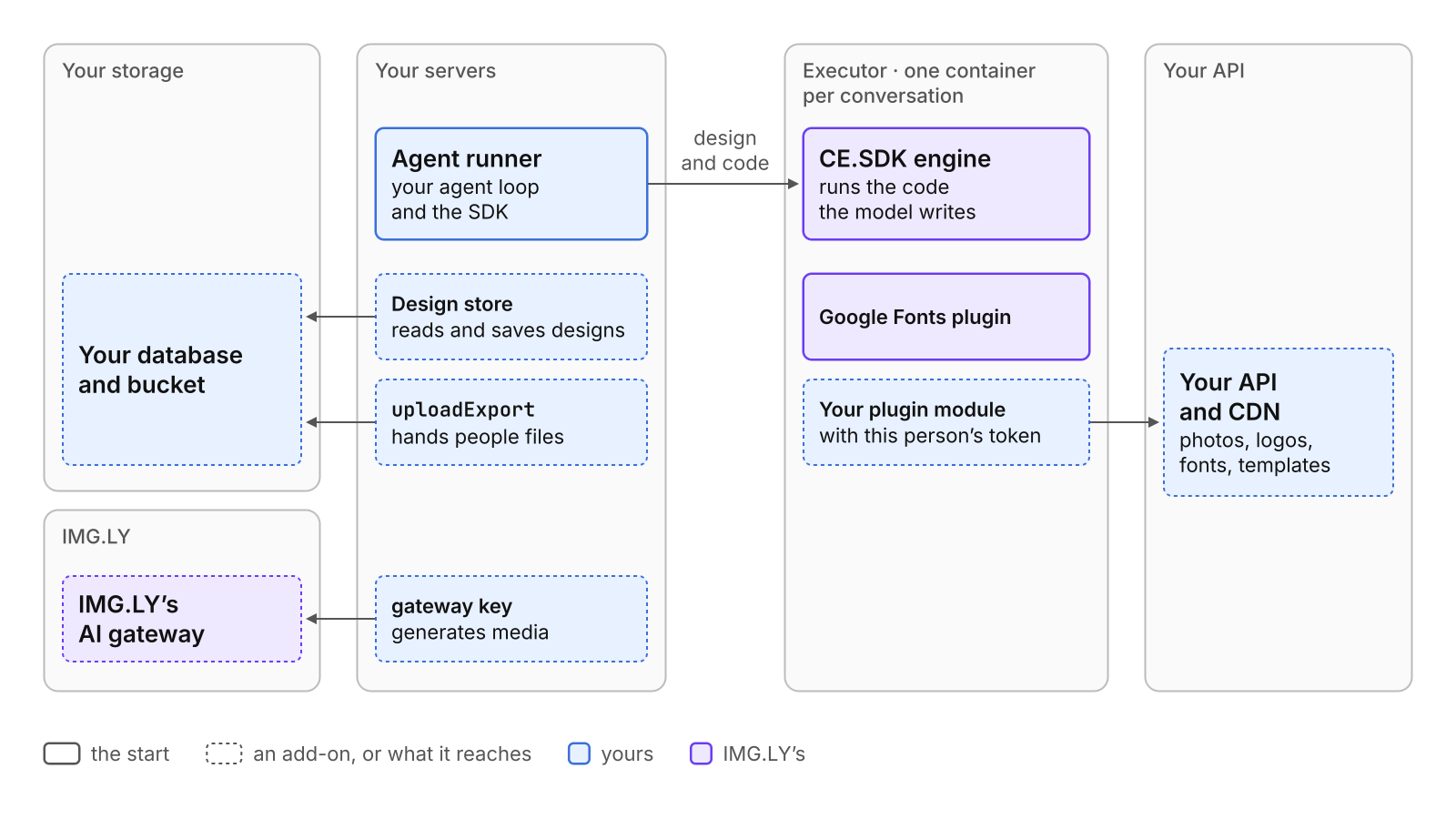
Your users can reach the agent through a chat, an API, or an MCP (Model Context Protocol) server with any of these; that is a separate choice (see Choose How Users Reach the Agent).
Start With Files In, Files Out#
A file goes in, files come out, and nothing stays: a resize or conversion API, a batch job overnight, or a first trial, which the Quickstart runs on your machine.
Three parts take part. Your agent runner is the server code that runs the
agent loop: it calls the model, hands it the design tools (functions the
model may ask to call) in codesign.tools, ends your system prompt with
codesign.instructions, runs each call, and sends back the result. The
executor is IMG.LY’s Docker image on your servers. It holds CE.SDK,
IMG.LY’s design engine, and runs the code the model writes to change a design,
in one container per conversation (your id for one chat or job), with
outbound traffic closed except to the hosts it needs
( Host the Executor). The model runs through IMG.LY’s
AI gateway on your CoDesign license key, or through any provider whose models
call tools, set up in your agent loop.
Contact sales to get a CoDesign license key.
Every setup on this page passes these options; acquire and EXECUTOR_TOKEN
are how your runner reaches the conversation’s executor:
// What every setup passes. Each add-on below adds to it.const base = (conversation: string): CoDesignOptions => ({ conversation, // your id for one chat or job: it gets an executor of its own // How the SDK reaches that executor: your `acquire` answers its address, and // EXECUTOR_TOKEN is the secret you started the executor containers with. executors: remoteExecutors({ acquire, token: process.env.EXECUTOR_TOKEN }), plugins: [googleFonts()], // IMG.LY's Google Fonts catalog: the smallest useful list gateway: false // no generated media; the model itself is set up in your agent loop});Your code loads a design, the model works on it, and your code exports the result:
// The start: a file in, files out. Your code loads and exports; nothing is stored.export async function redesign( file: Uint8Array, // an .imgly, a PSD, a PDF, an image…; leave out load() to start empty brief: string): Promise<{ png: Uint8Array; design: Uint8Array }> { const codesign = prepareCoDesign(base(crypto.randomUUID())); // one job, one executor try { // Every change the model makes names the design's version, so its first // message carries the version the file loaded at. const { version } = await codesign.load(file); await runYourAgent( codesign, `${brief}\nThe design is at version ${version}.` ); return { png: await codesign.export('png'), // charged design: await codesign.export('imgly') // the editable design with its images; free }; } finally { await codesign.release(); // the job is over: end the design's engine now }}The start and every add-on, setups.ts
import { readFileSync } from 'node:fs';
import {  googleFonts,  prepareCoDesign,  remoteExecutors,  type CoDesign,  type CoDesignOptions,  type UploadExportRequest,  type UploadExportResult} from '@imgly/codesign-sdk';
// From Connect Your Storage: the design store, and your database, bucket, and token clients.import { designStoreFor } from '../connect-your-storage/design-store.js';import { bucket, db, tokenFor } from '../connect-your-storage/yours.js';import { acquire, runYourAgent } from './yours.js';
// What every setup passes. Each add-on below adds to it.const base = (conversation: string): CoDesignOptions => ({  conversation, // your id for one chat or job: it gets an executor of its own  // How the SDK reaches that executor: your `acquire` answers its address, and  // EXECUTOR_TOKEN is the secret you started the executor containers with.  executors: remoteExecutors({ acquire, token: process.env.EXECUTOR_TOKEN }),  plugins: [googleFonts()], // IMG.LY's Google Fonts catalog: the smallest useful list  gateway: false // no generated media; the model itself is set up in your agent loop});
// The start: a file in, files out. Your code loads and exports; nothing is stored.export async function redesign(  file: Uint8Array, // an .imgly, a PSD, a PDF, an image…; leave out load() to start empty  brief: string): Promise<{ png: Uint8Array; design: Uint8Array }> {  const codesign = prepareCoDesign(base(crypto.randomUUID())); // one job, one executor  try {    // Every change the model makes names the design's version, so its first    // message carries the version the file loaded at.    const { version } = await codesign.load(file);    await runYourAgent(      codesign,      `${brief}\nThe design is at version ${version}.`    );    return {      png: await codesign.export('png'), // charged      design: await codesign.export('imgly') // the editable design with its images; free    };  } finally {    await codesign.release(); // the job is over: end the design's engine now  }}
// Add your design store: the agent opens and saves designs there.export function withYourStore(req: {  tenantId: string;  chatId: string;  designId: string; // an id your store does not hold yet starts a new design}): CoDesign {  // `read` and `write` over your table, limited to this tenant (Connect Your Storage).  const { read, write } = designStoreFor(db, bucket, req.tenantId);  return prepareCoDesign({    ...base(`${req.tenantId}.${req.chatId}`),    designs: { read, write },    design: req.designId // the design the conversation is about  });}
// The plugin module's text: the executor receives the file, not a function.const acmeSources = readFileSync(  new URL('../connect-your-storage/acme.plugin.js', import.meta.url),  'utf8');
// Add your files and brand: a plugin module the executor runs.export function withYourFiles(req: {  tenantId: string;  userId: string;  jobId: string;}): CoDesign {  return prepareCoDesign({    ...base(`${req.tenantId}.${req.jobId}`),    plugins: [      {        module: acmeSources, // registers your photos, logos, typefaces, and colors        // This person's values. The model's code can read them: a short-lived token.        options: { api: 'https://api.acme.com', token: tokenFor(req.userId) }      },      googleFonts()    ]  });}
// Add exports: the agent hands people files when it decides to.async function uploadExport(  req: UploadExportRequest): Promise<UploadExportResult> {  const key = `exports/${req.design}/${crypto.randomUUID()}.${req.format}`;  await bucket.put(key, req.bytes, req.mimeType);  return { downloadURL: await bucket.signedUrl(key, 24 * 3600) };}
export function withAgentExports(jobId: string): CoDesign {  return prepareCoDesign({    ...base(jobId),    uploadExport // each file the model exports is charged  });}
// Add generated media: the agent makes images, video, and audio through IMG.LY's AI gateway.export function withGeneratedMedia(jobId: string): CoDesign {  return prepareCoDesign({    ...base(jobId),    // Returns your CoDesign license key, kept on this runner; each generation is charged.    gateway: { bearer: async () => process.env.IMGLY_GATEWAY_API_KEY }  });}
// Every add-on together, as a design chat usually runs.export function everything(req: { tenantId: string; userId: string; chatId: string; designId: string;}): CoDesign { return prepareCoDesign({ ...base(`${req.tenantId}.${req.chatId}`), designs: designStoreFor(db, bucket, req.tenantId), // with listSourceId: the design list design: req.designId, plugins: [ { module: acmeSources, options: { api: 'https://api.acme.com', token: tokenFor(req.userId) } }, googleFonts() ], uploadExport, gateway: { bearer: async () => process.env.IMGLY_GATEWAY_API_KEY } });}yours.ts: the functions this page’s code calls
// The functions this page's code calls that are yours to write.import type { AcquiredExecutor, CoDesign } from '@imgly/codesign-sdk';
/** Hands a conversation its executor (see Host the Executor). */export async function acquire(_req: {  conversation: string;}): Promise<AcquiredExecutor | undefined> {  throw new Error('yours to write');}
/** Your agent loop: hands the model `codesign.tools`, appends `codesign.instructions` to your prompt, and runs until the model is done. */export async function runYourAgent(  _codesign: CoDesign,  _prompt: string): Promise<void> {  throw new Error('yours to write');}
What the agent can do. It reads IMG.LY’s design handbook, edits the design with code it writes, looks at renders of its work, and uses the fonts of the Google Fonts catalog. It cannot start a second design, list designs, or hand anyone a file: your code decides what is exported.
What you implement. The agent loop, the code that loads a file, and a
place for the files that come out. Imports already work here:
codesign.load() reads designs (a scene, CE.SDK’s text document of a
design, or an .imgly file, a scene packed with its images), images,
SVG, PDF, Photoshop (PSD), InDesign (IDML), and PowerPoint (PPTX) files
( Import and Export Files). Without load(), the
design starts as an empty page. codesign.export() renders PNG, JPEG, WebP,
SVG, PDF, PDF/X (the PDF standard for print), and HTML, with or without any
add-on.
Where data lives. Without a design store, the design lives in the memory
of the codesign object that prepareCoDesign returns, and in the executor
only while the agent works on it. It is gone with that object, so keep what
codesign.export() returns. The pictures an imported file carries stay
inside the design, and the .imgly file your code exports holds them. If your
job runner prepares one codesign per job, the SDK warns once per process,
unless NODE_ENV is production, that each keeps its designs in its own
memory. For jobs that is expected: each job keeps what it exports.
Designs never reach IMG.LY
( What IMG.LY Receives).
What is billed. The model’s use, through IMG.LY’s AI gateway or your own
provider, and each file your code exports. The design itself, as an .imgly
file or a scene, is free ( Billing).
What you secure. The model’s code runs only in the executor, where, in the start, it reaches nothing of yours but the design. Fetch a caller’s file yourself, with an allow-list of hosts and a size limit ( Secure the Endpoint).
Add Your Design Store#
Add it when people keep working on a design: across the messages of a chat, in your editor, or a week later. A chat runs each message as a new request, which builds the tools again, and a design in memory does not survive that. The agent then opens the design your product names and saves it after every change, in your own database:
// Add your design store: the agent opens and saves designs there.export function withYourStore(req: { tenantId: string; chatId: string; designId: string; // an id your store does not hold yet starts a new design}): CoDesign { // `read` and `write` over your table, limited to this tenant (Connect Your Storage). const { read, write } = designStoreFor(db, bucket, req.tenantId); return prepareCoDesign({ ...base(`${req.tenantId}.${req.chatId}`), designs: { read, write }, design: req.designId // the design the conversation is about });}What the agent can do. It works on designs your product keeps, and starts new designs: empty, or as a copy of a saved one. Every save compares versions, so a save a person made meanwhile is never overwritten; the model is told and works on the newer design ( Concurrent Edits).
What you implement. A design store: read(id) returns a design and
its version (any value that changes on every save), and
write(id, content, { ifMatch }) stores content only while the stored version
is still ifMatch, the one the call read. To start a design for a new chat,
pass a new id as design, and the store’s first write creates it. For the
whole store, its table, and its checks, see
The Design Store. If you
embed CE.SDK’s editor so people finish designs by hand, it saves to the same
store through a route of yours that checks the version too
( Your Editor).
Where data lives. In your database or bucket. The executor holds a design only while the agent works on it.
What is billed. Nothing more. Saving a design is free.
What you secure. read refuses ids outside the signed-in person’s tenant
(the customer account that owns the data), because every id the model passes
reaches it. write compares and updates in one statement, or the last save
wins with no error. The store runs in your runner, so the executor gets no
route and no credential to your designs.
Add Your Files and Brand#
Add it when the agent should design with your content: your photos and logos,
your brand’s typefaces and colors, your templates, or the files people
attached. Your files reach the agent through a plugin module, one
JavaScript file that registers your collections as asset sources,
searchable catalogs in CE.SDK’s format. Your runner sends its text with this
person’s values as options, and the executor runs it. It needs no design
store:
// Add your files and brand: a plugin module the executor runs.export function withYourFiles(req: { tenantId: string; userId: string; jobId: string;}): CoDesign { return prepareCoDesign({ ...base(`${req.tenantId}.${req.jobId}`), plugins: [ { module: acmeSources, // registers your photos, logos, typefaces, and colors // This person's values. The model's code can read them: a short-lived token. options: { api: 'https://api.acme.com', token: tokenFor(req.userId) } }, googleFonts() ] });}What the agent can do. It searches and places your photos, logos, typefaces, and colors. With a design store, it also starts designs from your templates and from files a source holds, such as a PSD a person attached, and lists saved designs by title.
What you implement. The module, with a source per collection: a search
(findAssets) over your API, and resolve when your bucket is private. A
source with uploadFile keeps new files, such as the pictures inside an
imported file: the sources whose types admit the file are offered it in the
order of plugins, and the first that returns an asset keeps it instead of
the design. With a store, one more source lists your designs, named as the
store’s listSourceId. If you embed CE.SDK’s editor, it applies the same
module, so people see the collections the agent sees. See
Your Files and
Bring Your Brand.
Where data lives. Your files stay in your bucket or behind your content
delivery network (CDN). A design keeps each file’s link for good, so the link
must still load next week; for a private bucket, that is a scheme of your own
that resolve signs
( Private Buckets).
What is billed. Nothing more. The requests to your API are yours.
What you secure. The Google Fonts plugin you started with carries nothing
of yours. Your module is the first code of yours that runs beside the model’s
code, which can read its options and call your API with them. So the token
in options opens only this person’s files, for minutes, and grants no right
to write designs; your API joins the executor’s outbound allow-list; and your
routes check every upload ( Security).
Add Exports#
Without this add-on, your code decides which files are made. With it, the agent renders a file when a person asks for one and tells them where to get it:
// Add exports: the agent hands people files when it decides to.async function uploadExport(  req: UploadExportRequest): Promise<UploadExportResult> {  const key = `exports/${req.design}/${crypto.randomUUID()}.${req.format}`;  await bucket.put(key, req.bytes, req.mimeType);  return { downloadURL: await bucket.signedUrl(key, 24 * 3600) };}
export function withAgentExports(jobId: string): CoDesign {  return prepareCoDesign({    ...base(jobId),    uploadExport // each file the model exports is charged  });}
What the agent can do. It renders the design in any format your code can
export, hands the file to uploadExport, and passes on where the person gets
it.
What you implement. uploadExport stores the bytes and returns a
downloadURL, a note for the model to pass on, or both
( Exported Files). The bytes
pass through your runner’s memory, so size it for the largest export you
allow.
Where data lives. Exported files in your bucket.
What is billed. Each file the model exports, when the model decides; a retry of the same export is billed once ( Billing).
What you secure. Download links that expire, because anyone who holds one gets the file. Count each export the model makes against your cost cap: the model decides how many it renders, and your model client’s token counts do not include them.
Add Generated Media#
Add it when the agent should make media your library does not have. It is
gateway: { bearer } in place of gateway: false:
// Add generated media: the agent makes images, video, and audio through IMG.LY's AI gateway.export function withGeneratedMedia(jobId: string): CoDesign { return prepareCoDesign({ ...base(jobId), // Returns your CoDesign license key, kept on this runner; each generation is charged. gateway: { bearer: async () => process.env.IMGLY_GATEWAY_API_KEY } });}What the agent can do. It generates images, video, speech, music, and sound effects through IMG.LY’s AI gateway when it decides a design needs them, such as a background photo your library does not have, and places them in the design.
What you implement. A function that returns your CoDesign license key,
here from IMGLY_GATEWAY_API_KEY. The key stays in your runner, out of the
model’s reach.
Where data lives. A generated image goes to the first of your sources that keeps new files, or stays inside the design without one. Each generation’s prompt and settings reach IMG.LY’s gateway.
What is billed. Each generation, when the model decides ( Billing). Count each one against your cost cap, as for exports: your model client’s token counts do not include it.
What you secure. A generated picture is new content that no person made or picked from your library. If your users’ designs must stay on brand or pass a review, run the agent on a copy of the design and let a person approve it before your code copies it over the real one; this needs your design store ( Proposal or Direct Edit).
Which Add-Ons You Need#
A design API or a batch job, such as resizing a poster for five channels, needs the start alone. Add your files and brand when the results must use your brand, and exports when the agent, not your code, decides which files to hand out.
A design chat in your product needs your design store at least, since each
message builds the tools again. Most chats take every add-on, as everything
in setups.ts does, and add tools of your own and live progress
( Add a Design Chat). An MCP server
for your customers’ AI assistants needs your design store too, so a design
outlives the connection an assistant opens to your server. A first trial
needs the start alone, which the Quickstart runs as it is.
Add or Remove Without Rewriting#
An add-on is an option, and none changes your agent loop. Hand the model
codesign.tools and end your system prompt with codesign.instructions, as
at the start. Both follow from your options, so the agent learns what it may
now do with no prompt change of yours ( Tools). Your
code’s calls stay too: load(), create(), edit(), and export() work
with or without any add-on, and with a store they read and save through it.
Removing an add-on is removing its option. Without designs, the agent’s
attempt to start a new design is refused in words the model reads; without
uploadExport or gateway, the agent cannot export or generate.
Next Steps#
- Generate Designs — run the start as a job behind an API.
- Connect Your Storage — build the design store,
the plugin module for your files, and
uploadExport. - Bring Your Brand — give the agent your typefaces, colors, and templates.
- Add a Design Chat — take every add-on behind a chat in your product.
- Security — see what the model’s code can reach.